
D-Link DGS-1005D/B
D-Link DGS-1005D/B 5-Port Gigabit Unmanaged Plastic Desktop Switch
Model: DGS-1005D/B
1. Bubuka
The D-Link DGS-1005D/B is a 5-Port Gigabit Unmanaged Plastic Desktop Switch designed to provide high-speed network connectivity for your home or small office. Its plug-and-play design allows for quick and easy installation, enabling fast file transfers and smooth media streaming across up to five devices. This manual provides detailed instructions for setting up, operating, and maintaining your DGS-1005D/B switch.
2. Eusi Paket
Mangga pariksa heula yén pakét anjeun ngandung barang-barang ieu:
- 1x DGS-1005D Switch
- 4x Suku Karét
- 1x CD-ROM with Product Documentation
- 1 x adaptor kakuatan
- 1 x Pasang Kit
- Pitunjuk Instalasi Gancang 1x
3. Fitur Produk
- Energy Efficient Ethernet: Reduces energy consumption without sacrificing performance, contributing to lower power bills.
- Quiet and Economical Design: Features an innovative design that runs cool and quiet, making it an unobtrusive addition to any workspace.
- Kecepatan Gigabit: Creates a blazing fast network with five Gigabit Ethernet ports, providing high-speed wired connections for up to five PCs or other devices.
- Diagnostik kabel: Includes a function that notifies users of cable conditions through product LEDs, aiding in troubleshooting.
- Garansi Saumur Hirup Wates: Register and enjoy Limited Lifetime Warranty support from D-Link, a global leader in the industry.
4. Produk Langkungview
4.1 Panel payun

The front panel of the DGS-1005D/B switch features LED indicators for power and each of the five Gigabit Ethernet ports. These LEDs provide visual feedback on the connection status and activity of each port, allowing for quick monitoring of your network.
4.2 Panel tukang
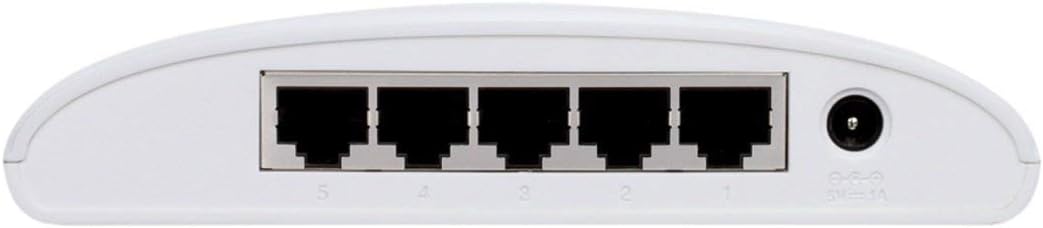
The rear panel houses the five Gigabit Ethernet ports (RJ45) for connecting your network devices and the power input jack. The ports are clearly numbered for easy identification and connection.
4.3 Desain kompak

The DGS-1005D/B features a compact and lightweight plastic desktop design, making it easy to place on any desk or shelf without taking up much space. Its unobtrusive form factor blends seamlessly into various environments.
5. Setélan
5.1 Sateuacan Anjeun Ngawitan
- Ensure you have a stable power source available.
- Have standard Ethernet cables (Cat5e or Cat6 recommended for Gigabit speeds) ready for connecting your devices.
5.2 Nyambungkeun Saklar
- panempatan: Teundeun saklar dina datar, permukaan stabil.
- Pasangkeun Suku Karét: Attach the four rubber feet to the bottom of the switch to prevent slipping and provide adequate ventilation.
- Sambungkeun Kakuatan: Connect the power adapter to the power input jack on the rear of the switch and then plug the adapter into a power outlet. The Power LED on the front panel should illuminate, indicating the switch is receiving power.
- Sambungkeun Alat: Connect your network devices (e.g., computers, network-attached storage, gaming consoles) to any of the five Gigabit Ethernet ports using standard Ethernet cables. The corresponding port LEDs will illuminate when a connection is established and blink to indicate network activity.
- Siap dianggo: The switch is now ready for use. No software configuration is required due to its unmanaged design.
6. Parentah Operasi
The D-Link DGS-1005D/B is an unmanaged switch, meaning it operates on a plug-and-play basis without requiring any software configuration. Once connected to power and network devices, it automatically detects network speeds (10/100/1000 Mbps) and adjusts for compatibility, providing seamless data transfer. The switch intelligently manages traffic flow to ensure optimal performance for all connected devices without user intervention.
7. Pangropéa
To ensure optimal performance and longevity of your DGS-1005D/B switch, follow these maintenance guidelines:
- Lingkungan: Keep the switch in a well-ventilated area, away from direct sunlight, heat sources, and excessive moisture.
- beberesih: Périodik ngabersihan bagian luar saklar ku kaén anu lemes sareng garing. Entong nganggo pembersih cair atanapi aerosol.
- Ventilasi: Do not block the ventilation slots on the device, as this can lead to overheating.
- Cairan: Hindarkeun tumpahan cairan dina alat.
8. Cara ngungkulan
If you encounter issues with your DGS-1005D/B switch, refer to the following common problems and solutions:
- LED Tanpa Daya:
- Pastikeun adaptor kakuatan disambungkeun sacara aman ka saklar sareng stop kontak listrik anu tiasa dianggo.
- Pastikeun stop kontak listrik aktip ku cara nyolokkeun alat sejen.
- Port LED Not Illuminating:
- Check if the Ethernet cable is securely connected to both the switch port and the connected device.
- Pastikeun alat anu nyambung hurung sareng adaptor jaringanna jalan kalayan leres.
- Coba kabel Ethernet béda pikeun ngaluarkeun kabel faulty.
- Test with a different device to confirm the port's functionality.
- Lambat Jaringan:
- Pastikeun sadaya alat sareng kabel anu nyambung ngadukung Gigabit Ethernet (kabel Cat5e atanapi Cat6 disarankeun pikeun kecepatan Gigabit).
- Check for excessive network traffic or bandwidth-intensive applications running on connected devices.
- Verify your internet service provider's speed if the issue is related to internet access.
9. Spésifikasi
| Fitur | Katerangan |
|---|---|
| merek | D-Tumbu |
| Nomer modél | DGS-1005D/B |
| Jumlah Palabuhan | 5 |
| Tipe panganteur | RJ45 |
| Laju Mindahkeun Data | 1000 Megabytes Per Second (Gigabit Ethernet) |
| Bahan Kasus | palastik |
| Voltage | 230 volt |
| Item Beurat | 0.01 ons |
| Ukuran produk (L x W x H) | 4.53 x 5.59 x 1.18 inci |
| Alat nu cocog | Desktop |
| Basa | Inggris |
| UPC | 790069252679 |
10. Garansi jeung Rojongan
The D-Link DGS-1005D/B 5-Port Gigabit Unmanaged Plastic Desktop Switch comes with a Limited Lifetime Warranty, providing peace of mind regarding its quality and durability. For technical support, product registration, or warranty claims, please refer to the contact information provided in the included product documentation or visit the official D-Link support websitus. Simpen resi pameseran anjeun pikeun validasi jaminan.
Ask a question about this manual
Ask about setup, troubleshooting, compatibility, parts, safety, or missing instructions. Manuals+ will review the question and use this page’s manual context to help answer it.