
1. Bubuka
This manual provides comprehensive instructions for the safe and proper installation, operation, and maintenance of your Vogel's EFF1140 LCD/Plasma TV Floor Stand. This floor stand is designed to securely hold flat panel televisions ranging from 25 to 42 inches, offering optimal viewing flexibility with its turn function and integrated cable management.
Please read all instructions carefully before assembly and use to ensure proper functionality and to prevent damage or injury.
2. Émbaran Kasalametan
- Kapasitas beurat: Do not exceed the maximum weight capacity specified for this stand. Refer to the Specifications section for details.
- Ukuran TV: This stand is designed for TVs between 25 and 42 inches. Ensure your TV falls within this range.
- Stabilitas: Always ensure the stand is placed on a stable, level surface. Uneven surfaces can lead to instability and tipping.
- Majelis: Follow all assembly instructions precisely. Incorrect assembly can result in product failure and potential injury.
- Barudak: Keep children away from the assembly area. Small parts can be a choking hazard. Do not allow children to climb on or play with the stand or mounted TV.
- Manajemén Kabel: Utilize the integrated cable inlay system to prevent tripping hazards and maintain a tidy appearance.
- Pakakas: Use appropriate tools for assembly. Do not overtighten screws.
3. Eusi Paket
Before beginning assembly, please verify that all components are present and undamaged. If any parts are missing or damaged, contact Vogel's customer support.
- Lempeng Dasar
- Kolom Pangrojong Utama
- TV Mounting Rails (2x)
- Horizontal TV Mounting Bar
- Glass Shelf (optional, if included)
- Mounting Hardware (screws, washers, spacers, bolts for TV attachment)
- Assembly Tools (e.g., Allen key)
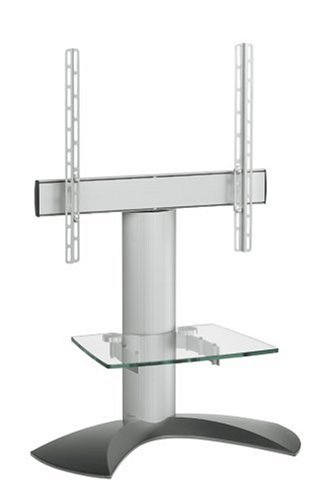
Gambar 1: Leuwihview of Vogel's EFF1140 TV Floor Stand components. This image displays the main parts including the base, central column, TV mounting bracket, and a glass shelf.
4. Setup jeung Majelis
Follow these steps carefully to assemble your Vogel's EFF1140 TV Floor Stand.
4.1. Base and Column Assembly
- Attach the main support column to the base plate using the provided screws and tools. Ensure it is securely fastened and stable.
4.2. Attaching TV Mounting Rails to TV
The EFF1140 uses VESA MIS-F compliant mounting rails. Select the appropriate screws, washers, and spacers from the hardware kit that match your TV's VESA mounting holes.
- Sacara ati-ati tempatkeun TV anjeun nyanghareup ka handap dina permukaan anu lemes sareng bersih pikeun nyegah karusakan layar.
- Align the two vertical mounting rails with the VESA mounting holes on the back of your TV.
- Secure the rails to the TV using the correct screws and spacers. Do not overtighten.
- Note: Some TV brands, such as Panasonic, may require specific bolt kits not included with the stand. Please check your TV's manual or contact the TV manufacturer if the provided bolts do not fit.
4.3. Mounting TV to Stand
- With assistance, carefully lift the TV with the attached mounting rails.
- Hook the mounting rails onto the horizontal mounting bar of the stand. Ensure the TV is securely seated and level.
- Secure the TV to the horizontal bar using the safety screws or locking mechanism provided.
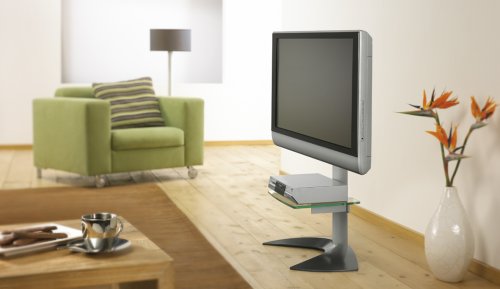
Figure 2: The Vogel's EFF1140 TV Floor Stand integrated into a living room, showcasing its design and how a TV is mounted.
4.4. Optional Glass Shelf Installation
If your model includes a glass shelf, install it onto the central column at the desired height. Ensure the shelf brackets are securely fastened. Note: Some users have reported issues with bracket alignment for the glass shelf. If you encounter difficulties, contact Vogel's support.
5. Ngoperasikeun Stand
5.1. Nyaluyukeun Viewing Angle (Turn Function)
The Vogel's EFF1140 features a turn function, allowing you to adjust the TV's horizontal viewing angle for optimal positioning.
- Gently grasp the sides of the TV.
- Carefully rotate the TV to the desired left or right angle. The stand is designed to allow smooth rotation.
- Avoid forcing the TV beyond its intended range of motion.
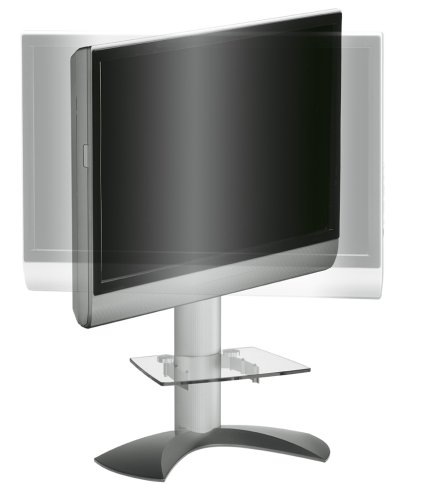
Figure 3: The Vogel's EFF1140 TV Floor Stand demonstrating its turn function, allowing the mounted television to pivot horizontally for flexible viewdina sudut.
5.2. Manajemén kabel
Utilize the integrated cable inlay system within the main support column to conceal and organize your TV and accessory cables. This helps maintain a clean aesthetic and prevents tripping hazards.
- Gather all cables from your TV and connected devices.
- Route them through the designated openings in the stand's column.
- Ensure cables are not pinched or under excessive tension.
6. Pangropéa
- beberesih: Ngusap stand ku lawon lemes, garing. Pikeun tanda nekad, a rada damp cloth with mild detergent can be used, followed by drying. Avoid abrasive cleaners or solvents.
- Pamariksaan: Pariksa sadaya sekrup sareng sambungan sacara berkala pikeun mastikeun éta tetep pageuh sareng aman. Kencengkeun deui upami diperyogikeun.
- Rak Kaca: Clean the glass shelf with a glass cleaner and a soft cloth.
7. Cara ngungkulan
- TV Mounting Bolts Do Not Fit:
The stand includes a universal bolt kit. However, some TV manufacturers (e.g., Panasonic) may require specific bolts not supplied. Consult your TV's instruction manual or contact the TV manufacturer directly to obtain the correct bolt kit.
- Glass Shelf Brackets Do Not Align:
If you experience difficulty aligning the glass shelf brackets, double-check the assembly steps. If the issue persists, contact Vogel's customer support for assistance.
- Stand Appears Unstable:
Ensure the stand is placed on a completely flat and level surface. Verify that all assembly screws are securely tightened. Do not exceed the maximum weight capacity of the stand.
8. Spésifikasi
| Modél | EFF1140 |
| merek | Vogel urang |
| Ukuran TV cocog | 25" - 42" |
| VESA minuhan | MIS-F |
| Ukuran produk (L x W x H) | 70.1 x 34.8 x 111.3 cm (27.6 x 13.7 x 43.8 inci) |
| Item Beurat | 11.9 kg (26.2 lbs) |
| Warna | pérak |
| Tipe Pamasangan | Lantai Gunung |
| Fitur | Turn function, Cable inlay system, Optional second shelf support |
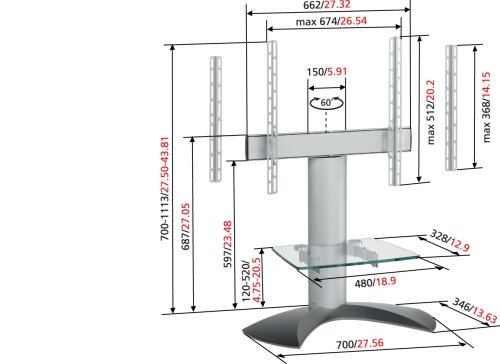
Figure 4: Technical drawing of the Vogel's EFF1140 TV Floor Stand with detailed dimensions in centimeters and inches.
9. Garansi jeung Rojongan
This Vogel's EFF1140 TV Floor Stand comes with a garansi 5 taun. For warranty claims, technical support, or inquiries regarding missing parts or assembly issues, please contact Vogel's customer service directly.
Please visit the official Vogel's websitus pikeun inpormasi kontak sareng sumber dukungan anu paling énggal.
Note: The warranty covers manufacturing defects and material flaws under normal use. It does not cover damage caused by improper installation, misuse, or unauthorized modifications.