
1. Bubuka
The Sigma SD14 is a 14-megapixel Digital Single-Lens Reflex (DSLR) camera designed for advanced photographers. It features the Foveon X3 direct-image sensor, which captures full RGB color information at each pixel layer, aiming for high-definition images with rich gradation. This manual provides essential information for setting up, operating, and maintaining your SD14 camera.
Key features include a 2.5-inch LCD monitor, a durable shutter mechanism rated for over 100,000 cycles, a 5-point autofocus system, and continuous shooting capabilities. The camera supports both RAW and JPEG image recording formats and includes Sigma Photo Pro 3.0 software for RAW image processing.

Gambar 1.1: Hareupeun view of the Sigma SD14 Digital SLR Camera, showing the lens mount and body design.
2. Naon dina Box
Verify that all the following items are included in your Sigma SD14 package:
- Sigma SD14 Digital SLR Camera Body
- Lithium-ion Power Battery BP-21
- Battery Charger BC-21
- Kabel USB
- Kabel Video
- Tali beuheung
- Eye Cap
- Cap awak
- Cap Kacamata
- SIGMA Photo Pro 3.0 CD-ROM
- SD14 Instruction Manual (this document)
3. Setélan
3.1. Ngecas sareng Masang Batré
- Insert the Lithium-ion Battery BP-21 into the Battery Charger BC-21.
- Sambungkeun carjer ka colokan listrik. Indikator ngecas bakal hurung.
- Charging typically takes approximately 120 minutes for a full charge.
- Saatos dicas pinuh, cabut batré tina carjer.
- Open the battery compartment cover on the camera body.
- Insert the charged battery into the compartment, ensuring correct orientation.
- Tutup panutup kompartemen batré aman.
A fully charged BP-21 battery can capture approximately 500 images.
3.2. Nyelapkeun Kartu Mémori
The SD14 uses CompactFlash (CF) Type I/II cards. Ensure the card is formatted in the camera before first use.
- Buka panutup slot kartu CF anu aya di sisi kaméra.
- Insert the CF card with the correct orientation until it clicks into place.
- Close the CF card slot cover securely.
3.3. Ngalampirkeun Lensa
The Sigma SD14 uses the Sigma SA Bayonet mount. Only Sigma SA mount lenses are directly compatible.
- Cabut tutup awak tina kaméra sareng tutup lénsa tukang tina lensa.
- Align the red index mark on the lens with the red index mark on the camera body's lens mount.
- Attach the lens by rotating it clockwise until it locks into place with a click.
- Pikeun nyabut lénsa, pencét tombol ngaleupaskeun lénsa dina awak kaméra sareng puterkeun lénsa lawan jarum jam.
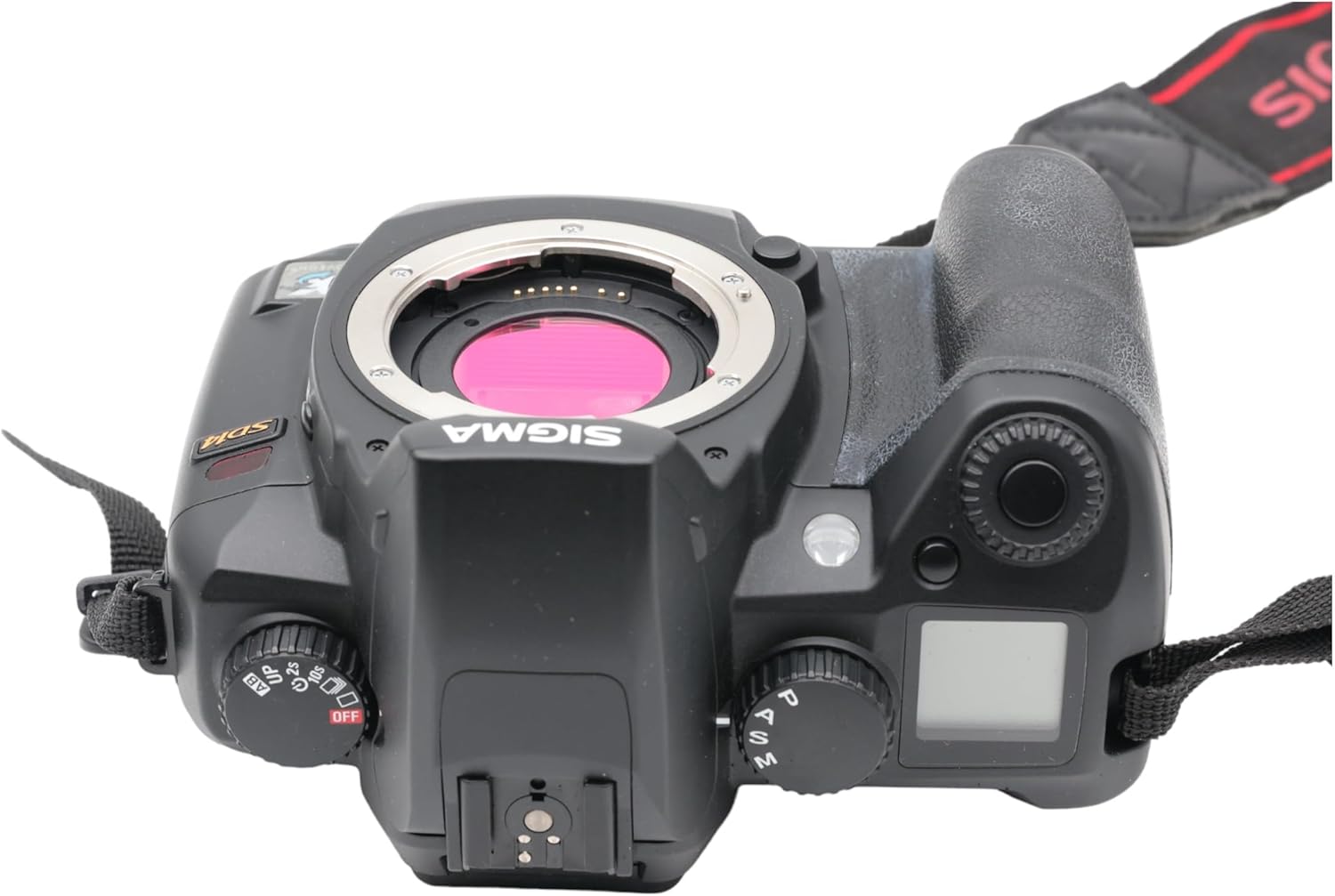
Gambar 3.1: Top view of the Sigma SD14, illustrating the lens mount and mode dials.
4. Operasi
4.1. Powering on / Pareum
Rotate the power switch to the ON position to turn on the camera. Rotate it to OFF to power down.
4.2. Kontrol Dasar sareng Tampilan
The SD14 features a 2.5-inch LCD monitor for reviewing images and navigating menus, and a pentaprism viewfinder for composing shots. The top LCD panel displays key settings such as resolution, metering mode, battery status, and remaining shots.

Gambar 4.1: Tukangeun view of the Sigma SD14, showing the LCD monitor, viewPanimu, sareng tombol kontrol.
Key buttons include MENU, ISO, WB (White Balance), and a 4-way controller with an OK button for navigation. The INFO button displays shutter speed, aperture, and other settings on the LCD.
4.3. Fokus
The camera utilizes a 5-point autofocus (AF) system (center, left, right, up, and down). The center AF point features a cross-type sensor for enhanced precision. AF point selection can be automatic or manual.
4.4. Metering Modes
The SD14 offers three metering modes:
- 8-segment Evaluative Metering: Analyzes the entire scene for balanced exposure.
- Center Area Metering: Prioritizes the central area of the frame.
- Center Weighted Average Metering: Measures the entire frame but gives more weight to the central area.
Exposure compensation and auto bracketing functions are available for fine-tuning exposure.
4.5. Rékam Gambar
The camera supports both RAW (X3F) and JPEG formats. JPEG recording offers four sizes (Super High, High, Medium, Low) and three quality settings (Fine, Normal, Basic).
- Super High (4608 x 3072 pixels): Suitable for A3 or larger prints.
- High (2640 x 1760 pixels): Suitable for A4 prints.
- Medium (1776 x 1184 pixels): Suitable for regular size prints.
- Low (1296 x 864 pixels): Cocog jeung web pages and email.
4.6. Shooting kontinyu
The SD14 can shoot continuously at 3 frames per second. The number of frames captured in a burst depends on the resolution setting:
- luhur: 6 pigura
- Sedeng: 12 pigura
- rendah: 24 pigura
These figures apply to both RAW and JPEG modes.
4.7. Lampu kilat internal
The built-in flash has a guide number of 11 (ISO 100) and covers a 17mm lens angle (28mm equivalent on 35mm format). It supports S-TTL automatic flash metering and can synchronize with shutter speeds up to 1/180 second.
4.8. Mirror Lock-up
Activate the mirror lock-up mechanism to prevent camera shake caused by mirror movement during exposure. This is particularly useful for macro photography, long telephoto shots, or scientific applications. For best results, use with a remote controller or cable release (sold separately).
4.9. Sigma Photo Pro 3.0 Software
The included Sigma Photo Pro 3.0 software is a RAW image developer. It allows for quick conversion of RAW data and offers three adjustment modes: X3F Mode (original settings), Auto Adjustment Mode, and Custom Mode for manual adjustments (exposure, contrast, shadow, highlight, saturation, sharpness, fill-light). The software supports 8-bit TIFF, 16-bit TIFF, and JPEG file formats, and sRGB, Apple RGB, Adobe RGB, and ColorMatch RGB color spaces.
5. Pangropéa
5.1. Image Sensor Dust Protector
The SD14 features a dust protector positioned in front of the image sensor. This design prevents dust from adhering directly to the sensor, minimizing its impact on image quality. If dust accumulates on the protector, it will be out of focus and generally not visible in images.
5.2. Ngabersihan Awak Kaméra sareng Lensa
- Anggo lawon anu lemes sareng henteu lint pikeun ngusap awak kaméra. Keur kokotor bandel, rada dampen lawon ku cai atawa solusi beberesih hampang.
- For lenses, use a lens brush to remove loose dust, then a lens cleaning solution and a microfiber cloth. Avoid touching the lens surface with your fingers.
- Never use organic solvents like paint thinner or benzene to clean the camera or lens.
5.3. Kaperawatan batré
- Simpen batré di tempat anu tiis sareng garing upami henteu dianggo.
- Hindarkeun sering-sering ngecas batré pikeun manjangkeun umurna.
- Upami kaméra henteu dianggo kanggo waktos anu panjang, cabut batréna.
6. Cara ngungkulan
| Masalah | Mungkin Cukang lantaranana | Solusi |
|---|---|---|
| Kaméra teu hurung. | Batré béak atawa teu bener diselapkeun. | Ngecas batré sapinuhna tur pastikeun eta diselapkeun bener. |
| Gambar blur. | Pokus salah, kaméra oyag, atawa lénsa kotor. | Ensure proper focus. Use a faster shutter speed or tripod. Clean the lens. |
| Images are too dark or too bright. | Incorrect exposure settings or metering mode. | Adjust exposure compensation. Select an appropriate metering mode for the scene. |
| Color blotching in underexposed areas. | Characteristic of the Foveon sensor when severely underexposed. | Aim to slightly overexpose images (e.g., +.7 EV) to retain shadow detail and avoid this effect. |
| Cannot record images. | Memory card is full, locked, or not inserted correctly. | Insert an empty card, unlock the card, or reinsert it correctly. Format the card if necessary (this will erase all data). |
| Kaméra freezes atawa jadi unresponsive. | glitch software samentara. | Cabut sareng pasang deui batréna pikeun ngareset kaméra. |
For more detailed troubleshooting or error codes, please refer to the comprehensive instruction manual included with your camera or visit the Sigma support websitus.
7. Spésifikasi
| Fitur | Rincian |
|---|---|
| Ngaran modél | SD14 |
| Resolusi Sénsor Poto | 14 MP (Foveon X3 direct-image sensor) |
| Ukuran Sénsor Poto | APS-C |
| Mountings cocog | Sigma SA Bayonet |
| Dirojong File Formulir | JPEG, RAW (X3F), TIFF |
| Ukuran layar | 2.5 Inches (150,000 pixels) |
| Viewpanyungsi | Optical Pentaprism (98% coverage, 0.9x magnification) |
| Pokus otomatis | 5-point (Phase Detection) |
| Laju shooting kontinyu | 3 pigura per detik |
| Maksimum Shutter Speed | 1/4000 detik |
| Minimum Shutter Speed | 30 detik |
| Ngalegaan Rentang ISO | 100 - 1600 |
| Modeu Pangukuran | 8-segment Evaluative, Center Area, Center Weighted Average |
| Built-in Flash Guide Number | 11 (ISO 100) |
| Média Panyimpenan | Compact Flash (CF) Type I/II |
| Sumber Daya | Lithium-ion Battery BP-21 |
| Konektipitas | USB, Video Out |
| Item Beurat | 1.65 Pon (kira-kira 748g) |
| Nomer modél | C23900 |
| UPC | 085126924416 |
7.1. Optional Accessories (Sold Separately)
- Sigma Lenses (over 40 compatible models)
- Flashguns: EF-500 DG SUPER, EF-500 DG ST, EM-140 DG
- Power Grip PG-21
- Cable Release CR-21
- Remote Controller RS-31
- AC Adapter SAC-21
8. Jaminan & Dukungan
8.1. Émbaran jaminan
For detailed warranty terms and conditions, please refer to the warranty card included with your product or visit the official Sigma websitus. Sinyal jaminan biasana kalebet cacad dina bahan sareng pagawean pikeun periode anu ditangtukeun ti tanggal pameseran.
8.2. Rojongan Palanggan
If you encounter any issues or have questions not covered in this manual, please contact Sigma customer support. Contact information can usually be found on the official Sigma websitus atanapi dina dokuméntasi jaminan.
Sumberdaya Online: Visit the official Sigma website for product registration, firmware updates, FAQs, and additional support resources.