
1. Bubuka
This manual provides comprehensive instructions for the safe and effective use of your DÖRR DAF-14 Ring Flash. The DAF-14 is specifically designed for Nikon DSLR cameras, offering automatic TTL flash control and a guide number of 14 (ISO 100, 105mm). It is ideal for macro photography and other applications requiring even, shadow-free illumination.
Mangga baca heula buku panduan ieu kalawan saksama sateuacan ngoperasikeun alat ieu pikeun mastikeun fungsina leres sareng nyegah karusakan.
2. Émbaran Kasalametan
- Kasalametan batré: Use only specified AA batteries (alkaline, NiCd, or NiMH). Do not mix old and new batteries, or different types of batteries. Ensure correct polarity when inserting. Remove batteries if the flash will not be used for an extended period.
- Cai sareng Uap: This device is not water-resistant. Do not expose the flash to rain, moisture, or high humidity.
- Panas: Avoid exposing the flash to direct sunlight or high temperatures. Do not cover the flash head during operation, as this may cause overheating.
- Penanganan: Handle the flash unit with care. Avoid dropping or subjecting it to strong impacts.
- Pembongkaran: Do not attempt to disassemble or repair the flash unit yourself. Refer all servicing to qualified personnel.
- Perlindungan panon: Do not fire the flash directly into eyes at close range, as this may cause temporary vision impairment.
3. Eusi Paket
Pastikeun yén sadaya item anu didaptarkeun di handap aya dina pakét anjeun:
- DÖRR DAF-14 Ring Flash Unit
- Adapter Rings (55mm, 58mm, 67mm)
- Lens Filter Thread (52mm)
- Manual Pitunjuk (dokumén ieu)

Gambar 3.1: The DÖRR DAF-14 Ring Flash packaging, showing the flash unit and included accessories.
4. Produk Langkungview
The DÖRR DAF-14 Ring Flash is a dedicated macro flash unit designed to provide even and consistent illumination for close-up photography. Its ring-shaped design minimizes shadows, making it ideal for detailed subjects.
Fitur konci:
- Guide Number of 14 (ISO 100, 105mm)
- Fully Automatic TTL Flash Control
- Automatic TTL Range: 0.9 to 7 meters
- Auto Exposure Confirmation
- Flash Duration: 1/700 second (at full power)
- Suhu Warna: 5600K
- Compatible with Nikon DSLR cameras
- Includes adapter rings for various lens filter threads

Gambar 4.1: The DÖRR DAF-14 Ring Flash unit, showing the main control box and the ring flash head connected by a cable.

Gambar 4.2: Tukangeun view of the DAF-14 control unit, displaying the TTL Dedicated Macro Digital Flash label, power switch (OFF/ON), and ready indicator light.

Gambar 4.3: Detail of the hot shoe mount on the DAF-14 control unit, used for attaching the flash to a Nikon DSLR camera.
5. Setélan
5.1 Pamasangan batré
- Locate the battery compartment on the DAF-14 control unit.
- Buka panutup kompartemen batré.
- Insert 4 x AA batteries (alkaline, NiCd, or NiMH) according to the polarity indicators inside the compartment. Ensure batteries are inserted correctly to avoid damage.
- Tutup panutup kompartemen batré aman.
5.2 Mounting the Flash to the Camera
- Pastikeun kaméra anjeun dipareuman.
- Slide the hot shoe mount of the DAF-14 control unit into your Nikon DSLR camera's hot shoe.
- Secure the flash by tightening the locking wheel on the hot shoe mount until it is firmly attached. Do not overtighten.
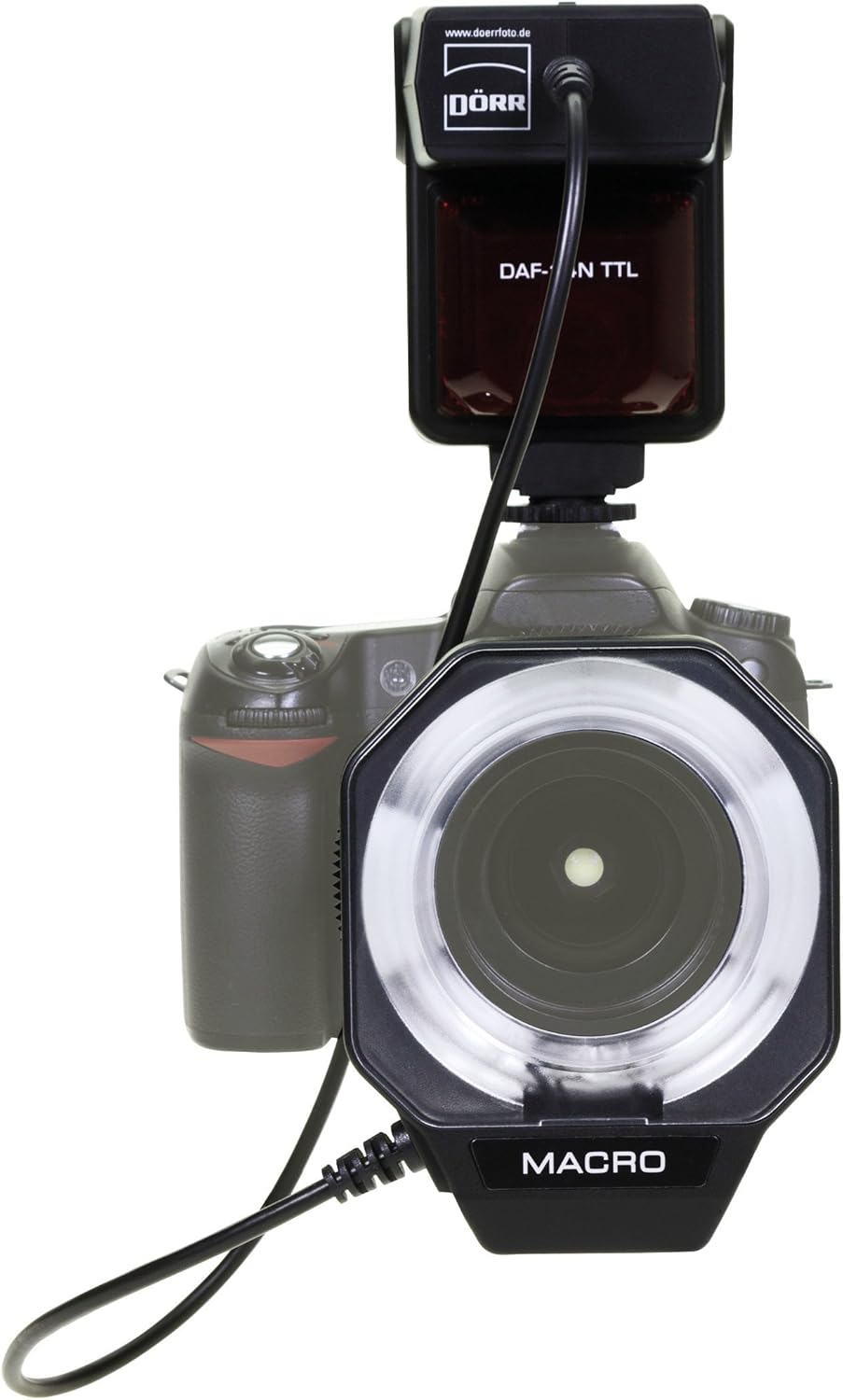
Gambar 5.1: The DAF-14 Ring Flash head attached to a camera lens, with the control unit mounted on the camera's hot shoe.

Gambar 5.2: Samping view of the DAF-14 Ring Flash mounted on a Nikon DSLR, illustrating the connection between the flash head and the control unit.
5.3 Attaching Adapter Rings
The DAF-14 Ring Flash head connects to your camera lens via adapter rings. The flash includes a 52mm lens filter thread and additional adapter rings for 55mm, 58mm, and 67mm lens filter threads.
- Determine the filter thread size of your camera lens. This is usually printed on the front of the lens or on the lens cap.
- Select the appropriate adapter ring (52mm, 55mm, 58mm, or 67mm) that matches your lens filter thread.
- Screw the chosen adapter ring onto the front filter thread of your camera lens.
- Attach the DAF-14 Ring Flash head to the adapter ring by aligning it and twisting gently until it locks into place.

Gambar 5.3: The included adapter rings (55mm, 58mm, 62mm, 67mm) for attaching the ring flash head to various lens filter threads.
6. Parentah Operasi
6.1 Powering on / Pareum
- To turn on the flash, slide the OFF/ON switch on the rear of the control unit to the ON posisi.
- The SIAP indicator light will illuminate when the flash is charged and ready to fire.
- To turn off the flash, slide the OFF/ON pindah ka Pareum posisi.
6.2 Automatic TTL Flash Control
The DAF-14 Ring Flash features fully automatic TTL (Through-The-Lens) flash control. This means the flash output is automatically adjusted by your camera to achieve optimal exposure. Simply set your camera to a compatible flash mode (e.g., Program, Aperture-priority, Shutter-priority, or Manual with flash enabled) and the flash will synchronize with the camera's metering system.
- Nomer pituduh: 14 (at ISO 100, 105mm equivalent).
- Automatic TTL Range: The effective range for automatic TTL operation is approximately 0.9 to 7 meters (3.0 to 23.0 feet).
- Auto Exposure Confirmation: The flash system provides confirmation when correct exposure has been achieved. Refer to your camera's manual for specific indicators.
6.3 Nyokot Poto
- Ensure the flash is securely mounted and powered on, and the SIAP cahayana dicaangan.
- Set your camera to the desired shooting mode. For macro photography, Aperture-priority mode (A/Av) is often recommended to control depth of field.
- Focus on your subject. The camera's autofocus system will typically work with the flash.
- Press the shutter button halfway to allow the camera to meter and the flash to pre-flash (if applicable for TTL).
- Press the shutter button fully to take the picture. The flash will fire automatically.
7. Pangropéa
- beberesih: Anggo lawon anu lemes sareng garing pikeun ngabersihkeun bagian luar unit lampu kilat. Pikeun kokotor anu bandel, usap sakedikamp lawon bisa dipaké, dituturkeun ku lawon garing. Ulah maké pangleyur atawa pembersih abrasif.
- Ngabersihan lensa: The front of the ring flash head can be cleaned with a lens cleaning cloth and solution, similar to a camera lens.
- Perawatan batré: Remove batteries if the flash will not be used for an extended period to prevent leakage. Store batteries in a cool, dry place.
- Panyimpenan: Store the flash unit in a dry, dust-free environment, away from extreme temperatures.
8. Cara ngungkulan
If you encounter issues with your DAF-14 Ring Flash, please refer to the following common problems and solutions:
- Flash henteu hurung:
- Pastikeun lampu kilatna hurung.
- Pariksa lamun éta SIAP light is illuminated. If not, the batteries may be low or incorrectly inserted. Replace batteries or check polarity.
- Verify the flash is securely mounted to the camera's hot shoe and the locking wheel is tightened.
- Check camera settings to ensure flash is enabled and in a compatible mode.
- Photos are too dark (underexposed):
- The subject may be outside the effective TTL range (0.9 to 7 meters). Move closer to the subject.
- Batteries may be low, affecting flash power. Replace with fresh batteries.
- Check camera's ISO setting. A higher ISO can help in low light conditions.
- Ensure the lens aperture is not too small (high f-number), which limits light reaching the sensor.
- Photos are too bright (overexposed):
- The subject may be too close to the flash. Increase distance or use flash exposure compensation on your camera if available.
- Check camera's ISO setting. A lower ISO can help reduce overall brightness.
- Inconsistent flash firing or power:
- This can sometimes be caused by loose battery contacts. Ensure batteries are firmly seated.
- Clean the hot shoe contacts on both the flash and the camera with a clean, dry cloth.
- If the issue persists, batteries may be faulty or nearing end-of-life. Try a new set of high-quality batteries.
If these steps do not resolve the issue, please contact DÖRR customer support.
9. Spésifikasi
| Fitur | Spésifikasi |
|---|---|
| merek | DÖRR |
| Nomer modél | 371016 (DAF-14) |
| Nomer Panungtun | 14 (ISO 100, 105mm) |
| Flash Control | Automatic TTL |
| Automatic TTL Range | 0.9 - 7 méter (3.0 - 23.0 kaki) |
| Flash Lilana | 1/700 second (full power) |
| Suhu Warna | 5600K |
| Sumber Daya | 4 x AA batteries (Alkaline, NiCd, or NiMH) |
| Lens Filter Thread | 52mm (built-in) |
| Included Adapter Rings | 55mm, 58mm, 67mm |
| Tipe Pamasangan | Hot Shoe Gunung |
| Mountings cocog | Nikon SB 700 (indicative of Nikon compatibility) |
| Téhnologi konektipitas | Wireless (implied by hot shoe mount and TTL) |
| Ukuran Paket | 21.6 x 17.6 x 7 cm |
| Beurat pakét | 422 g |
| Tingkat Résistansi Cai | Henteu Tahan Cai |
10. Garansi jeung Rojongan
For information regarding warranty coverage, technical support, or service, please refer to the warranty card included with your product or visit the official DÖRR websitus. Simpen bukti pameseran anjeun pikeun klaim garansi.