
Bubuka
This manual provides comprehensive instructions for the installation, operation, and maintenance of the Phonocar 1152927 Universal Steering Wheel Control Interface. This unit is designed to allow the retention of your vehicle's original steering wheel control functions when an aftermarket car stereo is installed. It ensures seamless integration, enabling control over various audio functions directly from your steering wheel.
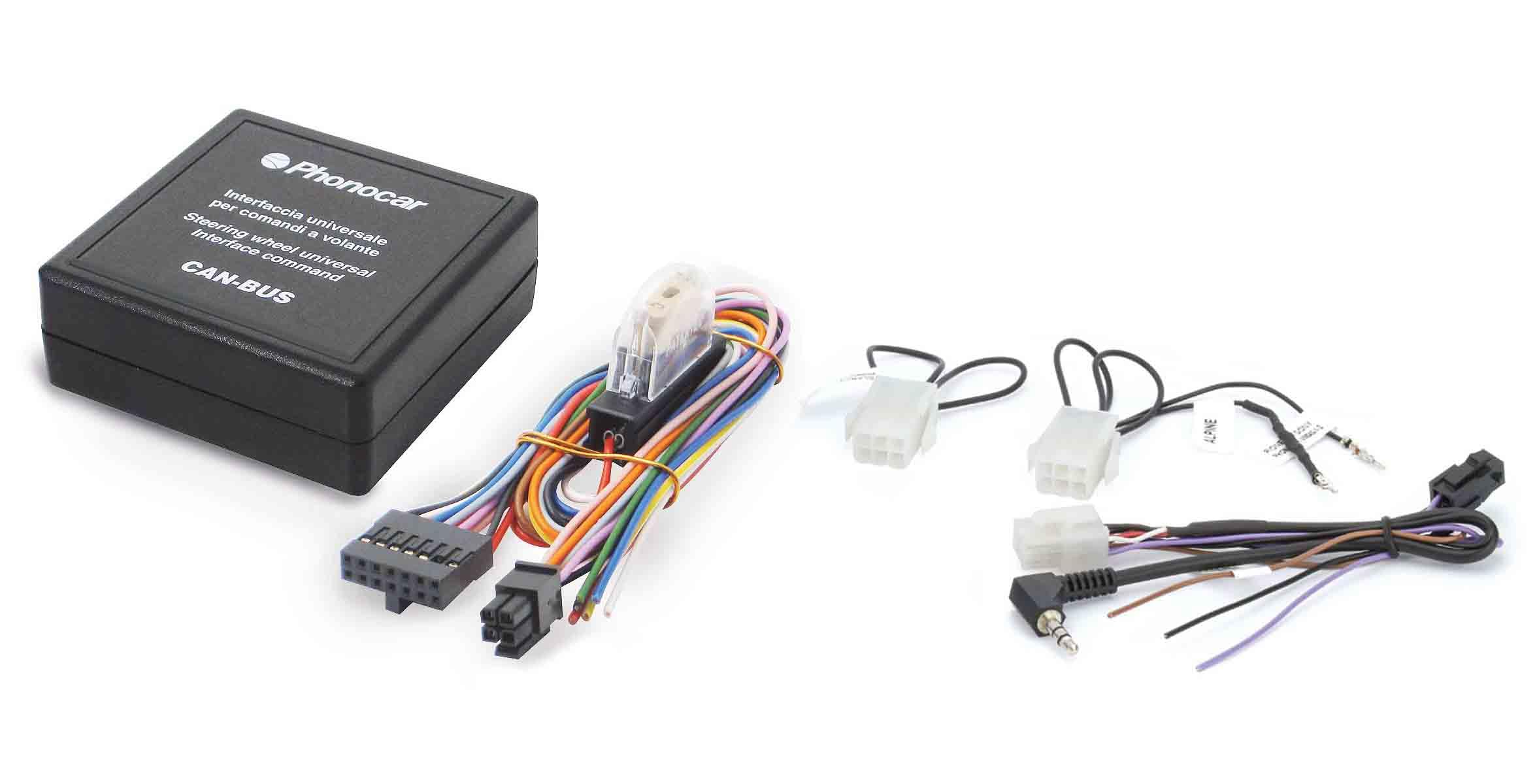
Image: The main Phonocar 1152927 control unit. This compact black box features the Phonocar logo, text indicating 'Universal Interface for steering-wheel commands', and 'CAN BUS' printed on its surface, along with a 'PRG' indicator.
Setup sareng Instalasi
Proper installation is crucial for the correct functioning of the Phonocar 1152927 interface. It is recommended that installation be performed by a qualified professional. This unit connects to your vehicle's wiring system and your aftermarket car stereo.
Komponén Langkungview
- Main Control Unit (Phonocar 1152927)
- Universal Wiring Harness
- Radio-Specific Adapters (for various aftermarket head units)
Léngkah-léngkah Instalasi
- Nyiapkeun kandaraan: Disconnect the vehicle's battery before beginning any electrical work. Remove the original car stereo and access the vehicle's wiring harness.
- Identipikasi sambungan: Locate the vehicle's positive under-key power supply and, if applicable, the CAN BUS lines. Refer to your vehicle's service manual for specific wiring diagrams.
- Connect Universal Wiring Harness: Connect the Phonocar universal wiring harness to the vehicle's wiring. Ensure all connections are secure and correctly matched according to the provided wiring diagram (not included in this general manual, refer to product packaging or manufacturer's specific instructions).
- Connect Radio-Specific Adapter: Select the appropriate radio-specific adapter for your aftermarket car stereo (e.g., Alpine, Pioneer, Sony, JVC, Clarion, Kenwood). Connect this adapter to the universal wiring harness and then to your aftermarket stereo's steering wheel control input.
- Main Unit Connection: Connect the main Phonocar 1152927 control unit to the universal wiring harness.
- Programming (if required): Some installations may require programming the unit to recognize specific vehicle or radio commands. The 'PRG' indicator on the main unit may be used during this process. Consult the detailed instructions that came with your unit for programming procedures.
- Fungsi Uji: Reconnect the vehicle's battery. Turn on the aftermarket stereo and test all steering wheel control functions (volume, track, mode, etc.) to ensure they operate correctly.

Image: A multi-colored universal wiring harness with various connectors. This harness facilitates the connection between the Phonocar control unit and the vehicle's electrical system.

Image: A collection of radio-specific adapter cables. These cables are designed to connect the Phonocar interface to various brands of aftermarket car stereos, including Alpine, Pioneer, Sony, JVC, Clarion, and Kenwood.
Ngoperasikeun Unit
Once correctly installed and configured, the Phonocar 1152927 operates automatically. It translates the signals from your vehicle's steering wheel controls into commands understood by your aftermarket car stereo.
- Kontrol volume: Use the volume up/down buttons on your steering wheel to adjust the audio level of your stereo.
- Pilihan Jalur/Stasion: Use the track forward/backward or seek buttons to change audio tracks, radio stations, or presets.
- Mode/Source Selection: If supported by your vehicle and stereo, the mode or source button on your steering wheel can switch between different audio sources (e.g., radio, USB, Bluetooth).
- Kontrol Telepon: For stereos with Bluetooth hands-free functionality, steering wheel buttons may allow answering or ending calls.
The specific functions available will depend on your vehicle's original steering wheel controls and the capabilities of your aftermarket car stereo.
Pangropéa
The Phonocar 1152927 Universal Steering Wheel Control Interface is designed for reliable, long-term operation and requires minimal maintenance.
- Sambungan: Periodically check that all wiring connections remain secure and free from corrosion. Loose connections can lead to intermittent functionality.
- Lingkungan: Ensure the unit is installed in a dry location, away from excessive heat, moisture, and direct sunlight.
- beberesih: Upami diperyogikeun, usap bagian luar unit sacara saksama nganggo lawon anu garing sareng lemes. Entong nganggo pembersih cair atanapi pelarut.
- Henteu aya Bagian anu Bisa Dilayanan Pamaké: The unit contains no user-serviceable parts. Do not attempt to open or repair the device, as this will void any warranty.
Pamérésan masalah
If you experience issues with your Phonocar 1152927 interface, consider the following troubleshooting steps:
- No Steering Wheel Control Functionality:
- Verify all wiring connections are correct and secure, especially the power, ground, and data lines to the vehicle, and the control input to the aftermarket stereo.
- Ensure the correct radio-specific adapter is used and properly connected.
- Check if your aftermarket stereo has a dedicated steering wheel control input and if it is enabled in the stereo's settings.
- Confirm that the unit has been correctly programmed for your vehicle and stereo, if programming was required. Refer to the detailed instructions for programming procedures.
- Intermittent Control Functionality:
- Pariksa sadaya sambungan naha aya anu leupas atanapi ruksak.
- Check for any signs of moisture or corrosion at the connection points.
- Incorrect Control Response:
- This may indicate incorrect programming or an incompatible configuration. Review the programming steps and ensure the correct settings are applied.
- Consult the aftermarket stereo's manual for its steering wheel control learning function, if available.
- Masalah kakuatan:
- Ensure the unit is receiving constant and switched power. Check vehicle fuses if necessary.
If problems persist after following these steps, contact Phonocar customer support or consult a professional car audio installer.
spésifikasi
| merek | Phonocar |
| Nomer modél | 1152927 |
| Jenis produk | Universal Steering Wheel Control Interface |
| Kasaluyuan | Universal for vehicles with positive under-key power and CAN BUS (where applicable). Compatible with various aftermarket radios including Alpine, Blaupunkt, Clarion, JVC, Kenwood, Pioneer, Sony. |
| Item Beurat | 120 g |
| Ukuran produk (L x W x H) | 5 x 4 x 37.1 cm |

Image: The retail packaging for the Phonocar 1152927 interface. The box highlights 'Universal Interface for steering-wheel commands' and lists compatible radio brands and CAN-BUS/K-BUS support.
Garansi sareng Rojongan
For warranty information, please refer to the documentation provided with your purchase or contact the retailer from whom you purchased the Phonocar 1152927 unit. Warranty terms and conditions may vary by region and retailer.
For technical support or further assistance, please visit the official Phonocar websitus atanapi hubungi departemén layanan palangganna. Pastikeun anjeun gaduh nomer modél produk anjeun (1152927) sareng rinci pameseran nalika milarian dukungan.