
VTech 80-109744
VTech Schulstart Laptop E Instruction Manual
Modél: 80-109744
1. Bubuka
This manual provides essential information for the safe and effective use of your VTech Schulstart Laptop E. This learning computer is designed for children aged 6 and up, offering 160 educational games in both German and English. It covers subjects such as letters, words, mathematics, nature, science, and creativity.
Punten baca manual ieu sacara saksama sateuacan ngoperasikeun alat sareng tahan pikeun rujukan ka hareup.
2. Émbaran Kasalametan
PERHATOSAN: Choking hazard due to small parts that can be swallowed. Not suitable for children under 36 months.
PERHATOSAN: Strangulation hazard. Keep packaging materials away from children.
- Salawasna ngawas barudak salila pamakéan.
- Ulah ngalaan alat ka suhu ekstrim atawa sinar panonpoé langsung.
- Jaga alat tetep garing. Ulah dicelupkeun kana cai atanapi cairan sanésna.
- Bersihkeun alatna nganggo lawon anu lemes sareng garing. Entong nganggo pembersih anu kasar.
- Pastikeun batréna dipasang kalayan leres numutkeun tanda polaritas.
- Cabut batré béak geura-giru.
- Ulah campur batré heubeul jeung anyar, atawa tipena béda accu.
- Batré anu teu tiasa dieusi deui henteu kedah dieusi deui.
- Batré anu tiasa dicas deui ngan ukur kedah dieusi dina pangawasan sawawa.
- Cabut batré anu tiasa dicas deui tina cocooan sateuacan ngecas.
- Terminal suplai teu kedah pondok-circuited.
3. Eusi Paket
The VTech Schulstart Laptop E package includes:
- 1 x VTech Schulstart Laptop E
- 1 x Cursor Mouse
- 3 x AA Demonstration Batteries (for test purposes only)
Note: A VTech power adapter and VTech laptop bag are sold separately and are not included.
4. Setélan
4.1 Pamasangan batré
The device requires 3 AA batteries. The included demonstration batteries are for testing purposes only and should be replaced with new batteries for regular use.
- Panggihan kompartemen batréna di handapeun laptop.
- Ngagunakeun obeng, buka panutup kompartemen batré.
- Remove the old demonstration batteries (if present).
- Selapkeun 3 batré AA anyar, mastikeun polaritasna bener (+/-) sakumaha dituduhkeun di jero kompartemen.
- Ganti panutup kompartemen batré jeung amankeun ku screw nu.

Figure 4.1: Battery installation guide. Replace demonstration batteries with new ones for extended play.
4.2 Connecting the Cursor Mouse
The VTech Schulstart Laptop E comes with a wired cursor mouse for interactive play.
- Locate the mouse port on the side of the laptop.
- Carefully insert the mouse connector into the port.
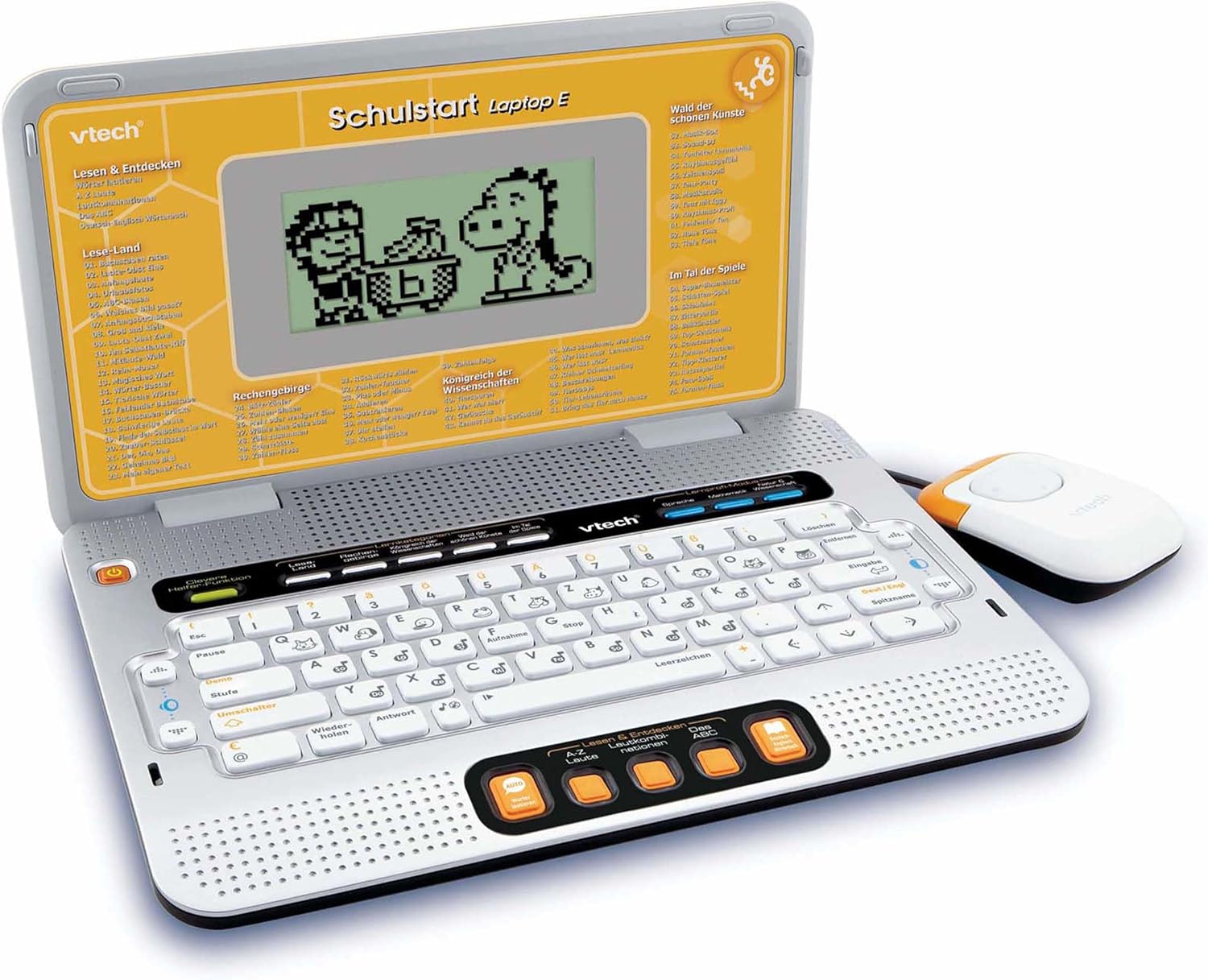
Figure 4.2: VTech Schulstart Laptop E with connected cursor mouse.
5. Parentah Operasi
5.1 Daya Hurung/Pareuman
To turn on the laptop, press the Kakuatan button, usually located on the top left of the keyboard area. To turn off, press the Kakuatan button again or the laptop will automatically shut down after a period of inactivity to conserve battery life.
5.2 Pamilihan Basa
The VTech Schulstart Laptop E supports both German and English. You can switch between languages using the dedicated language selection button or through the settings menu, if available. Refer to the on-screen prompts for initial setup.
5.3 Game Categories and Selection
The laptop features 160 educational games categorized as follows:
- Language Tools: 5 programna
- Letters & Words: 23 programna
- Mathematics: 16 programna
- Nature & Science: 12 programna
- Kreativitas: 12 programna
- Logic & Games: 12 programna
Use the arrow keys and the Enter button on the keyboard, or the cursor mouse, to navigate through the menu and select a game.

Figure 5.1: Navigating game categories on the VTech Schulstart Laptop E.
5.4 Tutor Function and Learning Modes
The laptop includes a Tutor function and a Learning Pro mode to enhance the learning experience:
- Tutor Function: Features 5 direct-dial keys for language tools (sounds, phonics, sound combinations, ABC with example words, German-English dictionary). These programs assist with letter pronunciation and reading.
- Learning Pro Mode: Offers progressive learning through increasing difficulty levels, adapting to the child's progress.
- Smart Helper Function: Provides additional hints and tips in many educational games upon request.

Figure 5.2: Child using the VTech Schulstart Laptop E's interactive learning features.
6. Pangropéa
6.1 beberesih
To clean the VTech Schulstart Laptop E, use a soft, slightly damp lawon. Ulah nganggo bahan kimia anu kasar atanapi pembersih anu abrasif. Pastikeun alatna dipareuman sareng dicabut tina sumber listrik sateuacan dibersihkeun.
6.2 Panyimpenan
Store the laptop in a cool, dry place away from direct sunlight and extreme temperatures. If the device will not be used for an extended period, remove the batteries to prevent leakage.

Figure 6.1: Optional VTech laptop bag for storage and transport (sold separately).
7. Cara ngungkulan
| Masalah | Mungkin Cukang lantaranana | Solusi |
|---|---|---|
| Alat henteu hurung. |
|
|
| Layar kosong atanapi kedap-kedip. |
|
|
| Keys or mouse not responding. |
|
|
| Sound is distorted or absent. |
|
|
8. Spésifikasi
- Jumlah modél: 80-109744
- Ukuran (L x W x H): 4 x 28 x 20 cm (1.57 x 11.02 x 7.87 inci)
- beurat: 1.29 kg (2.84 lbs)
- Umur Disarankeun: 6 taun ka luhur
- Batré: 3 x AA (not included for regular use)
- Basa: Jerman, Inggris
- Jumlah Kaulinan: 160
- Tanggal paleupasan: 31 Juli 2010
9. Garansi jeung Rojongan
Kanggo inpormasi garansi sareng dukungan palanggan, mangga tingal ka VTech resmi websitus atanapi hubungi distributor VTech lokal anjeun. Simpen resi pameseran anjeun salaku bukti pameseran.
Resmi VTech Websitus: www.vtech.com
Ask a question about this manual
Ask about setup, troubleshooting, compatibility, parts, safety, or missing instructions. Manuals+ will review the question and use this page’s manual context to help answer it.