
1. Bubuka
The D-Link DES-1008E is an 8-Port Fast Ethernet Desktop Switch designed to expand your network connectivity. This unmanaged switch provides eight 10/100 Mbps Ethernet ports, allowing you to connect multiple devices such as computers, printers, and network-attached storage (NAS) to your network. It supports full-duplex mode, delivering up to 200 Mbps throughput per port for efficient data transfer. The plug-and-play design ensures easy installation without the need for software configuration.
2. Eusi Paket
Mangga pariksa heula yén pakét anjeun ngandung barang-barang ieu:
- D-Link DES-1008E 8-Port Fast Ethernet Desktop Switch
- Adaptor kakuatan
- Guide Instalasi Gancang
If any items are missing or damaged, please contact your local D-Link reseller for assistance.
3. Setélan
Follow these steps to set up your D-Link DES-1008E switch:
- Posisi Switch: Place the switch on a flat, stable surface or mount it to a wall using appropriate hardware (not included). Ensure adequate ventilation around the device.
- Sambungkeun Adaptor Daya: Plug the provided power adapter into the power port on the back of the DES-1008E switch. Connect the other end of the power adapter to a standard electrical outlet. The power LED on the front of the switch should illuminate.
- Sambungkeun Alat Jaringan: Connect your network devices (e.g., computers, routers, game consoles) to any of the eight Ethernet ports on the switch using standard Ethernet cables. The corresponding port LED on the front of the switch will illuminate when a connection is established.
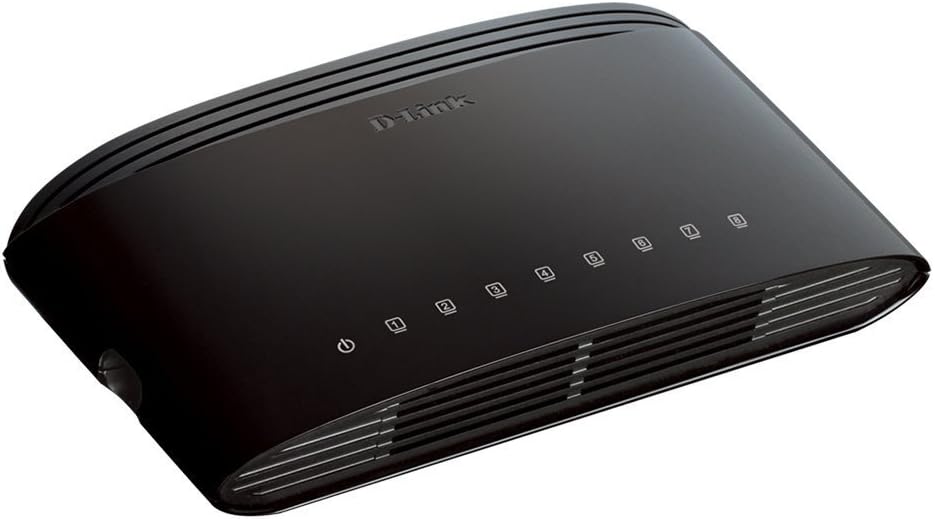
Gambar 1: Hareupeun view of the D-Link DES-1008E switch, showing the power indicator and eight port status LEDs.

Gambar 2: Tukangeun view of the D-Link DES-1008E switch, illustrating the eight Ethernet ports for device connections.
The D-Link DES-1008E is a plug-and-play device, requiring no software installation or configuration. Once connected, your devices should automatically detect the network connection.
4. Ngoperasikeun Switch
The DES-1008E operates automatically once powered on and connected. It functions as an unmanaged switch, meaning it requires no user intervention for basic network traffic management.
Indikator LED:
- LED kakuatan: Illuminates green when the switch is receiving power.
- LED Port (1-8): Each port has an associated LED. This LED illuminates green when a device is connected to the port and flashes to indicate network activity (data transmission).
5. Pangropéa
To ensure optimal performance and longevity of your D-Link DES-1008E switch, consider the following maintenance guidelines:
- beberesih: Gently wipe the exterior of the switch with a soft, dry cloth. Avoid using liquid or aerosol cleaners directly on the device.
- Ventilasi: Ensure that the ventilation slots on the switch are not blocked. Proper airflow prevents overheating.
- Lingkungan: Jalankeun saklar dina kisaran suhu sareng kalembaban anu ditangtukeun. Hindarkeun paparan ka sinar panonpoé langsung, panas kaleuleuwihan, atanapi lembab.
- Siklus kakuatan: If the switch experiences issues, a simple power cycle (unplugging and replugging the power adapter) can often resolve minor problems.
6. Cara ngungkulan
If you encounter issues with your D-Link DES-1008E switch, refer to the following troubleshooting tips:
- Henteu aya kakuatan:
- Pastikeun adaptor daya disambungkeun pageuh kana saklar sareng stop kontak listrik anu tiasa dianggo.
- Pariksa yén stop kontak listrik tiasa dianggo ku cara nyolokkeun alat anu sanés.
- Pariksa adaptor kakuatan pikeun karusakan anu katingali.
- Teu Aya Tautan/Kagiatan di Palabuhan:
- Confirm that the Ethernet cable is securely plugged into both the switch port and the connected device.
- Coba kabel Ethernet béda pikeun ngaluarkeun kabel faulty.
- Connect a different device to the same port to check if the port is functional.
- Pastikeun alat nu disambungkeun dihurungkeun tur adaptor jaringan na diaktipkeun.
- Kinerja Jaringan Lambat:
- Pariksa yén sadaya alat anu nyambung beroperasi dina kecepatan anu dipiharep.
- Check for excessive network traffic or bandwidth-intensive applications running on connected devices.
- Ensure your internet service provider (ISP) is delivering the expected speeds to your router.
- High-Pitched Sound from Power Adapter:
- Some users have reported a high-pitched sound from the included power adapter. If this occurs, consider using an alternative 5V power supply with compatible specifications. Ensure the replacement power supply meets the voltage and current requirements of the switch to avoid damage.
7. Spésifikasi
| Nomer modél | DES-1008E |
| Jumlah Palabuhan | 8 |
| Standar Ethernet | 10/100 Mbps Fast Ethernet |
| Laju Mindahkeun Data | Up to 200 Mbps (full-duplex) |
| Ngalihkeun Kamampuh | 1.6 Gbps |
| Ukuran méja Alamat MAC | Éntri 1K |
| Input kakuatan | 5V DC |
| Item Beurat | 9.44 ons |
| Warna | Hideung |
8. Garansi jeung Rojongan
The D-Link DES-1008E 8-Port Fast Ethernet Desktop Switch comes with a Kawates Jaminan Hirupna. For detailed warranty terms and conditions, please refer to the warranty information provided with your product or visit the official D-Link websitus.
For technical support, product registration, or to download the latest firmware and documentation, please visit the D-Link support website or contact D-Link customer service in your region. Support contact information can typically be found on the D-Link official websitus.