
Bubuka
The Ergotron Neo-Flex Mobile MediaCenter VHD is a versatile rolling computer cart designed to support heavy monitors or televisions up to 75 inches diagonal, weighing between 50 to 90 pounds. This cart provides effortless height adjustment, portrait-to-landscape rotation, and independent display tilt, making it suitable for various presentation and collaboration environments. Its robust design ensures stability and mobility for your display equipment.
Émbaran Kasalametan
- Kapasitas beurat: Do not exceed the maximum weight capacity of 90 lbs (40.8 kg) for the display. Overloading can cause instability and potential injury.
- Stabilitas: Ensure the display is securely mounted and all fasteners are tightened before moving the cart.
- Gerakan: Always push the cart from the base or lower frame. Avoid pushing from the top of the display. Ensure the path is clear of obstacles.
- Rem: Engage the wheel brakes when the cart is stationary to prevent accidental movement.
- Barudak jeung Pets: Keep children and pets away from the cart during assembly and operation.
- Kasalametan listrik: Route all cables safely to prevent tripping hazards. Do not overload power strips.
Disetél
Follow these steps for proper assembly and initial setup of your Neo-Flex Mobile MediaCenter VHD.
1. Unpacking sarta Idéntifikasi komponén
Carefully remove all components from the packaging. Verify that all parts are present according to the packing list (not provided in this manual, refer to your product's included documentation).
2. Majelis Base
Assemble the base components, ensuring the casters are securely attached. The casters allow for easy mobility and include locking mechanisms for stability.

3. Display Mounting
Attach your monitor or TV to the VESA mounting plate. This cart supports large VESA patterns, any size within 100-600mm by 100-400mm. Ensure the display is centered and securely fastened using the provided hardware.


4. Manajemén kabel
Utilize the integrated cable management features along the central column to route and secure all power and video cables. This prevents tangles and reduces tripping hazards.

Parentah Operasi
This section details how to adjust and move your Neo-Flex Mobile MediaCenter VHD.
1. adjustment jangkungna
The cart features 20 inches (51 cm) of effortless height adjustment. Locate the height adjustment mechanism (typically a lever or button) and gently raise or lower the display to your desired viewing height. Release the mechanism to lock the height in place.
2. Display Rotation (Portrait-to-Landscape)
To rotate the display, ensure there is sufficient clearance around the screen. Gently rotate the display 90 degrees to switch between portrait and landscape orientations. The mechanism is designed for smooth, controlled movement.
3. Display Tilt
The display can be tilted up to 20 degrees independently. Adjust the tilt mechanism to achieve the optimal viewing angle, reducing glare and improving visibility for various audience positions.
4. Mindahkeun Karanjang
Before moving the cart, ensure all cables are clear and the display is securely positioned. Release the brakes on the casters. Push the cart from the base or lower frame to guide it to the desired location. The cart is designed to roll easily through doorways and can be nested with other carts for storage.
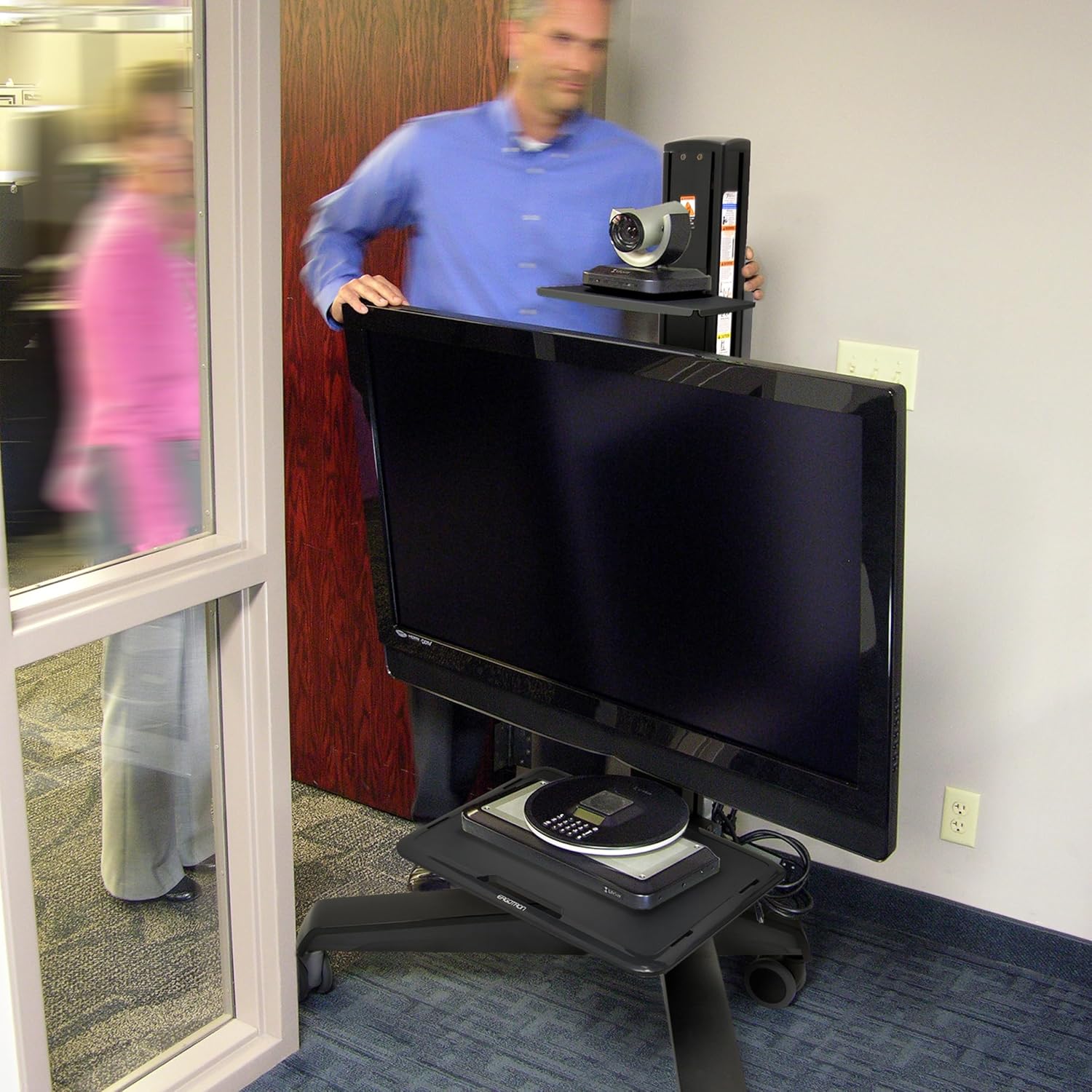


5. Locking Casters
Once the cart is in its desired position, engage the brakes on all casters to prevent unintended movement and ensure stability during use.
Pangropéa
- beberesih: Ngagunakeun lemes, damp cloth to clean the surfaces of the cart. Avoid abrasive cleaners or solvents.
- Pamariksaan: Periodically check all fasteners and connections to ensure they are tight and secure.
- Perawatan Caster: Jaga roda tetep bébas tina kokotor supados ngagulungna lancar.
Pamérésan masalah
| Masalah | Mungkin Cukang lantaranana | Solusi |
|---|---|---|
| Karanjang hésé dipindahkeun. | Caster brakes are engaged. Debris in casters. | Disengage all caster brakes. Clean any debris from the caster wheels. |
| Display feels unstable. | Mounting screws are loose. Display weight exceeds capacity. | Tighten all display mounting screws. Verify display weight is within 50-90 lbs (22.7-40.8 kg). |
| Pangaluyuan jangkungna kaku. | Mechanism requires lubrication or adjustment. | Refer to the full product manual for specific lubrication instructions or contact customer support. |
spésifikasi
| Fitur | Rincian |
|---|---|
| Nomer modél | 24-191-085 |
| Display Size Compatibility | Nepi ka 75 inci diagonal |
| Kapasitas beurat | 50 nepi ka 90 lbs (22.7 nepi ka 40.8 kg) |
| Kasaluyuan VESA | 100x100mm ka 600x400mm |
| adjustment jangkungna | 20 inci (51 cm) |
| Témbongkeun Dengdekkeun | 20 degrees independent tilt |
| Rotasi tampilan | Portrait to Landscape |
| Item Beurat | 92.6 pon (42 kg) |
| Bahan | Plastic (frame likely metal, but specification says plastic) |
| Warna | Hideung |
| Tipe Pamasangan | Lantai Gunung |
Garansi sareng Rojongan
The Ergotron Neo-Flex Mobile MediaCenter VHD comes with a garansi 3 taun, ensuring quality and reliability. For technical support, warranty claims, or additional product information, please visit the official Ergotron websitus atanapi ngahubungan departemén layanan palanggan maranéhna.
Anjeun tiasa mendakan langkung seueur inpormasi sareng sumber dukungan ku nganjang ka Ergotron Store on Amazon atanapi perusahaan resmina websitus.