
Bubuka
This manual provides detailed instructions for the safe installation, operation, and maintenance of your Utilitech 3-Light 123-Watt Bronze Dusk-to-Dawn Security Light. Please read all instructions carefully before beginning installation and retain this manual for future reference. This security light is designed for outdoor use and features a built-in motion sensor and photo-control for automated operation.
Émbaran Kasalametan
PERHATOSAN: Résiko shock listrik. Pegatkeun sambungan kakuatan dina sekering atawa circuit breaker saméméh instalasi atawa ngalayanan.
- Produk ieu kedah dipasang saluyu sareng kode pamasangan anu dianggo ku jalma anu wawuh sareng konstruksi sareng operasi produk sareng bahaya anu aya.
- Mastikeun suplai voltage is 120 Volts AC, 60 Hz.
- Use only suitable bulbs as specified in the 'Specifications' section.
- Ulah nyobian ngaropéa fixture nu. Sakur modifikasi tiasa ngabatalkeun jaminan sareng nyiptakeun bahaya kaamanan.
- This fixture is UL Safety Listed, ensuring compliance with recognized safety standards.
Eusi pakét
Before beginning installation, ensure all parts are present. If any part is missing or damaged, do not attempt to assemble, install, or operate the product.
- Security Light Fixture (1)
- Pemasangan Hardware (screws, mur kawat, dll.)
- Buku Panduan (1)
Setup sareng Instalasi
This security light is designed for wall mount installation and requires hardwiring to an existing electrical circuit.
1. Nyiapkeun Instalasi
- Pareuman kakuatan dina circuit breaker atanapi kotak sekering kana kotak outlet dimana fixture bakal dipasang.
- Bungkus wadahna sareng komponénna kalayan ati-ati.
2. Pamasangan Fixture
- Pasangkeun braket pemasangan kana kotak sambungan listrik nganggo sekrup anu disayogikeun. Pastikeun éta dipasang pageuh.
- Feed the electrical wires from the junction box through the center hole of the mounting bracket.
3. Sambungan Wiring
- Connect the bare copper ground wire from the fixture to the ground wire from the junction box using a wire nut.
- Connect the white (neutral) wire from the fixture to the white (neutral) wire from the junction box using a wire nut.
- Connect the black (hot) wire from the fixture to the black (hot) wire from the junction box using a wire nut.
- Taliti keun sadaya kawat kana kotak simpang.
4. Securing the Fixture and Installing Bulbs
- Align the fixture with the mounting bracket and secure it with the provided screws. Ensure a tight seal against the mounting surface to prevent water intrusion.
- Install three (3) Halogen or compact fluorescent bulbs (not included) into the sockets. Do not exceed the maximum wattage specified in the 'Specifications' section.
- Adjust the light heads to the desired direction.
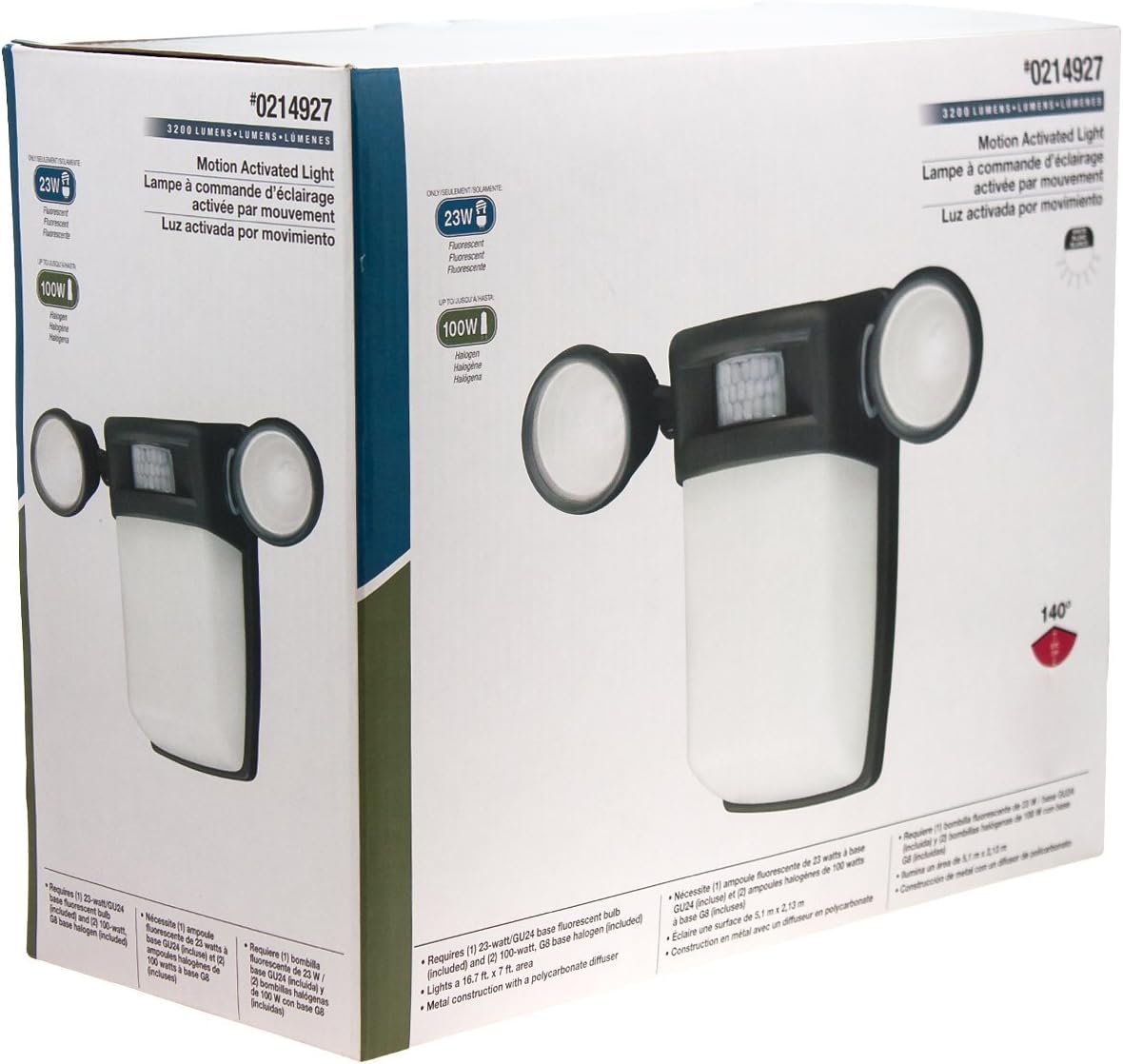
Gambar 1: Hareupeun view of the Utilitech 3-Light 123-Watt Bronze Dusk-to-Dawn Security Light in its retail packaging. This image shows the overall design with three adjustable light heads and the central motion sensor.

Gambar 2: Sisi view of the Utilitech 3-Light 123-Watt Bronze Dusk-to-Dawn Security Light in its retail packaging. This perspective highlights the depth of the fixture and the positioning of the light heads relative to the main body.
Parentah Operasi
This security light is equipped with both a photo-control sensor for dusk-to-dawn operation and a 140° automatic motion sensor for enhanced security.
Fitur Dusk-to-Dawn
The integrated photo-control sensor detects ambient light levels. The light will automatically turn on at dusk and turn off at dawn, providing continuous illumination during nighttime hours. No manual adjustment is typically required for this feature.
Operasi Sénsor gerak
The 140° automatic motion sensor detects movement within its range. When motion is detected, the light will activate for a set duration. The fixture may include adjustable settings for sensitivity and duration. Refer to the specific controls on your fixture for adjustment. Some models may also feature remote control capabilities for these settings.
Adjusting Light Heads
The three light heads are adjustable. Gently pivot each light head to direct illumination to your desired coverage area.
Pangropéa
Regular maintenance ensures optimal performance and extends the lifespan of your security light.
- beberesih: périodik ngabersihan fixture kalawan lemes, damp cloth. Do not use abrasive cleaners or solvents, as they may damage the finish or electrical components. Ensure power is off before cleaning.
- Ngagantian bohlam: Turn off power at the circuit breaker before replacing bulbs. Allow bulbs to cool completely before handling. Replace with three (3) Halogen or compact fluorescent bulbs of the specified wattage.
- Sensor beberesih: Keep the motion sensor lens and photo-control sensor free of dirt, dust, and obstructions to ensure proper operation.
Pamérésan masalah
If your security light is not functioning as expected, refer to the following common issues and solutions:
| Masalah | Mungkin Cukang lantaranana | Solusi |
|---|---|---|
| Lampu teu hurung pisan. | No power, faulty bulbs, wiring issue, or defective sensor. | Check circuit breaker. Ensure bulbs are correctly installed and not burnt out. Verify wiring connections. If issues persist, consult a qualified electrician. |
| Lampu terus hurung. | Motion sensor sensitivity too high, duration setting too long, or photo-control sensor obstructed/faulty. | Adjust motion sensor sensitivity and duration settings. Ensure photo-control sensor is not blocked by debris or external light sources. |
| Lampu hurung beurang. | Photo-control sensor is obstructed or in a shaded area. | Ensure the photo-control sensor is exposed to natural daylight and not covered by dirt or obstructions. |
| Motion sensor does not detect movement. | Sensor sensitivity too low, obstructed view, or incorrect angle. | Increase sensor sensitivity. Clear any obstructions from the sensor's field of view. Adjust the sensor's angle to cover the desired area. |
spésifikasi
| Fitur | Spésifikasi |
|---|---|
| merek | Utilitech |
| Nomer modél | 0214927 |
| Voltage | 120 Volt AC, 60 Hz |
| Wattage | 123 Watt (total) |
| Jenis Bohlam | Halogen or Compact Fluorescent (3 bulbs required) |
| Light Heads | 3, adjustable |
| Sudut Sénsor gerak | 140 derajat |
| Fitur Dusk-to-Dawn | Yes, photo-control sensor |
| Bahan | logam |
| Bérés | Perunggu |
| Tipe Pamasangan | Tembok Gunung |
| Ukuran (H x W x D) | 10.25 di x 13.5 di x 5.75 di |
| Item Beurat | 3.5 pon |
| Daptar Kaamanan | UL Didaptarkeun |