
1. Bubuka
Hatur nuhun pikeun meuliasing the Gemini PS3-USB 3 Channel 10-Inch Mixer. This manual provides essential information for the proper setup, operation, and maintenance of your mixer. Please read this manual thoroughly before use to ensure optimal performance and to prevent damage.
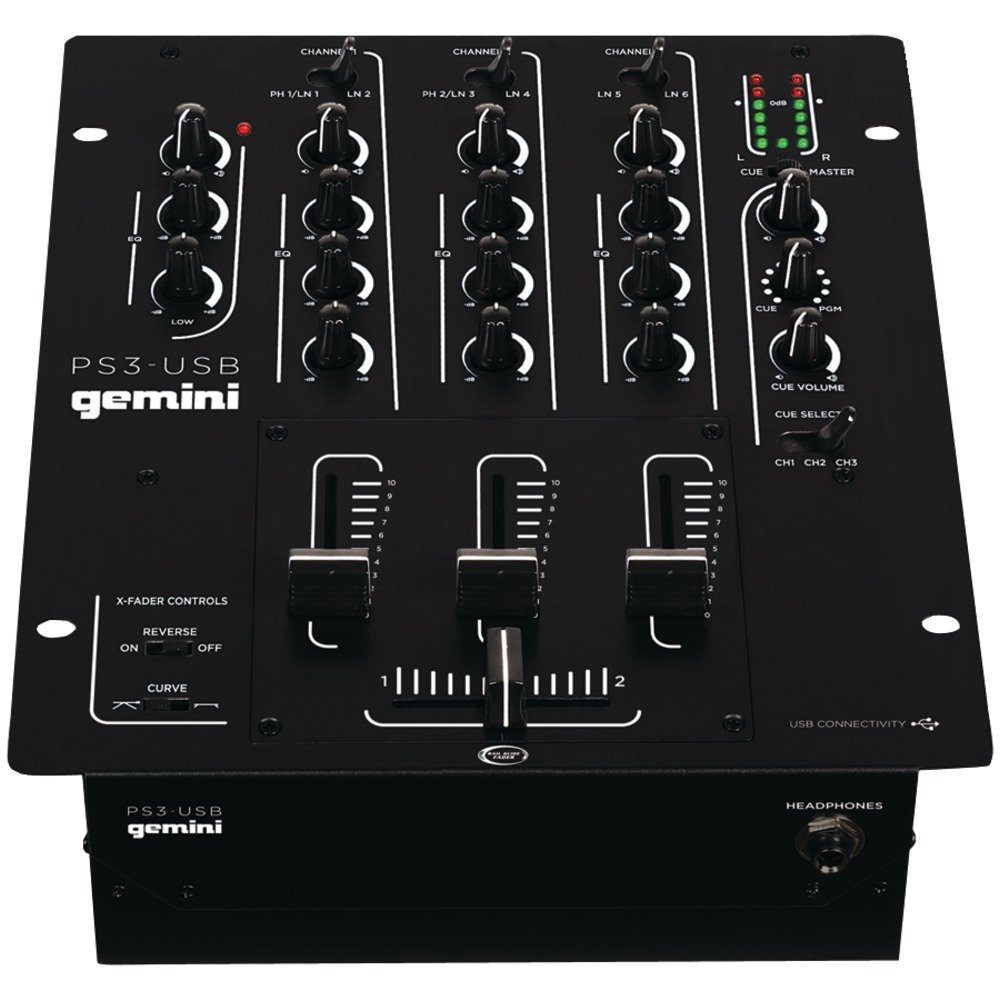
Gambar 1: Hareupeun view of the Gemini PS3-USB Mixer, showing controls and inputs.
2. Parentah Kasalametan
- Sumber Daya: Sambungkeun unit ngan ka catu daya anu ditangtukeun.
- Ventilasi: Pastikeun ventilasi anu leres. Ulah meungpeuk bukaan ventilasi.
- Cai sareng Uap: Ulah ngalaan unit ka hujan atawa Uap. Ulah nempatkeun objék ngeusi cairan dina unit.
- Panas: Jauhkeun unit tina sumber panas sapertos radiator, register panas, kompor, atanapi aparat sanésna (kalebet ampLiifiers) anu ngahasilkeun panas.
- beberesih: Ngabersihan ngan ku kaén garing.
- Palayanan: Rujuk sadayana jasa ka tanaga jasa anu mumpuni. Entong nyobian ngalayanan produk ieu nyalira.
3. Setélan
3.1 Ngabongkar bungkusan
Carefully unpack the mixer and check for any signs of damage. Retain the packaging materials for future transport or storage.
3.2 Nyambungkeun Daya
Connect the provided power adapter to the mixer's power input and then to a suitable electrical outlet.
3.3 Panyambung Audio
The PS3-USB features 5-line, 3-channel inputs with 2 convertible Phono/Line RCA inputs.
- Phono/Line Inputs: Connect turntables or line-level devices (CD players, media players) to the RCA inputs. Use the Phono/Line switch to select the appropriate input type for each channel.
- Kaluaran Master: Connect the Master RCA outputs to your amplifier atanapi speaker Powered.
- Rékam Kaluaran: Connect the Record RCA outputs to a recording device if you wish to record your mix.
- Headphone: Plug your 1/4" (6.3mm) headphones into the front panel headphone connector.
3.4 Sambungan USB
Connect the mixer to your Mac or PC using a standard USB cable. This allows for simultaneous playback and recording through your computer's media player software.
4. Parentah Operasi
4.1 Kontrol jeung Fungsi Leuwihview
Familiarize yourself with the mixer's layout:
- Channel Gain Control: Adjusts the input level for each channel.
- 3-Band Rotary EQ: Provides control over High, Mid, and Low frequencies for each channel.
- Saluran Faders: Kontrol volume unggal saluran individu.
- Crossfader: A user-replaceable Rail Glide crossfader with curve and reverse controls for blending between channels.
- Jilid Master: Ngadalikeun tingkat kaluaran sakabéh mixer.
- Méter VU: Visual indicators for master or cue levels.
- Cue Section: Includes rotary cue volume, CUE/PGM controls, and a split cue switch for headphone monitoring.
- Bagian Mikropon: Features a rotary microphone volume control and a 2-band EQ for microphone input.
4.2 Campuran Dasar
- Connect your audio sources to the appropriate Phono/Line inputs.
- Set the Phono/Line switch for each channel to match your source.
- Adjust the Gain control for each active channel to achieve a healthy input level without clipping (distortion).
- Use the channel faders to bring up the volume of your desired audio sources.
- Utilize the 3-band EQ to shape the sound of each channel.
- Use the crossfader to smoothly transition between channels.
- Monitor your mix using headphones via the Cue section and adjust the Master Volume for the main output.
4.3 Playback USB jeung Rékam
Once connected via USB, your computer should recognize the PS3-USB as an audio device.
- Playback: Select the PS3-USB as the output device in your computer's sound settings or media player software to route audio through the mixer.
- Ngarékam: Select the PS3-USB as the input device in your recording software. The mixer's master output will be sent to your computer for recording.
5. Pangropéa
- beberesih: Anggo lawon anu lemes sareng garing pikeun ngabersihkeun bagian luar mixer. Entong nganggo pembersih cair atanapi pelarut.
- Crossfader Replacement: The Rail Glide crossfader is user-replaceable. Refer to the Gemini website or authorized service centers for replacement parts and instructions if needed.
- Panyimpenan: When not in use for extended periods, store the mixer in a cool, dry place, preferably in its original packaging.
6. Cara ngungkulan
| Masalah | Mungkin Cukang lantaranana | Solusi |
|---|---|---|
| No sound output from master. | Master volume too low; incorrect input selection; ampmasalah liifier / spiker. | Increase Master Volume. Check Phono/Line switches. Verify ampsambungan lampu/spiker sareng dayana. |
| Taya sora ti saluran husus. | Channel fader down; Gain too low; incorrect Phono/Line selection; source device off/muted. | Raise channel fader. Adjust Gain. Correct Phono/Line switch. Check source device. |
| Audio distort. | Input Gain too high; Master Volume too high; faulty cable. | Reduce channel Gain. Reduce Master Volume. Replace cables. |
| USB recording/playback not working. | Incorrect USB connection; computer audio settings incorrect; driver issues. | Ensure USB cable is securely connected. Select PS3-USB as audio device in computer settings. Restart computer. |
7. Spésifikasi
- model: PS3USB
- Saluran: 3
- Input: 5-Line, 2 Convertible Phono/Line RCA, USB
- Kaluaran: Master RCA, Record RCA, 1/4" (6.3mm) Headphone
- EQ: 3-Band Rotary EQ per channel, 2-Band EQ for Microphone
- Crossfader: User-replaceable Rail Glide with Curve and Reverse controls
- Konektipitas: USB for Mac/PC Playback & Recording
- Dimensions (Approximate Shipping): 12.00 inci x 10.00 inci x 3.25 inci
- Weight (Approximate Shipping): 6.2 lbs (2.8 kg)
- UPC: 747705208149
8. Garansi jeung Rojongan
This Gemini product is covered by a garansi 90 poé ti tanggal pameseran. Garansi ieu ngawengku cacad manufaktur sareng padamelan dina panggunaan normal. Éta henteu ngawengku karusakan anu disababkeun ku salah guna, kacilakaan, modifikasi, atanapi perbaikan anu henteu sah.
For technical support, service inquiries, or warranty claims, please contact your authorized Gemini dealer or visit the official Gemini websitus pikeun inpo kontak.
Punten nahan bukti pameseran anjeun pikeun validasi garansi.