
D-Patalina DIR-636L
D-Link Wireless N 300 Mbps Home Cloud App-Enabled Gigabit Router (DIR-636L) User Manual
Model: DIR-636L
Bubuka
This manual provides comprehensive instructions for setting up, operating, and maintaining your D-Link Wireless N 300 Mbps Home Cloud App-Enabled Gigabit Router (DIR-636L). Please read this manual thoroughly before using the device to ensure optimal performance and safety.
Naon dina Box
- D-Link Cloud Router 1200 (DIR-636L)
- kabel Ethernet
- adaptor kakuatan
- Gancang Install Guide
Produk Leuwihview


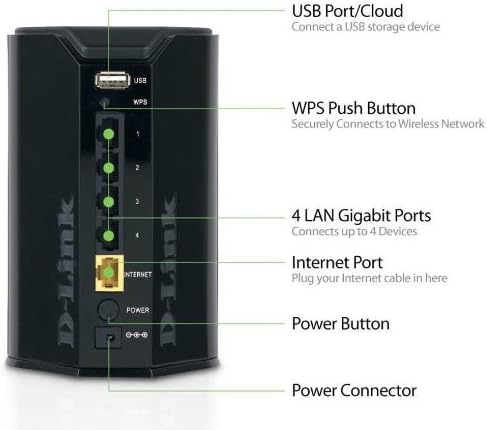
The D-Link DIR-636L Cloud Router is designed for high-performance wireless connectivity and network management. It features a compact, vertical design with indicator lights on the front and all connectivity ports on the rear for efficient cable management.
Disetél
Instalasi Awal
- Bongkarkeun Routerna: Taliti miceun sadaya komponén tina kotak.
- Posisi router: Place the router in a central location in your home for optimal wireless coverage. Avoid placing it near large metal objects or other electronic devices that may cause interference.
- Sambungkeun Modem: Connect one end of the provided Ethernet cable to the Internet port (yellow) on the back of the DIR-636L router and the other end to your modem's Ethernet port.
- Sambungkeun Kakuatan: Plug the power adapter into the router's power connector and then into a wall outlet. The power LED on the front of the router should illuminate.
- Daya Hurung: Press the power button on the back of the router. Wait for the Internet LED to turn solid green, indicating a successful connection.
Konfigurasi via Web Pangotektak
- Nyambung ka router: Connect your computer to one of the LAN Gigabit ports (1-4) on the router using an Ethernet cable, or connect wirelessly to the default Wi-Fi network (SSID and password are on a label on the router).
- Access Setup Wizard: Buka a web browser jeung tipe http://dlinkrouter.local or http://192.168.0.1 kana palang alamat.
- Turutan ajakan dina layar: The D-Link Setup Wizard will guide you through configuring your Internet connection, wireless network name (SSID), and password.
Configuration via QRS Mobile App
For quick setup using your smartphone or tablet, download the free D-Link QRS Mobile app from your device's app store. The app will guide you through the setup process step-by-step.
Ngoperasikeun Router
Konéktipitas Wireless
The DIR-636L provides wireless speeds up to 300 Mbps, ideal for video streaming and web surfing. Its built-in high-powered amplifier ensures wall-to-wall coverage throughout your home.
Connecting Devices Wirelessly:
- Sambungan standar: On your device, select your Wi-Fi network name (SSID) and enter the password you configured during setup.
- WPS (Wi-Fi Protected Setup): Press the WPS button on the back of the router (labeled "WPS") and then activate WPS on your wireless device within two minutes to establish a secure connection without entering a password.
Konektipitas kabel
The router features four Gigabit Ethernet ports for blazing fast wired connections. These are ideal for gaming consoles, smart TVs, desktop computers, and other devices requiring stable, high-speed connections.
SharePort Mobile App
Utilize the free D-Link SharePort Mobile app to wirelessly access media files (videos, music, photos) stored on a USB drive connected to the router's USB 2.0 port. This allows you to stream content directly to your iPhone, iPad, or Android device.
Official D-Link video demonstrating the features of the Wireless-N300 Dual-Band Gigabit Cloud Router, including wireless file sharing and network monitoring capabilities.
mydlink Cloud Services
The mydlink app allows you to monitor and manage your home network remotely from your iPhone, iPad, or Android device. You can view web browsing history, see connected and blocked devices in real-time, and receive automatic email alerts for unauthorized connections.
Pangropéa
- Reboots biasa: Periodically rebooting your router (unplugging and replugging the power) can help clear its memory and improve performance. A monthly reboot is generally sufficient.
- Pembaruan firmware: Check the D-Link support websitus pikeun apdet firmware. Ngajaga firmware router anjeun tetep mutahir mastikeun kinerja, kaamanan, sareng aksés kana fitur-fitur anyar anu optimal.
- Bersihan fisik: Keep the router clean and free of dust to prevent overheating. Use a soft, dry cloth.
- Kaamanan: Ganti kecap akses Wi-Fi anjeun sareng kredensial login router sacara rutin. Anggo kecap konci anu kuat sareng unik.
Pamérésan masalah
Taya Konéksi Internét
- Pariksa Kabel: Ensure all Ethernet cables are securely connected to the correct ports on the router and modem.
- Reboot Alat: Power cycle your modem first, wait 30 seconds, then power cycle your router. Wait for all indicator lights to stabilize.
- Masalah ISP: Taroskeun Panyadia Ladénan Internét (ISP) anjeun pikeun ngonfirmasi yén henteu aya jasatages di wewengkon Anjeun.
Slow Wireless Speed or Poor Coverage
- Nempatkeun router: Move the router to a more central location, away from obstructions like thick walls, large metal objects, or other electronics.
- gangguan: Other wireless devices (cordless phones, microwaves) can cause interference. Try changing your Wi-Fi channel in the router settings.
- Loba teuing Alat: If many devices are connected, consider upgrading to a higher-speed router or optimizing network usage.
Teu Bisa Ngaksés Kaca Setelan Router
- Alamat IP: Pastikeun komputer anjeun disetel pikeun kéngingkeun alamat IP sacara otomatis (DHCP).
- Alamat anu leres: Double-check that you are typing the correct address (http://dlinkrouter.local or http://192.168.0.1).
- Firewall/Antivirus: Pareuman samentawis firewall atanapi parangkat lunak antipirus dina komputer anjeun anu tiasa ngahalangan aksés.
- Pabrik Reset: As a last resort, perform a factory reset by pressing and holding the reset button on the router for 10 seconds. Catetan: Ieu bakal ngahapus sadaya setélan khusus anjeun.
spésifikasi
| Fitur | Rincian |
|---|---|
| Ngaran modél | DIR-636L |
| Tipe Wireless | 802.11bgn |
| Laju nirkabel | Nepi ka 300 Mbps |
| palabuhan Ethernet | 4 x Gigabit Ethernet |
| palabuhan USB | 1 x USB 2.0 |
| Kaamanan | Wi-Fi Protected Access (WPA/WPA2), WPS |
| IPv6 Certified | Sumuhun |
| Ukuran (L x W x H) | 4.5 x 3.8 x 5.5 inci |
| Item Beurat | 9.9 ons |
| Sistem Operasi cocog | Windows 7, Windows Vista, Windows XP SP2, Mac OS X (v10.4) |
Garansi sareng Rojongan
The D-Link Wireless N 300 Mbps Home Cloud App-Enabled Gigabit Router (DIR-636L) comes with a 1-taun jaminan kawates. D-Link also provides 24/7 basic installation support.
For further assistance, technical support, or to check for the latest firmware updates, please visit the official D-Link support websitus atanapi ngahubungan layanan palanggan maranéhna.
Note: Warranty terms may vary by region. Please refer to the warranty card included with your product or the D-Link websitus pikeun detil husus.
Ask a question about this manual
Ask about setup, troubleshooting, compatibility, parts, safety, or missing instructions. Manuals+ will review the question and use this page’s manual context to help answer it.