
1. Bubuka
This manual provides comprehensive instructions for the installation, operation, maintenance, and troubleshooting of your D-Link DGS-1100-08 8 Port Easy Smart Managed Gigabit Network Internet Desktop Switch. Please read this manual thoroughly before using the device to ensure proper functionality and to prevent damage.
2. Émbaran Kasalametan
Observe the following safety guidelines to ensure safe operation of the device:
- Ensure the power adapter is connected to a compatible power source.
- Ulah ngalaan alat ka cai atawa kalembaban kaleuleuwihan.
- Ulah muka alat casing; ngarujuk sadaya jasa ka tanaga anu mumpuni.
- Simpen alat dina permukaan anu stabil, datar kalayan ventilasi anu cekap.
- Hindarkeun nempatkeun alat caket sumber panas atanapi dina sinar panonpoé langsung.
3. Eusi Paket
Pariksa yén pakét anjeun ngandung barang-barang ieu:
- D-Link DGS-1100-08 8 Port Easy Smart Managed Gigabit Network Internet Desktop Switch
- Adaptor kakuatan
- Documentation (Quick Installation Guide, Warranty Card)
4. Produk Langkungview
The DGS-1100-08 is an 8-port Gigabit Ethernet switch designed for small and medium businesses, offering essential management functions.
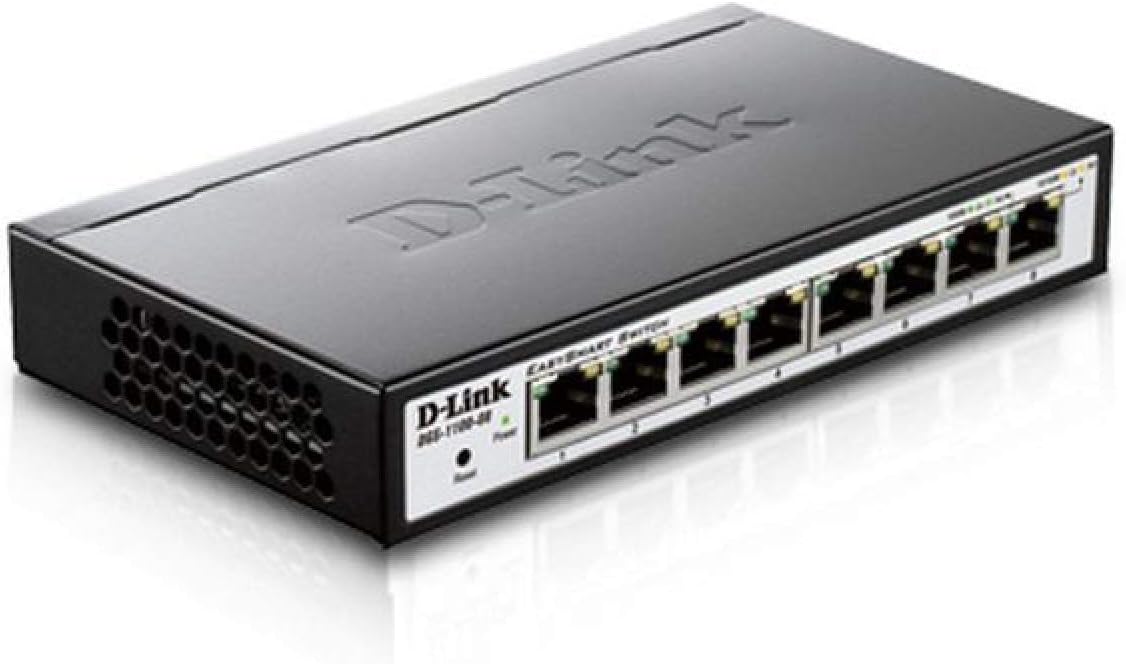
Gambar 4.1: Angled view of the D-Link DGS-1100-08 switch, showing the D-Link logo, model number, power and reset buttons, and the eight Gigabit Ethernet ports with their corresponding LED indicators.

Gambar 4.2: Hareupeun view of the D-Link DGS-1100-08 switch, clearly displaying the eight Gigabit Ethernet ports labeled 1 through 8, along with the Power LED and Reset button.
4.1 Panel payun
- Port Ethernet (1-8): Eight 10/100/1000BASE-T Gigabit Ethernet ports for network connections.
- LED kakuatan: Nunjukkeun status kakuatan alat.
- Tombol Reset: Used to reset the device to factory default settings.
4.2 Indikator LED
| LED | Status | Katerangan |
|---|---|---|
| Kakuatan | Héjo padet | Alat dihurungkeun. |
| Link/Act (Per Port) | Héjo padet | A valid network connection is established at Gigabit speed. |
| Link/Act (Per Port) | Padet Amber | A valid network connection is established at 10/100 Mbps speed. |
| Link/Act (Per Port) | Ngacapruk | Data keur dikirimkeun atawa ditampi dina port. |
5. Setélan
Follow these steps to set up your DGS-1100-08 switch:
- Sambungan fisik: Connect your network devices (computers, servers, network printers) to the Ethernet ports (1-8) on the switch using standard Ethernet cables.
- Sambungan Daya: Connect the provided power adapter to the power input on the switch and then plug it into a power outlet. The Power LED should illuminate.
- Aksés Awal: The switch has a default IP address of 10.90.90.90 and a default username/password of admin/admin. Pikeun ngakses ka web management interface, you may need to temporarily configure your computer's IP address to be in the same subnet (e.g., 10.90.90.100 with a subnet mask of 255.0.0.0).
- Web Aksés Antarmuka: Buka a web browser jeung asupkeun
http://10.90.90.90in the address bar. Log in with the default credentials. - Pembaruan firmware: It is recommended to check for and install the latest firmware version from the D-Link support website to ensure optimal performance and access to the latest features and bug fixes.
6. Parentah Operasi
The DGS-1100-08 is a managed switch, offering various features configurable via its web panganteur manajemén:
- VLAN (Jaringan Area Lokal Virtual): Configure 802.1Q VLANs for network segmentation and enhanced security.
- Kualitas Pelayanan (QoS): Prioritaskeun lalu lintas jaringan pikeun aplikasi kritis sapertos sora sareng pidéo.
- Bandwidth Limiting: Control the maximum bandwidth for specific ports to manage network congestion.
- Link Aggregasi: Gabungkeun sababaraha tautan fisik kana hiji tautan logis pikeun ningkatkeun bandwidth sareng redundansi.
- IGMP Snooping: Optimize multicast traffic delivery, preventing unnecessary flooding to all ports.
- Palabuan Eunteung: Copy traffic from one or more source ports to a destination port for network monitoring and analysis.
Refer to the online help within the web management interface for detailed configuration steps for each feature.
7. Pangropéa
To ensure the longevity and optimal performance of your switch:
- Jaga alat tetep beresih sareng leupas tina lebu. Anggo kaén anu lemes sareng garing pikeun beberesih.
- Mastikeun ventilasi ditangtoskeun ku ngajaga vents jelas tina halangan.
- Regularly check the D-Link support website for firmware updates and apply them as recommended.
- Perform periodic backups of your switch configuration to a local file.
8. Cara ngungkulan
If you encounter issues with your DGS-1100-08 switch, consider the following:
- Henteu aya kakuatan: Ensure the power adapter is securely connected to both the switch and a working power outlet. Check the Power LED.
- Henteu aya tautan dina Port: Pariksa yén kabel Ethernet disambungkeun leres dina duanana tungtung. Uji nganggo kabel atanapi port anu béda. Pastikeun alat nu disambungkeun dihurungkeun tur fungsina bener.
- Teu Bisa Aksés Web panganteur: Double-check your computer's IP address configuration to ensure it is in the same subnet as the switch (default 10.90.90.90). Clear your browser's cache or try a different browser.
- Masalah Kinerja Jaringan: Check for excessive network traffic, loopbacks (ensure loopback detection is enabled), or incorrect QoS configurations.
- Reset ka Default Pabrik: If issues persist, use the reset button on the front panel to restore the switch to its original factory settings. This will erase all custom configurations.
9. Spésifikasi
| Fitur | Rincian |
|---|---|
| Nomer modél | DGS-1100-08 |
| Jumlah Palabuhan | 8 x 10/100/1000BASE-T Gigabit Ethernet |
| Laju Mindahkeun Data | 1000 Megabits per detik |
| Ukuran produk (L x W x H) | 6.75 x 3.94 x 1.13 inci |
| Item Beurat | 15 ons |
| Tipe Manajemén | Easy Smart Managed |
| Hemat Daya | D-Link Green Technology, IEEE 802.3az (Energy Efficient Ethernet) |
| Komponén Kaasup | Switch - 8 ports - managed |
10. Garansi jeung Rojongan
D-Link provides a Garansi saumur hirup for the DGS-1100-08 switch, ensuring long-term reliability and peace of mind.
For further assistance, technical support, or to download the full user guide and latest firmware, please visit the official D-Link support website or refer to the User Guide (PDF) available at https://manuals.plus/m/ecc0db5b29561c67ba510c6e291c2f520d486733cbbed65950841084a1c2cb4f.
You can also visit the D-Link Store for more product information and resources: D-Link Store on Amazon.