
1. Bubuka
This manual provides essential information for the proper setup, operation, and maintenance of your Dual DAB 2 A DAB/DAB+ Radio Adapter. Please read these instructions carefully before using the device to ensure optimal performance and safety. The Dual DAB 2 A allows you to upgrade your existing stereo system with digital radio reception (DAB/DAB+) and traditional FM radio.
2. Émbaran Kasalametan
- Sumber Daya: Anggo ngan ukur adaptor kakuatan anu ditangtukeun. Pastikeun voltage cocog sarat alat.
- Cai sareng Uap: Ulah ngalaan alat ka hujan, beueus, atawa cairan ngeclak/mercik. Ulah nempatkeun barang-barang anu dieusian ku cairan, sapertos vas, dina alat.
- Ventilasi: Pastikeun ventilasi nyukupan. Ulah meungpeuk bukaan ventilasi.
- Panas: Jauhkeun alat tina sumber panas sapertos radiator, register panas, kompor, atanapi aparat sanésna (kalebet ampLiifiers) anu ngahasilkeun panas.
- beberesih: Cabut colokan alat tina stop kontak sateuacan dibersihkeun. Anggo lawon anu lemes sareng garing. Entong nganggo pembersih cair atanapi pembersih aerosol.
- Palayanan: Entong nyobian ngalayanan produk ieu nyalira. Rujuk sadayana ngalayanan ka tanaga jasa anu mumpuni.
3. Eusi Paket
Mangga parios heula sadaya barang anu didaptarkeun di handap ieu kalebet kana pakét anjeun:
- Dual DAB 2 A Radio Adapter
- Adaptor kakuatan
- External Antenna (wire with connector)
- Kadali jauh
- Manual pangguna (dokumén ieu)
4. Produk Langkungview
4.1 Panel payun
The front panel features the main display and controls for operating the device.

Gambar 4.1: Hareupeun view of the Dual DAB 2 A radio adapter. The display shows the current time (14:28) and the selected station ("Senderliste #Galaxy"). The "DAB+" logo is visible at the top left, and "Dual" is printed at the bottom center.

Gambar 4.2: Pahareup-hareup view of the Dual DAB 2 A, providing a clearer look at the illuminated multi-line LCD display and the device's compact design.
4.2 Panel pungkur jeung sambungan
The rear panel contains all necessary connection ports for power, antenna, and audio output.

Gambar 4.3: Tukangeun view of the Dual DAB 2 A. From left to right, the ports are: GARINGAN (3.5mm audio jack), DC 6.0V = 0.5A (power input), ANTENNA (coaxial connector for external antenna), and POWER kancing.

Gambar 4.4: Samping view of the Dual DAB 2 A, illustrating its compact and slightly curved profile.

Gambar 4.5: Sisi angled view showing the rear connections, including the Line Out, DC power input, and antenna port.
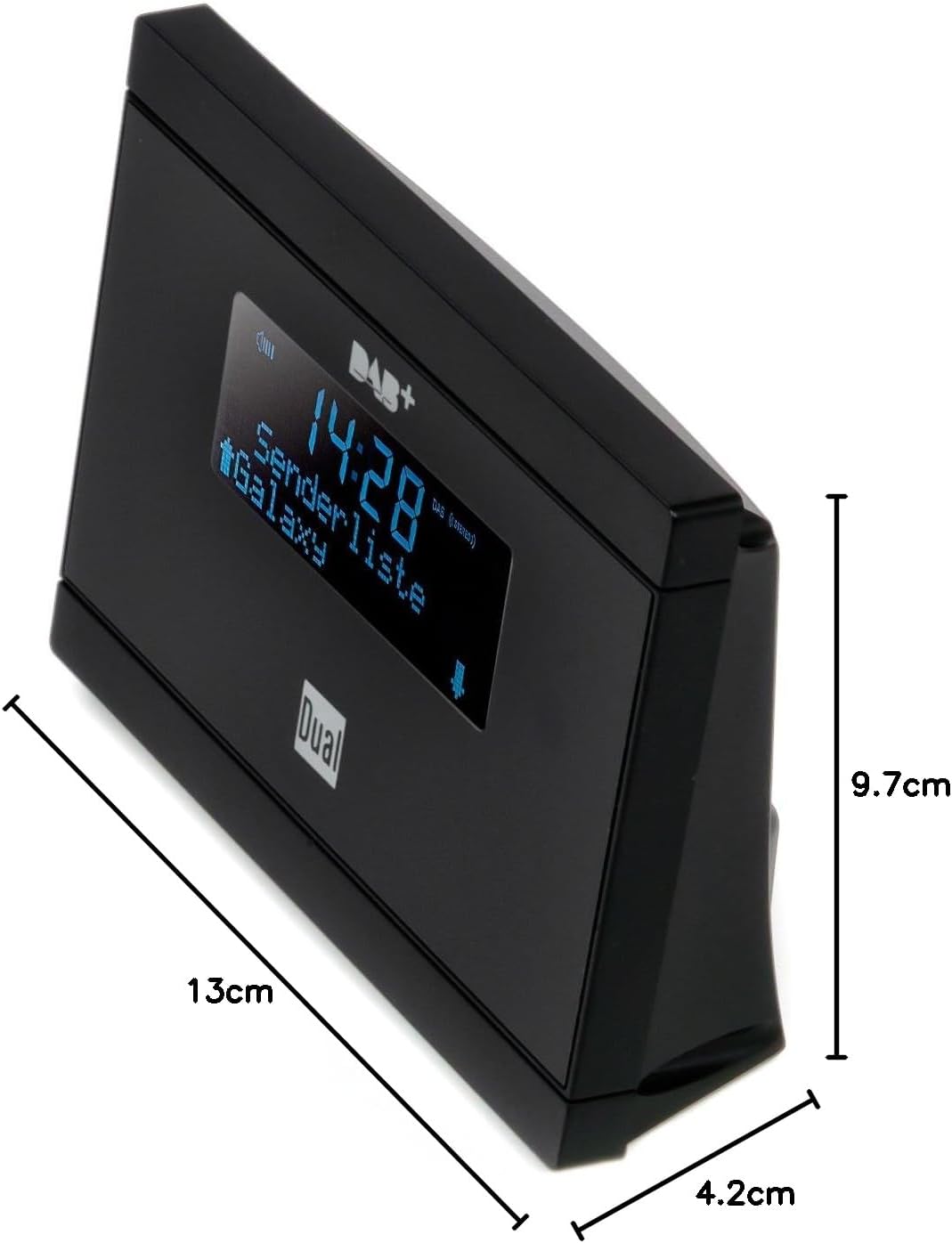
Gambar 4.6: Dimensions of the Dual DAB 2 A: 13 cm (length), 4.2 cm (width), and 9.7 cm (height).
5. Setélan
5.1 Nyambungkeun anteneu
- Panggihan lokasina ANTENNA port on the rear of the DAB 2 A.
- Connect the supplied external wire antenna to this port.
- For optimal reception, position the antenna away from other electronic devices and metallic objects. You may also connect a commercially available external antenna for improved signal quality.
5.2 Connecting to your Stereo System
- Panggihan lokasina GARINGAN (3.5mm jack) on the rear of the DAB 2 A.
- Connect an audio cable (not supplied) from the GARINGAN of the DAB 2 A to an available audio input (e.g., AUX IN, LINE IN) on your existing stereo system or audio device.
5.3 Sambungan Daya
- Sambungkeun adaptor daya anu disayogikeun ka DC 6.0V = 0.5A port on the rear of the DAB 2 A.
- Colokkeun adaptor kakuatan kana stop kontak témbok nu cocog.
6. Parentah Operasi
6.1 Powering on / Pareum
Pencét éta POWER button on the rear of the device or on the remote control to turn the unit on or off.
6.2 Initial Scan (DAB/DAB+)
Upon first power-on, the device will automatically perform a scan for available DAB/DAB+ stations. This process may take a few minutes. Once complete, the first available station will begin playing.
6.3 Switching Between DAB/DAB+ and FM
Ngagunakeun éta MODÉ button on the remote control or the device (if available) to switch between DAB/DAB+ and FM radio modes.
6.4 Tuning and Station Selection
- DAB/DAB+: Ngagunakeun éta luhur/handap arrow buttons on the remote control or device to navigate through the list of available digital stations.
- FM: Dina modeu FM, anggo luhur/handap arrow buttons to manually tune frequencies or initiate an automatic scan for the next available station.
6.5 Nyimpen sarta Recalling prasetél
The DAB 2 A allows you to store up to 20 favorite stations (DAB/DAB+ and FM combined).
- Pikeun nyimpen: Setel ka stasiun anu dipikahoyong. Pencét terus tahan tombol PRESET button (or similar, refer to remote control layout) until the display shows a preset number. Use the arrow buttons to select a preset number (1-20) and confirm.
- Ngelingan: Pencét éta PRESET button briefly, then use the arrow buttons to select the desired preset station.
6.6 Clock, Alarm, and Sleep Functions
The device features a clock, alarm, and sleep timer. Refer to the detailed instructions in the full manual for setting these functions. The alarm can be set to wake you with DAB, FM, or a buzzer sound.
7. Pangropéa
- beberesih: Always unplug the device before cleaning. Use a soft, dry, lint-free cloth to wipe the surfaces. Do not use abrasive cleaners, waxes, or solvents.
- Panyimpenan: Upami teu dianggo salami waktos anu lami, cabut kabel alat teras simpen di tempat anu tiis sareng garing.
8. Cara ngungkulan
| Masalah | Mungkin Cukang lantaranana | Solusi |
|---|---|---|
| Taya kakuatan | Adaptor daya teu nyambung atawa stop kontak faulty. | Pastikeun adaptor daya disambungkeun sacara aman ka alat sareng stop kontak listrik anu tiasa dianggo. |
| Taya sora | Audio cable not connected, incorrect input selected on stereo, or volume too low. | Check audio cable connection. Select the correct input on your stereo system. Increase volume on both the DAB 2 A and your stereo. |
| Poor DAB/DAB+ reception or no stations found | Weak signal, antenna not properly connected or positioned. | Ensure the antenna is securely connected and positioned for optimal reception. Try repositioning the antenna. Consider using a higher-gain external antenna. Perform a full scan for stations. |
| Panarimaan FM Goréng | Weak signal, antenna not properly connected or positioned. | Extend and reposition the wire antenna. Try a different antenna if available. |
| Kadali jauh teu jalan | Batteries are dead or incorrectly inserted, or line of sight is blocked. | Replace batteries with new ones, ensuring correct polarity. Remove any obstructions between the remote and the device. |
9. Spésifikasi
| Fitur | Rincian |
|---|---|
| merek | Ganda |
| Nomer modél | DAB 2 A |
| Warna | Hideung |
| Téhnologi konektipitas | Auxiliary (3.5mm Line Out) |
| Fitur husus | DAB/DAB+ Radio, FM Tuner, Clock, Alarm, Sleep Function |
| Alat nu cocog | Devices with 3.5 mm audio connector |
| Ukuran produk (L x W x H) | 13 cm x 4.2 cm x 9.7 cm |
| Téhnologi Tuning | FM, DAB, DAB+ |
| Sumber Daya | Electric Cable (DC 6.0V=0.5A) |
| Band Radio Dirojong | FM, DAB, DAB+ |
| Item Beurat | 200 gram |
10. Garansi jeung Rojongan
For warranty information and technical support, please refer to the documentation provided with your purchase or contact Dual customer service. Keep your proof of purchase for any warranty claims.