
BOYA BY-VM190
Buku Panduan Pangguna Mikropon Kondensor Video Arah Profesional BOYA BY-VM190
Model: BY-VM190
Bubuka
The BOYA BY-VM190 is a professional directional video condenser shotgun microphone designed for use with HDSLR cameras, camcorders, and audio recorders. Its compact and lightweight design, combined with an integrated shock mount, makes it suitable for various video recording applications. This manual provides essential instructions for setting up, operating, and maintaining your BY-VM190 microphone.
Naon dina Box
Mangga pastikeun sadaya barang parantos aya sateuacan neraskeun setelan.
- BY-VM190 Microphone
- Kaca Depan Busa
- Integrated Shock Mount (attached to microphone)
- Mawa Kantong
- Manual pangguna (dokumén ieu)

Image: The BY-VM190 microphone shown with its included accessories, including a foam windshield, a furry windshield, and a carrying pouch, mounted on a DSLR camera.
Disetél
1. Pamasangan batré
The BY-VM190 microphone requires one 9V battery for operation.
- Locate the battery compartment on the underside of the microphone body.
- Geser muka kompartemen batréna.
- Pasangkeun hiji batré 9V, pastikeun polaritasna bener (+/-).
- Tutup panutup kompartemen batré aman.

Gambar: A lengkep view of the battery compartment on the BY-VM190 microphone, illustrating the process of inserting a 9V battery.
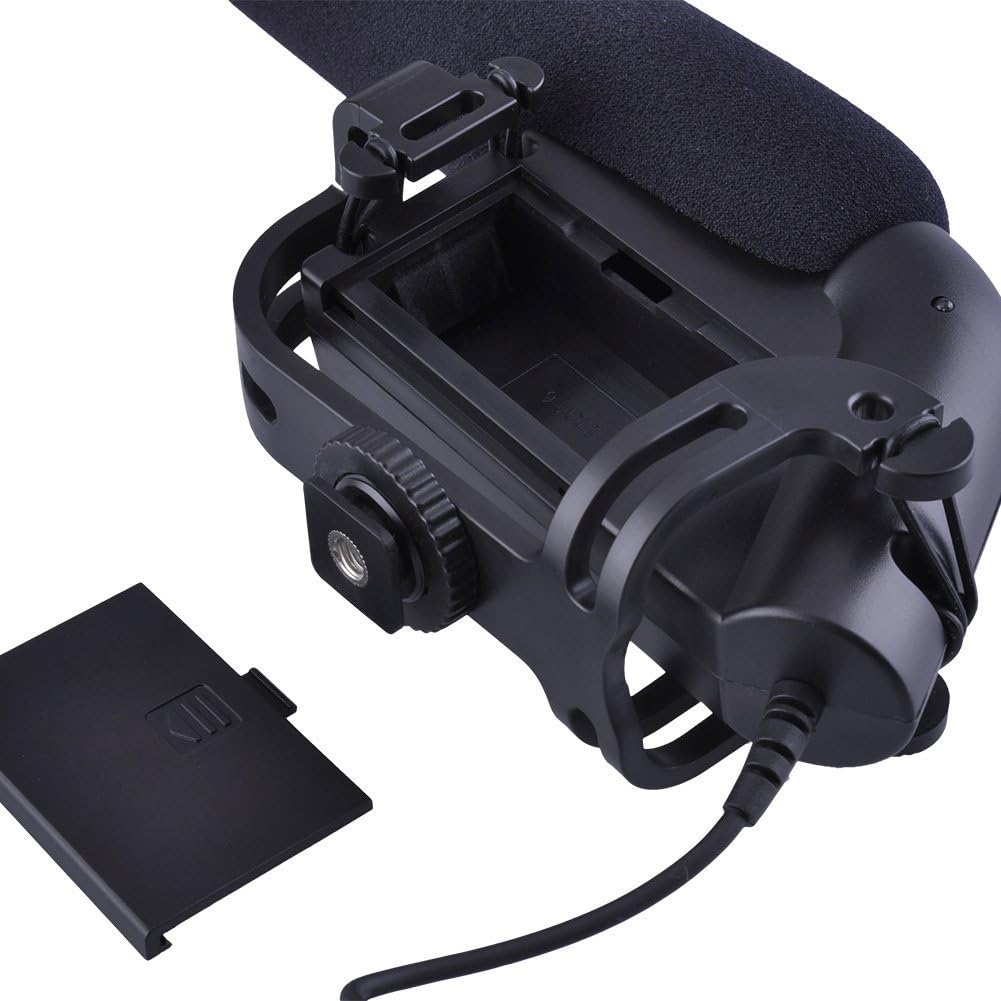
Image: An alternative perspective of the battery compartment, highlighting the 9V battery slot and its orientation.
2. Masang Mikropon
The BY-VM190 features an integrated shock mount designed to attach to a camera's hot shoe or cold shoe.
- Slide the microphone's shoe mount into your camera's hot shoe or cold shoe.
- Tighten the locking wheel on the shoe mount to secure the microphone in place.
- For optimal audio, ensure the microphone is pointed towards your sound source.

Image: The BY-VM190 microphone securely mounted on a DSLR camera, demonstrating its typical setup for video recording.

Gambar: A view from beneath the microphone, illustrating the integrated shock mount and the shoe mount mechanism used for attachment to a camera.
3. Connecting to Camera/Camcorder
Connect the microphone to your recording device using the integrated 3.5mm mini-pin plug.
- Plug the 3.5mm connector from the microphone into the external microphone input jack on your camera or camcorder.
- Pastikeun sambunganna aman pikeun nyegah gangguan audio.
Parentah Operasi
1. Powering on / Pareum
The microphone features a power switch to conserve battery life when not in use.
- Locate the ON/OFF switch on the side of the microphone body.
- Slide the switch to the "ON" position to power on the microphone.
- Slide the switch to the "OFF" position when the microphone is not in use to save battery.

Gambar: A lengkep view of the control panel on the microphone, showing the ON/OFF switch and the low-cut filter switch.
2. High-Pass Filter (Low-Cut Filter)
The BY-VM190 includes a selectable high-pass filter (also known as a low-cut filter) to reduce unwanted low-frequency noise.
- The filter has two settings: "Flat" and "80Hz".
- Datar: No low-frequency attenuation. Use for capturing the full frequency range.
- 80Hz: Activates the high-pass filter, cutting off frequencies below 80Hz. This is useful for reducing ambient noise such as air conditioners, traffic, or wind rumble.
- Adjust the switch according to your recording environment and desired audio quality.
3. Using the Windshield
The included foam windshield helps to reduce wind noise during outdoor recordings.
- Slide the foam windshield over the microphone capsule when recording in windy conditions.
- For more extreme wind, a furry windshield (often called a "dead cat") can be used for enhanced wind noise reduction.

Image: The BY-VM190 microphone with a furry windshield attached, demonstrating its use for reducing wind noise in outdoor recording environments.
Pangropéa
- beberesih: Use a soft, dry cloth to clean the microphone body. Avoid using harsh chemicals or solvents.
- Panyimpenan: When not in use, store the microphone in its carrying pouch in a dry, dust-free environment. Remove the 9V battery if storing for extended periods to prevent leakage.
- Penanganan: Handle the microphone with care. Avoid dropping it or exposing it to extreme temperatures or moisture.
Pamérésan masalah
| Masalah | Mungkin Cukang lantaranana | Solusi |
|---|---|---|
| Taya kaluaran audio |
|
|
| Kualitas audio goréng / Sora latar anu kaleuleuwihi |
|
|
| Audio intermittent |
|
|
spésifikasi
| Fitur | Rincian |
|---|---|
| Tipe Mikropon | Condenser Microphone (Unidirectional) |
| Pola Polar | Super-Cardioid |
| Réspon Frékuénsi | 40-20000Hz |
| Tinggi-Pass Filter | Selectable (Flat/80Hz) |
| Sensitipitas | -40dB (0dB = 1V/Pa at 1 KHz) |
| Rasio Sinyal-ka-Noise (S/N) | 75dB or More (1KHz at 1Pa) |
| Impedansi kaluaran | 200Ω or Less |
| Sumber Daya | 9V Lithium or Alkaline Battery (not included) |
| Panyambung | 3.5mm Mini-pin Plug |
| Ukuran (L x W x H) | 9.84 x 5.51 x 3.15 inci (Diménsi Produk) |
| Item Beurat | 9.9 ons |
| Alat nu cocog | Camcorder, Camera (DSLR) |
| Bahan | Foam (windshield) |
Garansi sareng Rojongan
For warranty information and technical support, please refer to the documentation provided with your purchase or visit the official BOYA websitus. Simpen bukti pameseran anjeun pikeun klaim garansi.
Pabrikan: Boya
model: BY-VM190
Ask a question about this manual
Ask about setup, troubleshooting, compatibility, parts, safety, or missing instructions. Manuals+ will review the question and use this page’s manual context to help answer it.