
1. Bubuka
The D-Link DIR-808L Wireless AC600 Dual-Band Cloud Router provides high-speed Wi-Fi connectivity with dual-band technology and Fast Ethernet ports. This device is designed to deliver a reliable networking experience for home use, supporting activities such as HD media streaming, online gaming, and web browsing. It includes security features and mydlink Cloud Services for remote network management.
The DIR-808L is backward compatible with existing Wi-Fi devices (802.11a/b/g/n) for seamless integration into your current network setup.
2. Eusi Paket
Pariksa yén pakét anjeun ngandung barang-barang ieu:
- Wireless AC600 Dual Band Cloud Router (DIR-808L)
- Adaptor kakuatan
- Kabel Ethernet
- Gancang Install Guide
If any of the above items are missing or damaged, please contact your local D-Link reseller.
3. Sarat Sistim minimum
To set up and use the D-Link DIR-808L router, ensure your computer meets the following minimum requirements:
- Sistem operasi: Windows® 8, Windows® 7, Windows Vista®, Windows® XP SP3, or Mac OS® X (v10.4 or higher)
- Web Browser: Internet Explorer® v6, Mozilla® Firefox®, Google Chrome, or Safari 4 or higher
- Hardware: Kartu Panganteur Jaringan (NIC)
For Internet access, you will also need:
- Kabel atanapi DSL Modem
- Langganan sareng Panyadia Ladénan Internét (ISP)
4. Pakakas Ngalangkunganview
Familiarize yourself with the physical components and ports of your DIR-808L router.

Gambar 4.1: Hareupeun view of the DIR-808L router with power and internet status indicators.

Gambar 4.2: Rear panel of the DIR-808L router, detailing port layout.
Katerangan Panel Belakang:
- Port LAN (1-4): Four Fast Ethernet ports for connecting wired devices such as computers, gaming consoles, or network storage.
- Port Internét: Nyambung ka modem Anjeun pikeun aksés internét.
- Tombol Reset: Press and hold for 10 seconds to restore the router to factory default settings.
- Input kakuatan: Sambungkeun adaptor listrik anu kalebet di dieu.
- Tombol WPS: Use for easy, secure wireless connection to WPS-compatible devices.
5. Setup jeung Instalasi
Follow these steps to set up your D-Link DIR-808L router.
5.1 Sambungan fisik
- Pareum listrik: Cabut daya tina modem sareng router anjeun (upami aya).
- Sambungkeun Modem: Connect an Ethernet cable from your modem's Ethernet port to the Internét port on the back of your DIR-808L router.
- Sambungkeun Komputer (Opsional): For initial setup, connect an Ethernet cable from your computer's Ethernet port to any of the LAN ports (1-4) on the back of your DIR-808L router. You can also connect wirelessly using the default Wi-Fi name and password found on the device label.
- Modem Hurungkeun: Connect the power adapter to your modem and power it on. Wait for the modem's indicator lights to stabilize, indicating an active internet connection.
- Kakuatan dina router: Sambungkeun adaptor kakuatan anu kalebet kana Input kakuatan on the back of your DIR-808L router and plug it into a power outlet. The power LED on the front of the router should illuminate.
5.2 Konfigurasi Awal (Web Browser)
After physical connections are made, configure your router using a web browser.
- Buka a web browser (e.g., Chrome, Firefox, Edge) on a computer connected to the router.
- Dina bar alamat, ngetik
http://dlinkrouter.localor192.168.0.1terus pencét Lebetkeun. - The D-Link Setup Wizard should appear. Follow the on-screen instructions to configure your Internet connection, wireless network name (SSID), and password.
- Create a unique password for your router's administration interface for security.
5.3 Quick Router Setup Mobile App
Alternatively, you can use the D-Link Quick Router Setup mobile app for convenient setup from your smartphone or tablet.
- Download the "D-Link QRS Mobile" app from the Apple App Store or Google Play Store.
- Connect your mobile device to the router's default Wi-Fi network (SSID and password are on the router's label).
- Launch the QRS Mobile app and follow the instructions to complete the setup.
6. Operasi
This section covers the basic operation of your DIR-808L router.
6.1 Dual-Band Wireless Performance
The DIR-808L operates on two frequency bands: 2.4 GHz and 5 GHz.
- Pita 2.4 GHz: Nyayogikeun cakupan anu langkung lega sareng penetrasi anu langkung saé nembus témbok, cocog pikeun panggunaan internét umum sareng alat anu langkung lami.
- Pita 5 GHz: Offers faster speeds and less interference, ideal for high-bandwidth activities like HD video streaming and online gaming, but with a shorter range.
You can configure separate SSIDs (network names) for each band or use a single SSID for both, allowing the router to intelligently assign devices to the optimal band.
6.2 Konéktivitas Kabel
The four Fast Ethernet LAN ports allow you to connect up to four wired devices directly to the router for stable and fast connections.
6.3 mydlink Cloud Management
mydlink Cloud Services enable you to monitor and manage your network remotely from anywhere using the mydlink Lite app or the mydlink web portal.
- Aksés Jauh: View connected devices, block unwanted users, and receive notifications.
- Kadali kolot: Manage internet access schedules and block specific websitus.
To use mydlink services, you will need to register your router with a mydlink account during or after the initial setup process.
6.4 Kaamanan nirkabel
The DIR-808L supports WPA/WPA2 encryption to secure your wireless network. It is recommended to use WPA2-PSK (AES) for the strongest security.
- WPS (Wi-Fi Protected Setup): Provides a simple way to connect WPS-compatible devices to your wireless network by pressing the WPS button on the router and the device.
7. Pangropéa
Proper maintenance ensures optimal performance and longevity of your router.
- Pembaruan firmware: Periodically check the D-Link support website for firmware updates. Updating firmware can improve performance, add new features, and fix security vulnerabilities. Instructions for updating firmware are typically provided with the update package.
- beberesih: Keep the router in a clean, dust-free environment. Use a soft, dry cloth to clean the exterior. Do not use liquid cleaners or aerosols.
- panempatan: Place the router in a central location, away from obstructions and devices that may cause interference (e.g., cordless phones, microwaves).
8. Cara ngungkulan
This section addresses common issues you might encounter with your DIR-808L router.
8.1 Taya Sambungan Internét
- Pariksa Kabel: Ensure all Ethernet cables are securely connected to the correct ports on the router and modem.
- Siklus kakuatan: Power off your modem, then your router. Wait 30 seconds, then power on your modem first. Once the modem is fully online (indicator lights stable), power on your router.
- Status Modem: Verify that your modem has an active internet connection. Check its indicator lights or consult your modem's manual.
- Setélan ISP: Confirm your Internet Service Provider (ISP) settings are correctly entered in the router's web panganteur.
8.2 Slow Wireless Speed or Poor Range
- Nempatkeun router: Position the router in a central location, elevated, and away from large metal objects, concrete walls, and other electronic devices that may cause interference.
- gangguan: Other wireless devices (cordless phones, microwaves, Bluetooth devices) can interfere with Wi-Fi signals. Try changing the wireless channel in the router's settings.
- Dual-Band Usage: Connect devices that require high bandwidth (e.g., streaming devices) to the 5 GHz band, and other devices to the 2.4 GHz band.
- Firmware: Pastikeun firmware router anjeun geus up to date.
8.3 Teu Bisa Ngaksés Router Web Panganteur
- Alamat IP: Pastikeun komputer anjeun disetel pikeun kéngingkeun alamat IP sacara otomatis (DHCP).
- Alamat anu leres: Double-check that you are typing the correct address:
http://dlinkrouter.localor192.168.0.1. - Temporary Disable Firewall/Antivirus: Pareuman samentawis firewall atanapi parangkat lunak antipirus dina komputer anjeun anu tiasa ngahalangan aksés.
- Reset Router: If all else fails, perform a factory reset by pressing and holding the Reset button on the back of the router for 10 seconds. Catetan: Ieu bakal ngahapus sadaya setélan khusus anjeun.
9. Spésifikasi Téknis
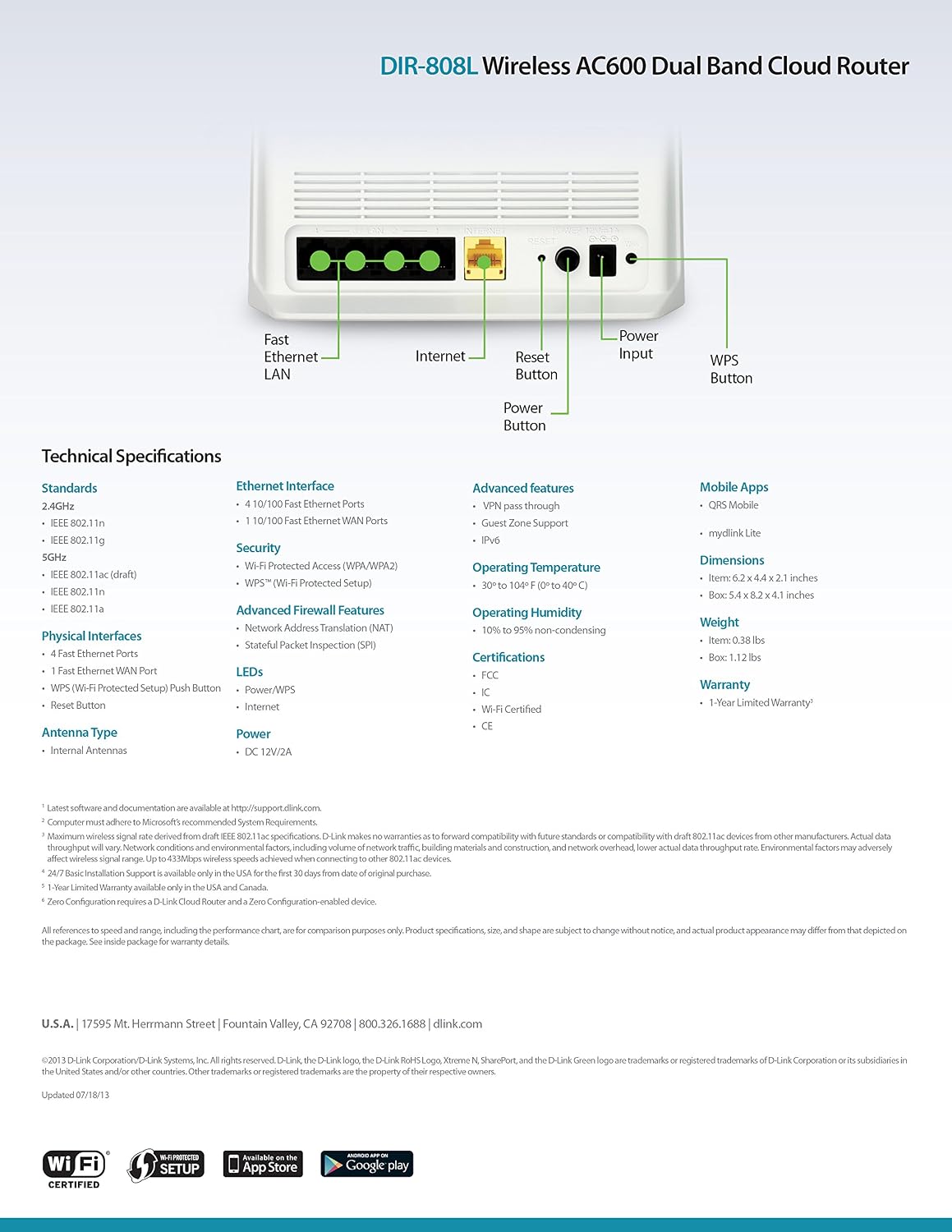
Gambar 9.1: Technical specifications and rear panel diagram of the DIR-808L router.
| Fitur | Katerangan |
|---|---|
| Ngaran modél | DIR-808L |
| Tipe Wireless | 802.11ac (AC600), 802.11a/b/g/n |
| Frékuénsi Band Kelas | Dual-Band (2.4 GHz & 5 GHz) |
| Konektipitas kabel | 4 x Fast Ethernet LAN Ports, 1 x Fast Ethernet WAN Port |
| Kaamanan | WPA/WPA2, WPS (Wi-Fi Protected Setup) |
| Kasaluyuan System Operasi | Windows, Mac, Android |
| Ukuran (L x W x H) | 2.1 x 6.1 x 4.4 inci |
| Item Beurat | 7.2 ons (0.45 pon) |
| Input kakuatan | 12V DC, 1A |
| Suhu Operasi | 0 nepi ka 40 ° C (32 nepi ka 104 ° F) |
| Kalembaban Operasi | 10% nepi ka 95% non-condensing |
| Sertifikasi | FCC, Wi-Fi Certified, CE |
10. Émbaran jaminan
The D-Link DIR-808L Wireless AC600 Dual-Band Cloud Router comes with a 1-Taun jaminan kawates ti tanggal beuli. Garansi ieu nyertakeun cacad dina bahan sareng pagawean dina panggunaan normal.
For full warranty terms and conditions, please refer to the warranty card included with your product or visit the official D-Link websitus.
Legal Disclaimer: D-Link is not responsible for honoring warranty claims from unauthorized resellers. Please contact the manufacturer directly for official warranty service.
11. Rojongan Téknis
If you encounter problems that are not addressed in this manual, or require further assistance, please contact D-Link Technical Support.
- D-Link Rojongan Websitus: Nganjang support.dlink.com for FAQs, documentation, and firmware downloads.
- Phone Support (U.S.): You may contact D-Link customer support at 1-877-453-5465. Please have your product model number (DIR-808L) and serial number ready when calling.