
1. Bubuka
This manual provides essential information for the installation, operation, maintenance, and troubleshooting of your ALDES MOTUS 45 /120 23KW D125 /D125 aerator. Please read this manual thoroughly before using the product to ensure safe and optimal performance. Keep this manual for future reference.
2. Parentah Kasalametan
Salawasna turutan pancegahan kaamanan dasar nalika nganggo alat-alat listrik pikeun ngirangan résiko kahuruan, kejutan listrik, sareng tatu pikeun jalma.
- Pastikeun catu daya cocog sareng voltage specified on the aerator's rating label.
- Do not operate the aerator with a damaged cord or plug.
- Jauhkeun leungeun, rambut, sareng pakean anu longgar tina bagian anu obah.
- Do not immerse the aerator in water or other liquids.
- Unplug the aerator from the power outlet before cleaning or performing any maintenance.
- Alat ieu henteu dimaksudkeun pikeun dianggo ku jalma (kaasup murangkalih) anu kakurangan kamampuan fisik, indrawi, atanapi mental, atanapi kirang pangalaman sareng pangaweruh, kecuali aranjeunna dipasihan pangawasan atanapi petunjuk ngeunaan panggunaan alat ku jalma anu tanggung jawab kasalametanana. .
3. Eusi Paket
Pariksa heula sadaya komponén aya sareng henteu ruksak nalika dibuka. Upami aya barang anu leungit atanapi ruksak, langsung hubungi padagang anjeun.
- ALDES MOTUS 45 /120 23KW D125 /D125 Aerator unit
- Pemasangan hardware (screws, jangkar)
- Manual pangguna (dokumén ieu)
4. Setup jeung Instalasi
Proper installation is crucial for the performance and longevity of your aerator. If you are unsure about any step, consult a qualified professional.
4.1 Milih Lokasi
Select a location that allows for optimal airflow and is free from obstructions. Ensure the mounting surface is stable and can support the weight of the aerator.
4.2 Mounting the Aerator
- Mark the desired mounting points on the wall or window frame using the aerator as a template.
- Drill pilot holes at the marked locations. Use appropriate drill bits for your wall material.
- Selapkeun jangkar témbok upami diperlukeun.
- Secure the aerator to the mounting surface using the provided screws. Ensure it is level and firmly attached.
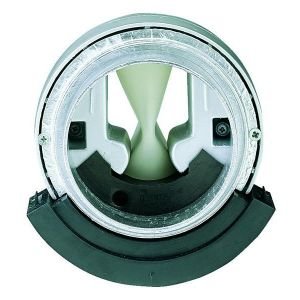
Figure 1: ALDES MOTUS 45 /120 23KW D125 /D125 Aerator unit. This image shows the compact design of the aerator, typically mounted on a wall or window frame for ventilation purposes.
4.3 Sambungan Listrik
Connect the aerator to a suitable power outlet. Ensure the connection is secure and complies with local electrical codes. If in doubt, consult a qualified electrician.
5. Parentah Operasi
Your ALDES aerator is designed for simple operation.
- Hurungkeun/Pareuman: Locate the power switch, usually on the side or front of the unit. Flip the switch to the 'ON' position to start the aerator and 'OFF' to stop it.
- Penyesuaian Aliran Udara: If your model includes an airflow adjustment mechanism (e.g., a dial or slider), rotate or slide it to increase or decrease the ventilation rate as needed.
- Lampu Indikator: Observe any indicator lights. A green light typically signifies that the unit is operating correctly.
6. Pangropéa
Regular maintenance ensures the efficiency and extends the lifespan of your aerator.
6.1 Ngabersihan Exterior
- Pegatkeun Daya: Always unplug the aerator before cleaning.
- Ngusap handap: Ngagunakeun lemes, damp lawon pikeun ngusap surfaces exterior. Ulah make cleaners abrasive atawa pangleyur.
- Keringkeun sacara saksama: Pastikeun unit parantos garing sateuacan nyambungkeun deui kakuatan.
6.2 Filter Cleaning/Replacement (if applicable)
Some aerator models include a filter to prevent dust and debris from entering the unit. Refer to your specific model's design for filter access.
- Saringan Aksés: Carefully open the cover or grille to access the filter.
- Filter beresih: Gently remove the filter. Clean it with a soft brush or vacuum cleaner. If washable, rinse with lukewarm water and allow it to air dry completely.
- Ganti Filter: Insert the clean or new filter back into its position.
- Tutup panutup: Securely close the cover or grille.
7. Cara ngungkulan
Sateuacan ngahubungi dukungan palanggan, cobian solusi ieu pikeun masalah umum:
| Masalah | Mungkin Cukang lantaranana | Solusi |
|---|---|---|
| Aerator does not turn on. | Taya catu daya. Pindah daya pareum. |
Check if the unit is plugged in securely. Pastikeun stop kontak listrik fungsina. Flip the power switch to 'ON'. |
| Aliran hawa handap. | Blocked intake/exhaust. Saringan kotor. |
Clear any obstructions from the vents. Clean or replace the filter (refer to Section 6.2). |
| Sora teu biasa. | Bagéan leupas. Uing dina kipas. |
Disconnect power and inspect for any loose components. Carefully remove any debris from the fan blades. If noise persists, contact support. |
8. Spésifikasi
- model: ALDES MOTUS 45 /120 23KW D125 /D125
- Pabrikan: ALDES
- Beurat barang: 1.2 kg
- ASIN: B00FPF2UD0
9. Garansi jeung Rojongan
Your ALDES MOTUS 45 /120 23KW D125 /D125 aerator comes with a standard manufacturer's warranty. Please refer to the warranty card included with your purchase for specific terms and conditions.
For technical support, spare parts, or warranty claims, please contact ALDES customer service through their official websitus atanapi inpormasi kontak anu disayogikeun dina dokuméntasi pameseran anjeun.
Sumberdaya Online: For additional information and FAQs, visit the official ALDES websitus: www.aldes.fr