
1. Bubuka
The COUGAR Evolution Galaxy is a full tower computer case designed for enthusiasts, offering a spacious interior and advanced cooling capabilities. This manual provides detailed instructions for the assembly, operation, and maintenance of your computer case, ensuring optimal performance and longevity.
2. Fitur konci
- Interior lega: Accommodates up to 8 PCI cards, providing flexibility for multiple graphics solutions.
- Pendinginan Lanjutan: Supports up to 7 fans, including dual 12cm COUGAR TURBINE HYPER-SPIN Bearing Silent Fans, with a unique dual-fan-set management system for excellent ventilation.
- Kasaluyuan motherboard: Supports Extended ATX and ATX motherboards.
- Konstruksi awét: Made from SECC Alloy Steel for robust protection.
- Konéktipitas Panel hareup: Features 4 USB 3.0 ports for high-speed data transfer.
- Bottom Mount PSU: Power supply mounts at the bottom for improved thermal management.
3. Setup jeung Instalasi
3.1 Ngabongkar sareng Inspeksi
Carefully remove the computer case from its packaging. Inspect for any signs of damage during transit. Retain all packaging materials for future transport or warranty claims.
3.2 Pamasangan motherboard
- Remove the side panel by unscrewing the thumbscrews at the rear of the case.
- Pasangkeun tameng I/O anu disayogikeun sareng motherboard anjeun kana liang tukang casing.
- Align the motherboard with the pre-installed standoffs. If necessary, install additional standoffs according to your motherboard's form factor.
- Gently place the motherboard onto the standoffs and secure it with screws.
Gambar 1: Interior view of the COUGAR Evolution Galaxy case, highlighting the motherboard tray and tool-less drive bays.
3.3 Pamasangan drive
The COUGAR Evolution Galaxy features tool-less drive bays for easy installation.
- 5.25" Devices (Optical Drives): Remove the front panel bay cover. Slide the 5.25" device into the bay until it clicks into place.
- 3.5" HDDs: Slide the hard drive into the designated 3.5" drive tray until it secures.
- SSD/HDD 2.5": These can be mounted in the 3.5" trays using adapter screws or dedicated 2.5" mounts if available.

angka 2: interior lengkep view showing the orange tool-less drive bay mechanisms for easy installation of storage devices.
3.4 Pamasangan catu daya
The power supply unit (PSU) mounts at the bottom rear of the case.
- Position the PSU into the designated compartment at the bottom rear.
- Pasangkeun PSU kana wadahna nganggo sekrup ti tukang.
Gambar 3: Tukangeun view of the COUGAR Evolution Galaxy case, illustrating the bottom-mounted power supply area, multiple PCI expansion slots, and the rear exhaust fan.
3.5 Manajemén kabel
Utilize the cutouts and tie-down points behind the motherboard tray to route cables. This improves airflow and maintains a clean interior aesthetic.
3.6 Fan and Front Panel Connections
Connect all case fans to the motherboard or the integrated fan controller. Connect the front panel headers (USB 3.0, audio, power switch, reset switch, HDD LED, Power LED) to the corresponding pins on your motherboard. Refer to your motherboard manual for pin assignments.
4. Parentah Operasi
4.1 Powering On
Once all components are installed and connected, ensure the power supply switch is in the 'ON' position. Press the power button on the front panel of the case to start your system.
4.2 kipas controller
The COUGAR Evolution Galaxy includes an integrated fan controller. Use the controls on the top panel to adjust fan speeds for optimal balance between cooling performance and noise levels. Connect your case fans to this controller for centralized management.
4.3 Front Panel Ports
The front panel provides convenient access to USB 3.0 ports and audio jacks for headphones and microphones. Ensure these are correctly connected to your motherboard's internal headers during setup.

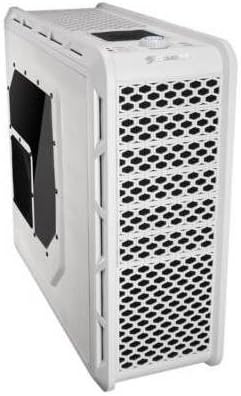
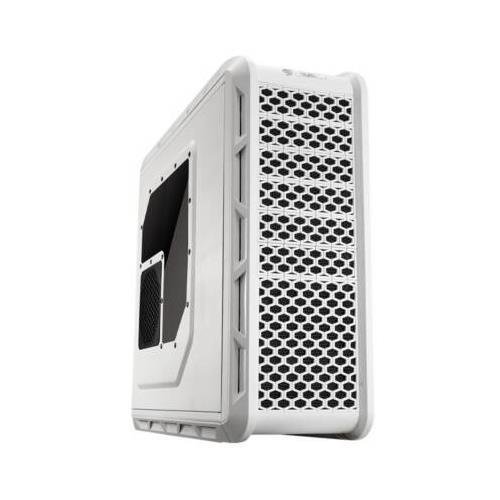
Figure 4: Angled front-side view of the COUGAR Evolution Galaxy case, showcasing the mesh front panel for airflow and the top-mounted controls and ports.
5. Pangropéa
5.1 Lebu Filter beberesih
The case is equipped with dust filters to prevent dust accumulation inside. Regularly clean these filters (e.g., monthly) by removing them and washing with water or using a vacuum cleaner. Ensure filters are completely dry before reinstallation.
5.2 beberesih umum
Ngagunakeun lemes, damp cloth to clean the exterior surfaces of the case. Avoid abrasive cleaners or solvents that may damage the finish. For interior cleaning, use compressed air to remove dust from components and fans.
5.3 Fan Inspection
Periodically check all fans for proper operation. Ensure they are spinning freely and quietly. Replace any fans that are noisy or not functioning correctly to maintain optimal cooling.

Gambar 5: Sisi view of the COUGAR Evolution Galaxy case, featuring a clear side panel window and a dedicated fan mount for additional cooling.
6. Cara ngungkulan
- Sistem Teu Hurung:
- Check all power connections, including the PSU to the wall outlet, PSU to motherboard, and front panel power switch header.
- Pastikeun saklar PSU dina posisi 'ON'.
- Penggemar Teu Diputer:
- Verify fan cables are securely connected to the motherboard or fan controller.
- Check fan controller settings if applicable.
- Front Panel USB Ports Not Working:
- Ensure the USB 3.0 header cable from the case is correctly connected to the motherboard.
- Check motherboard BIOS settings for USB port enablement.
7. Spésifikasi
| Fitur | Spésifikasi |
|---|---|
| Jenis Kasus | munara pinuh |
| Motherboard kasaluyuan | Extended ATX, ATX |
| Bahan | Alloy Steel (SECC) |
| Warna | Bodas |
| Item Beurat | 29.8 pon |
| Ukuran Fan | 12 Centimeters (Dual COUGAR TURBINE HYPER-SPIN Bearing Silent Fans included) |
| Métode Cooling | Hawa |
| Power Supply ningkatna Tipe | Gunung handap |
| Jumlah USB 3.0 palabuhan | 4 |
8. Garansi jeung Rojongan
For warranty information and technical support, please refer to the official COUGAR websitus atanapi ngahubungan pangecér lokal Anjeun. Simpen bukti pameseran anjeun pikeun klaim garansi.