
1. Bubuka
This manual provides essential instructions for the safe and efficient operation, setup, maintenance, and troubleshooting of your Hobart N50-60 5-Quart Commercial Countertop Planetary Stand Mixer. Designed for heavy-duty commercial use, this mixer features a robust gear-driven transmission and three fixed speeds, making it suitable for a wide range of mixing applications. Please read this manual thoroughly before operating the mixer.

Figure 1: Hobart N50-60 Commercial Planetary Stand Mixer. This image shows the complete mixer unit with the stainless steel bowl and a whisk attachment.
2. Parentah Kasalametan
WARNING: To reduce the risk of serious injury, always follow these safety precautions.
- Baca sadaya parentah sateuacan ngoperasikeun mixer.
- Ensure the mixer is placed on a stable, level, and dry surface to prevent tipping.
- Always unplug the mixer from the electrical outlet before cleaning, assembling, disassembling parts, or performing any maintenance.
- Keep hands, hair, clothing, and utensils away from moving parts during operation to prevent injury. Never use your hands to scrape the bowl while the mixer is running.
- Do not immerse the mixer base in water or other liquids. Clean with a damp lawon wungkul.
- Paké ngan kantétan jeung asesoris dianjurkeun ku produsén.
- Do not operate the mixer with a damaged cord or plug, or after the appliance malfunctions or has been dropped or damaged in any manner. Contact qualified service personnel.
- Pengawasan anu ketat diperyogikeun nalika alat naon waé dianggo ku atanapi caket barudak.
- Pastikeun catu daya cocog sareng voltage specified on the mixer's rating label (100-120V/2.9A or 230V/1.4A).
- Never attempt to bypass safety interlocks or modify the mixer.

Gambar 2: Tukangeun view of the mixer, highlighting the power cord connection and a warning label. Always ensure the power cord is in good condition and properly connected.
3. Eusi Paket
Pastikeun yén sadaya item aya dina bungkusan:
- Hobart N50-60 Planetary Stand Mixer Unit
- 5-saparapat stainless steel Pergaulan Mangkuk
- "D" Wire Whip (Balloon-shaped)
- "B" Flat Beater (Cast Aluminum)
- "ED" Dough Hook (Cast Aluminum)
4. Setélan
- Ngabongkar bungkusan: Sacara saksama miceun sadaya komponén tina bungkusan. Simpen bungkusan pikeun transportasi atanapi neundeun ka hareup.
- panempatan: Position the mixer on a sturdy, level, and dry countertop or work surface capable of supporting its weight (approximately 55 lbs). Ensure adequate clearance around the mixer for ventilation and operation.
- Pamasangan mangkok:
- Lower the bowl support by pulling the hand lever located on the side of the mixer downwards.
- Place the 5-quart stainless steel mixing bowl onto the bowl support, aligning the pins on the support with the slots on the bowl.
- Raise the bowl support by pushing the hand lever upwards until it locks securely into place.
- Pamasangan Attachment:
- Ensure the mixer is OFF and unplugged.
- Slide the desired attachment (wire whip, flat beater, or dough hook) onto the agitator shaft until it clicks into place. Rotate the attachment slightly if needed to engage the pin.
- Gently pull down on the attachment to ensure it is securely locked.
- Sambungan Daya: Plug the mixer's power cord into a grounded electrical outlet that matches the mixer's voltage syarat.

Gambar 3: Hareupeun view of the mixer with the whisk attachment and stainless steel bowl correctly installed. Note the bowl lift lever on the right side.

angka 4: Tutup-up view of the 5-quart stainless steel bowl and the whisk attachment, showing how they connect to the mixer head.
5. Parentah Operasi
- Tambahkeun Bahan: With the mixer OFF and the bowl in the raised position, add your ingredients to the 5-quart stainless steel mixing bowl.
- Pilih Speed: The N50-60 features a three-speed transmission. Use the speed selector lever (typically labeled 1, 2, 3) to choose the desired mixing speed. It is generally recommended to start at a lower speed and gradually increase as needed.
- Start Mixer: Press the large ON button to start the mixer.
- Ngacampurkeun Monitor: Observe the mixing process. If necessary, stop the mixer, scrape down the sides of the bowl, and restart.
- Eureunkeun Mixer: Press the large OFF button to stop the mixer.
- Remove Bowl and Attachment: Once mixing is complete, ensure the mixer is OFF. Lower the bowl support using the hand lever. Carefully remove the attachment by pushing it upwards and then sliding it off the agitator shaft. Then, remove the mixing bowl.
- Saklar Reset Manual: In case of an overload or electrical issue, the mixer may automatically shut off. Locate the manual reset switch (often a small button on the mixer body) and press it to reset the circuit. If the issue persists, unplug the mixer and contact service.
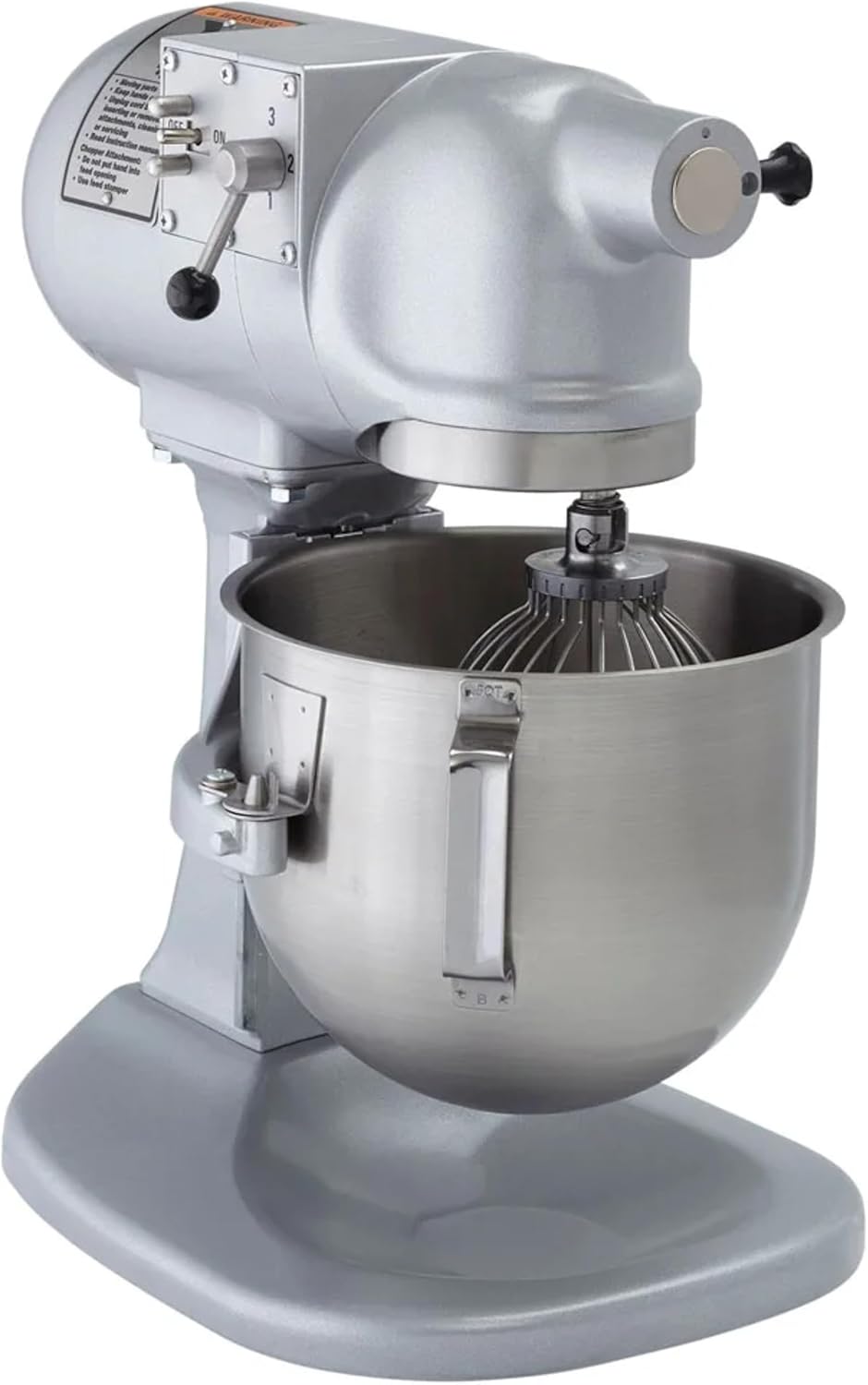
Gambar 5: Sisi view of the mixer, illustrating the location of the speed selector lever (1, 2, 3) and the prominent ON/OFF buttons for easy operation.
6. Pangropéa jeung beberesih
Regular cleaning and maintenance will ensure the longevity and optimal performance of your Hobart N50-60 mixer.
6.1 beberesih poean
- Salawasna cabut mixer saméméh beberesih.
- Mangkok Campuran sareng Lampiranna: The 5-quart stainless steel mixing bowl and the included attachments (wire whip, flat beater, dough hook) are dishwasher safe. Alternatively, wash them with warm, soapy water, rinse thoroughly, and dry immediately.
- Awak mixer: Ngusap bagian luar mixer nganggo iklanamp cloth. For stubborn stains, use a mild detergent. Avoid abrasive cleaners or scouring pads, as these can damage the Hobart gray hybrid powder enamel finish. Ensure no water enters the motor housing or electrical components.
- Hub lampiran: Clean the attachment hub area to prevent food buildup.
6.2 Pangropéa Umum
- Periodically inspect the power cord for any signs of damage. If damaged, it must be replaced by a qualified technician.
- Ensure all moving parts operate smoothly. Do not attempt to lubricate internal components unless specified by the manufacturer.
- Keep the mixer in a clean, dry environment when not in use.
7. Cara ngungkulan
This section addresses common issues you might encounter with your Hobart N50-60 mixer.
| Masalah | Mungkin Cukang lantaranana | Solusi |
|---|---|---|
| Adun teu hurung. |
|
|
| Mixer eureun salila operasi. |
|
|
| Kantétanna hésé dipasang/dicabut. |
|
|
| Noise atanapi geter anu teu biasa. |
|
|
8. Spésifikasi
| Fitur | Rincian |
|---|---|
| Ngaran modél | N50-60 |
| merek | Hobart |
| Kapasitas | 5 Kwartir |
| Ukuran produk (D x W x H) | 15 "D x 11" W x 17" H |
| Bahan | Aluminium, Stainless Steel |
| Warna | Gray (Hybrid Powder Enamel Finish) |
| Jumlah Speeds | 3 Kagancangan Tetep |
| Voltage | 100-120 Volts / 230 Volts |
| Wattage | 348 watt |
| Kontrol Tipe | Button (On/Off), Toggle (Speed) |
| Bahan Wadahna | Beusi sténless |
| Aman pikeun Mesin Pencuci Piring (Mangkok) | Sumuhun |
| Komponén Kaasup | Mixer, 5-Qt Bowl, Wire Whip, Flat Beater, Dough Hook |
| Sertifikasi | UL listed, NSF certified |

Figure 6: Dimensional diagram of the Hobart N50-60 mixer, showing its height (17"), width (11"), and depth (15").
9. Émbaran jaminan
Warranty details for the Hobart N50-60 Commercial Planetary Stand Mixer are typically provided with your purchase documentation or can be obtained directly from the manufacturer's official websitus. Punten tahan bukti pameseran anjeun pikeun klaim garansi.
10. Rojongan
For technical assistance, spare parts, or service inquiries, please contact Hobart customer support. You can typically find contact information on the official Hobart websitus atawa ngaliwatan dealer otorisasi Anjeun.
Visit the official Hobart Store for more information: Hobart Store