
Bubuka
The Nyko Media Remote for Xbox One provides convenient control over your Xbox One console and various media applications. This remote simplifies navigation and playback of streaming content and physical media, offering dedicated buttons for common functions. It also features the ability to power your Xbox One on and off, and control basic functions of your television.

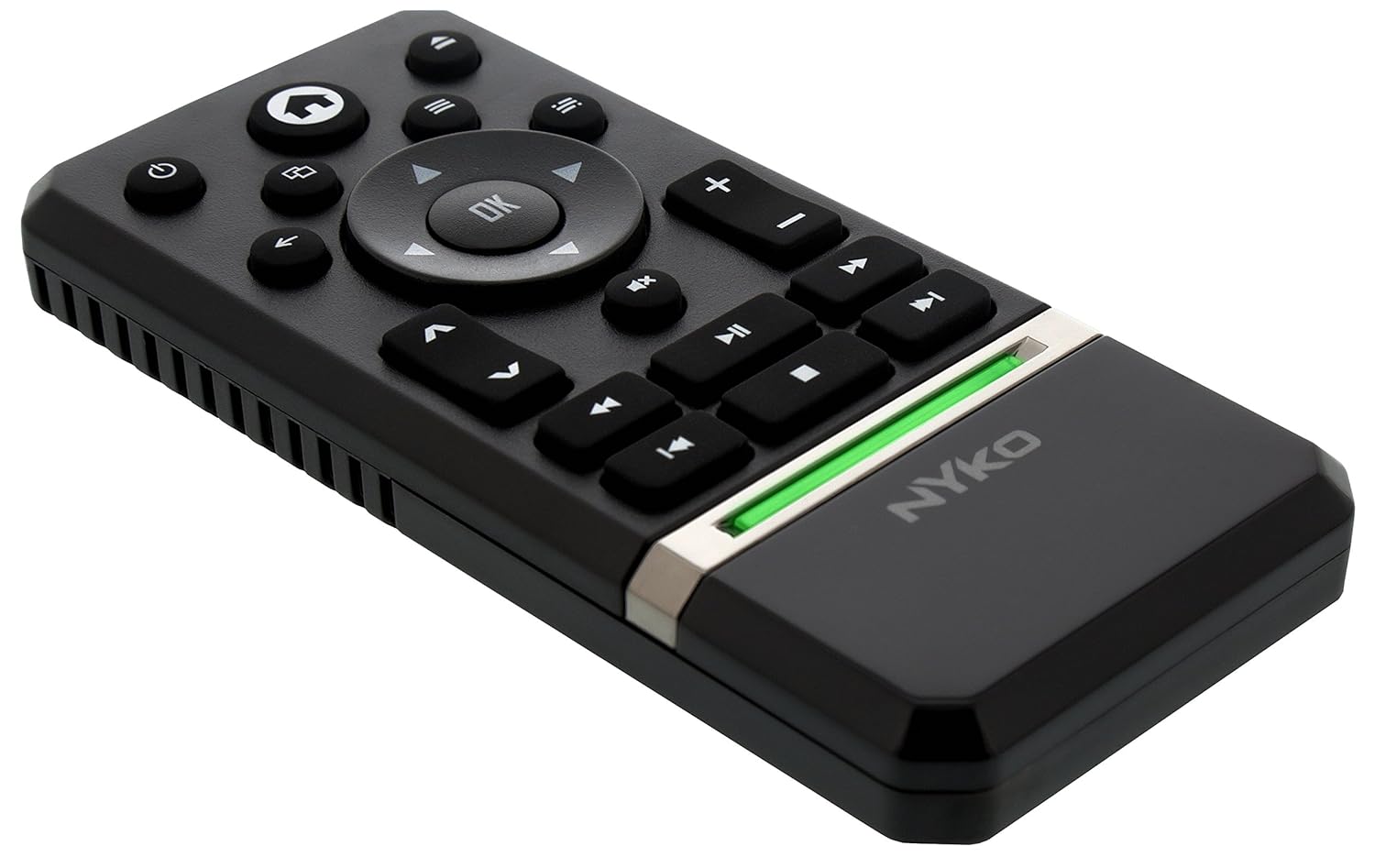
Image: Nyko Media Remote for Xbox One, front view.
Eusi pakét
- Nyko Media Remote for Xbox One (Model: 86116)
- Catetan: Batré AAA teu kalebet sareng kedah dipésér misah.

Image: Nyko Media Remote for Xbox One in its retail packaging.
Disetél
1. Pamasangan batré
- Panggihan kompartemen batré dina tonggong remote.
- Geser panutup batré ka handap pikeun muka.
- Pasangkeun dua (2) batré AAA, pastikeun polaritasna (+/-) leres sapertos anu dituduhkeun di jero kompartemenna.
- Pasang deui panutup batré ku cara ngageser ka luhur dugi ka ngaklik kana tempatna.
Gambar: Tukangeun view of the remote with the battery cover removed, illustrating the AAA battery placement.
2. Sambungan Awal
The Nyko Media Remote uses infrared (IR) technology. No manual pairing is required for the Xbox One. Simply ensure a clear line of sight between the remote's IR emitter and the Xbox One's IR receiver.
For TV control functions (volume, channels, power), your TV must be configured to respond to the Xbox One's IR signals, typically through the Xbox One's OneGuide settings. The remote sends commands to the Xbox One, which then relays them to your TV via its IR blaster (if configured) or Kinect sensor.
Parentah Operasi
The Nyko Media Remote provides comprehensive control for your Xbox One and various media applications. Refer to the diagram below for button identification and their primary functions.

Gambar: Hareupeun view of the Nyko Media Remote, displaying all control buttons.
Fungsi Tombol:
| Tombol | Fungsi |
|---|---|
| Tombol Daya (⏻) | Powers the Xbox One console on or off. |
| Tombol Imah (⌂) | Returns to the Xbox One Home screen. |
| View Tombol (🗀) | Accesses additional information or options within an app or game. |
| Tombol Menu (☰) | Opens context-sensitive menus or options. |
| Pad arah (D-Pad) | Navigates through menus and content. |
| Tombol OKÉ | Confirms selections. Can also function as Play/Pause in some apps. |
| Tombol Balik (←) | Balik deui ka layar atawa menu saméméhna. |
| OneGuide Button (📱) | Launches the Xbox OneGuide for live TV and media. |
| Volume Kaluhur/Turun (⏸ / ⏷) | Adjusts the television volume (requires TV setup via Xbox One). |
| Tombol Jempé (🔇) | Mutes or unmutes television audio. |
| Saluran luhur / handap (▲ / ▼) | Changes television channels (requires TV setup via Xbox One). |
| Gancang Ngaleungitkeun (⏪) | Ngamundurkeun pamuteran média. |
| Play / Reureuh (⏯) | Muterkeun atanapi ngareureuhkeun pamuteran média. |
| Maju gancang (⏩) | Majukeun gancang pamuteran média. |
| Lagu saméméhna (⏮) | Skips ka awal lagu ayeuna atawa lagu saméméhna. |
| Eureun (⏹) | Ngeureunkeun pamuteran média. |
| Lagu salajengna (⏭) | Ngaluncat ka lagu atawa bab salajengna. |
Media and App Control:
The remote is designed for seamless control of various Xbox One applications, including:
- OneGuide
- Netflix
- Hulu Plus
- Amazon Instan Video
- Other streaming services and Blu-ray/DVD playback
Dedicated playback buttons (Play, Pause, Fast Forward, Rewind, Stop, Skip) provide intuitive control for movies, music, and other media.
Pangropéa
Ngagantian batré:
When the remote's performance diminishes or it stops responding, it is likely time to replace the batteries. Follow the "Battery Installation" steps in the Setup section to replace the two AAA batteries.
beberesih:
To clean the remote, gently wipe it with a soft, dry cloth. Avoid using harsh chemicals, abrasive cleaners, or excessive moisture, as these can damage the remote's finish or internal components.
Pamérésan masalah
- Jauh Teu Ngabales:
- Pastikeun batré AAA seger dipasang leres.
- Verify there is a clear line of sight between the remote and the Xbox One console. Obstructions can block the infrared signal.
- Move closer to the Xbox One console. The remote has a maximum effective range of approximately 9 meters (25 feet).
- TV Control (Volume, Channel, Power) Not Working:
- Confirm that your Xbox One's OneGuide settings are properly configured for your television. The remote sends commands to the Xbox One, which then controls the TV.
- Ensure any necessary IR blasters or Kinect sensors are correctly set up and positioned.
- Intermittent Response:
- This can sometimes occur due to weak batteries or environmental interference. Replace batteries and ensure a clear line of sight.
spésifikasi
| Fitur | Rincian |
|---|---|
| merek | Nyko |
| Ngaran modél | Média Jauh |
| Nomer modél | 86116 |
| Téhnologi konektipitas | Infrabeureum (IR) |
| Alat nu cocog | Xbox One, Television (via Xbox One IR blaster/Kinect) |
| Jenis Batré | 2 x batré AAA (teu kaasup) |
| Rentang maksimum | Nepi ka 9 méter (25 suku) |
| Item Beurat | 0.1 Pon (kira-kira 45 gram) |
| Warna | kulawu poék |
| Fitur tambahan | Ergonomic design, dedicated media playback controls. |
Garansi sareng Rojongan
Nyko products are designed for quality and reliability. For specific warranty details, please refer to the documentation included with your purchase or visit the official Nyko website. The product includes warranty information in multiple languages.
Rojongan Palanggan:
- Surélék: customer.support@nyko.com
- Telepon: +1-888-400-6956
- Pendaptaran online: www.nyko.com
- Inpormasi Tambahan: http://uqr.me/nykotechnologies/qr/83215

Gambar: Tukangeun view of the product packaging, detailing features and customer support contact information.