
Bubuka
The Samson Concert 288 Handheld Wireless System is a high-performance UHF wireless solution designed for vocal performances, presentations, educational applications, and other scenarios requiring two users. This system offers easy setup, reliable operation, and premium sound quality.
Naon dina Box
Carefully unpack your Concert 288 system and ensure all components are present:
- Panarima CR288
- (2) CH288 Handheld Transmitters (Q6 Dynamic Microphone capsules)
- 1/4" audio cable
- adaptor AC
- Rék dipasang kit
Disetél
Follow these steps to set up your Samson Concert 288 Wireless System:
- Penempatan panarima: Position the CR288 receiver in a location that provides a clear line of sight to the area where the handheld transmitters will be used. Avoid placing it near large metal objects or other wireless devices that could cause interference.
- Sambungan Antenna: Attach the two antennas to the antenna connectors on the rear of the CR288 receiver. Ensure they are securely tightened and positioned for optimal reception.
- Sambungan Daya: Connect the supplied AC adapter to the POWER DC IN jack on the rear of the receiver and plug it into an appropriate power outlet.
- Kaluaran Audio: Connect the CR288 receiver to your mixer or amplifier using the appropriate audio cables. The receiver offers balanced XLR outputs (CH A OUT, CH B OUT) for individual channels and an unbalanced 1/4" MIX OUT for a combined signal.
- Pamasangan batré pamancar: Open the battery compartment of each CH288 handheld transmitter and insert two fresh AA batteries, observing correct polarity.
- Daya Hurung: Power on the receiver and then each handheld transmitter. The receiver's display should show the selected channel.
- Frékuénsi papasangan: The system is designed for easy pairing. If necessary, use the IR sync function to match the transmitter frequencies with the receiver channels. Refer to the detailed instructions in the full manual for specific frequency selection and syncing procedures.
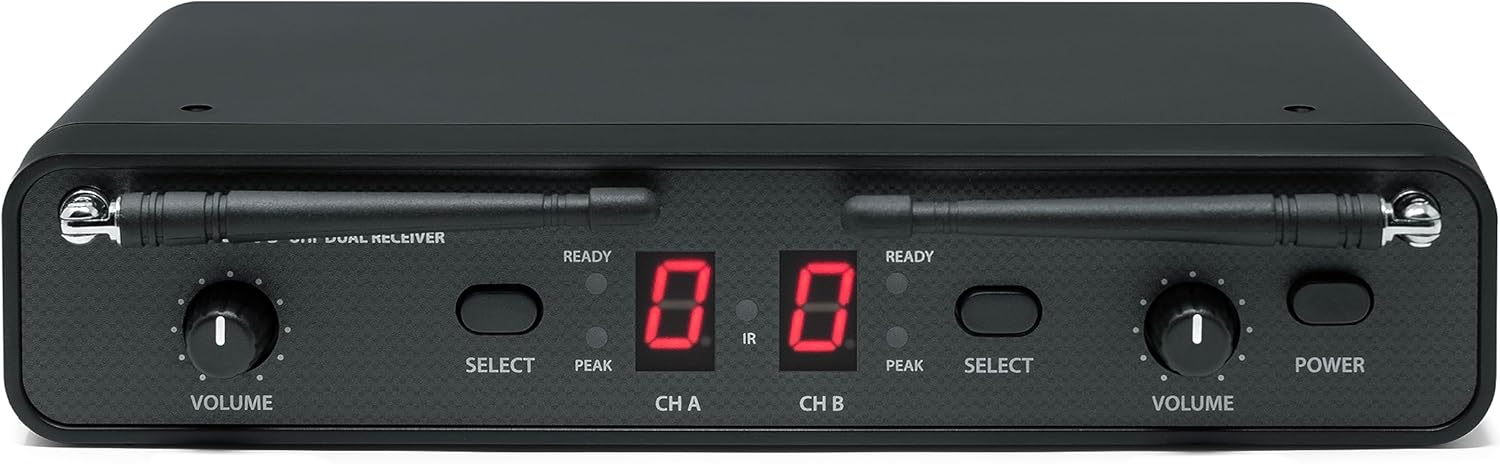
Hareupeun view of the Samson CR288 Dual UHF Receiver, showing volume controls, channel displays, and power button.

Ti luhur ka handap view of the Samson CR288 Dual UHF Receiver with antennas extended, indicating optimal setup for signal reception.

Tukangeun view of the Samson CR288 Dual UHF Receiver, showing power input, balanced XLR outputs for channels A and B, and an unbalanced 1/4" mix output.
Ngoperasikeun
Once the system is set up, follow these guidelines for operation:
- Pamakéan mikropon: Hold the CH288 handheld microphone approximately 2-6 inches from your mouth for optimal sound capture.
- Kontrol volume: Adjust the individual volume controls on the CR288 receiver for each channel (CH A and CH B) to achieve the desired audio level.
- Fungsi mute: Each handheld transmitter features a mute button. Press it to temporarily silence the microphone without powering it off.
- Ngawaskeun: Listen to the audio output through your sound system to ensure clear sound and proper levels.
- rentang: Maintain a reasonable distance between the transmitters and the receiver to ensure a stable wireless connection. The effective range can vary based on environmental conditions.

Two Samson CH288 handheld wireless microphones, featuring power/mute buttons and durable construction.
Pangropéa
Proper maintenance ensures the longevity and performance of your wireless system:
- beberesih: Use a soft, dry cloth to clean the exterior of the receiver and transmitters. Avoid using abrasive cleaners or solvents.
- Ngagantian batré: Replace batteries in the handheld transmitters when the low battery indicator appears or when performance degrades. Always use fresh, high-quality AA batteries.
- Panyimpenan: When not in use for extended periods, remove batteries from the transmitters and store the system in a cool, dry place away from direct sunlight and extreme temperatures.
- Perawatan Antenna: Handle antennas carefully to avoid bending or breaking. Ensure they are properly secured during operation and storage.
Pamérésan masalah
If you encounter issues with your Concert 288 system, refer to the following common solutions:
| Masalah | Mungkin Cukang lantaranana | Solusi |
|---|---|---|
| Taya sora tina mikropon | Microphone muted, batteries dead, receiver not powered, incorrect channel selected, audio cable disconnected. | Check mute button, replace batteries, ensure receiver is powered, verify channel pairing, check audio cable connections. |
| Sinyal nu teu puguh atawa putus sinyal | Out of range, interference from other devices, weak batteries, obstructed line of sight. | Reduce distance to receiver, identify and eliminate interference sources, replace batteries, ensure clear line of sight. |
| Hissing or static noise | Interference, gain levels too high, faulty cable. | Adjust receiver/mixer gain, check for interference, try a different audio cable. |
| Kualitas sora goréng | Incorrect microphone placement, low battery, interference. | Adjust microphone position, replace batteries, check for interference. |
For more detailed troubleshooting or persistent issues, consult the full product manual or contact Samson support.
spésifikasi
| Fitur | Rincian |
|---|---|
| merek | SAMSON |
| Nomer modél | SWC288HQ6-H (Concert 288 Handheld) |
| Téhnologi konektipitas | Nirkabel (UHF) |
| Jumlah Saluran | 2 |
| Input Audio | Wireless microphones (Q6 Dynamic Microphone capsule) |
| Sumber Daya | Battery Powered (Transmitters), AC Adapter (Receiver) |
| Tipe Pamasangan | Tabletop (Rack mount kit included) |
| Ukuran barang (L x W x H) | 13 x 4 x 14 inci |
| Item Beurat | 4 pon |
| Bahan Kandang | Logam, Plastik |
| UPC | 809164213178 |
Émbaran jaminan
The Samson Concert 288 Handheld Dual-Channel Wireless System is covered by a Bagian 1 taun sareng jaminan tenaga kerja from the date of purchase. Please retain your proof of purchase for warranty claims. This warranty covers manufacturing defects and malfunctions under normal use. It does not cover damage caused by misuse, accidents, unauthorized modifications, or improper installation.
Ngarojong
For further assistance, technical support, or warranty inquiries, please visit the official Samson websitus atanapi ngahubungi departemén layanan palangganna. Anjeun tiasa mendakan langkung seueur inpormasi sareng sumber daya di Samson Store on Amazon.