
D-Link DCS-6501LH/E
D-Link DCS-6501LH/E Compact Full HD Pan & Tilt Wi-Fi Camera User Manual
Model: DCS-6501LH/E
Bubuka
This manual provides comprehensive instructions for the setup, operation, and maintenance of your D-Link DCS-6501LH/E Compact Full HD Pan & Tilt Wi-Fi Camera. This camera is designed to monitor large areas of your home or small office with its Full HD resolution and versatile pan and tilt functionality. It features integrated night vision for monitoring in low light, two-way audio for communication, and motion/sound detection for security alerts. The camera supports local recording to an SD card and cloud storage, and can be controlled via the mydlink app or voice commands with Amazon Alexa and Google Assistant.
Eusi pakét
- D-Link DCS-6501LH/E Compact Full HD Pan & Tilt Wi-Fi Camera
- Gancang Mimitian Guide
- Pamasangan screws
- Micro USB Power adaptor
- Tripod/Mounting Base
Disetél
1. Kaméra Langkungview

Hareupeun view of the D-Link DCS-6501LH/E camera, showing the lens, status LED, and D-Link logo.

Balik deui view of the D-Link DCS-6501LH/E camera, showing the speaker grille, micro USB power port, and reset button.
2. Ngahurungkeun Kaméra
Connect the micro USB power adapter to the camera's power port and plug it into a wall outlet. The camera's status LED will illuminate, indicating it is powering on.
3. Installing the mydlink App
Download the official mydlink app from the Apple App Store or Google Play Store on your smartphone or tablet. Create a mydlink account or log in if you already have one.
4. Adding the Camera to mydlink
- Open the mydlink app and tap the "Add a Device" icon.
- Nyeken kode QR anu aya dina kaméra atanapi bungkusanna.
- Follow the on-screen instructions to connect the camera to your Wi-Fi network. Ensure your Wi-Fi network is 2.4 GHz for optimal compatibility.
- Once connected, the camera's status LED will turn solid green.
5. Masang kaméra
The camera can be placed on a flat surface using its integrated base or mounted to a wall or ceiling using the provided mounting screws and tripod/mounting base. Ensure the camera is positioned to cover the desired monitoring area.
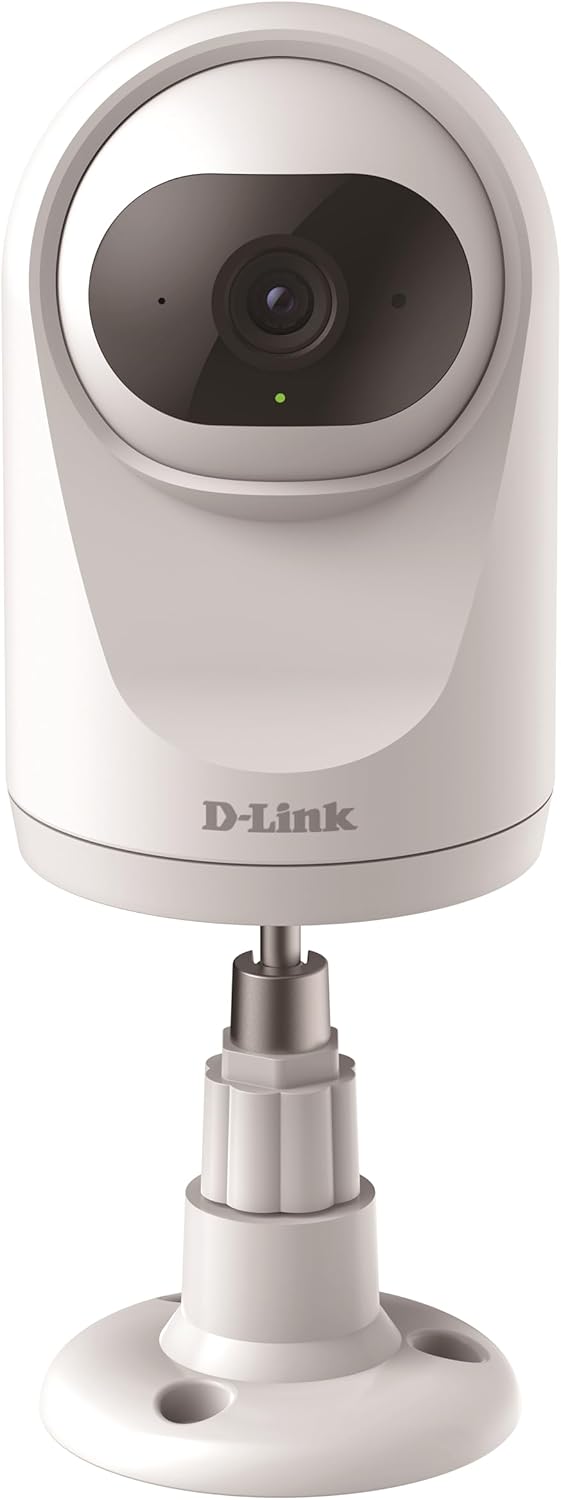
The camera can be placed on a flat surface using its included stand, providing stability and a clear view.

The camera can also be securely mounted to a wall or ceiling using the provided hardware for a fixed installation.
Ngoperasikeun kaméra
Pan jeung Dengdekkeun Fungsionalitas
The DCS-6501LH/E features motorized pan (340°) and tilt (90°) capabilities, allowing you to remotely adjust the camera's viewing angle through the mydlink app. This enables comprehensive coverage of large areas.

The camera offers a wide 340-degree horizontal pan and 90-degree vertical tilt range for extensive area coverage.
Automatic Motion Tracking
When enabled, the camera can automatically detect and track moving objects within its field of view, ensuring that important events are captured. This feature utilizes the pan and tilt motors to follow the subject.

The camera's automatic motion tracking feature follows moving subjects, keeping them in frame.
Visi Peuting
The integrated night vision allows the camera to capture clear video footage even in complete darkness, up to a range of 5 meters. This ensures 24/7 monitoring capabilities.
Gerak sareng Deteksi Sora
The camera is equipped with advanced motion and sound detection. When motion or sound is detected, the camera can automatically send push notifications to your mydlink app and begin recording video.
Audio Dua Arah
Utilize the built-in microphone and speaker for two-way communication. You can listen to what's happening in the camera's vicinity and speak through the camera from your smartphone.

The camera supports two-way audio, allowing users to listen and speak through the device.
Rekaman sareng Panyimpenan Video
The camera supports recording video locally to a microSD card (not included) or to the mydlink cloud. A 1-year free mydlink cloud subscription is included, allowing remote storage, playback, and download of recorded videos.
Modeu Privasi
For enhanced privacy, the camera features a physical privacy mode that rotates the lens to completely cover it, ensuring no video is captured when privacy is desired.

The camera's privacy mode physically covers the lens, ensuring complete privacy when needed.
Pangropéa
- beberesih: Lembut usap lénsa kaméra jeung awakna ku kaén nu garing tur lemes. Ulah make cleaners cair atawa bahan abrasive.
- Pembaruan firmware: Regularly check for and install firmware updates through the mydlink app to ensure optimal performance, security, and access to new features.
- Kartu MicroSD: If using a microSD card, periodically check its status and format it if necessary to maintain recording performance.
Pamérésan masalah
Kaméra Teu Nyambung ka Wi-Fi
- Pastikeun jaringan Wi-Fi anjeun 2.4 GHz. Kaméra henteu ngadukung jaringan 5 GHz.
- Pastikeun kecap akses Wi-Fi leres.
- Pindahkeun kaméra langkung caket kana router Wi-Fi anjeun pikeun ningkatkeun kakuatan sinyal.
- Balikan deui kaméra sareng router Wi-Fi anjeun.
- Perform a factory reset on the camera (refer to the Quick Start Guide for instructions) and try the setup process again.
Kualitas Pidéo Goréng
- Pariksa kecepatan sambungan internét anjeun. Sambungan anu stabil sareng gancang diperyogikeun pikeun streaming anu optimal.
- Pastikeun lénsa kaméra bersih sareng bébas tina lebu atanapi kokotor.
- Atur posisi kaméra pikeun nyingkahan silau langsung atanapi lampu latar anu kuat.
Motion/Sound Detection Not Working
- Verify that motion and sound detection settings are enabled in the mydlink app.
- Adjust the sensitivity levels for detection in the app.
- Pastikeun teu aya halangan anu ngahalangan kaméra view.
spésifikasi
| Fitur | Rincian |
|---|---|
| Nomer modél | DCS-6501LH/E |
| Resolusi | 1080p lengkep HD |
| pan Range | 340 derajat |
| Rentang Dengdekkeun | 90 derajat |
| Wengi Sawangan Sawangan | 5 méter |
| Konektipitas | Wi-Fi (2.4 GHz) |
| Konsumsi Daya | 4 Watt |
| Ukuran (L x W x H) | 7.7 x 7.7 x 12.1 cm |
| Beurat | 190 gram |
| Fitur husus | Two-Way Audio, Motion Detection, Sound Detection, Automatic Motion Tracking, Privacy Mode, SD Card/Cloud Recording |
| Jero rohangan / pamakéan outdoor | jero rohangan |
Garansi sareng Rojongan
For warranty information and technical support, please refer to the D-Link official website or contact D-Link customer service. Keep your purchase receipt for warranty claims.
D-Link Official Websitus: www.dlink.com
Ask a question about this manual
Ask about setup, troubleshooting, compatibility, parts, safety, or missing instructions. Manuals+ will review the question and use this page’s manual context to help answer it.