
1. Bubuka
This manual provides essential information for the safe and efficient operation of your COTEK SP-1000-112 Pure Sine Wave Inverter. Please read all instructions carefully before installation and use. The SP-1000-112 is designed to convert 12VDC battery power into 120VAC pure sine wave electricity, suitable for sensitive electronics and various AC appliances.
Fitur konci:
- Pure sine wave output for clean, stable power.
- Power ON / OFF kamampuhan kadali jauh (Terminal Héjo).
- Input & output are fully isolated for enhanced safety.
- Suhu & beban dikawasa kipas pendingin pikeun pagelaran optimal.
- panganteur ramah-pamaké.
- Tipe 1 Indoor Aluminium dipager.

Gambar 1: COTEK SP-1000-112 Pure Sine Wave Inverter, front-side view. This image shows the overall design of the COTEK SP-1000-112 Pure Sine Wave Inverter, highlighting its compact form factor and blue casing.
2. Émbaran Kasalametan
Always observe the following safety precautions to prevent injury and damage to the inverter or connected equipment.
- Bahaya listrik: Vol luhurtage is present inside the inverter when connected to a battery. Do not open the inverter casing.
- Ventilasi anu leres: Pastikeun ventilasi anu cekap di sakitar inverter pikeun nyegah panas teuing. Ulah ngahalangan liang ventilasi.
- Lokasi garing: Install the inverter in a dry environment, away from water, moisture, and corrosive substances.
- Kasalametan batré: Work in a well-ventilated area when connecting batteries. Batteries can produce explosive gases. Wear appropriate personal protective equipment.
- Grounding: The inverter must be properly grounded. Follow all local and national electrical codes.
- Kapasitas beban: Do not exceed the inverter's rated output power. Overloading can cause damage and fire hazards.
- California Proposisi 65 Peringatan: Produk ieu tiasa ngandung bahan anu diimbau ku California Proposition 65.

Gambar 2: Safety equipment for electrical work. Image depicting essential safety gear such as a hard hat, safety glasses, and work gloves, emphasizing the importance of personal protective equipment during installation and maintenance.
3. Setup jeung Instalasi
Follow these steps for proper installation of your SP-1000-112 inverter.
3.1 Pasang Inverter
- Choose a secure, dry, and well-ventilated location.
- Ensure sufficient clearance around the inverter for airflow, especially around the cooling fan vents.
- Mount the inverter horizontally on a stable surface using appropriate fasteners.
3.2 Sambungan Input DC
Sambungkeun inverter langsung ka bank batré 12VDC. Anggo kabel anu ukuranana pas pikeun ngaminimalkeun voltase.tage drop and ensure safe operation.
- Pastikeun saklar kakuatan inverter dina posisi OFF.
- Sambungkeun kabel DC positif (+) tina batré ka terminal positif (+) dina inverter.
- Sambungkeun kabel DC négatif (-) tina batré ka terminal négatif (-) dina inverter.
- Amankeun sadaya sambungan anu caket.

Gambar 3: Rear panel of COTEK SP-1000-112 Inverter. The rear panel includes the DC input terminals for battery connection, a ground lug, and a green terminal block for remote control and monitoring connections.
3.3 Sambungan Kaluaran AC
The inverter features two GFCI 120VAC outlets for connecting your AC appliances.
- Ensure the inverter is powered off before connecting any AC loads.
- Plug your AC appliances directly into the GFCI outlets on the front panel.
- Do not exceed the inverter's continuous power rating of 1000W.

Gambar 4: Front panel of COTEK SP-1000-112 Inverter. The front panel features two GFCI 120VAC outlets, a power ON/OFF switch, and LED indicators for operational status and fault conditions. DIP switches for configuration are also visible.
3.4 Remote Control Connection (Optional)
The inverter supports an optional remote control via the green terminal block on the rear panel. Refer to the remote control's specific instructions for wiring details.
4. Parentah Operasi
4.1 Powering on / Pareum
- After all connections are secure, switch the inverter's power switch to the ON position.
- The LED indicators will illuminate to show operational status.
- To power off, switch the power switch to the OFF position.
4.2 Modeu Hemat Daya
The SP-1000-112 features an adjustable power saving mode, which can be configured via DIP switches. This mode reduces power consumption when no load or a very light load is detected, helping to conserve battery energy.

Gambar 5: Light bulb illustrating power saving mode. A light bulb glowing, symbolizing the inverter's power saving mode feature which optimizes energy consumption for lighter loads.
4.3 GFCI outlet
The integrated Ground Fault Circuit Interrupter (GFCI) outlets provide protection against electrical shock. If a ground fault is detected, the GFCI will trip, cutting power to the outlets. To reset, press the 'RESET' button on the outlet.

Gambar 6: RV park at night, powered by inverter. An image of an RV park illuminated at night, demonstrating a typical application where the inverter provides reliable power for various appliances.
5. Pangropéa
Pangropéa rutin mastikeun umur panjang sareng operasi anu tiasa dipercaya tina inverter anjeun.
- beberesih: Periodically clean the exterior of the inverter with a dry cloth. Ensure ventilation openings are free from dust and debris. Do not use liquid cleaners.
- Sambungan: Unggal taun mariksa sadaya sambungan DC sareng AC pikeun ketat sareng korosi. Sambungan leupas bisa ngabalukarkeun overheating sarta kinerja goréng.
- Operasi Kipas: The cooling fan is temperature and load controlled. Ensure it operates freely when needed. If the fan becomes excessively noisy or stops working, contact support.
6. Cara ngungkulan
Bagian ieu ngabahas masalah umum anu anjeun tiasa pendak sareng inverter anjeun.
6.1 Indikator LED
The inverter features LED indicators to communicate its status:
- LED Héjo: Operasi normal.
- Yellow/Orange LED: Kaayaan peringatan (contona, voltase batré lemahtage, suhu luhur).
- LED Beureum: Fault condition (e.g., overload, short circuit, over temperature, input over/under voltage). The inverter will typically shut down in this state.
6.2 Isu umum jeung Solusi
- Henteu aya kaluaran AC:
- Check if the inverter is powered on.
- Verify DC input connections are secure and battery voltage aya dina jangkauan operasi.
- Check if the GFCI outlets have tripped. Press the 'RESET' button.
- Look for fault indicators (Red LED).
- Inverter Pareum:
- Overload: Reduce the connected AC load. The inverter has overload protection.
- Batré Rendah Voltage: Recharge or replace the battery. The inverter will shut down to protect the battery from deep discharge.
- Langkung Suhu: Ensure adequate ventilation. Allow the inverter to cool down. The fan should be operating.
- Input Over/Under Voltage: Verifikasi batré voltage is stable and within the specified input range (10.5-16.5VDC for 12V models).
- GFCI Trips Frequently:
- This can indicate a ground fault in the connected appliance or wiring. Disconnect appliances one by one to identify the faulty device.
- Pastikeun inverter leres grounded.
- A faulty appliance drawing excessive current can also trip the GFCI.
7. Spésifikasi
spésifikasi teknis lengkep pikeun COTEK SP-1000-112 Pure Sine Wave Inverter.
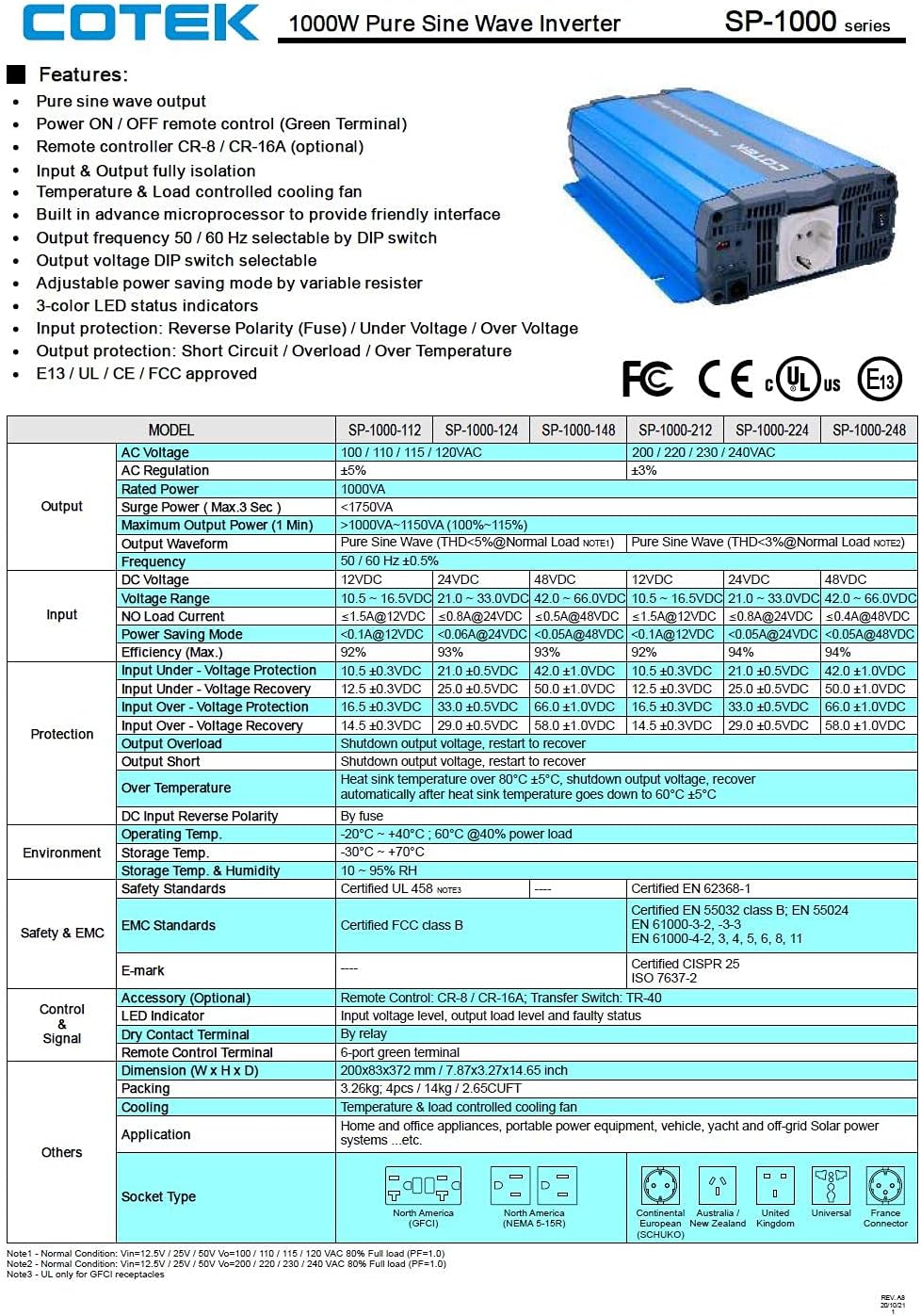
Gambar 7: Technical specifications table for COTEK SP-1000 series inverters. This table provides comprehensive technical specifications for the SP-1000 series, including AC voltage, wattage, surge power, frequency, input voltage range, efficiency, and protection features.

Gambar 8: Mechanical drawings and performance curves for COTEK SP-1000 series inverters. This image displays detailed mechanical dimensions of the inverter, along with power voltage and power temperature curves illustrating performance characteristics under various conditions.
| Fitur | Spésifikasi |
|---|---|
| merek | COTEK |
| Ngaran modél | Cotek SP-1000-112 1000 Watt 110 Volt AC 12 Volt DC Pure Sine Inverter |
| Dianjurkeun Mangpaat | Kandaraan |
| Sumber Daya | Batré Powered |
| Wattage (Terus) | 1000 watt |
| Masukan Voltage | 12 volt DC |
| Daya Kaluaran | 1000 Watt AC |
| Jumlah Outlet | 2 (GFCI) |
| Frékuénsi | 60 Hz |
| Standby Power Shutoff | Efisiensi Tinggi |
| Item Beurat | 9 pon |
| Warna | Biru |
| UPC | 810308000592 |
| Jumlah Bagian Mfr | SP-1000-112 |
8. Émbaran jaminan
Inverter Gelombang Sinus Murni COTEK SP-1000-112 dilengkepan ku 2 Taun Produsén Garansi. Please retain your proof of purchase for warranty claims. For specific terms and conditions, refer to the warranty documentation provided with your product or contact COTEK customer support.
9. Rojongan Palanggan
For technical assistance, troubleshooting beyond this manual, or warranty inquiries, please contact COTEK customer support. Refer to the manufacturer's official websitus atawa bungkusan produk pikeun inpo kontak panganyarna.
Pabrikan: Cotek