
1. Bubuka
This manual provides essential information for the safe and efficient operation, installation, and maintenance of your COTEK SP-1000-124 Pure Sine Wave Inverter. This device converts 24VDC battery power into 120VAC household electricity, suitable for sensitive electronics. Please read this manual thoroughly before use.
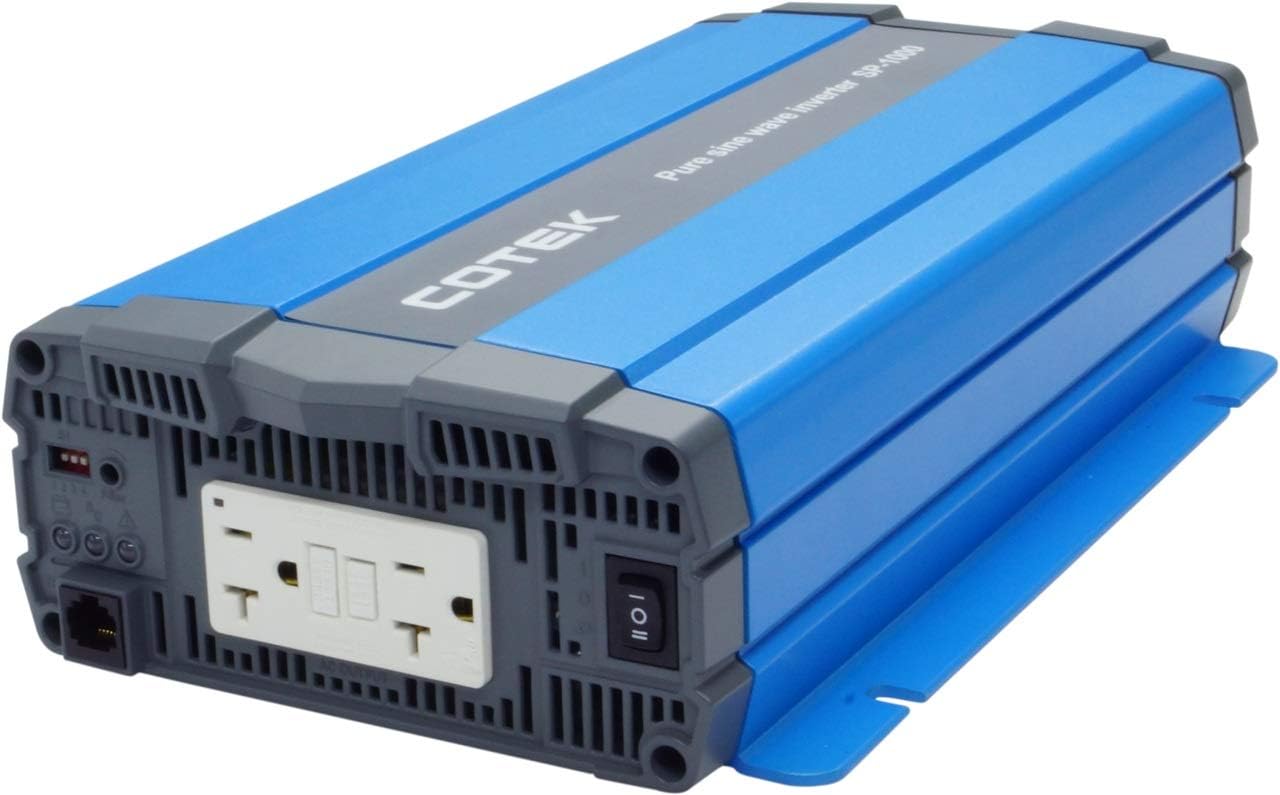
Gambar 1.1: Hareupeun view of the COTEK SP-1000-124 Pure Sine Wave Inverter, showcasing desain kompak na.
2. Émbaran Kasalametan
Always observe the following safety precautions to prevent injury or damage to the inverter and connected equipment.
- Bahaya listrik: This inverter produces high voltage AC power. Treat the output terminals with the same caution as a standard AC wall outlet.
- Ventilasi anu leres: Ensure adequate airflow around the inverter. Do not block ventilation openings. Overheating can cause the inverter to shut down or be damaged.
- Kasalametan batré: Work in a well-ventilated area when connecting to batteries. Batteries can produce explosive gases. Wear appropriate personal protective equipment.
- Grounding: The inverter must be properly grounded. Refer to local electrical codes for grounding requirements.
- Uap: Do not expose the inverter to rain, snow, spray, or any liquids. It is designed for indoor use (Type 1 Indoor Aluminum Enclosure).
- Personil anu mumpuni: Pamasangan sareng ngalayanan kedah dilakukeun ku tanaga anu mumpuni wungkul.

Gambar 2.1: Example of recommended safety equipment for electrical work.
3. Fitur Produk
The COTEK SP-1000-124 Inverter offers the following key features:
- Pure sine wave output for compatibility with all AC loads, including sensitive electronics.
- Power ON / OFF remote control capability via a dedicated Green Terminal.
- Input jeung kaluaran pinuh terasing pikeun kaamanan ditingkatkeun.
- Temperature and load controlled cooling fan ensures optimal performance and extends unit lifespan.
- Antarbeungeut anu ramah-pangguna pikeun gampang dioperasikeun.
- Type 1 Indoor Aluminum Enclosure for durability and protection.
4. Setup jeung Instalasi
Follow these steps for proper installation of your inverter.
4.1 Pamasangan
Mount the inverter in a dry, well-ventilated area, away from direct sunlight, heat sources, and flammable materials. Ensure sufficient clearance around the unit for proper airflow, especially around the fan vents. Refer to the mechanical drawings for dimensions and mounting hole locations.

Image 4.1: Mechanical drawings illustrating the inverter's dimensions and mounting points.
4.2 Sambungan Input DC
Connect the inverter directly to a 24VDC battery bank using appropriate gauge cables. Ensure correct polarity: connect the positive (+) terminal of the inverter to the positive (+) terminal of the battery, and the negative (-) terminal of the inverter to the negative (-) terminal of the battery. Use a fuse or circuit breaker on the positive DC line, close to the battery, as recommended by the inverter specifications.

Image 4.2: Rear panel of the inverter with DC input terminals clearly marked.
4.3 Sambungan Kaluaran AC
The inverter features dual GFCI 120VAC outlets. Plug your AC appliances directly into these outlets. Ensure the total wattagJumlah alat anu nyambung henteu ngaleuwihan peringkat daya kontinyu inverter nyaéta 1000W.

Image 4.3: Front panel of the inverter with dual GFCI AC outlets and the main power switch.
4.4 Remote Control Connection (Optional)
The inverter supports a remote ON/OFF control via the green terminal block. Connect a compatible remote switch or control system to this terminal for convenient power management.
5. Parentah Operasi
5.1 Powering on / Pareum
To power on the inverter, ensure all DC connections are secure, then press the main power switch on the front panel to the 'ON' position. Alternatively, if a remote control is connected, use the remote switch. To power off, reverse this process.
5.2 Load Management
The SP-1000-124 provides 1000 watts of continuous power and can handle a surge power of up to 1750 watts for less than 3 seconds. Avoid exceeding the continuous power rating to prevent overload shutdowns. If the inverter shuts down due to overload, reduce the connected load and restart the unit.
5.3 GFCI outlet
The integrated Ground Fault Circuit Interrupter (GFCI) outlets provide enhanced safety by quickly cutting power in case of a ground fault. If a GFCI outlet trips, disconnect the appliance, reset the GFCI, and re-evaluate the appliance for faults before reconnecting.

Image 5.1: The inverter provides power for various AC loads, including lighting.
6. Pangropéa
Pangropéa rutin mastikeun umur panjang sareng operasi anu tiasa dipercaya tina inverter anjeun.
- beberesih: Periodically clean the inverter's exterior with a dry cloth. Ensure ventilation openings and the cooling fan are free from dust and debris. Do not use liquid cleaners.
- Sambungan: Regularly check all DC and AC connections for tightness. Loose connections can cause overheating and poor performance.
- Kaséhatan batré: Monitor the health of your battery bank. A weak or improperly maintained battery can affect inverter performance and lifespan.

Image 6.1: Proper battery maintenance is crucial for inverter performance.
7. Cara ngungkulan
Bagian ieu ngabahas masalah umum anu anjeun tiasa pendak sareng inverter anjeun.
- Teu aya Daya Kaluaran: Check DC input connections and battery voltage. Ensure the inverter is switched ON. Check for tripped GFCI outlets.
- Inverter Pareum: This often indicates an overload, low input voltage, or overheating. Reduce the load, check battery charge, and ensure proper ventilation. Allow the unit to cool if it's hot.
- GFCI Outlet Trips Frequently: This may indicate a fault in the connected appliance or wiring. Disconnect all appliances and test the GFCI. If it still trips, the inverter may require service. If it holds, connect appliances one by one to identify the faulty device.
- Kipas Teu Jalan: The cooling fan is temperature and load controlled. It will only activate when necessary. If the inverter is hot and the fan is not running, contact support.
8. Spésifikasi
spésifikasi teknis lengkep pikeun COTEK SP-1000-124 Pure Sine Wave Inverter.
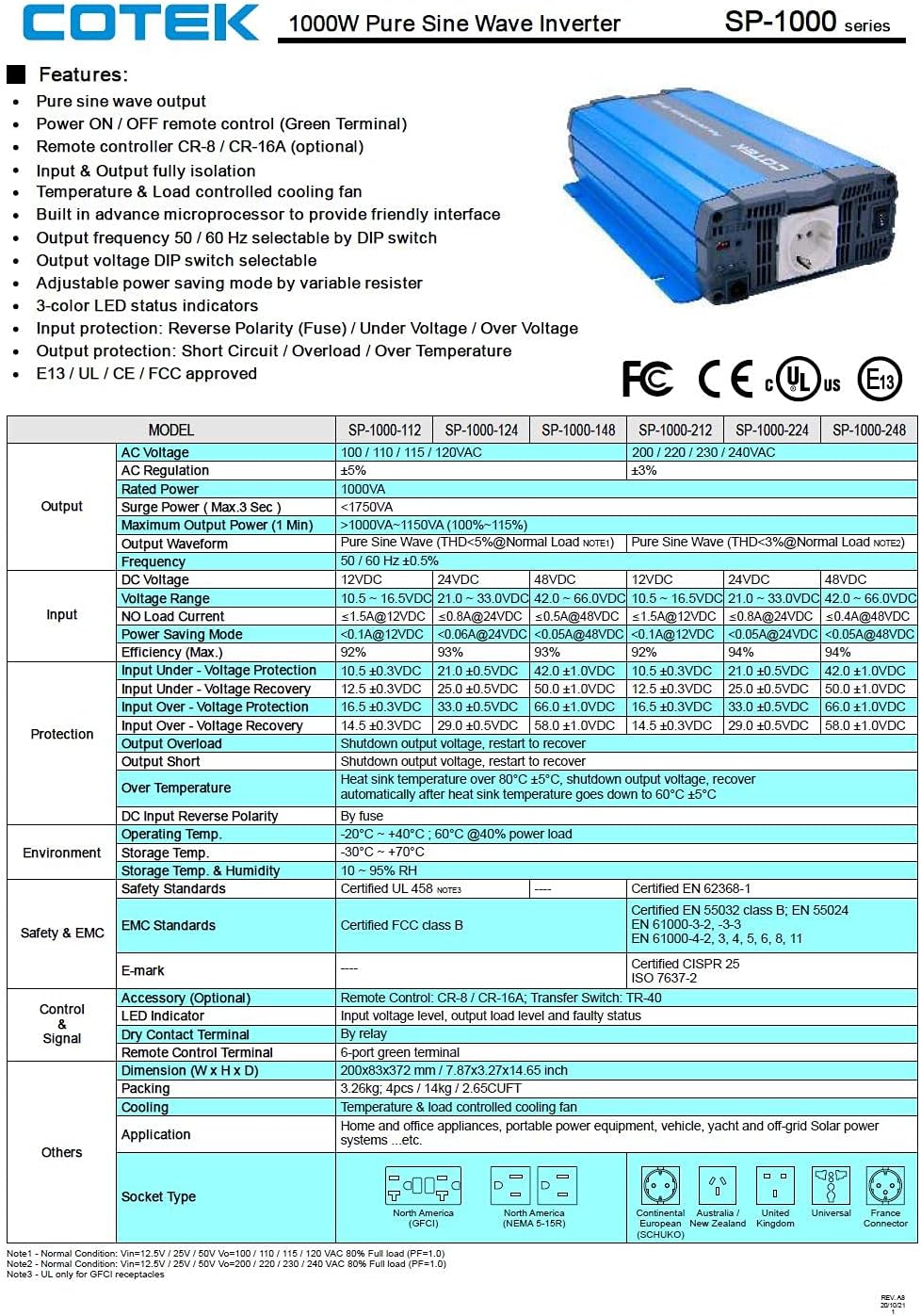
Image 8.1: Official specification sheet for the COTEK SP-1000 series inverters.
| Spésifikasi | Nilai |
|---|---|
| merek | COTEK |
| Ngaran modél | SP-1000-124 (SP Series) |
| Wattage (Terus) | 1000 Watt |
| Surge Power (Max 3 sec) | 1750 Watt |
| Masukan Voltage | 24 volt DC |
| Kaluaran Voltage | 120 Volt AC |
| Bentuk gelombang kaluaran | Galura murni |
| Frékuénsi | 60 Hz |
| Jumlah Outlet | 2 (Dual GFCI) |
| Item Beurat | 8.94 pon |
| Jenis Kandang | Type 1 Indoor Aluminum |
| Niiskeun | Temperature & load controlled fan |
9. Garansi jeung Rojongan
Inverter Gelombang Sinus Murni COTEK SP-1000-124 dilengkepan ku 2-Taun Garansi Produsén. This warranty covers defects in materials and workmanship under normal use. For warranty claims or technical support, please contact your authorized COTEK dealer or the manufacturer directly. Keep your purchase receipt as proof of purchase.