
1. Bubuka
This manual provides comprehensive instructions for the safe and efficient operation of your Cotek AEK-3000-12 LV Switching Mode Power Supply. Please read this manual thoroughly before installation and use to ensure proper functionality and to prevent damage to the unit or connected equipment. Keep this manual for future reference.
2. Émbaran Kasalametan
Always observe the following safety precautions to prevent electric shock, injury, or damage to the power supply and connected devices:
- Pegatkeun Daya: Always disconnect the AC input power before making any connections or performing maintenance.
- Grounding anu leres: Ensure the power supply is properly grounded to prevent electric shock.
- Hindarkeun Uap: Ulah ngantepkeun unit ieu ka hujan, kalembaban, atanapi kalembaban anu kaleuleuwihi.
- Personil anu mumpuni: Pamasangan sareng ngalayanan ngan ukur kedah dilakukeun ku tanaga anu mumpuni.
- Ventilasi: Pastikeun ventilasi anu cekap di sakitar unit pikeun nyegah panas teuing. Ulah ngahalangan liang ventilasi.
- Bener Voltage: Pariksa yén input voltage cocog spésifikasi catu daya.
- Perlindungan Overload: Do not exceed the rated output current or voltage.
3. Produk Langkungview
The Cotek AEK-3000-12 is a high-performance 3000W, 12V programmable single-output DC power supply. Designed for industrial and scientific applications, it features high power density, a low profile (1.5U), and advanced control options for precise voltage and current regulation. This unit supports both local and remote control, making it versatile for various system integrations.
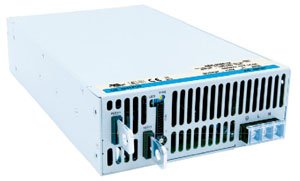
Gambar 1: Hareupeun view of the Cotek AEK-3000-12 LV Switching Mode Power Supply. This image shows the compact design and typical layout of the power supply unit.
4. Fitur
The AEK-3000-12 power supply offers a robust set of features for demanding applications:
- Universal AC input/Full range operation.
- 3000W output power, 12V nominal output.
- Programmable output Voltage (0% - 105% of nominal).
- Programmable output Current (0% - 105% of nominal).
- High power density: 16.3W / inch³.
- Forced current sharing for parallel operation, allowing for increased output current.
- Constant current limit function, suitable for battery charging applications.
- Selectable auxiliary output: +5V / 0.5A or +9V / 0.3A.
- Global control via RS232 interface.
- Remote setting for multiple power supply units via RS232, RS485, and I²C interfaces.
- Power OK signal for system monitoring.
- Remote ON / OFF and Remote sense functions for precise voltage regulation at the load.
- Comprehensive protections: overvoltage, overload, overtemperature, short-circuit, and fan failure.
- RoHS Patuh.
5. Setélan
5.1 Ngabongkar sareng Inspeksi
Carefully unpack the power supply and inspect it for any signs of shipping damage. If damage is found, contact your supplier immediately. Retain all packaging materials for future transport.
5.2 Pamasangan
Mount the power supply in a location that allows for adequate airflow and heat dissipation. Ensure that the ventilation openings are not obstructed. Maintain sufficient clearance around the unit as specified in the technical drawings (not provided in this manual).
5.3 Input Power Connection
Connect the AC input power cable to the designated AC input terminals on the power supply. Ensure proper grounding by connecting the ground wire to the protective earth terminal. Verify that the input voltage and frequency are within the specified range (Universal AC input).
5.4 Sambungan Kaluaran
Connect the DC output cables to the load, observing correct polarity. The positive (+) output should connect to the positive terminal of the load, and the negative (-) output to the negative terminal of the load. Use appropriately sized cables to handle the maximum output current.
5.5 Remote Control Connections
For remote operation, connect the RS232, RS485, or I²C communication cables to the respective ports on the power supply and your control system. Refer to the detailed communication protocol documentation (not provided in this manual) for specific wiring and command structures. Connect remote sense lines to the load for improved voltage regulation at the point of load.
6. Parentah Operasi
6.1 Powering on / Pareum
After all connections are securely made, switch on the AC input power. The power supply will perform a self-test. To power off, switch off the AC input power.
6.2 Setting Output Voltage jeung Ayeuna
Kaluaran voltage and current can be set either locally via the front panel controls (if available) or remotely via the communication interfaces (RS232, RS485, I²C). Refer to the programming guide (not provided in this manual) for detailed instructions on remote programming commands. The output voltage and current are programmable from 0% to 105% of their nominal values.
6.3 Using Programmable Features
Utilize the programmable features to precisely control the output for specific application requirements. This includes setting constant voltage (CV) or constant current (CC) modes, and adjusting parameters dynamically through the remote interfaces.
6.4 Parallel Operation (Current Sharing)
For applications requiring higher current, multiple AEK-3000-12 units can be operated in parallel using the forced current sharing feature. Connect the current sharing lines as per the wiring diagram (not provided in this manual) to ensure balanced load distribution among the units.
6.5 Auxiliary Output Usage
The power supply provides a selectable auxiliary output of +5V/0.5A or +9V/0.3A. This output can be used to power low-power control circuits or external sensors. Refer to the product's technical specifications for details on selecting the desired auxiliary output voltage.
7. Pangropéa
Regular maintenance helps ensure the longevity and reliable operation of your power supply.
- beberesih: Bersihkeun bagian luar unit sacara berkala nganggo lawon anu lemes sareng garing. Pastikeun liang ventilasi bébas tina lebu sareng kokotor. Entong nganggo pembersih cair atanapi pelarut.
- Ventilasi: Regularly check that the cooling fans are operating correctly and that there is unobstructed airflow around the unit.
- Sambungan: Inspect all input and output connections periodically to ensure they are secure and free from corrosion.
- Pangropéa internal: Internal maintenance should only be performed by authorized service personnel. There are no user-serviceable parts inside.
8. Cara ngungkulan
Upami anjeun mendakan masalah sareng catu daya anjeun, tingali léngkah-léngkah ngungkulan umum ieu:
| Masalah | Mungkin Cukang lantaranana | Solusi |
|---|---|---|
| Taya indikasi kakuatan | No AC input, blown fuse, power switch off. | Check AC input cable, verify power source, check fuse, ensure power switch is ON. |
| Taya kaluaran DC | Output disabled, overvoltage protection (OVP) tripped, overcurrent protection (OCP) tripped, faulty output connection. | Check output enable status, reset OVP/OCP (if applicable), verify output connections, reduce load. |
| kaluaran salah voltage/ayeuna | Incorrect settings, remote sense not connected or faulty, calibration issue. | Verify programmed settings, check remote sense connections, consult service for calibration. |
| Unit overheating | Blocked ventilation, excessive ambient temperature, fan failure, overloaded. | Ensure clear airflow, reduce ambient temperature, check fan operation, reduce load. |
| Kasalahan komunikasi | Incorrect cable, wrong protocol settings, address conflict. | Verify communication cable, check baud rate and protocol settings, ensure unique device address. |
If the problem persists after attempting these solutions, contact Cotek technical support or your authorized dealer.
9. Spésifikasi
Key technical specifications for the Cotek AEK-3000-12 LV Switching Mode Power Supply:
- merek: Cotek
- Jumlah modél: AEK-3000-12
- Kaluaran Wattage: 3000 Watt
- Nominal Kaluaran Voltage: 12 volt
- Input Minimum Voltage: 115 Volt AC
- Ukuran barang (L x W x H): 11.02 x 6.69 x 2.5 inci (280 x 170 x 63.5 mm)
- Beurat barang: 8.4 Pon (3.81 kg)
- Pabrikan: Cotek
- ASIN: B00YO4ZFSA
10. Garansi jeung Rojongan
The Cotek AEK-3000-12 LV Switching Mode Power Supply comes with a garansi 3 taun from the date of purchase, covering defects in materials and workmanship under normal use. This warranty does not cover damage caused by misuse, accident, unauthorized modification, or improper installation.
For technical support, warranty claims, or service inquiries, please contact your authorized Cotek dealer or visit the official Cotek websitus pikeun inpo kontak.