
1. Bubuka
This manual provides essential information for the safe and efficient operation of your Philips 40PFL4609/F8 40-inch Full HD LED Smart TV. Please read these instructions carefully before using your television and retain them for future reference.
2. Émbaran Kasalametan
Salawasna turutan pancegahan kaamanan dasar nalika nganggo televisi ieu pikeun ngirangan résiko kahuruan, kejutan listrik, sareng tatu.
- Ulah ngalaan televisi ka hujan atawa beueus.
- Do not open the cabinet; refer all servicing to qualified personnel.
- Pastikeun ventilasi anu cekap di sakitar televisi.
- Nangtayungan kabel kakuatan tina keur leumpang dina atawa pinched.
- Cabut colokan televisi nalika badai kilat atanapi nalika henteu dianggo kanggo waktos anu lami.
3. Eusi Paket
Pastikeun yén sadaya item aya dina kotak:
- Philips 40PFL4609/F8 40-inch Full HD LED Smart TV
- Remote Control (merlukeun 2 batré AAA, kaasup)
- Kabel listrik
- Tabletop Stand and Screws
- Pituduh Mimitian Gancang (henteu kalebet dina manual digital ieu)
- Manual pangguna (dokumén ieu)
4. Setélan
4.1 Ngabongkar sareng Nempatkeun
Carefully remove the television from its packaging. Inspect the TV for any physical damage. Place the television on a stable, flat surface or mount it on a wall using a compatible VESA 200x200mm wall mount (sold separately).
4.2 Majelis nangtung
If using the tabletop stand:
- Teundeun TV nyanghareupan handap dina permukaan lemes, beresih pikeun nyegah karuksakan layar.
- Sejajarkeun stand jeung liang pamasangan di handapeun TV.
- Ngamankeun stand ngagunakeun screws disadiakeun.
4.3 Nyambungkeun Daya
Connect the power cord to the TV's power input, then plug the other end into a 110 VAC, 60 Hz electrical outlet.
4.4 Nyambungkeun Alat éksternal
TV Philips anjeun nawiskeun sababaraha pilihan sambungan kanggo alat éksternal.
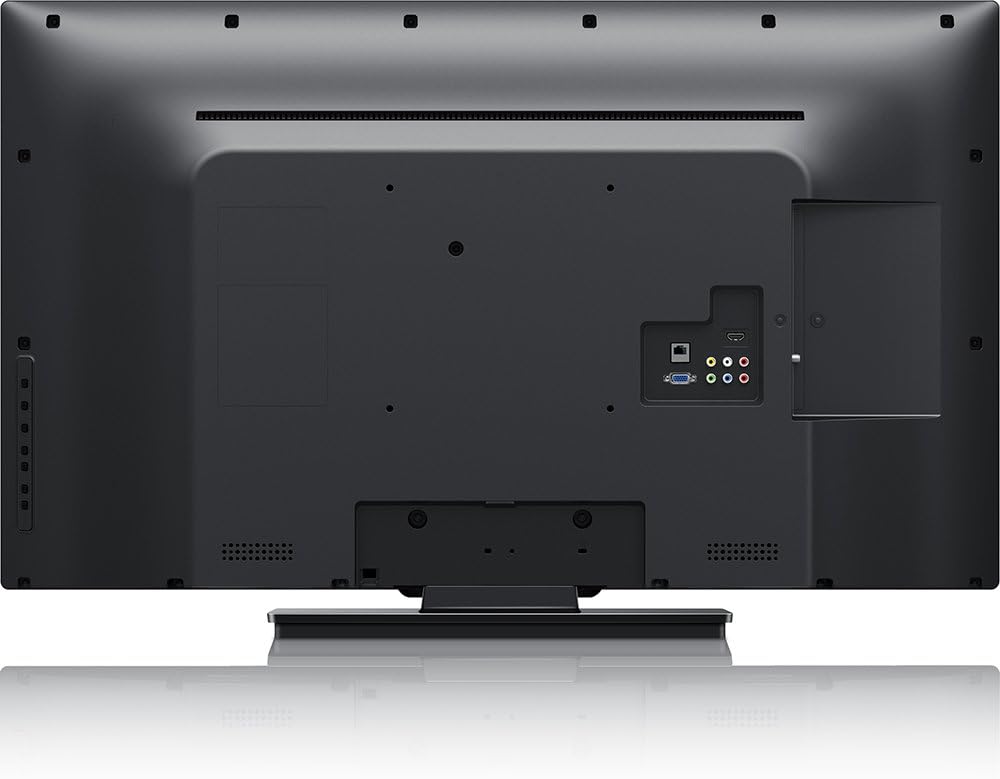
Gambar: Tukangeun view of the Philips 40PFL4609/F8 television, highlighting the input ports including HDMI, DVI, and other audio/video connections.
- HDMI: Connect Blu-Ray players, game consoles, or other HDMI-enabled devices. This model has 1 HDMI port.
- DVI: Connect computers or other DVI-enabled devices.
- USB: Connect USB storage devices for media playback. This model has 1 USB 2.0 port.
- Antena/Kabel: Sambungkeun anteneu atawa sinyal TV kabel pikeun saluran siaran.
4.5 Wizard Setup Awal
Saatos dihurungkeun pikeun anu munggaran, TV bakal nungtun anjeun dina prosés setelan awal:
- Pilihan Basa: Pilih basa anu anjeun pikaresep.
- Sambungan jaringan: Connect to your home Wi-Fi network. The TV supports Wi-Fi connectivity.
- Scan Channel: Scan for available broadcast channels (if an antenna or cable is connected).
5. Ngoperasikeun TV
5.1 Jauh Control Leuwihview
The included remote control allows you to navigate menus, adjust settings, and control playback. Insert two AAA batteries into the remote control, ensuring correct polarity.
5.2 Fungsi Dasar
- kakuatan: Pencét tombol daya pikeun ngaktipkeun atanapi mareuman TV.
- Volume: Anggo tombol polumeu pikeun nyaluyukeun tingkat sora.
- Saluran: Use the channel buttons to change TV channels.
- Input: Press the input button to select connected devices (HDMI, DVI, etc.).
5.3 Smart TV Features (Net TV)
Your Philips TV features Net TV, providing access to online content and applications.
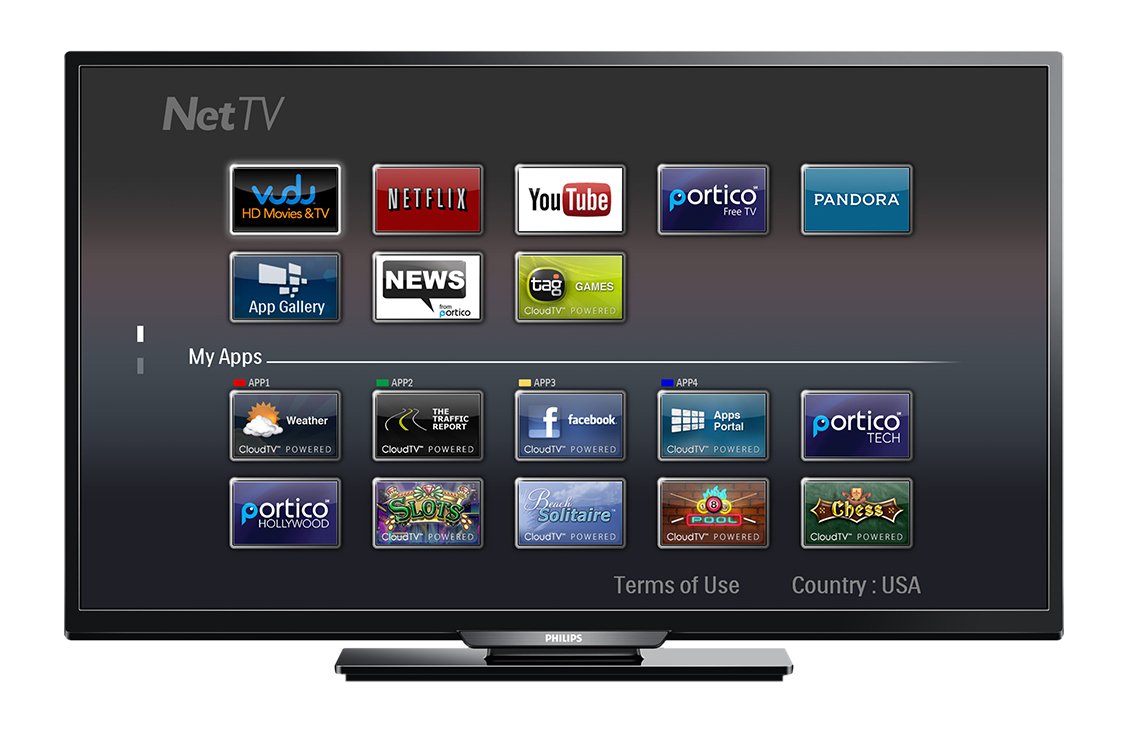
Gambar: Hareupeun view of the Philips 40PFL4609/F8 television, showing the Net TV interface with various application icons such as Netflix, YouTube, and other streaming services.
- Ngaksés Aplikasi: Use the remote control to navigate to the Net TV menu and select applications like Netflix and YouTube.
- Konektipitas Wi-Fi: Ensure your TV is connected to a stable Wi-Fi network for optimal Smart TV performance.
5.4 Setélan Gambar
Adjust picture settings to enhance your viewpangalaman:
- Pixel Plus HD: This video engine enhances detail, depth, and clarity.
- 120Hz PMR (Perfect Motion Rate): Provides sharp images in fast-moving scenes.
- Access the picture menu to adjust brightness, contrast, color, and sharpness.
5.5 Setélan Sora
Optimize audio output:
- SRS TruSurround: Enjoy immersive sound with this integrated surround sound format.
- Access the audio menu to adjust bass, treble, and sound modes.
5.6 Média Playback via USB
Connect a USB storage device to the TV's USB 2.0 port to view poto, muter musik, atawa lalajo video.
6. Pangropéa
6.1 Ngabersihan Layar
Ngusap layar nganggo kaén anu lembut sareng teu aya serat. Pikeun tanda nekad, dampbilas lawon ku saeutik cai atanapi pembersih layar khusus. Ulah nyemprotkeun cairan langsung kana layar.
6.2 Ngabersihkeun Casing
Lap TV casing ku lawon anu lemes sareng garing. Ulah make cleaners abrasive atawa pangleyur.
6.3 Apdet parangkat lunak
This model may not support automatic software updates via the internet. Check the Philips support website for information on manual firmware updates, if available, to ensure optimal performance and access to the latest features.
7. Cara ngungkulan
If you encounter issues with your television, refer to the following common solutions:
- Henteu aya kakuatan: Ensure the power cord is securely plugged into both the TV and the electrical outlet. Check the power outlet with another device.
- Taya Gambar/Sora: Verify the correct input source is selected. Check all cable connections (HDMI, DVI, antenna).
- Henteu aya sambungan jaringan: Ensure your Wi-Fi router is working correctly. Re-enter your Wi-Fi password if necessary.
- Net TV Limitations: Some users have reported that the Net TV functionality on this model can be basic or limited in terms of additional app installation or software updates. If you find the built-in Smart TV features insufficient, consider connecting an external streaming device.
- Ruksakna Fisik: Upon unboxing, carefully inspect the screen and casing for any damage, especially along the edges, which could affect display quality. Contact your retailer immediately if damage is found.
- Remote Control Teu Gawé: Ganti batré AAA. Pastikeun teu aya halangan antara jauh sareng sénsor IR TV.
8. Spésifikasi

Gambar: Samping view of the Philips 40PFL4609/F8 television, illustrating its slim profile and side-mounted connectivity options.
| Fitur | Katerangan |
|---|---|
| Ngaran modél | PHILIPS 40PFL4609/F8 |
| Ukuran layar | 40 Inci (100.3 Sentimeter) |
| Téknologi tampilan | LED, LCD |
| Resolusi | 1080p lengkep HD |
| Refresh Laju | 120 Hz (120Hz PMR) |
| Rasio Aspék | 16:9 |
| Téhnologi konektipitas | Wifi |
| Layanan Internét anu Cocog | Netflix, YouTube |
| Fitur husus | Blu-Ray compatible, DVI Input, HDMI Input, Full HD, HD Compatible, Internet, Surround Sound |
| Palabuhan HDMI | 1 |
| USB 2.0 palabuhan | 1 |
| Mode Kaluaran Audio | Stereo, Sakuliling Sora |
| Integrated Surround Sound Format | SRS TruSurround |
| Pedaran Speaker | SRS TruSurround |
| Konsumsi Daya | 89 Watt |
| Voltage | 110 VAC 60 Hz |
| Item Beurat | 8200 gram |
| Standar Pamasangan VESA | 200 x 200 mm |
| Warna | Hideung |
| Alat nu cocog | Laptop, Tablet, Game Console, Headphones |
| Model Taun | 2016 |
9. Émbaran jaminan
This Philips television comes with a 12-bulan jaminan kawates provided by the manufacturer. Please retain your proof of purchase for warranty claims. The warranty covers manufacturing defects under normal use conditions.
10. Rojongan Palanggan
For further assistance, technical support, or warranty inquiries, please contact Philips customer service. Refer to the official Philips website or your product packaging for contact details specific to your region.