
Bubuka
The Leviton Decora Smart Switch Companion (DD0SR-1Z) is designed for multi-location switching applications, enabling control of lights or ceiling fans from multiple wall locations. This device requires a compatible Leviton Decora Smart, Decora Digital, or Decora switch, dimmer, or fan speed control to function. It is not intended for stand-alone use.

Image: The DD0SR-1Z companion switch shown installed in a wall, emphasizing its non-standalone nature. It controls lights or a ceiling fan from another location when paired with a primary control.
Émbaran Kasalametan penting
PERHATOSAN: To avoid fire, shock, or death; turn off power at the circuit breaker or fuse and test that power is off before wiring. Install in accordance with all National and Local Electrical Codes. This device is intended for installation in a standard wall box. Use only copper or copper clad wire. Do not use with aluminum wire. If you are unsure about any part of these instructions, consult a qualified electrician.
Eusi pakét
- One DD0SR-1Z Leviton Decora Smart Switch Companion (White)
- Ivory and Light Almond faceplates (included for color customization)
Kasaluyuan
The DD0SR-1Z is a companion device and requires a primary Decora Smart, Decora Digital, or Decora switch, dimmer, or fan speed control to operate. It supports multi-location applications with up to 9 additional companion devices. Refer to the compatibility chart below for specific compatible primary devices.

Image: A compatibility chart detailing various Leviton Wi-Fi, Z-Wave, and Decora Digital/Decora primary devices (Dimmers, Switches, Fan Speed Controls) that can be used with the DD0SR-1Z companion.
Setup sareng Instalasi
This device is designed to replace an existing 3-way switch in a multi-location setup. A neutral wire or load side wiring is required for installation. Always ensure power is off at the circuit breaker before beginning any electrical work.
Léngkah-léngkah pamasangan:
- Pareuman Daya: Locate the circuit breaker controlling the switch you are replacing and turn it OFF. Verify power is off using a voltage panguji.
- Hapus saklar anu aya: Carefully remove the wallplate and unscrew the existing switch from the wall box. Disconnect the wires, noting their connections.
- Wire the DD0SR-1Z: Connect the wires to the DD0SR-1Z according to the wiring diagram provided with your primary smart switch. A neutral wire connection is essential.
- Pasang saklar: Secure the DD0SR-1Z into the wall box with the provided screws.
- Pasang Faceplate: Snap on the desired color faceplate (white, ivory, or light almond). Additional faceplate colors (DDKIT-S) are available separately.
- Mulangkeun Daya: Hurungkeun kakuatan deui ON di circuit breaker.

Image: A diagram illustrating the process of removing and attaching faceplates for color customization, with examples of white, ivory, light almond, gray, black, and brown faceplates.
Typical multi-location applications include stairwells, long hallways, or open areas with multiple entrances, where control from more than one point is desired.
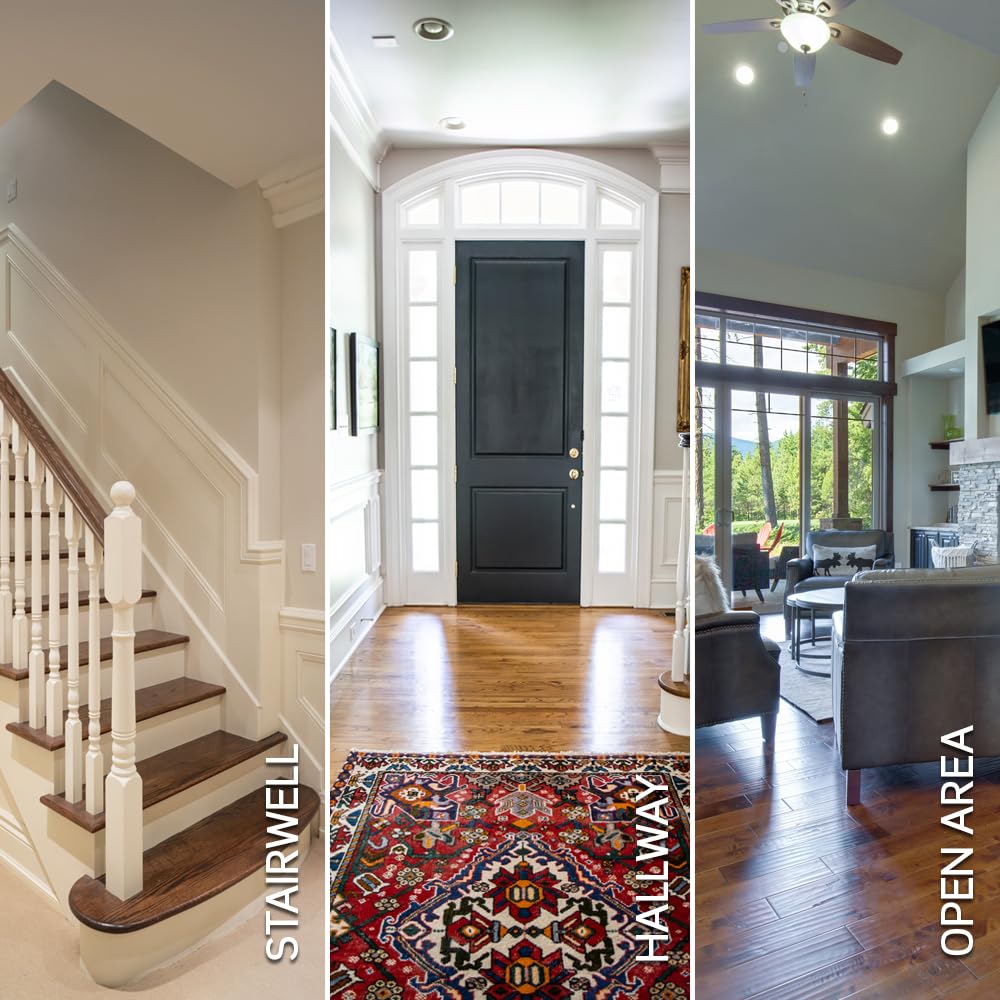
Gambar: Examples of common household areas where multi-location switching is beneficial, including a stairwell, a hallway, and an open-plan room.
Parentah Operasi
The DD0SR-1Z companion switch provides basic ON/OFF control for the connected lights or fan in conjunction with its primary smart control device.
- Pikeun ON: Pencét éta luhur portion of the rocker switch.
- Pikeun mareuman: Pencét éta handap portion of the rocker switch.

Gambar: A lengkep view of the DD0SR-1Z switch, indicating the top button for turning on and the bottom button for turning off, and noting the removable faceplate for color changes.
Pangropéa
The Leviton Decora Smart Switch Companion requires minimal maintenance.
- beberesih: Rapihkan alat dengan lembut, damp lawon. Ulah nganggo pembersih abrasif, pangleyur, atanapi bahan kimia anu keras, sabab ieu tiasa ngaruksak lapisan atanapi komponén internal.
- Pamariksaan: Periodically inspect the switch and wallplate for any signs of damage or loose connections. If any issues are found, turn off power at the circuit breaker and consult a qualified electrician.
Pamérésan masalah
| Masalah | Mungkin Cukang lantaranana | Solusi |
|---|---|---|
| Companion switch not responding | No power to the circuit; Primary smart switch not functioning; Loose wiring connection. | Check circuit breaker. Verify primary smart switch is operational. Turn off power and check all wiring connections. |
| Lights/Fan not turning ON/OFF | Companion not correctly paired/wired with primary control; Incorrect wiring. | Ensure the companion switch is correctly wired and connected to a compatible primary control device. Review diagram wiring. |
| Faceplate difficult to change | Téhnik anu teu leres. | Refer to the faceplate changing diagram in the Setup section. Apply gentle, even pressure. |
spésifikasi
| Fitur | Rincian |
|---|---|
| Nomer modél | DD0SR-1Z |
| Modeu Operasi | Manual |
| Operasi Voltage | 120 VAC, 60Hz |
| Tipe Kontak | Biasana Buka |
| Tipe Panyambung | Terminal Skru |
| Ukuran (L x W x H) | 1.75 x 1.4 x 4.13 inci |
| Item Beurat | 3.2 ons |
| Jinis Sirkuit | 3-way, multi-way |
| Tipe Aktuator | Rocker Pindah |
| Alat nu cocog | Leviton Decora Smart, Decora Digital, or Decora switches, dimmers, or fan speed controls |
| Color Options (Included) | White, Ivory, Light Almond |
| Material (Contact) | Beusi sténless |
Garansi sareng Rojongan
For detailed warranty information, technical assistance, or to contact customer support, please visit the official Leviton website or refer to the documentation included with your primary smart control device. Keep your purchase receipt for warranty claims.