
Gallagher 13053
Timbangan Otomatis Gallagher W310 v2 Manual Pangguna
Model: 13053 | Brand: Gallagher
Bubuka
The Gallagher W310 v2 Automatic Weigh Scale is an entry-level device designed for efficient and accurate livestock weighing. It features basic two-way drafting capability and seamless integration with the HR5 Hand Held EID Tag Reader. This manual provides comprehensive instructions for setting up, operating, and maintaining your W310 v2 weigh scale to ensure optimal performance and longevity.

Figure 1: The Gallagher W310 v2 Automatic Weigh Scale, shown in its open position, displaying the screen and control buttons.
Fitur konci:
- Automatic Weight Capture: Enables rapid and accurate weight capture regardless of animal movement.
- Two-Way Drafting: Basic drafting capability with a second screen for statistics display, including number of animals weighed, maximum, and minimum individual weights.
- Device Communication: Inbuilt communication port for sending weight data to computers or printers, equipped with APS standard.
- Konektipitas Bluetooth: Allows a Bluetooth adapter to be powered from the weigh scale, enabling weight data transfer to HR5 Hand Held EID Tag Readers or custom software applications.
- Sababaraha Mode Timbangan: Choose between Auto-weighing, Manual weighing, and Fine weighing for various operational needs.
- Antarmuka anu ramah-pamaké: Large, easy-to-read backlit display screen, clearly labelled push buttons, and a smooth-action rotary switch for mode selection.
- Desain awét: Tough, water-resistant case for protection in harsh environments.
- Batré anu tiasa dicas deui internal: Long-lasting battery with charge indicator and low voltage shutdown, can be powered externally if needed.
Setup sareng Instalasi
Proper setup is crucial for accurate and reliable operation of your Gallagher W310 v2 Weigh Scale. Follow these steps carefully:
- Ngabongkar bungkusan: Carefully remove the weigh scale from its packaging. Inspect for any signs of damage. Retain packaging for future transport or storage.
- Ngeusi batre: The W310 v2 has an internal rechargeable battery. Before first use, fully charge the unit using the provided AC adapter. Connect the adapter to the charging port on the scale and plug it into a suitable power outlet. The charge indicator on the display will show charging status.
- Connecting Load Bars: The W310 v2 is designed for use with Gallagher load bars (sold separately). Connect the load bar cables to the appropriate ports on the weigh scale. Ensure connections are secure.
- Mounting the Scale: Mount the weigh scale in a secure, stable location, typically near the weighing platform or crush. Ensure it is protected from direct impact and excessive moisture, although it features a water-resistant case.
- Daya mimiti Hurung: Press and hold the power button to turn on the scale. The display will illuminate, and the system will perform a self-check.
- Connecting to External Devices (Optional):
- HR5 Hand Held EID Tag Pamaca: To connect via Bluetooth, ensure the Bluetooth adapter is powered from the weigh scale. Follow the pairing instructions for your HR5 reader to establish a connection.
- Computer/Printer: Use the inbuilt communication port (serial or USB, depending on model/adapter) to connect to a computer or printer for data transfer. Refer to your computer's or printer's manual for specific connection details.

Figure 2: The Gallagher W310 v2 Weigh Scale mounted and in operation within a livestock handling system, demonstrating a typical installation.
Parentah Operasi
The W310 v2 offers multiple weighing modes to suit different operational needs. Familiarize yourself with the controls and modes for efficient weighing.
Kadali Langkungview:
- Rotary Selector Knob: Used to navigate between different weighing modes and settings.
- WEIGH Key: Initiates a manual weighing cycle.
- ZERO Key: Zeros the scale before weighing.
- Hapus konci: Deletes the last recorded weight or clears data.
- F1/F2 Keys: Function keys for additional options or settings.
- Tampilan backlit: Shows weight, mode, battery status, and other information.
Modeu Timbangan:
Rotate the selector knob to choose your desired weighing mode:
- Auto-weighing Mode:
In this mode, the animal's weight locks automatically once stable, allowing for fast, hands-free weighing. This is ideal for high-throughput operations.
- Ensure the scale is zeroed before an animal enters the platform.
- Once the animal is on the platform, the scale will detect its presence and automatically lock onto a stable weight.
- The locked weight will be displayed and can be recorded or sent to connected devices.
- Manual Weighing Mode:
This mode gives the operator full control over the weighing cycle. The weight is recorded only when the WEIGH key is pressed.
- Place the animal on the platform.
- Wait for the animal to settle.
- Pencét éta TIMUR key to capture and record the weight.
- Fine Weighing Mode:
Designed for small load weighing, this mode operates with no zero tracking for greater accuracy. It is suitable for precise measurements where minimal movement is expected.
- Ensure the platform is clear and stable.
- Place the item to be weighed carefully on the platform.
- The scale will display the precise weight.
Manajemén Data:
- Statistics Display: The second screen provides statistics such as the number of animals weighed, maximum weight, and minimum weight.
- Sending Weights: If connected to an HR5 Hand Held EID Tag Reader or other devices via Bluetooth or communication port, weights can be sent and recorded against individual animal IDs.
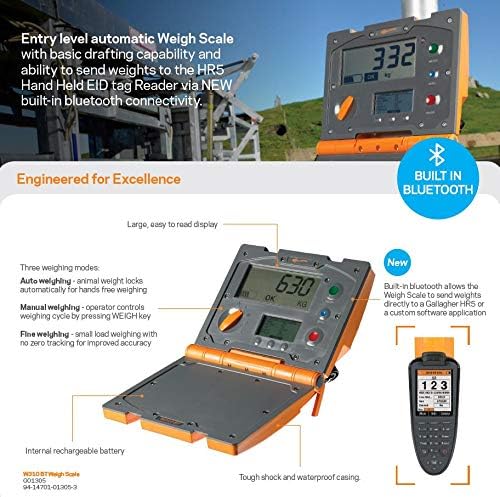
Gambar 3: Detil view of the Gallagher W310 v2 Weigh Scale highlighting its key features, including built-in Bluetooth connectivity, multiple weighing modes, and the large display.
Pangropéa
Regular maintenance ensures the longevity and accuracy of your Gallagher W310 v2 Weigh Scale.
- beberesih:
The W310 v2 has a tough, water-resistant case. Clean the unit regularly with a damp lawon. Ulah nganggo pembersih abrasif atanapi pelarut anu tiasa ngaruksak tampilan atanapi casing. Ensure all ports are free of debris.
- Perawatan batré:
To maximize battery life, avoid fully discharging the battery frequently. Recharge the unit when the low voltage indicator appears. If storing the unit for an extended period, ensure it is charged to approximately 50% and recharge every few months.
- Panyimpenan:
When not in use, store the weigh scale in a dry, cool place, away from direct sunlight and extreme temperatures. Use the original packaging if available for added protection.
- Pamariksaan:
Periodically inspect cables, connectors, and the casing for any signs of wear or damage. Replace damaged components immediately to prevent further issues.
Pamérésan masalah
This section provides solutions to common issues you might encounter with your W310 v2 Weigh Scale.
| Masalah | Mungkin Cukang lantaranana | Solusi |
|---|---|---|
| Skala teu hurung. | Battery is fully discharged or faulty. | Connect the AC adapter and charge the unit. If it still doesn't turn on, the battery may need replacement or contact support. |
| Bacaan beurat teu akurat. | Load bars not properly connected or damaged; scale not zeroed; unstable weighing platform. | Ensure load bars are securely connected. Press the ZERO key before weighing. Verify the weighing platform is stable and level. |
| Cannot connect to HR5 Reader via Bluetooth. | Bluetooth adapter not powered; incorrect pairing procedure; interference. | Ensure the Bluetooth adapter is powered. Re-attempt pairing following instructions for both devices. Reduce interference by moving closer to the HR5 reader. |
| Tampilanna taram atawa kedip-kedip. | Low battery; extreme temperatures. | Recharge the battery. Operate the scale within its specified temperature range. |
If you encounter issues not listed here or if the suggested solutions do not resolve the problem, please contact Gallagher customer support.
spésifikasi
| Fitur | Rincian |
|---|---|
| Produsén | Gallagher |
| Nomer Bagian | 13053 |
| Dimensi produk | 23.5 x 21.5 x 9.5 cm |
| Item Beurat | 3.4 kg |
| Warna | oranyeu |
| Gaya tampilan | LCD |
| Fitur husus | Backlit Display, Internal Rechargeable Battery, Bluetooth Connectivity (via adapter) |
| Sumber Daya | Internal Rechargeable Battery / AC Adapter |
| Tanggal Sadia munggaran | 11 Pébruari 2020 |
Garansi sareng Rojongan
The Gallagher W310 v2 Automatic Weigh Scale comes with a jaminan hiji taun ti tanggal beuli. Garansi ieu nyertakeun cacad dina bahan sareng pagawean dina panggunaan normal.
For warranty claims, technical support, or further assistance, please contact Gallagher customer service. You can typically find contact information on the official Gallagher websitus atawa ngaliwatan distributor lokal Anjeun.
Mangga siapkeun nomer modél produk anjeun (13053) sareng bukti pameseran nalika ngahubungi dukungan.
Ask a question about this manual
Ask about setup, troubleshooting, compatibility, parts, safety, or missing instructions. Manuals+ will review the question and use this page’s manual context to help answer it.