
Bubuka
This manual provides detailed instructions for the setup, operation, and maintenance of your Theater Solutions TS212 by Goldwood Bluetooth 2.1 Speaker System. Please read this manual thoroughly before using the product to ensure proper function and to maximize your listening experience. Keep this manual for future reference.
Naon dina Box
Taliti ngabongkar sadaya komponén sareng pastikeun sadaya barang aya. Lamun aya item nu leungit atawa ruksak, mangga ngahubungan rojongan customer.
- Speaker Subwoofer Powered
- 2 Passive Wired Satellite Speakers
- Fungsi Jauh Control
- 3.5mm pikeun RCA Audio Cable
- Manual pangguna (dokumén ieu)

Image: All components included in the TS212 system package.
Produk Leuwihview
Subwoofer Front Panel

Gambar: Hareupeun view of the TS212 subwoofer.
- Woofer: Front-firing for enhanced bass response.
- Palabuhan: Bass reflex port for optimized airflow.
- Control Panel (Top): Includes volume, mode selection, and playback controls.
Subwoofer Top Panel (USB/SD)

Image: Top panel of the TS212 subwoofer with media inputs.
- Slot Kartu SD/MMC: Pikeun muter audio files from an SD or MMC card.
- U Disk (USB) Port: Pikeun muter audio files from a USB drive or charging devices.
Subwoofer Rear Panel

Gambar: Tukangeun view of the TS212 subwoofer.
- Saklar kakuatan: Toggles the system power ON/OFF.
- AC DI: Power input for the included power cord.
- Treble VOL: Nyaluyukeun kaluaran frékuénsi luhur.
- Bass VOL: Nyaluyukeun kaluaran frékuénsi handap.
- INPUT/OUTPUT: RCA stereo input and output jacks for connecting audio sources and satellite speakers.
Speaker satelit

Image: One of the TS212 satellite speakers.
- Supir lengkep: Delivers clear mid-range and high-frequency audio.
- Sambungan kabel: Connects directly to the subwoofer via integrated RCA cables.
Kadali jauh
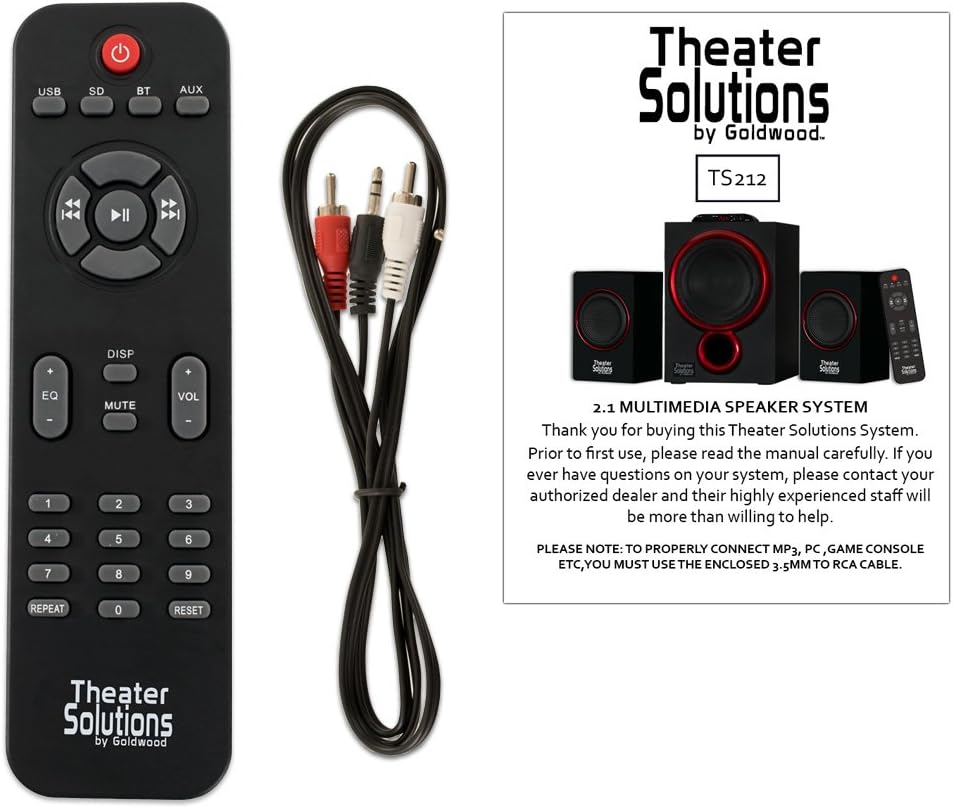
Image: Remote control for the TS212 system.
- Tombol Daya: Ngahurungkeun atanapi mareuman sistem.
- Tombol Mode: Ngaliwatan modeu input (Bluetooth, AUX, USB, SD).
- Volume +/-: Nyetél volume master.
- Kadali Puteran: Play/Pause, Skip Forward/Backward.
- EQ: Milih prasetél equalizer.
- Jempé: Ngajempékeun kaluaran audio.
- Papan tombol angka: For direct track selection in USB/SD mode.
Disetél
1. Panempatan
- Place the subwoofer on a stable, flat surface, preferably on the floor, to optimize bass performance.
- Position the satellite speakers to the left and right of your listening area, facing towards you, for optimal stereo imaging. Ensure they are on a stable surface.
2. Nyambungkeun Spiker Satelit
- Connect the RCA cables from the two satellite speakers to the corresponding RCA output jacks on the rear panel of the subwoofer. Match the colors (typically red for right, white/black for left).
3. Connecting Audio Source
- For devices with a 3.5mm audio output (e.g., smartphones, laptops, MP3 players), use the included 3.5mm to RCA cable. Connect the 3.5mm end to your device and the RCA ends to the INPUT jacks on the subwoofer's rear panel.
- For devices with RCA audio outputs (e.g., DVD players, some TVs), use a standard RCA to RCA cable (not included) to connect to the INPUT jacks on the subwoofer.
4. Sambungan Daya
- Ensure the power switch on the rear of the subwoofer is in the OFF position.
- Connect the power cord to the AC IN port on the subwoofer and then plug it into a standard 110V grounded wall outlet.
Parentah Operasi
1. Powering on / Pareum
- Flip the power switch on the rear of the subwoofer to the ON position. The LED display on the subwoofer will illuminate.
- To turn off the system, flip the power switch to the OFF position.
2. Pilihan Modeu
- Press the 'MODE' button on the subwoofer's top panel or the remote control to cycle through available input modes: Bluetooth (BT), Auxiliary (AUX), USB, and SD. The selected mode will be shown on the LED display.
3. Operasi Bluetooth
- Select 'BT' mode using the 'MODE' button. The system will enter pairing mode, indicated by a flashing 'BT' on the display.
- On your Bluetooth-enabled device (e.g., smartphone), search for Bluetooth devices and select 'TS212' from the list.
- Once paired, the 'BT' indicator will stop flashing, and you can play audio from your device through the speaker system.
4. Auxiliary (AUX) Input
- Select 'AUX' mode using the 'MODE' button.
- Ensure your audio source is connected to the RCA INPUT jacks on the subwoofer's rear panel.
- Puterkeun audio tina alat anjeun anu nyambung.
5. Putereun Kartu USB/SD
- Insert a USB drive into the 'U DISK' port or an SD/MMC card into the 'SD/MMC CARD' slot on the subwoofer's top panel.
- Sistem bakal otomatis ngalih ka modeu USB atanapi SD sareng mimiti muterkeun audio anu cocog files. If not, select the appropriate mode using the 'MODE' button.
- Use the playback controls on the subwoofer or remote to manage your music.
6. Nyaluyukeun Volume, Bass, sareng Treble
- Jilid Master: Use the 'VOL +/-' buttons on the subwoofer's top panel or the remote control.
- Bass/Tréble: Use the 'BASS VOL' and 'TREBLE VOL' knobs on the rear panel of the subwoofer to fine-tune the low and high frequencies.
Pangropéa
- beberesih: Anggo kaén anu garing sareng lemes pikeun ngabersihan permukaan spéker. Ulah make cleaners cair atawa bahan abrasive.
- Ventilasi: Ensure the subwoofer has adequate ventilation and its vents are not blocked to prevent overheating.
- Panyimpenan: Upami henteu dianggo kanggo waktos anu lami, simpen sistem di tempat anu tiis sareng garing, jauh tina sinar panonpoé langsung sareng suhu anu ekstrim.
Pamérésan masalah
| Masalah | Mungkin Cukang lantaranana | Solusi |
|---|---|---|
| Taya kakuatan | Power cord not connected; Power switch off; Outlet not working | Ensure power cord is securely plugged in; Turn power switch ON; Test outlet with another device |
| Taya sora | Incorrect mode selected; Volume too low; Audio cable loose/incorrect; Device not playing audio | Select correct input mode; Increase volume; Check all cable connections; Ensure audio is playing on source device |
| Bluetooth teu nyambung | Not in Bluetooth mode; Device too far; Already paired with another device | Select 'BT' mode; Move device closer (within 10 meters); Disconnect from other devices and try pairing again |
| USB/SD teu tiasa diputer | Modeu salah; Teu cocog file format; Corrupted media; Media not inserted correctly | Select USB/SD mode; Ensure files are compatible (e.g., MP3); Try different USB/SD media; Reinsert media |
| Sora distort | Volume too high; Source audio quality poor; Incorrect bass/treble settings | Reduce volume on both system and source; Use high-quality audio files; Adjust Bass/Treble knobs |
spésifikasi
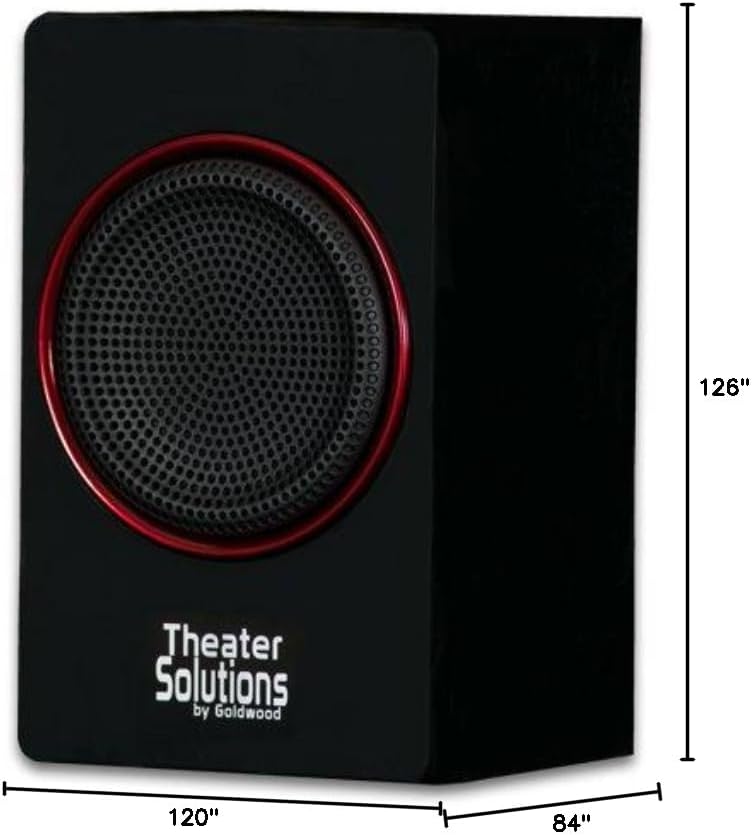
Image: Dimensions of the TS212 subwoofer.
| Fitur | Rincian |
|---|---|
| Nomer modél | TS212 |
| merek | Téater Leyuran |
| Konfigurasi Speaker | 2.1 Saluran |
| Daya Kaluaran Maksimum | 600 Watt (Puncak) |
| Téhnologi konektipitas | Auxiliary, Bluetooth, RCA, USB |
| Rentang Bluetooth | 10 méter |
| Mode Kaluaran Audio | Stereo |
| Diaméter Subwoofer | 10 inci |
| Satellite Speaker Size | 5.25 inci |
| Sumber Daya | Corded Electric (110V US Standard) |
| Item Beurat | 12 pon |
| Subwoofer Dimensions (D x W x H) | 84"D x 120"W x 126"H (Note: These dimensions appear to be for packaging or an illustrative image, actual product dimensions are typically smaller: Subwoofer 10.5" x 7" x 10", Satellites 6" x 3.75" x 3.5" each) |
| Alat nu cocog | Laptop, Pamuter MP3, Smartphone, Tablet, Televisi |
Garansi sareng Rojongan
This Theater Solutions TS212 by Goldwood speaker system comes with a Lifetime Warranty against manufacturer's defects. For warranty claims or technical support, please contact Goldwood Sound, Inc. or your authorized dealer. Please retain your proof of purchase for warranty validation.