
1. Bubuka
This manual provides essential instructions for the safe and efficient installation, operation, and maintenance of your COTEK SP-3000-148 High Frequency Pure Sine Wave Inverter. Please read this manual thoroughly before attempting any installation or operation to ensure proper use and to prevent potential hazards. Keep this manual for future reference.
2. Parentah Kasalametan
Salawasna perhatikeun pancegahan kaamanan di handap ieu pikeun ngirangan résiko kejutan listrik, seuneu, atanapi tatu:
- Baca sagala parentah: Before operating the inverter, read all instructions and cautionary markings on the inverter, the batteries, and all appropriate sections of this manual.
- tanaga mumpuni: All electrical work should be performed by qualified personnel familiar with battery and inverter systems and their installation.
- Ventilasi: Ensure adequate ventilation around the inverter. Do not install in a zero-clearance compartment.
- Hindarkeun Uap: Do not expose the inverter to rain, snow, spray, or bilge water.
- Pembumian anu leres: The inverter must be properly grounded.
- Kasalametan batré: Work in a well-ventilated area when working with batteries. Wear eye protection and protective clothing. Avoid touching eyes while working near batteries.
- Pegatkeun kakuatan: Before performing any maintenance or cleaning, disconnect all power to the inverter.

Image: Always use appropriate safety equipment when working with electrical systems.
3. Fitur Produk
The COTEK SP-3000-148 inverter offers the following key features:
- Output gelombang sinus murni pikeun éléktronika sénsitip.
- Power ON / OFF remote control capability via green terminal.
- Input & kaluaran pinuh isolasi pikeun kaamanan ditingkatkeun.
- Temperature & load controlled cooling fan for optimal performance and longevity.
- Antarbeungeut anu ramah-pangguna pikeun gampang dioperasikeun.
- Type 1 Indoor Aluminum Enclosure for durability and protection.
4. Produk Langkungview
The COTEK SP-3000-148 is a high-frequency pure sine wave inverter designed to convert 48VDC battery power into stable 120VAC electricity, suitable for a wide range of applications.

Gambar: Gemblengna view of the COTEK SP-3000-148 Pure Sine Wave Inverter.
4.1 Panel tukang
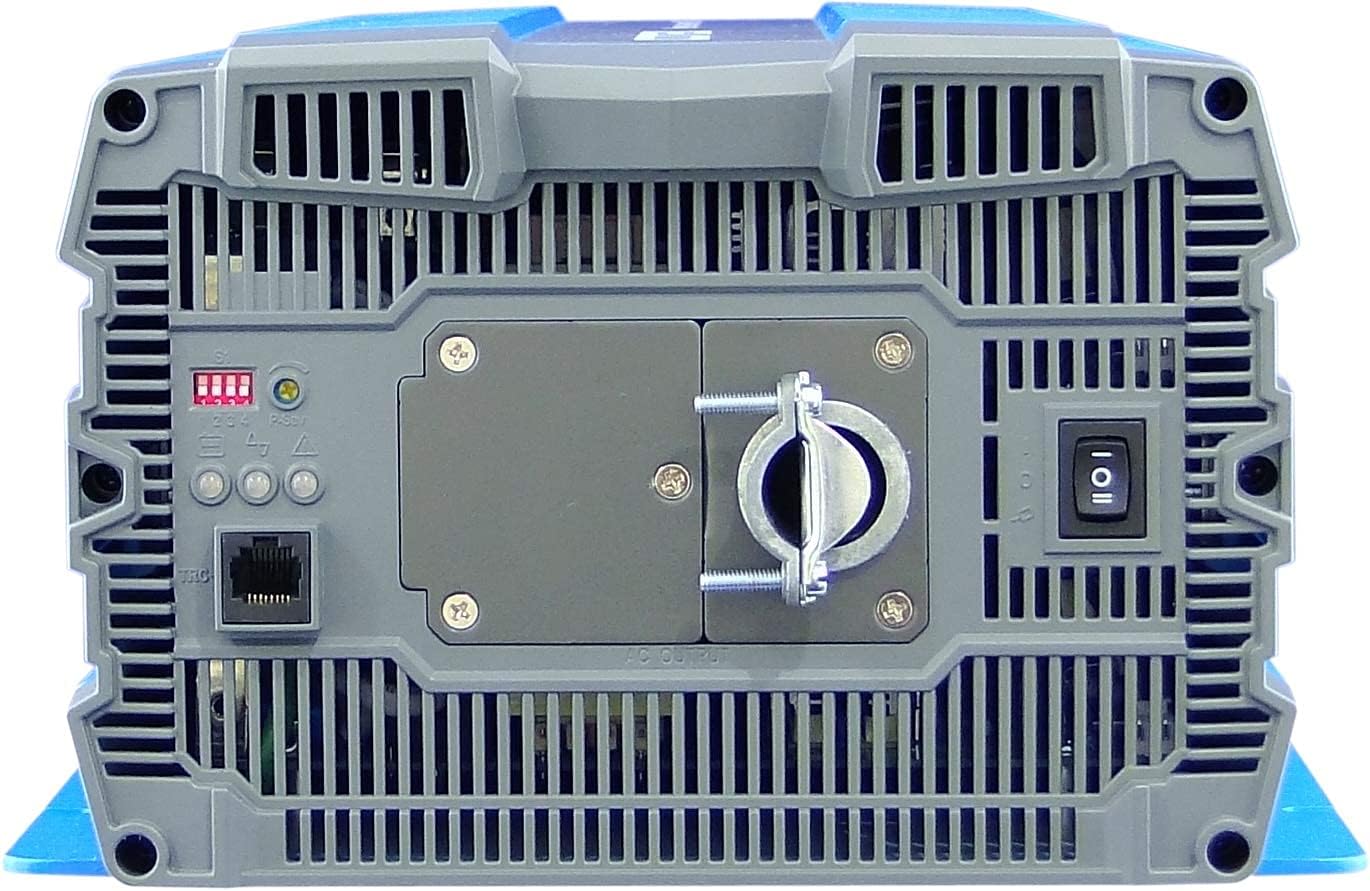
Image: Rear panel of the COTEK SP-3000-148 inverter.
- Terminal Kaluaran AC: Hardwire connection for 120VAC output.
- Saklar DIP: Used for configuring output voltage jeung frékuénsi.
- Remote Control Port (Green Terminal): For connecting an optional remote ON/OFF switch.
- Saklar kakuatan: Main ON/OFF switch for the inverter.
- Indikator LED: Display operational status and fault conditions.
4.2 Panel payun
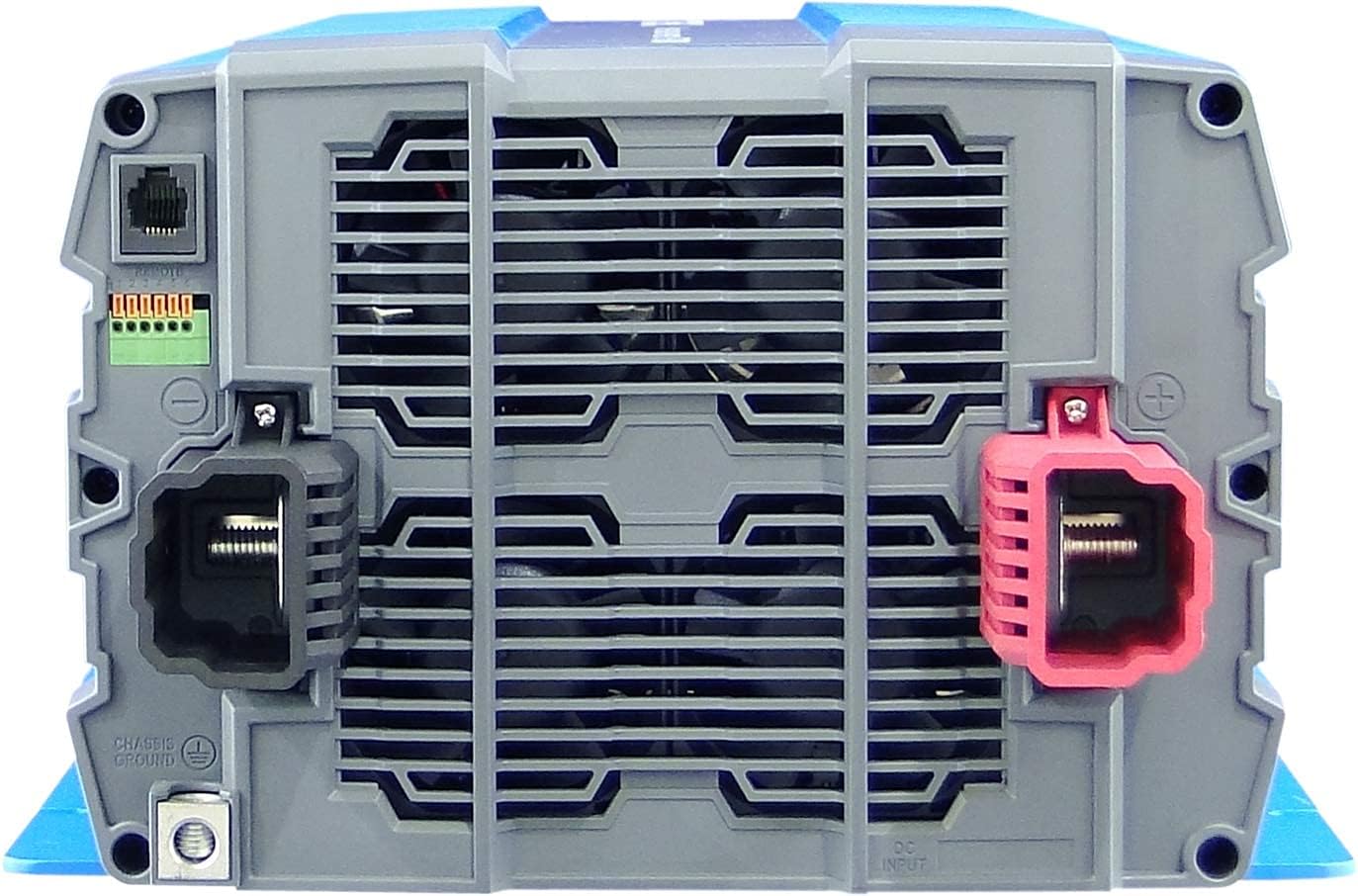
Image: Front panel of the COTEK SP-3000-148 inverter.
- Terminal Input DC: Positive (+) and Negative (-) terminals for 48VDC battery connection.
- Chassis Ground Terminal: For connecting the inverter to earth ground.
5. Pamasangan
Pamasangan anu leres penting pisan pikeun operasi anu aman sareng éfisién inverter anjeun.
5.1 Pamasangan
- lokasi: Choose a dry, well-ventilated area, away from direct sunlight, heat sources, and flammable materials.
- Orientasi: Mount the inverter horizontally on a flat, stable surface. Ensure adequate clearance around the unit for proper airflow.
- Pamasangan Aman: Use appropriate fasteners to securely mount the inverter to prevent movement or vibration.

Image: Mechanical drawings with dimensions for mounting the SP-3000 series inverter.
5.2 Kabel
Sadaya kabel kedah saluyu sareng kode listrik lokal sareng nasional.
5.2.1 DC Input Connection (48VDC)
- Connect the positive (+) terminal of the inverter to the positive terminal of your 48VDC battery bank.
- Connect the negative (-) terminal of the inverter to the negative terminal of your 48VDC battery bank.
- Use appropriately sized cables and fuses/breakers for the DC input circuit to prevent overcurrent.
5.2.2 AC Output Connection (120VAC Hardwire)
- Connect your AC loads to the hardwire AC output terminal block on the rear panel.
- Ensure proper polarity (Line, Neutral, Ground) for all AC connections.
- Consult a qualified electrician for hardwiring AC circuits.
5.2.3 Grounding
- Connect the chassis ground terminal on the inverter's front panel to a reliable earth ground.
- This connection is essential for safety and to minimize electrical noise.
5.2.4 Sambungan Kadali Jarak Jauh
- Connect an optional remote ON/OFF switch to the green terminal block on the rear panel.
- Refer to the remote control's specific instructions for wiring details.
6. Operasi
6.1 Powering on / Pareum
- Pikeun Ngahurungkeun: Ensure all connections are secure. Flip the main power switch on the rear panel to the 'ON' position. The LED indicators will illuminate to show operational status.
- Pikeun mareuman: Flip the main power switch to the 'OFF' position. If using a remote switch, ensure it is also in the 'OFF' position.
6.2 DIP Pindah Setélan
The DIP switches on the rear panel allow configuration of the inverter's output voltage and frequency. Refer to the diagram below for specific settings. Always power off the inverter before changing DIP switch settings.

Image: COTEK SP-3000 series specifications and DIP switch settings.
6.2.1 Kaluaran Voltage Pilihan
The inverter supports various output voltages (100V, 110V, 115V, 120V AC). Adjust DIP switches according to the desired output voltage as indicated in the specifications diagram.
6.2.2 Output Frequency Selection
The inverter can operate at 50Hz or 60Hz. Set the DIP switches to match the required frequency for your region or application.
6.2.3 Modeu Hemat Daya
The inverter features a power saving mode (High Efficiency). Refer to the diagram for enabling or disabling this feature via DIP switches.
6.3 Indikator LED
The inverter is equipped with LED indicators to display its operational status and alert you to potential issues. Consult the specifications diagram for a detailed explanation of each LED's meaning.
7. Pangropéa
Pangropéa rutin mastikeun umur panjang sareng operasi anu tiasa dipercaya tina inverter anjeun.
- beberesih: Periodically clean the exterior of the inverter with a dry cloth. Ensure ventilation openings are free from dust and debris. Do not use liquid cleaners.
- Sambungan: Regularly check all DC and AC connections for tightness. Loose connections can cause overheating and poor performance.
- Pamariksaan batré: Inspect your battery bank regularly for corrosion, damage, or signs of leakage.
8. Cara ngungkulan
The SP-3000-148 inverter includes several protection features. If the inverter stops operating or indicates a fault, refer to the table below for common issues and solutions.
| Masalah | Mungkin Cukang lantaranana | Solusi |
|---|---|---|
| Taya Kaluaran AC / Inverter Pareum | Main switch off, low battery voltage, overload, internal fuse. | Check power switch, charge batteries, reduce load, check DC input fuse. |
| Input Dina-Voltage Alarem | Batré voltage handap teuing. | Ngecas atawa ngaganti accu. |
| Input Leuwih-Voltage Alarem | Batré voltage luhur teuing. | Check charging system, ensure correct battery voltage. |
| Kaluaran Overload | Connected load exceeds inverter's capacity. | Kurangkeun beban total anu disambungkeun ka inverter. |
| Leuwih Suhu | Inverter overheating due to poor ventilation or excessive load. | Ensure adequate ventilation, reduce load, allow inverter to cool. |
| Sirkuit pondok | Short circuit detected on AC output. | Identify and clear the short circuit on the AC output wiring or load. |
9. Spésifikasi
The following table details the technical specifications for the COTEK SP-3000-148 Pure Sine Wave Inverter:
| Fitur | Spésifikasi |
|---|---|
| Modél | SP-3000-148 |
| AC Voltage | 120VAC (Selectable via DIP switch) |
| Peraturan AC | ± 5% |
| Dipeunteun Power | 3000W |
| Surge Power (1 Sec) | 6000W |
| Daya Kaluaran Maksimum (1 Menit) | 3450W |
| Bentuk gelombang kaluaran | Pure Sine Wave (THD<3% at nominal load) |
| Frékuénsi | 60Hz (Selectable via DIP switch) |
| DC Voltage | 48VDC |
| Voltage Rentang | 42.0 ~ 66.0VDC |
| Taya Beban Ayeuna | <1.0A @48VDC |
| Modeu Hemat Daya | <0.4A @48VDC |
| Efisiensi (Max.) | 92% |
| Input Dina-Voltage panyalindungan | 42.0 ± 0.5VDC |
| Input Dina-Voltage Alarem | 44.0 ± 0.5VDC |
| Input Dina-Voltage Pamulihan | 50.0 ± 0.5VDC |
| Input Leuwih-Voltage panyalindungan | 66.0 ± 1.0VDC |
| Input Leuwih-Voltage Pamulihan | 64.0 ± 1.0VDC |
| Kaluaran Overload | Shutdown output, restart to recover. |
| Kaluaran pondok | Shutdown output, restart to recover. |
| Leuwih Suhu | Shutdown output, auto-recovery after cooling. |
| DC Input Reverse Polaritasna | Ku sekering |
| Suhu Operasi | -20°C ~ +40°C |
| Suhu Panyimpenan. & Kalembaban | -30°C ~ +70°C, 10 ~ 95% RH |
| Ukuran (W x H x D) | 442 x 239 x 102.5 mm (17.4 x 9.4 x 4.0 inci) |
| Beurat | 8.2 kg (18.08 lbs) |
| Garansi | 2 Taun Produsén |
10. Émbaran jaminan
Inverter Gelombang Sinus Murni COTEK SP-3000-148 dilengkepan ku 2-Taun Garansi Produsén. This warranty covers defects in materials and workmanship under normal use. Please retain your proof of purchase for warranty claims. For detailed warranty terms and conditions, refer to the official COTEK warranty statement or contact customer support.
11. Rojongan Palanggan
If you encounter any issues not covered in this manual or require technical assistance, please contact COTEK customer support. Have your product model number (SP-3000-148) and purchase information ready when contacting support.