
Bubuka
Hatur nuhun pikeun meuliasing the Ezonetronics 1DIN Car Stereo, Model RM-CW9601. This unit features a 7-inch retractable touchscreen, Bluetooth connectivity, FM radio, and multimedia playback capabilities. This manual provides essential information for installation, operation, and maintenance to ensure optimal performance and user satisfaction. Please read this manual thoroughly before using the product.
Émbaran Kasalametan
- Entong ngoperasikeun unit dina cara anu ngaganggu anjeun tina nyetir. Salawasna prioritas kaamanan jalan.
- Ensure proper installation by a qualified professional to prevent damage to the unit or vehicle.
- Avoid exposing the unit to extreme temperatures, direct sunlight for prolonged periods, or moisture.
- Do not attempt to disassemble or modify the unit. This may void the warranty and pose safety risks.
- Tetep polumeu dina tingkat nu ngidinan Anjeun pikeun ngadéngé sora lalulintas éksternal.
Eusi pakét
Pastikeun yén sadaya item aya dina bungkusan:
- Ezonetronics 1DIN Car Stereo Unit (RM-CW9601)
- Kakuatan sareng Kabel Speaker Kabel
- Kadali jauh
- Manual pangguna (dokumén ieu)
- Mounting Accessories (brackets, screws)
- Optional: Rearview Kaméra (upami kalebet dina pakét khusus anjeun)
Produk Leuwihview
The Ezonetronics RM-CW9601 features a single DIN chassis with a motorized retractable 7-inch touchscreen display. The front panel includes essential controls and ports for easy access.

Gambar 1: Hareupeun view of the Ezonetronics RM-CW9601 car stereo, illustrating the 7-inch screen in both retracted and extended positions, along with front panel controls and ports.
Kontrol sareng Port Panel Hareup:
- Tombol Kakuatan / Mode: Press to turn on/off, short press to change mode.
- Jilid Kenop: Puterkeun pikeun nyaluyukeun volume. Pencét pikeun nganonaktipkeun/ngahapus sora.
- Port USB: Pikeun playback média ti drive USB.
- Slot Kartu SD: For media playback from SD cards.
- Input AUX: 3.5mm jack pikeun alat audio éksternal.
- Tombol Reset: Tombol leutik pikeun ngareset unit (merlukeun obyek anu nunjuk).
- Screen Retract/Extend Button: Controls the motorized screen movement.
Disetél
1. Pamasangan
The RM-CW9601 is designed for a standard 1DIN car stereo opening. Professional installation is highly recommended. Ensure the vehicle's battery is disconnected before starting installation.
- Cabut stereo mobil anu aya tina dasbor.
- Connect the wiring harness to the vehicle's wiring.
- Secure the unit into the dashboard using the provided mounting brackets and screws.
- Reconnect the vehicle's battery and test the unit.
2. Wiring Diagram (General)
Refer to the detailed wiring diagram included with your product packaging for specific connections. Below are common connections:
- Kawat konéng: Konstan 12V (Batre)
- Kawat beureum: Switched 12V (Aksesori/Ignition)
- Kawat Hideung: taneuh
- Kawat Oranyeu: Illumination (Optional)
- Kawat Biru: Anteneu Kakuatan / Amplifier Jauh Hurungkeun
- Kabel Speaker: Connect to vehicle speakers (e.g., White/White-Black for Front Left, Grey/Grey-Black for Front Right, Green/Green-Black for Rear Left, Purple/Purple-Black for Rear Right).
- Input Kaméra Mundur: Connect to the rearview camera video output and reverse trigger wire.
- Input Kontrol Setir: Connect to vehicle's steering wheel control wires (if applicable).

Gambar 2: Illustration of USB connection points, relevant for media input and smartphone integration.
Parentah Operasi
1. Operasi dasar
- Hurungkeun/Pareuman: Pencét tombol daya dina panel hareup atawa dina remot kontrol.
- Penyesuaian volume: Rotate the volume knob or use the remote control.
- Pilihan Mode: Short press the power/mode button to cycle through available modes (Radio, USB, SD, Bluetooth, AUX, CarPlay/Android Auto).
- Kontrol layar: Use the dedicated button to retract or extend the 7-inch display.
2. Fungsi Bluetooth
The unit supports Bluetooth for hands-free calling and wireless audio streaming.
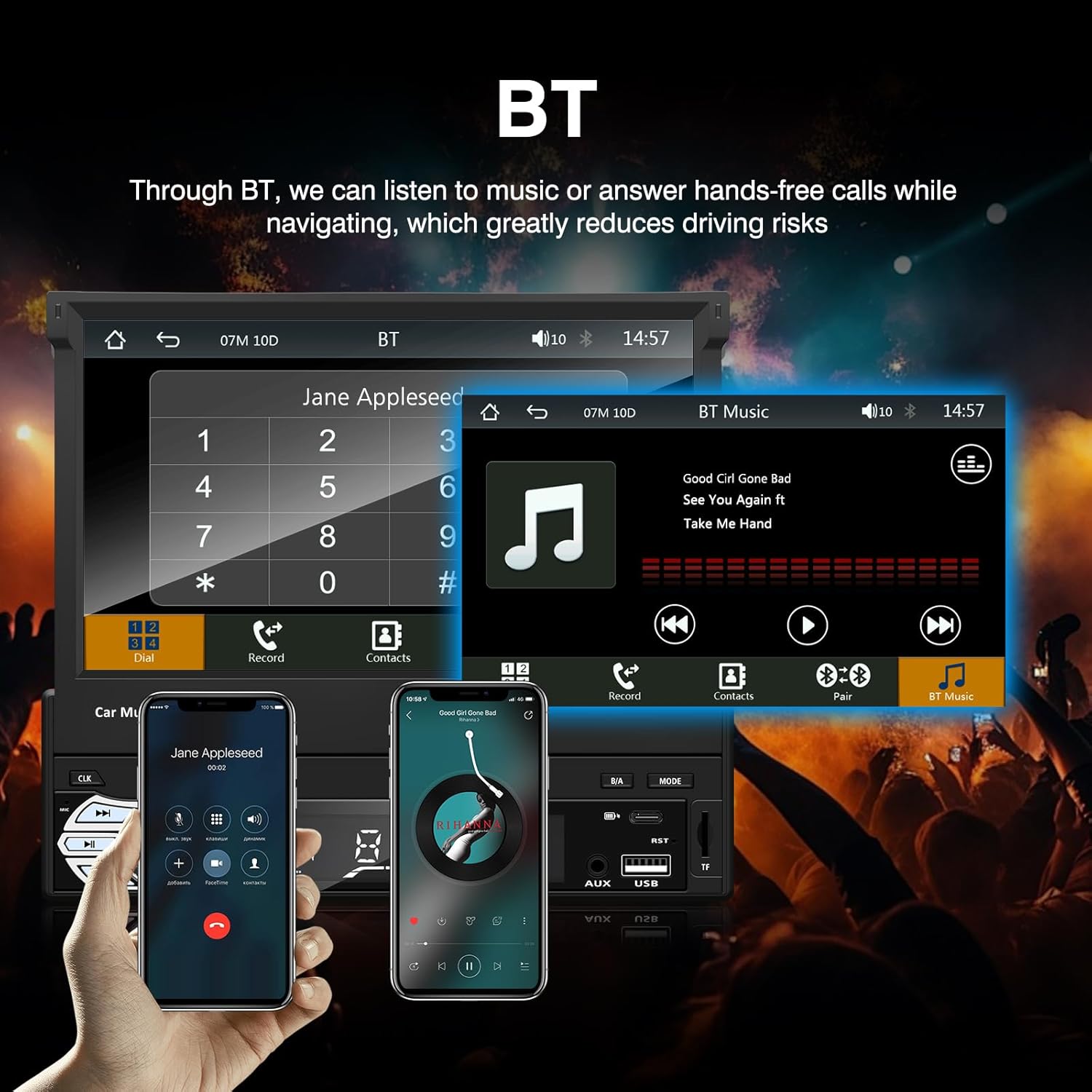
Gambar 3: Bluetooth interface for hands-free calls and music streaming, showing a dial pad and music controls.
- papasangan: Aktipkeun Bluetooth dina alat sélulér Anjeun. Milarian pikeun available devices and select "Ezonetronics" or similar. Enter PIN "0000" if prompted.
- Telepon Hand-Free: Once paired, you can make and receive calls directly through the car stereo. Use the touchscreen or remote to dial, answer, or end calls.
- Streaming Audio (A2DP): Play music from your paired device wirelessly. Control playback (play/pause, skip) from the car stereo or your device.
3. USB/SD Media Playback
Insert a USB drive or SD card into the respective slot. The unit will automatically switch to USB/SD mode and begin playing compatible media files.

Gambar 4: Icons indicating support for Bluetooth, Auxiliary input, TF (SD) Card, and USB connections for media playback.
- Supported formats include RM, RMVB, ASF, MKV, DIVX, MPEG4, AVI, VOB for video, and MP3/MP4 for audio.
- Napigasi ngaliwatan polder jeung files ngagunakeun panganteur layar rampa.
4. Radio FM
Access the FM radio mode to listen to local broadcasts.

Gambar 5: FM Radio interface with frequency display and equalizer settings for audio customization.
- Scan Otomatis: Automatically search and save strong stations.
- Tuning Manual: Fine-tune frequencies using the touchscreen.
- Prasetél: Save your favorite stations for quick access (up to 18 preset stations).
5. Apple CarPlay / Android Auto
Connect your compatible smartphone via USB to access Apple CarPlay or Android Auto features directly on the stereo's display.

Gambar 6: Wired Apple CarPlay interface, displaying phone applications like navigation, music, and messages on the car stereo screen.

Gambar 7: Wired Android Auto interface, displaying Android applications like Google Maps, Spotify, and phone calls on the car stereo screen.
- Ensure your phone has CarPlay or Android Auto enabled.
- Use a high-quality USB cable for a stable connection.
- Access navigation, music, messages, and other compatible apps safely while driving.
6. Tautan Eunteung
Mirror Link allows you to display your smartphone's screen content directly onto the car stereo's display via a USB data cable.

Gambar 8: Mirror Link function demonstrating a smartphone screen being projected onto the car stereo display.
- Sambungkeun smartphone anjeun ka port USB nganggo kabel data.
- Turutan parentah dina-layar dina stereo jeung telepon Anjeun pikeun nyieun sambungan.
- Note: Functionality may vary depending on your smartphone model and operating system.
7. Tukangeunview Input kaméra
When a rearview camera is connected and the vehicle is shifted into reverse, the stereo automatically displays the camera feed.

Gambar 9: Reversing display showing the view from a rearview camera with parking assistance lines, providing an intuitive aid for parking.
- Pastikeun pungkurview camera is properly installed and connected to the dedicated input.
- The display will automatically switch to the camera view when the reverse gear is engaged.
8. Kontrol Setir
The unit supports connection to your vehicle's existing steering wheel controls for convenient operation. Refer to your vehicle's manual and the stereo's wiring diagram for proper connection and configuration.
Pangropéa
- Ngabersihan layar: Anggo lawon anu lemes sareng henteu lint pikeun ngusap layar rampa. Ulah make cleaners abrasive atawa pangleyur.
- beberesih umum: Wipe the unit's exterior with a dry, soft cloth.
- Hindarkeun Cairan: Do not spray liquids directly onto the unit.
- Suhu: Avoid prolonged exposure to extreme heat or cold, which can affect the unit's lifespan.
Pamérésan masalah
| Masalah | Mungkin Cukang lantaranana | Solusi |
|---|---|---|
| Unit teu hurung. | kabel salah; sekering ditiup; Masalah batré kendaraan. | Check power connections (Yellow, Red, Black wires). Inspect vehicle fuses. Ensure battery is charged. |
| Taya sora. | Volume too low; Mute activated; Incorrect speaker wiring. | Naékkeun volume. Pariksa naha bisu aktip. Pariksa sambungan spiker. |
| Bluetooth teu nyambung. | Bluetooth not enabled on phone; Incorrect pairing process. | Ensure phone's Bluetooth is on and discoverable. Re-attempt pairing. |
| USB/SD media not playing. | Teu dirojong file format; Corrupted media; Drive/card not inserted correctly. | Cék file formats. Try a different USB drive/SD card. Ensure proper insertion. |
| Tukangeunview kaméra teu némbongan. | Kaméra teu nyambung; Kabel pemicu mundur teu nyambung. | Verify camera video input and reverse trigger wire connection. |
Upami masalah masih aya, konsultasi ka teknisi anu mumpuni atanapi hubungi dukungan palanggan.
spésifikasi
- merek: EZoneTronics
- Jumlah modél: RM-CW9601
- warna: Hideung
- layar: 7-inch Capacitive Touchscreen, Retractable
- Téknologi konektipitas: Bluetooth, USB, SD, AUX, RCA
- Bluetooth: Integrated Bluetooth 2.0 with A2DP/Hands-free
- Alat anu cocog: Smartphone
- Mode Kaluaran Audio: Stereo
- Video Encoding Support: RM, RMVB, ASF, MKV, DIVX, MPEG4, AVI, VOB
- Rojongan USB/SD: Up to 32GB max.
- Fitur husus: Touchscreen, Steering Wheel Control Support, Rear Camera Input, Apple CarPlay, Android Auto, Mirror Link
- Pabrikan: Rhythm Electronics Limited
Garansi sareng Rojongan
This product comes with a limited manufacturer's warranty.
- Main Unit Warranty: 12 months for defective items (excluding damaged or misused items after receipt).
- Asesoris Garansi: 3 months for accessories.
Pikeun klaim garansi atanapi dukungan téknis, mangga ngahubungi pangecér atanapi produsén anjeun sacara langsung. Simpen resi pameseran anjeun salaku bukti pameseran.