
1. Bubuka
Hatur nuhun pikeun meuliasing the iHome IB90 Bluetooth Headphones. These headphones are designed to provide rich, detailed sound with an enhanced bass response, offering a comfortable listening experience with wireless freedom and extended battery life. This manual will guide you through the setup, operation, and maintenance of your new headphones.
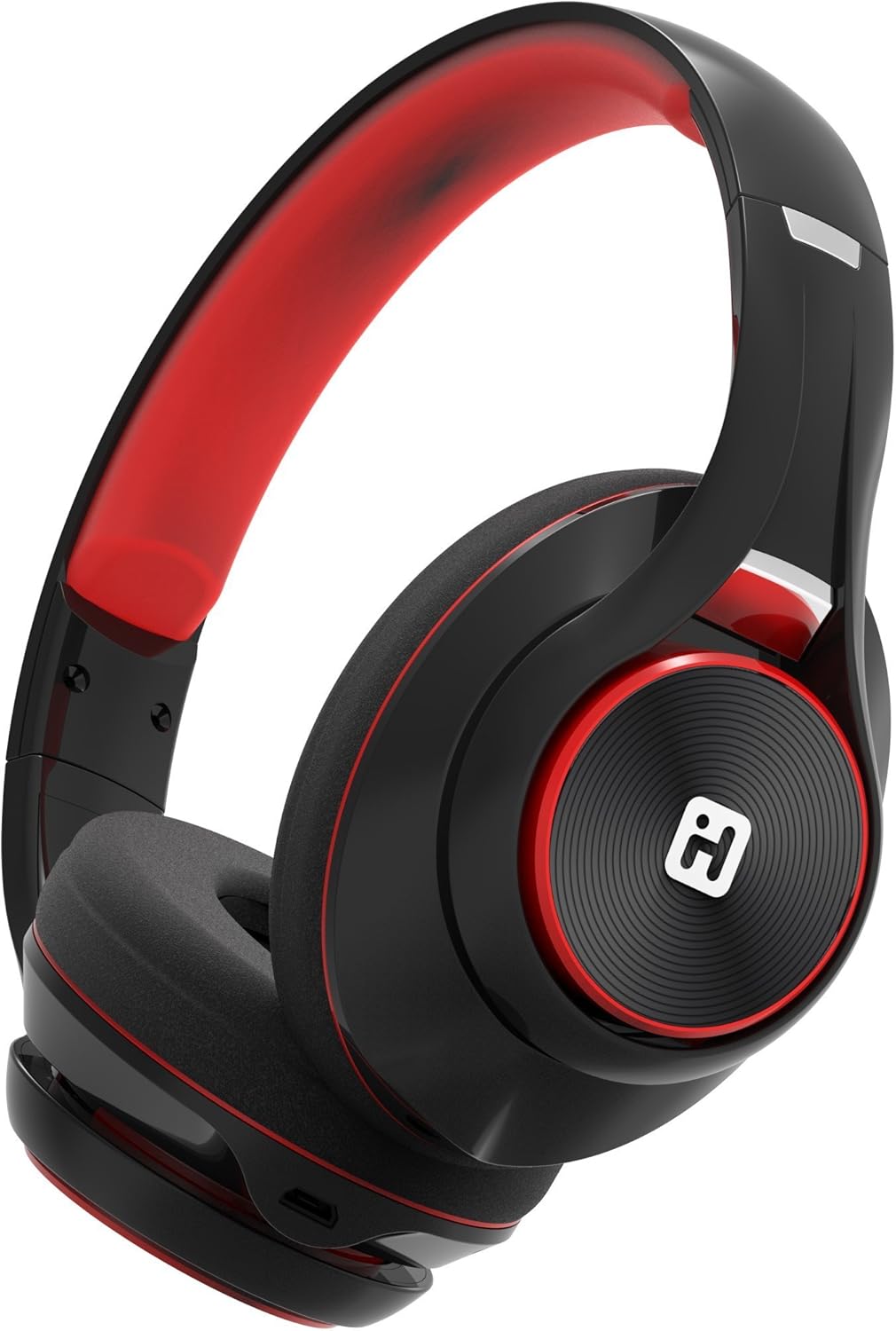
Image: iHome IB90 Bluetooth Headphones, featuring a comfortable over-ear design in black and red.
2. Eusi Paket
- iHome IB90 Bluetooth Headphones
- Audio Cable (for wired mode)
- USB Charging Cable (not explicitly listed but implied for rechargeable battery)
3. Setélan
3.1 Ngecas Headphone
Before initial use, fully charge your headphones. The extra-long life rechargeable battery provides up to 46 hours of continuous use on a single charge. A 10-minute charge can provide 1 hour of play when the battery is low.
- Sambungkeun kabel ngecas USB anu disayogikeun kana port ngecas dina headphone.
- Sambungkeun tungtung kabel USB anu sanés ka port USB anu didamel (contona, komputer, adaptor témbok).
- Lampu indikator ngecas bakal hurung nalika ngecas sareng pareum nalika dicas pinuh.
3.2 Nyapasangkeun Bluetooth
Pair your iHome IB90 headphones with your Bluetooth-enabled device to enjoy wireless audio.
- Pastikeun headphone dicas sareng dipareuman.
- Press and hold the Power/Bluetooth button on the headphones until the indicator light flashes, indicating pairing mode. Voice prompts will confirm Bluetooth connection status.
- On your device (smartphone, tablet, computer), go to the Bluetooth settings and enable Bluetooth.
- Select "iHome IB90" (or similar model name) from the list of available devices.
- Once connected, a voice prompt will confirm successful pairing, and the indicator light will change.
3.3 Melody Voice Assistant Setup
The iHome IB90 headphones are compatible with the free Melody voice-powered personal music assistant app, allowing you to control music from services like Spotify and iHeartRadio using voice commands. The voice control button on the earcup also works with Siri and Google Assistant.
Image: Melody Personal Music Assistant app logo.
- Download the Melody app from your device's app store (App Store for iOS, Google Play for Android).
- Open the Melody app and follow the on-screen instructions to set up your account and link your preferred music streaming services.
- Ensure your headphones are paired with your device.
- Use the voice control button on the earcup to activate Melody or your device's native voice assistant (Siri/Google Assistant) and issue commands.
Video: This video demonstrates the features and functionality of the Melody voice-powered personal music assistant, highlighting its integration with iHome products for hands-free music control and access to various streaming platforms.
4. Ngoperasikeun Headphone
4.1 On-Ear Remote Control
The earcup features convenient controls for managing your audio and calls:
- Puter / Reureuh: Press the designated button to play or pause audio.
- Pilihan Lagu: Use the track buttons to skip forward or backward.
- Kontrol volume: Saluyukeun polumeu nganggo tombol polumeu.
- Ngajawab / mungkas Telepon: The built-in echo-cancelling microphone allows for hands-free phone calls. Press the call button to answer or end a call.

Image: Close-up of the iHome IB90 headphone earcup, illustrating the location of control buttons.
4.2 Kontrol sora
Activate your personal voice assistant (Melody, Siri, or Google Assistant) by pressing the dedicated voice control button on the earcup. You can then use voice commands to:
- Play specific songs, artists, albums, or playlists.
- Check weather, set reminders, and make phone calls (via Siri/Google Assistant).
- Access music from various streaming platforms (via Melody app).
4.3 Modeu kabel
The headphones can also be used in wired mode with the provided audio cable, ensuring you can continue listening even if the battery is depleted. Simply connect the audio cable to the headphone's audio input and your device's audio output.
5. Pangropéa
5.1 beberesih
Pikeun ngajaga kaayaan headphone anjeun:
- Lap panutup ceuli sareng bandana nganggo lawon anu lemes sareng garing.
- Ulah nganggo pembersih abrasif, pangleyur, atanapi bahan kimia anu kasar.
- Ulah ngalelepkeun headphone kana cai, sabab éta henteu tahan cai.
5.2 Panyimpenan
When not in use, store your headphones in a cool, dry place away from direct sunlight and extreme temperatures. The foldable design allows for compact storage and portability.
6. Cara ngungkulan
If you encounter issues with your iHome IB90 headphones, refer to the following common solutions:
- Henteu aya kakuatan: Pastikeun headphone tos dicas pinuh. Sambungkeun kana sumber daya nganggo kabel ngecas USB.
- Teu Bisa Masangkeun via Bluetooth: Make sure the headphones are in pairing mode (flashing indicator light). Turn off and on your device's Bluetooth, then try re-pairing. Ensure the headphones are not already connected to another device.
- Henteu aya Sora atanapi Volume Lemah: Check the volume levels on both the headphones and your connected device. Ensure the headphones are properly paired. If using wired mode, ensure the audio cable is securely connected.
- Mikropon Teu Gawé: Verify that the headphones are properly connected via Bluetooth. Check your device's audio input settings to ensure the headphone microphone is selected.
- Kabocoran sora: The iHome IB90 headphones feature passive noise isolation, not active noise cancellation (ANC). While they provide an immersive sound environment, they may not completely block out all external noise, and some sound may be audible to others at higher volumes.
7. Spésifikasi
| Fitur | Rincian |
|---|---|
| merek | iHome |
| Nomer modél | IB90v2BRC |
| Panempatan Ceuli | Leuwih Ceuli |
| Faktor Bentuk | Dina Ceuli |
| Kontrol bising | None (Passive Noise Isolation) |
| Téhnologi konektipitas | Bluetooth |
| Téhnologi nirkabel | Bluetooth |
| Tipe Kontrol | Kadali jauh |
| Diwangun-Dina Media | Headphone |
| Item Beurat | 0.5 pon |
| Bahan Kandang | palastik |
| Mangpaat husus Pikeun Produk | Lalampahan |
| Tingkat Résistansi Cai | Henteu Tahan Cai |
8. Garansi jeung Rojongan
For warranty information and customer support, please refer to the documentation included with your product or visit the official iHome website. This manual does not contain specific warranty details.