
Salicru SLC 700 Twin Pro2 (699CA000001)
Salicru SLC 700 Twin Pro2 UPS User Manual
Model: SLC 700 Twin Pro2 (699CA000001) | Brand: Salicru
1. Bubuka
This manual provides essential information for the safe and efficient operation of your Salicru SLC 700 Twin Pro2 Uninterruptible Power System (UPS). This online double conversion UPS is designed to provide clean, stable, and reliable power to critical equipment, protecting against power outages, surges, and fluctuations. Please read this manual thoroughly before installation and operation.
2. Parentah Kasalametan
Always observe the following safety precautions to prevent injury and damage to the UPS or connected equipment.
- Ulah muka UPS casing. Henteu aya bagian anu tiasa dilayanan ku pangguna di jero. Rujuk sadayana jasa ka tanaga jasa anu mumpuni.
- Ulah masang UPS dina sinar panonpoé langsung, deukeut sumber panas, atawa di lingkungan nu kaleuleuwihan lebu, kalembaban, atawa zat corrosive.
- Pastikeun UPS disambungkeun ka stop kontak anu di-ground.
- Do not block ventilation openings. Adequate airflow is crucial for proper operation and to prevent overheating.
- In case of fire, use a CO2 or dry chemical extinguisher. Do not use water.
- Disconnect the UPS from the AC power source before cleaning or performing any maintenance.
- The UPS contains internal batteries. Do not dispose of the UPS or its batteries in fire. Batteries may explode.
- Battery servicing should be performed or supervised by personnel knowledgeable about batteries and the required precautions.
3. Eusi Paket
Pastikeun yén sadaya item aya dina bungkusan:
- Salicru SLC 700 Twin Pro2 UPS Unit
- Manual pangguna (dokumén ieu)
- Kabel listrik
- Kabel Komunikasi USB
- CD parangkat lunak (upami aya)
4. Produk Langkungview
4.1 Panel payun

Gambar 4.1: Hareupeun view of the Salicru SLC 700 Twin Pro2 UPS, showing the LCD display and control panel.
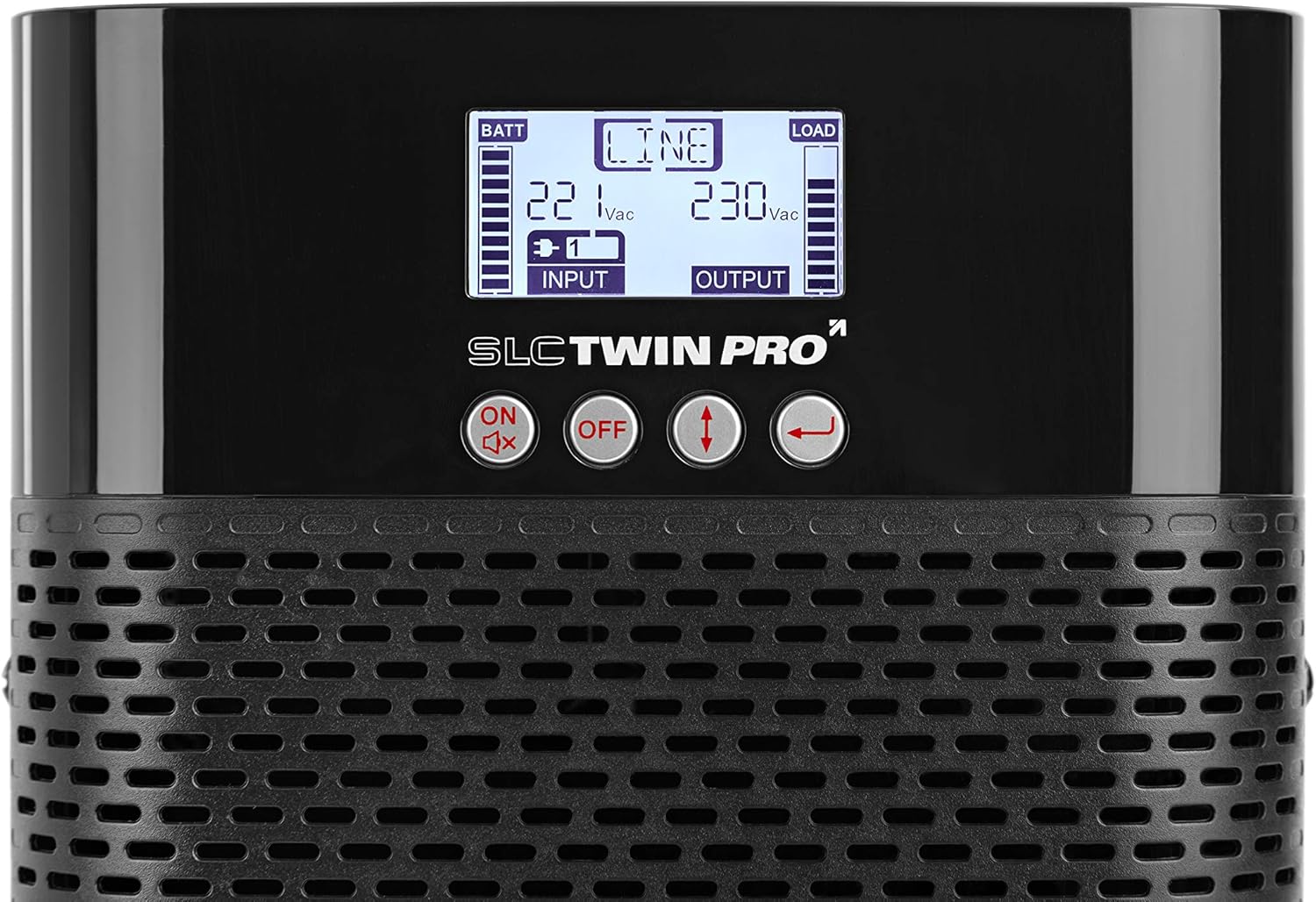
Gambar 4.2: Close-up of the LCD display and control buttons. The display shows battery status, input/output voltage, and load level. Buttons include ON/Mute, OFF, Up/Down arrows, and Enter.
- Layar LCD: Shows real-time UPS status, input/output voltage, battery level, load capacity, and various operational modes.
- Tombol kontrol:
- ON/Mute: Ngahurungkeun UPS atanapi mareuman alarm.
- Pareuman: Powers off the UPS.
- Panah luhur/handap: Navigate through LCD menu options.
- Lebetkeun: Konfirmasi pilihan atawa asupkeun sub-menu.
- Kisi-kisi Ventilasi: Ensures proper airflow for cooling the internal components.
4.2 Panel tukang

Gambar 4.3: Tukangeun view of the Salicru SLC 700 Twin Pro2 UPS, detailing the connection ports and cooling fan.
- Input AC: Power cord connection for incoming utility power.
- Sockets kaluaran AC: Outlets for connecting protected equipment.
- Breaker: Resettable circuit breaker for overload protection.
- Kipas pendingin: Dissipates heat from the unit.
- Port USB: Pikeun nyambungkeun ka komputer pikeun monitoring sarta manajemén software.
- Pelabuhan EPO (Daratan Daya Darurat): For remote emergency shutdown.
- Slot Calakan: For optional communication cards (e.g., SNMP card).
5. Setélan
5.1 Nempatkeun
Choose a suitable location for the UPS:
- Tempatkeun UPS dina permukaan anu datar sareng stabil.
- Ensure adequate clearance around the ventilation openings (front, sides, and rear) for proper airflow.
- Avoid areas with high humidity, extreme temperatures, or direct sunlight.
- Keep the UPS away from strong electromagnetic fields.
5.2 Nyambung kana Kakuatan
- Sambungkeun kabel daya anu disayogikeun ka Input AC port on the rear panel of the UPS.
- Colokkeun tungtung kabel listrik anu sanésna kana stop kontak témbok anu di-ground.
- Allow the UPS to charge its internal batteries for at least 8 hours before initial use to ensure full runtime capacity. The UPS will charge even if it is turned off.
5.3 Nyambungkeun Alat
Connect your critical equipment to the Sockets Kaluaran AC on the rear panel of the UPS. Ensure that the total power consumption of all connected devices does not exceed the UPS's capacity (700VA / 630W).
- Connect computers, monitors, network devices, and other sensitive electronics.
- Do not connect laser printers or other high-surge current devices to the UPS output, as this may overload the unit.
6. Operasi
6.1 Turning On the UPS
- Ensure the UPS is connected to AC utility power.
- Pencét jeung tahan tombol ON/Ngajempékeun button on the front panel for approximately 2 seconds until you hear a beep.
- UPS bakal ngalakukeun uji mandiri, teras tampilan LCD bakal hurung, nunjukkeun status ayeuna.
6.2 Turning Off the UPS
- If the UPS is supplying power to connected devices, ensure they are properly shut down.
- Pencét jeung tahan tombol Pareum button on the front panel for approximately 2 seconds until you hear a beep.
- The UPS will shut down, and the LCD display will turn off.
- To completely remove power, disconnect the power cord from the wall outlet.
6.3 Émbaran Témbongkeun LCD
The LCD display provides real-time operational status. Use the Up/Down arrow buttons to cycle through different information screens.
| Indikator | Katerangan |
|---|---|
| BATT | Tingkat ngeusi batre. |
| GARIS | Indicates the UPS is operating on utility power (Online mode). |
| MUAT | Output load level. |
| Masukan Voltage | Current incoming AC voltage. |
| Kaluaran Voltage | Current outgoing AC voltage supplied by the UPS. |
| Mode batré | Indicates the UPS is operating on battery power during an outage. |
| Modeu Bypass | Indicates the UPS is supplying utility power directly to the load, bypassing the inverter. |
7. Pangropéa
Pangropéa anu leres mastikeun umur panjang sareng kinerja optimal UPS anjeun.
- Perawatan batré:
- Recharge the batteries every 3 months if the UPS is not in use to prevent battery degradation.
- Perform a battery calibration (if supported by software) annually to ensure accurate runtime estimates.
- Batteries typically last 3-5 years. Contact qualified service personnel for battery replacement.
- beberesih:
- Use a soft, dry cloth to clean the exterior of the UPS.
- Entong nganggo pembersih cair atanapi aerosol.
- Bersihkeun kisi-kisi ventilasi sacara berkala pikeun nyegah ngumpulna lebu.
- Panyimpenan:
- If storing the UPS for an extended period, ensure the batteries are fully charged.
- Simpen dina tempat anu tiis, garing.
- Recharge the batteries every 3 months during storage.
8. Cara ngungkulan
This section addresses common issues you might encounter with your UPS. If the problem persists, contact technical support.
| Masalah | Mungkin Cukang lantaranana | Solusi |
|---|---|---|
| UPS teu hurung. | No AC input power; Low battery; UPS fault. | Check power cord connection and wall outlet. Allow batteries to charge. If problem persists, contact support. |
| UPS berbunyi bip terus. | On battery mode; Overload; Battery fault. | Check if utility power is present. Reduce connected load. Check battery status on LCD. |
| UPS goes to battery mode frequently. | Unstable utility power; Sensitivity setting too high. | Check utility power quality. Adjust UPS input voltage sensitivity via software (if available). |
| Runtime batré pondok. | Batteries not fully charged; Old batteries; Overload. | Allow batteries to fully charge. Consider battery replacement if old. Reduce connected load. |
9. Spésifikasi
Key technical specifications for the Salicru SLC 700 Twin Pro2 UPS.
| Fitur | Rincian |
|---|---|
| Nomer modél | 699CA000001 |
| merek | SALICRU |
| Dimensi produk | 35.6 x 14.4 x 22.8 cm |
| Item Beurat | 9.3 kg |
| Kapasitas Daya Kaluaran | 700 VA / 630 W |
| Masukan Voltage | 220 V |
| Kaluaran Voltage | 230 V |
| Peunteun ayeuna | 2 Amps |
| Faktor Bentuk | munara |
| Tipe Panyambung | ATX, EPS, USB |
| Batré Diperlukeun | 1 batré Litium Ion (kaasup) |
| Warna | Hideung |
| Téknologi | Konversi Ganda Online |
| Faktor Daya Kaluaran | 0.9 |
10. Garansi jeung Rojongan
For warranty information and technical support, please refer to the warranty card included with your product or visit the official Salicru websitus. Simpen resi pameseran anjeun salaku bukti pameseran pikeun klaim garansi.
Salicru Official Websitus: www.salicru.com
Ask a question about this manual
Ask about setup, troubleshooting, compatibility, parts, safety, or missing instructions. Manuals+ will review the question and use this page’s manual context to help answer it.