
DÖRR 204473
Dörr 204473 8 MP Snapshot IR TFT Trail Camera
Manual Parentah pangguna
Bubuka
Thank you for choosing the Dörr 204473 8 MP Snapshot IR TFT Trail Camera. This camera is designed for versatile surveillance, offering high-quality images and videos both day and night. Its robust, weatherproof design makes it ideal for outdoor use, capturing wildlife or monitoring property with its motion detection capabilities. Please read this manual carefully before operating the camera to ensure proper use and to maximize its performance.
Émbaran Kasalametan
- Ulah ngalaan kaméra kana suhu anu ekstrim atanapi sinar panonpoé langsung salami waktos anu lami.
- Ensure the battery compartment is securely closed to maintain water resistance.
- Use only recommended battery types (AA batteries). Do not mix old and new batteries, or different types of batteries.
- Jauhkeun kaméra tina médan magnét anu kuat.
- Entong nyobian ngabongkar atanapi ngarobih kaméra. Ieu bakal ngabatalkeun jaminan.
- Buang batré sareng komponén éléktronik sacara tanggung jawab dumasar kana peraturan lokal.
Produk Leuwihview
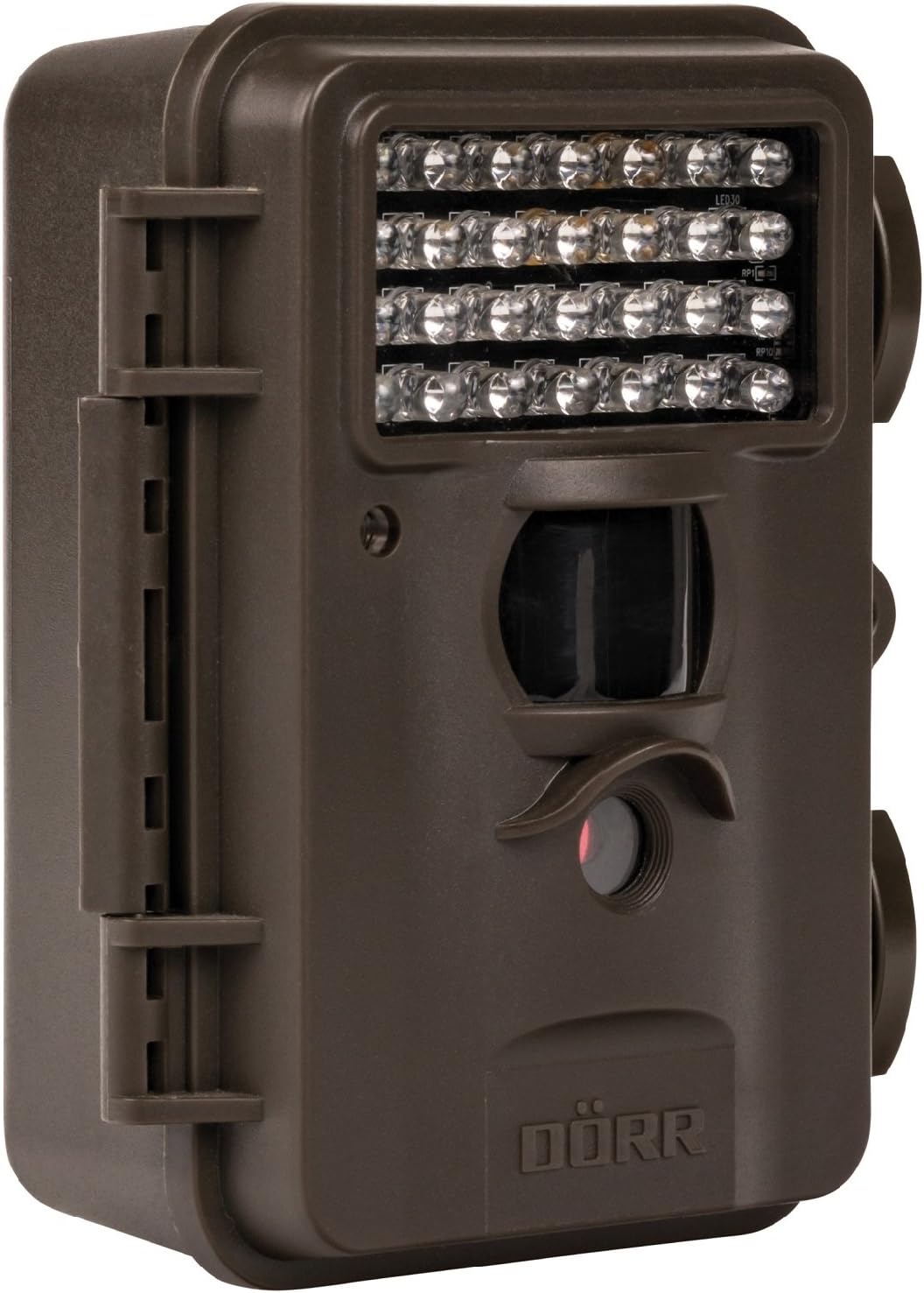
This image displays the front of the Dörr 204473 Trail Camera. Visible features include the array of 28 infrared LEDs at the top, the passive infrared (PIR) motion sensor below the LEDs, and the camera lens at the bottom. The camera has a rugged, dark brown, weatherproof casing with a latch on the left side.
The Dörr 204473 camera features a compact and durable design. Key components include:
- LEDs Infrabeureum: 28 nearly invisible LEDs for night illumination up to 15 meters.
- Sensor Gerak Pir: Detects movement to trigger photo or video capture.
- Lensa kaméra: Captures 8MP still images and video.
- TFT tampilan: Pikeun navigasi menu sareng viewing captured media (located inside the camera).
- Control Keypad: For setting up and operating the camera.
- Perumahan Tahan Cuaca: Protects the camera from environmental elements.
Disetél
1. Pamasangan batré
- Open the camera housing latch on the side.
- Panggihan kompartemen batré.
- Insert 4 or 8 AA batteries, ensuring correct polarity (+/-).
- Tutup panutup kompartemen batré aman.
2. Instalasi Kartu SD
- With the camera housing open, locate the SD/SDHC card slot.
- Insert an SD/SDHC memory card (up to 32 GB) into the slot until it clicks into place. Ensure the card is inserted in the correct orientation.
- Pikeun nyabut, dorong kartu ka jero dugi ka kaluar.
3. Masang kaméra
The camera can be mounted using a strap or a wall mount. Ensure the camera is positioned to capture the desired area without obstructions. The mounting type is wall mount.
- Pemasangan Tali: Selapkeun tali anu disayogikeun kana slot di tukang kaméra teras pageuhkeun kana tangkal atanapi tihang.
- Pamasangan témbok: Use appropriate screws and anchors (not included) to secure the camera to a wall or flat surface.
Parentah Operasi
1. Powering on / Pareum
- To power on, slide the power switch to the 'ON' position.
- Pikeun mareuman, geser saklar daya ka posisi 'OFF'.
2. Menu Napigasi
Once powered on, the TFT display will activate. Use the keypad buttons (UP, DOWN, LEFT, RIGHT, OK, MENU) to navigate through the settings menu. The menu is available in English and German.
3. Nyetél Tanggal sareng Waktos
- Enter the menu and navigate to 'Date/Time' settings.
- Use the navigation buttons to set the current date and time.
- Confirm with 'OK'. Each captured image will display the time, date, and temperature in °C.
4. Photo/Video Modes and Settings
The camera supports both still image and video capture. Adjust settings such as resolution, trigger interval, and burst mode via the menu.
- Resolusi: Set to 8MP for still images.
- Waktu Pemicu: The camera has a fast trigger time of 1.3 seconds.
- Deteksi gerak: Configure the sensitivity of the PIR sensor.
- Visi Peuting: The 28 IR LEDs automatically activate in low light conditions for night vision up to 15 meters.
5. Viewing Files
Anjeun tiasa view captured photos and videos directly on the camera's TFT display or by connecting the camera to a computer via USB (cable not included) or by inserting the SD card into a card reader.
Pangropéa
- beberesih: Use a soft, dry cloth to clean the camera lens and housing. Do not use abrasive cleaners or solvents.
- Perawatan batré: Cabut batré upami kaméra moal dianggo kanggo waktos anu panjang pikeun nyegah bocor.
- Panyimpenan: Simpen kaméra di tempat anu tiis, garing, sareng jauh tina sinar panonpoé langsung nalika henteu dianggo.
Pamérésan masalah
| Masalah | Mungkin Cukang lantaranana | Solusi |
|---|---|---|
| Kaméra teu hurung | batré lemah atawa maot; polaritasna batré salah. | Ganti batré; mastikeun polaritasna bener. |
| Teu aya gambar/video anu direkam | SD card full or not inserted correctly; motion sensor blocked or sensitivity too low. | Insert/replace SD card; format SD card; clear sensor path; increase sensor sensitivity. |
| Poor image quality at night | Subject too far from camera; IR LEDs obstructed. | Ensure subject is within 15m range; clear any obstructions from IR LEDs. |
| Camera not detecting motion | PIR sensor sensitivity too low; camera positioned incorrectly. | Increase PIR sensitivity; reposition camera for optimal detection angle. |
spésifikasi
| Fitur | Rincian |
|---|---|
| merek | DÖRR |
| Nomer modél | 204473 |
| Resolusi Masih Éféktif | 8 MP |
| Resolusi Video Éféktif | 8 MP |
| Wengi Sawangan Sawangan | 15 méter |
| Jumlah IR LEDs | 28 |
| pemicu Time | 1.3 detik |
| Panyimpenan | SD/SDHC Memory Card (up to 32 GB) |
| Sumber Daya | 4x or 8x AA Batteries |
| Warna | Hideung |
| Bahan | logam |
| Ukuran barang (L x W x H) | 10 x 7 x 12.2 cm |
| Tingkat Résistansi Cai | Tahan cai |
| Tipe Pamasangan | Tembok Gunung |
| Aplikasi anu disarankeun | Deteksi Gerakan, Visi Peuting |
Garansi sareng Rojongan
For warranty information and technical support, please refer to the documentation provided with your purchase or visit the official Dörr websitus. Simpen bukti pameseran anjeun pikeun klaim garansi.
Ask a question about this manual
Ask about setup, troubleshooting, compatibility, parts, safety, or missing instructions. Manuals+ will review the question and use this page’s manual context to help answer it.