
ADE WS1703
ADE Professional Wireless Digital Weather Station
User Manual - Model WS1703
Bubuka
Thank you for choosing the ADE Professional Wireless Digital Weather Station, Model WS1703. This device combines a precise weather forecast station, indoor and outdoor thermometer, hygrometer, and barometer, all housed in a stylish genuine bamboo and high-quality ABS plastic casing. This manual provides detailed instructions for setup, operation, and maintenance to ensure optimal performance and longevity of your weather station.

Gambar 1: ADE Professional Wireless Digital Weather Station main unit and outdoor sensor.
This image shows the main weather station unit with its large color display and a separate white outdoor sensor. The main unit features a bamboo frame, displaying various weather parameters like outdoor and indoor temperature, humidity, moon phase, and barometric pressure.
Eusi pakét
Mangga parios eusi pakét taliti. Upami aya barang anu leungit atanapi rusak, hubungi pangecér anjeun.
- ADE Professional Wireless Digital Weather Station (Main Unit)
- Sénsor luar Wireless
- Adaptor Daya AC
- 4 x Batré AAA (pikeun unit utama sareng sénsor)
- Manual pangguna (dokumén ieu)
Disetél
1. Powering Unit Utama
The main unit can be powered by either the included AC power adapter for continuous display illumination or by batteries for portable use.
- Daya AC: Connect the AC power adapter to the DC input port on the back of the main unit, then plug the adapter into a standard wall outlet. The display will light up immediately.
- Daya Batré: Open the battery compartment on the back of the main unit. Insert 2 x AAA batteries (included), observing the correct polarity (+/-). Close the compartment. The display will illuminate for 15 seconds when a button is pressed.
2. Masang Batré dina Sensor Luar Ruangan
The outdoor sensor requires batteries for operation.
- Buka kompartemen batré di tukang sensor luar ruangan.
- Insert 2 x AAA batteries (included), observing the correct polarity (+/-).
- Tutup kompartemen anu aman.

Gambar 2: Powering the main unit and outdoor sensor. This image illustrates the options for powering the weather station: either via an AC adapter for continuous operation or with batteries for portable use. It also shows the battery installation for the outdoor sensor.
3. Sensor Placement and Synchronization
Place the outdoor sensor in a shaded, dry location away from direct sunlight and precipitation to ensure accurate readings. The sensor has a range of up to 60 meters (200 feet) from the main unit.
- Ensure the main unit and outdoor sensor are within effective range of each other.
- The main unit will automatically attempt to connect with the outdoor sensor upon power-up. This may take a few minutes.
- Once connected, the outdoor temperature and humidity will appear on the main unit's display. If connection fails, try repositioning the sensor or pressing the 'Sensor' button on the main unit (if available) to initiate a manual search.
Parentah Operasi
Paparan Liwatview
The large LED color display provides a comprehensive overview of all weather data and time information.

Gambar 3: Key functions and display areas. This image highlights various sections of the weather station's display, including outdoor temperature, indoor temperature, humidity, barometric pressure, moon phases, date, time, and animated weather forecasts.
- Suhu & Kalembaban Luar: Displays current readings from the wireless sensor. Includes Min/Max memory.
- Suhu jero rohangan & kalembaban: Displays current readings from the main unit's internal sensors. Includes Min/Max memory.
- Animated Weather Forecast: Icons indicate sunny, partly cloudy, cloudy, rain, heavy rain/thunderstorm, heavy snowfall. Includes a trend indicator.
- Tekanan Barometric: Shows current atmospheric pressure and a 12-hour history graph.
- Waktos & Tanggal: Radio-controlled clock (DCF) with perpetual calendar, day of the week (in 8 languages), and moon phases.
- Alarm Ibun: An indicator for potential frost conditions.
Nyetel waktos sareng kaping
The weather station features a radio-controlled clock (DCF) that automatically synchronizes the time and date. Manual adjustment is also possible.

Gambar 4: Radio-controlled clock and manual settings. This image illustrates the radio-controlled time synchronization feature and highlights the snooze button and adjustable backlight.
- Upon initial power-up, the unit will attempt to receive the DCF signal. This may take several minutes or hours depending on your location.
- If the signal is weak or unavailable, you can manually set the time, date, and language using the buttons on the back of the unit (refer to the detailed manual for specific button functions).
Alarm sareng Fungsi Snooze
Stasion cuaca ngawengku jam alarm kalayan fitur snooze.
- Press the 'ALARM' button (or similar, refer to detailed manual) to set the alarm time.
- When the alarm sounds, press the 'SNOOZE' button to temporarily silence it for a few minutes.
- To turn off the alarm, press any other button or let it sound for a set duration.
Suhu Alarm
You can set programmable upper and lower limits for outdoor temperature alarms.
- Consult the detailed manual for instructions on setting temperature alarm thresholds.
- An audible alert will sound if the outdoor temperature exceeds or falls below your set limits.
Témbongkeun Lampu Latar
The display backlight behavior depends on the power source.
- Daya AC: The display backlight is permanently on with 3 adjustable brightness levels (full, low, off).
- Daya Batré: The backlight illuminates for 15 seconds when any button is pressed to conserve battery life.
Pangropéa
- beberesih: Lap unit utama sareng sénsor ku kaén anu lemes,amp lawon. Ulah make cleaners abrasive atawa pangleyur.
- Ngagantian batré: Replace batteries in both the main unit and outdoor sensor when the low battery indicator appears on the display, or if performance degrades. Always replace all batteries at the same time with new ones of the same type.
- Perawatan sénsor: Ensure the outdoor sensor's ventilation openings are clear of dust and debris. Periodically check its placement to ensure it remains protected from direct weather elements.
Pamérésan masalah
| Masalah | Mungkin Cukang lantaranana | Solusi |
|---|---|---|
| Teu aya pangukuran suhu/kaleuleuwihan di luar ruangan. |
|
|
| Lepat waktos/tanggal. |
|
|
| Display is dim or blank (on battery power). |
|
|
spésifikasi
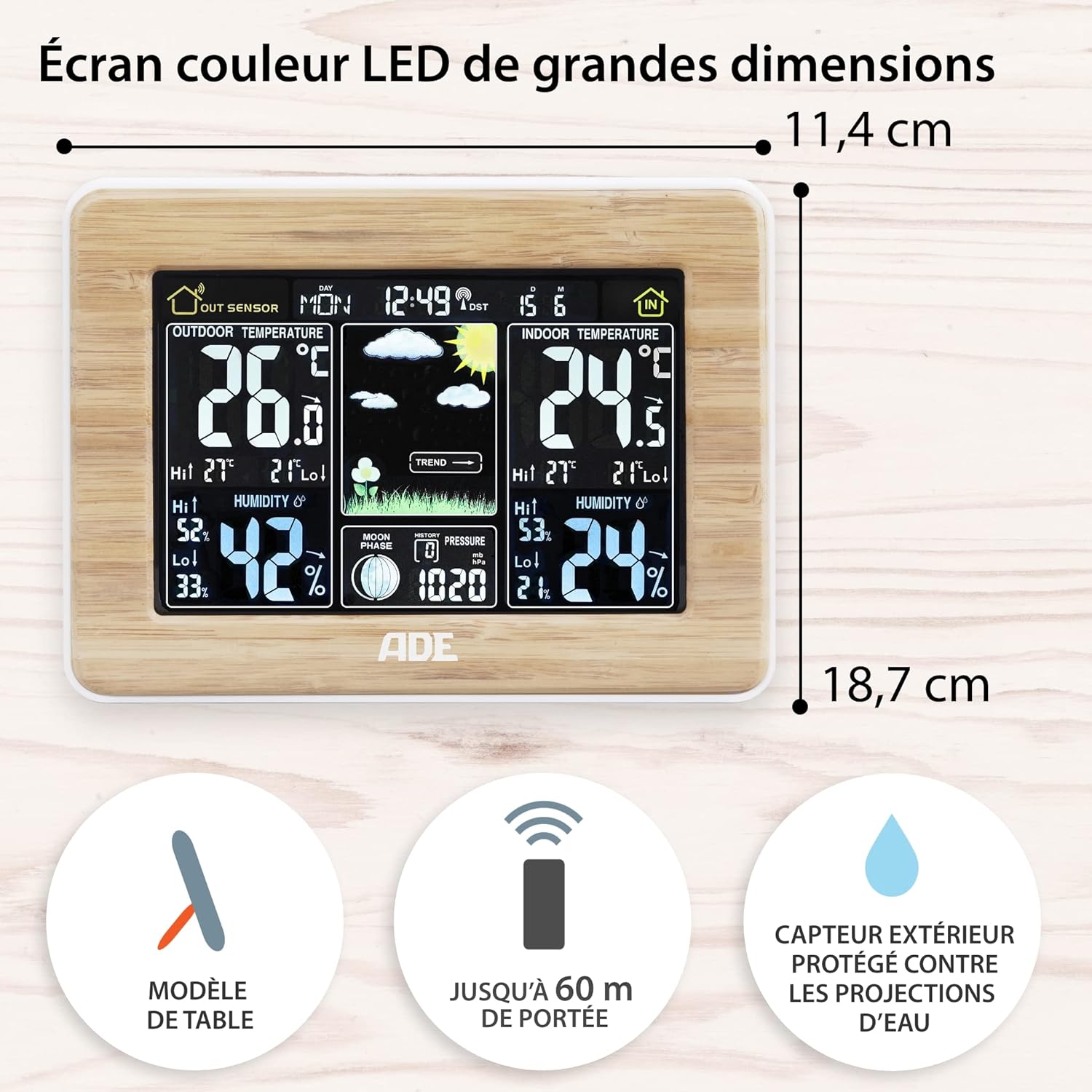
Gambar 5: Main unit dimensions and sensor range. This image shows the dimensions of the main weather station unit and highlights the outdoor sensor's 60m range and splash-proof design.
- model: WS1703
- Main Unit Dimensions (L x W x H): 16.5 x 22 x 5.3 cm (6.5 x 8.7 x 2.1 inci)
- beurat: 300 gram (kira-kira.)
- Bahan: Genuine Bamboo and ABS Plastic
- Sumber Daya (Unit Utama): AC Power Adapter (included) or 2 x AAA Batteries (included)
- Sumber Daya (Sénsor Luar Ruangan): 2 x Batré AAA (kaasup)
- Rentang Sensor Luar Ruangan: Up to 60 meters (200 feet) in open area
- Suhu Témbong: ° C / ° F
- Kisaran asor: 20% - 95% RH
- Fitur husus: Animated Weather Forecast, 12-hour Barometric Pressure History, Min/Max Temperature & Humidity Memory, Radio-Controlled Clock (DCF), Alarm with Snooze, Perpetual Calendar, Moon Phases, Frost Alarm, Adjustable Backlight.
Garansi sareng Rojongan
Inpormasi Garansi: This product is covered by a manufacturer's warranty. Please refer to the warranty card or documentation included with your purchase for specific terms and conditions. Retain your proof of purchase for warranty claims.
Rojongan Palanggan: For technical assistance, troubleshooting, or inquiries regarding your ADE Professional Wireless Digital Weather Station, please contact the retailer where you purchased the product or visit the official ADE websitus pikeun sumber rojongan.
While this manual provides comprehensive guidance, additional support may be available through online FAQs or direct contact with the manufacturer.
Ask a question about this manual
Ask about setup, troubleshooting, compatibility, parts, safety, or missing instructions. Manuals+ will review the question and use this page’s manual context to help answer it.