
Bubuka
The Wilfa Precision Automatic Coffee Brewer WSP-1B is designed to deliver an optimal coffee brewing experience. This manual provides detailed instructions for setting up, operating, and maintaining your coffee brewer to ensure consistent, high-quality results. Key features include precise temperature and water control, a detachable water tank, and adjustable flow control to customize your brew.
Produk Leuwihview
Familiarize yourself with the components of your Wilfa Precision Automatic Coffee Brewer.

Gambar 1: Component Diagram of the Wilfa Precision Automatic Coffee Brewer.
- Saklar on/off
- tank cai removable
- Coffee jug (carafe)
- Panyekel saringan
- Kontrol aliran sareng eureun netes
- Tombol ngamimitian / tetep haneut
- Kabel kakuatan sareng colokan
- Measuring spoon (5, 10, and 15g)
The brewer features a sleek design with a transparent, detachable water tank and a double-walled filter basket for optimal temperature during brewing.
Disetél
- Ngabongkar bungkusan: Carefully remove all components from the packaging. Ensure all parts listed in the Product Overview hadir.
- panempatan: Place the coffee brewer on a stable, flat, heat-resistant surface, away from water sources and direct heat.
- Bersihan awal: Before first use, wash the glass carafe, filter holder, and water tank with warm, soapy water. Rinse thoroughly and dry.
- Pamasangan Tangki Air: Ensure the detachable water tank is securely placed on its base.
- Siklus Brew Kahiji (Beresih): Fill the water tank to its maximum level with fresh, cold water. Do not add coffee. Place the empty filter holder and carafe in position. Run a full brew cycle to flush the system. Discard the water.

Gambar 2: The Wilfa Precision Automatic Coffee Brewer set up on a kitchen counter.
Parentah Operasi
- Tangki cai ngeusian: Remove the detachable water tank and fill it with fresh, cold water to the desired level. The tank has marked measurements for water to coffee ground ratio. Re-attach the water tank securely.
- Nyiapkeun saringan: Place a paper filter (or reusable filter if applicable) into the filter holder.
- Tambahkeun bubuk kopi: Add your desired amount of medium-ground coffee to the filter. For optimal results, use approximately 55 grams of coffee for 1 liter of water.
- Set Flow Control: Adjust the flow control dial on the filter holder to your preference. This allows you to control the brewing speed, mimicking a pour-over method. For a stronger brew, a slower flow rate can be selected. Ensure the drip stop is open for brewing.
- Mimitian Brewing: Press the start button. The brewer will heat water to the optimal temperature of 197º-205ºF and begin the brewing process.
- Fungsi tetep haneut: The hot warming plate will keep your coffee warm in the carafe after brewing is complete. The brewer automatically shuts off after one hour.

Gambar 3: Filling the detachable water tank with precise measurements.

Gambar 4: Adding coffee grounds to the double-walled filter basket.
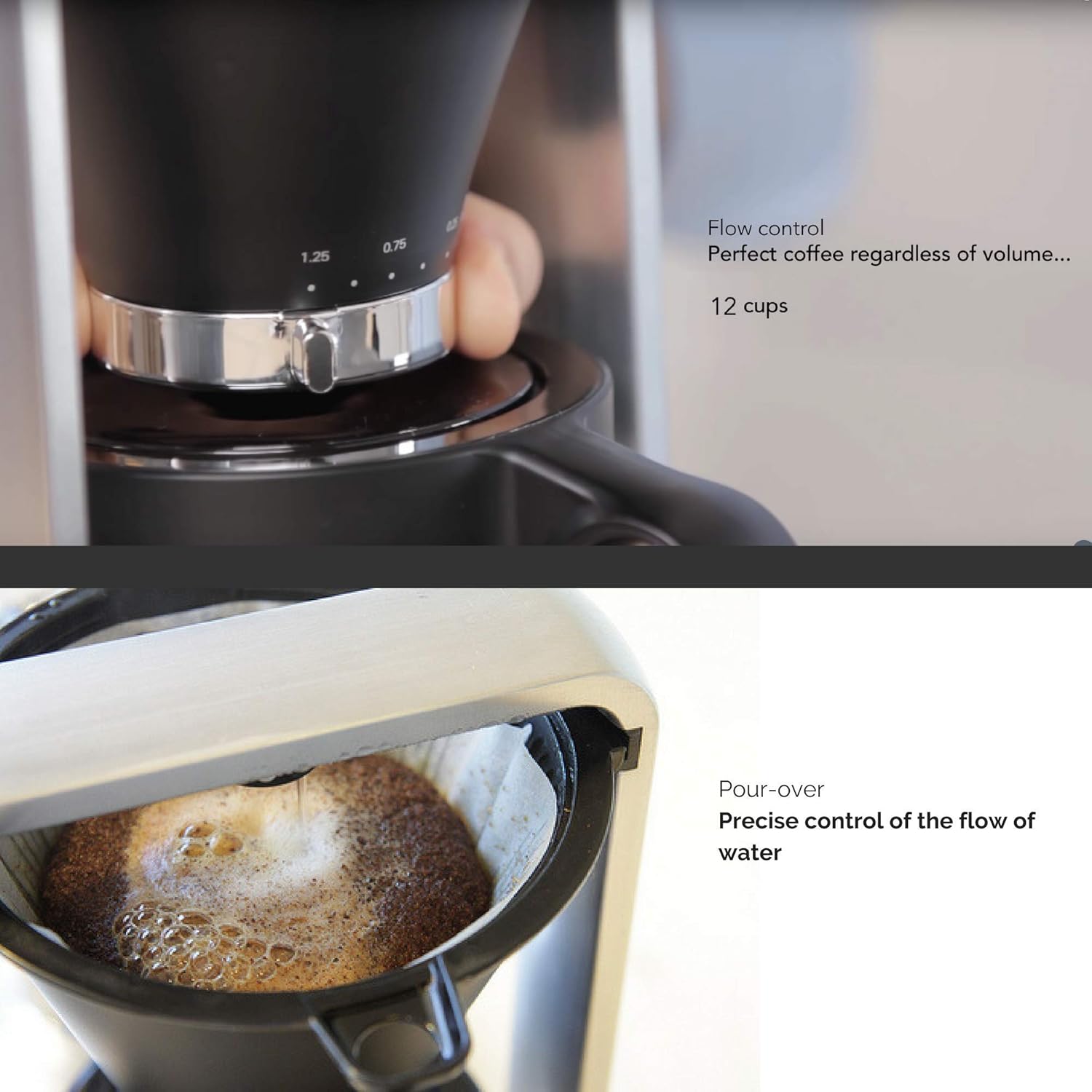
Gambar 5: Adjusting the flow control for customized brewing.
Pangropéa
- beberesih poean: After each use, discard used coffee grounds and filter. Wash the filter holder, glass carafe, and lid with warm, soapy water. The detachable water tank can also be easily cleaned. Rinse thoroughly and dry.
- Bersihan Luar: Ngusap bagian luar mesin kopi ku hipu, damp lawon. Ulah make cleaners abrasive atawa neuleumkeun unit utama dina cai.
- Turun: Depending on water hardness, descale the coffee maker regularly (e.g., every 1-3 months) to prevent mineral buildup. Use a commercial descaling solution suitable for coffee makers or a mixture of white vinegar and water (1:1 ratio). Follow the descaling product's instructions or run a brew cycle with the solution, then rinse by running several cycles with fresh water.
Pamérésan masalah
- Kopi Teu Diseduh:
- Pastikeun kabel listrik dicolokkeun sacara aman.
- Check if the water tank is properly seated and filled with water.
- Verify the start button has been pressed.
- Slow Brewing or Clogged Filter:
- Check the flow control setting; a slower setting will result in a longer brew time.
- Ensure the coffee grounds are not too fine, which can clog the filter.
- Descale the machine if mineral buildup is suspected.
- Cai bocor:
- Ensure the water tank is correctly positioned and not overfilled.
- Check that the filter holder and carafe are properly aligned.
- Coffee Tastes Weak or Too Strong:
- Adjust the coffee-to-water ratio.
- Experiment with the grind size of your coffee beans.
- Adjust the flow control setting to achieve desired strength.
spésifikasi
| Fitur | Rincian |
|---|---|
| merek | Wilfa |
| Nomer modél | WSP-1B |
| Kapasitas | 1.25 Liter (kira-kira 42 fl oz) |
| Warna | Hideung |
| Jenis Kopi Maker | Tuang Leuwih |
| Modeu Operasi | Pinuh Otomatis |
| Wattage | 1050 watt |
| Input Antarmuka Manusa | Layar cabak |
| Jenis Filter | Bisa dipaké deui |
| Item Beurat | 5 Pon (kira-kira 2.27 kg) |
| Bahan | Gelas (Karafe) |
| Komponén Kaasup | Teko, Saringan |
| Optimal Brewing Temperature | 197º-205ºF (91.6º-96.1ºC) |
Garansi sareng Rojongan
For warranty information and customer support, please refer to the documentation included with your purchase or visit the official Wilfa websitus. Simpen bukti pameseran anjeun pikeun klaim garansi.