
Bubuka
This manual provides detailed instructions for the setup, operation, maintenance, and troubleshooting of your Dual DT 450 manual turntable. Designed for optimal audio quality, this belt-driven turntable features a high-quality wooden housing, a balanced tonearm with adjustable tracking force, and an integrated switchable phono pre-amplifier. Please read these instructions carefully before using your turntable to ensure proper function and longevity.
Produk Leuwihview
The Dual DT 450 turntable is engineered to deliver an exceptional vinyl listening experience. Its robust construction and thoughtful features ensure stable playback and clear sound reproduction.
Fitur konci:
- Desain: High-quality wooden housing for stable operation and a puristic aesthetic.
- Fleksibilitas: Connects to traditional HiFi systems via phono or AUX input; supports two speeds (33/45 RPM).
- pra-amppanguat: Built-in switchable phono pre-amplifier for easy connection.
- Magnetic Pickup System: Features an Audio Technica AT 3600 cartridge with pre-set tracking force and a damped tonearm angkat.
- Asesoris kaasup: Turntable unit, platter with drive belt, counterweight, platter mat, dust cover, center puck, and user manual.
produk Views:
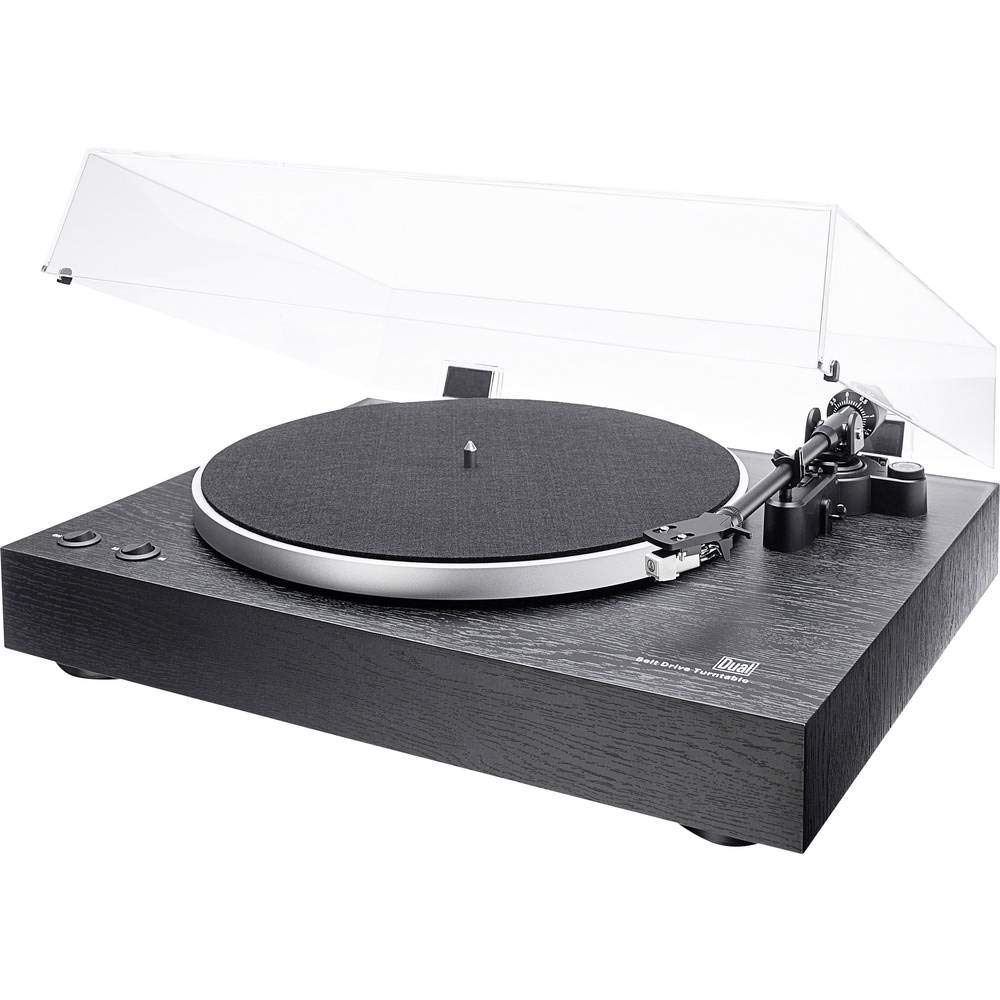
Gemblengna view of the Dual DT 450 Turntable with its dust cover.

Diwincik view of the Audio Technica AT 3600 magnetic pickup system on the tonearm.

The Dual DT 450 Turntable with its transparent dust cover in the open position.

The Dual DT 450 Turntable with its transparent dust cover in the closed position, protecting the platter and tonearm.
Guide Setup
Follow these steps to correctly set up your Dual DT 450 turntable.
- Ngabongkar bungkusan: Carefully remove all components from the packaging. Ensure all accessories listed in the product overview hadir.
- panempatan: Simpen meja putar dina permukaan anu stabil sareng rata, jauh tina sinar panonpoé langsung, sumber panas, sareng geteran anu kuat.
- Pamasangan Platter sareng Sabuk: Place the platter onto the spindle. Carefully install the drive belt around the inner rim of the platter and around the motor pulley.
- Pamasangan counterweight: Slide the counterweight onto the rear of the tonearm. Rotate it until the tonearm is balanced and floats freely. Then, adjust the counterweight to the recommended tracking force (refer to cartridge specifications, typically around 2-3 grams for the AT3600).
- Penyesuaian Anti Skating: Set the anti-skating dial to match the tracking force you set. This helps prevent the stylus from skipping across the record.
- Pamasangan panutup debu: Attach the dust cover hinges to the rear of the turntable unit.
- Sambungan Daya: Connect the power adapter to the DC input on the rear of the turntable, then plug it into a wall outlet.
- Sambungan Audio: Connect the RCA cables from the turntable to your amplifier or receiver. Use the PHONO input if your amplifier has one and switch the turntable's internal pre-amplifier to 'OFF'. If your amplifier only has AUX/LINE inputs, switch the turntable's internal pre-amplifier to 'ON' and connect to an available AUX/LINE input. Ensure the ground wire is connected to your amplifier's ground terminal if available.
Setup Video Demonstrasi:
This video demonstrates the general setup and operation of a turntable. While it may feature a different model, the basic principles of assembly and connection are applicable to the Dual DT 450.
Parentah Operasi
Once your Dual DT 450 is set up, follow these steps to play your vinyl records.
- Daya Hurung: Turn the power switch to the 'ON' position. The platter will begin to rotate.
- Rékam tempat: Carefully place your vinyl record onto the platter. If playing a 45 RPM single, use the included center puck.
- Pilih Speed: Choose the correct playback speed (33 or 45 RPM) using the speed selector switch.
- Angkat Tonearm: Anggo tuas angkat tonearm pikeun ngangkat tonearm.
- Posisi Tonearm: Gently mindahkeun tonearm ngaliwatan alur mimiti nu dipikahoyong tina rékaman.
- Tonearm handap: Slowly lower the tonearm using the tonearm lift lever. The stylus will descend onto the record, and playback will begin.
- Saluyukeun Volume: Atur volume dina telepon anu nyambung ampalat pangdéngé atawa panarima ka tingkat déngékeun anu dipikahoyong.
- Ngeureunkeun Playback: At the end of the record, or when you wish to stop, use the tonearm lift lever to raise the tonearm, then return it to its rest. Turn the power switch to 'OFF'.
Pangropéa
Regular maintenance ensures optimal performance and extends the life of your turntable.
- Panutup lebu: Clean the dust cover with a soft, dry cloth. Avoid abrasive cleaners that may scratch the surface.
- Perawatan Stylus: Bersihkeun stylus sacara rutin nganggo sikat lemes anu dirancang pikeun ngabersihkeun stylus, nyikat ti tukang ka hareup. Stylus anu kotor tiasa ngirangan kualitas sora sareng ngaruksak rékaman.
- beberesih rékaman: Keep your records clean to prevent dust and debris from accumulating on the stylus and affecting playback. Use a dedicated record cleaning brush or solution.
- beberesih umum: Wipe the turntable chassis with a soft, slightly damp lawon. Ulah make bahan kimia kasar.
- Inspeksi Sabuk: Pariksa sabuk panggerak sacara berkala pikeun ayana karusakan atanapi peregangan. Ganti upami diperyogikeun pikeun ngajaga kecepatan puter anu akurat.
Pamérésan masalah
If you encounter issues with your Dual DT 450, refer to the following common problems and solutions:
| Masalah | Mungkin Cukang lantaranana | Solusi |
|---|---|---|
| Teu aya sora atawa sora nu leutik pisan | Incorrect audio connection; Pre-amplifier switch setting; Amplifier input selection; Stylus not properly seated. | Check RCA cable connections. Ensure pre-amplifier switch is set correctly (ON for AUX, OFF for PHONO). Select the correct input on your amplifier. Verify stylus is securely attached to the cartridge. |
| Distorted or muffled sound | Dirty stylus; Incorrect tracking force; Damaged stylus; Worn record. | Clean the stylus. Re-adjust tracking force. Replace the stylus if damaged. Try a different record. |
| Piring turntable henteu muter | Power not connected; Drive belt dislodged or broken; Motor issue. | Ensure power adapter is connected and plugged in. Check if the drive belt is properly seated around the platter and motor pulley. If the issue persists, contact customer support. |
| Ngarekam skipping | Dust/debris on record or stylus; Incorrect tracking force or anti-skating; Turntable not level; Damaged record. | Clean record and stylus. Re-adjust tracking force and anti-skating. Ensure turntable is on a level surface. Inspect record for damage. |
Spésifikasi teknis
| Fitur | Spésifikasi |
|---|---|
| merek | Ganda |
| Ngaran modél | DT 450 |
| Nomer modél | 75268 |
| Gaya | Turntable Manual |
| Warna | Hideung |
| Bahan | Kai |
| Dimensi produk | 43.5 x 36.7 x 14.4 cm |
| Item Beurat | 6 kg |
| Kagancangan Rotasi Maksimum | 45 rpm |
| Fitur husus | Pra-built-inamplifier, Dust cover, Adjustable speed |
| Voltage | 12 volt |
| Sumber Daya | DC (Gleichstrom) |
| Babandingan sinyal-ka-noise (dB) | 60 dB |
Garansi sareng Rojongan
For warranty information and customer support, please refer to the documentation included with your product or visit the official Dual websitus. Simpen bukti pameseran anjeun pikeun klaim garansi.