
Bubuka
This manual provides detailed instructions for the installation, setup, and operation of your Juhui Universal 433 MHz 2-Channel Wireless Receiver Kit. This product is designed to replace existing faulty receivers or to control additional devices using a free button on your remote control. It supports a wide range of 433.92 MHz wireless remote controls with fixed code or HCS control codes.
1. Setup jeung Instalasi
1.1 Eusi pakét
pakét anjeun kedah ngandung:
- 1 x Universal 433 MHz 2-Channel Receiver with Housing
- 2 x 433 MHz Remote Controls
- 1 x Manual Instruksi (Dokumén ieu)
1.2 Ngakabelkeun Panarima
The receiver requires a power supply of 12-24 V AC-DC. The output contacts are normally open (NA) and typically monostable. Ensure correct polarity when connecting the power supply.

Gambar: Pahareup-hareup view of the receiver's circuit board. This image highlights the wiring terminals for power input (12-24V AC/DC) and the two relay output channels. The 'LEARN' buttons (S1, S2) and indicator LEDs are also visible.
Connect the power supply to the designated terminals (usually marked + and - or AC/DC). Connect the devices you wish to control (e.g., garage door opener, gate motor) to the relay output terminals (typically marked NO, COM for each channel).

Gambar: The universal receiver unit with its protective housing opened. This view shows the internal circuit board, including the antenna, wiring terminals, and programming buttons, alongside the grey plastic casing.
1.3 Learning Remote Controls
The receiver features a self-learning function and can store up to 400 different remote controls. Follow these steps to program your remote controls:
- Daya Hurung: Ensure the receiver is powered correctly (12-24 V AC-DC).
- Lebetkeun Modeu Diajar: Press and hold the 'LEARN' button (S1 for Channel 1, S2 for Channel 2) on the receiver's circuit board for approximately 2-3 seconds. An indicator LED on the receiver will illuminate or flash, indicating it is in learning mode.
- Sinyal Pangiriman: While the receiver is in learning mode, press the button on your remote control that you wish to associate with that channel.
- Konfirmasi: The indicator LED on the receiver will typically flash rapidly or turn off, confirming that the remote control has been successfully learned.
- Repeat for Other Channels/Remotes: Repeat the process for the second channel (using S2) or for additional remote controls.
- Kaluar tina Modeu Diajar: The receiver will automatically exit learning mode after a short period of inactivity or after a successful learning process.
Catetan: If you encounter issues, ensure your remote control operates on the 433.92 MHz frequency and is compatible (fixed code or HCS rolling code).
2. Parentah Operasi
Once the remote controls are programmed, operating the connected devices is straightforward:
- Activate Channel 1: Press the corresponding button on your programmed remote control to activate Channel 1. This will trigger the relay connected to Channel 1, operating the associated device (e.g., opening/closing a garage door).
- Activate Channel 2: Press the corresponding button on your programmed remote control to activate Channel 2. This will trigger the relay connected to Channel 2, operating the associated device.

Gambar: This composite image displays the main components of the kit: the 2-channel receiver unit, two compact remote controls with keychains, and a visual representation of a garage door, indicating the primary application of the product.
The output contacts are typically monostable, meaning they will activate for a set duration or until the button is released, depending on the receiver's configuration and the connected device.
3. Pangropéa
The Juhui Universal 433 MHz 2-Channel Receiver Kit is designed for low maintenance. To ensure optimal performance and longevity:
- Tetep Bersih: Periodically clean the exterior of the receiver housing with a soft, dry cloth. Avoid using abrasive cleaners or solvents.
- Perlindungan Lingkungan: The receiver has an IP44 protection rating, meaning it is protected against solid objects larger than 1mm and splashing water from any direction. It is designed for indoor use or protected outdoor environments. Avoid direct exposure to heavy rain or extreme temperatures.
- Batré Remote Control: Replace batteries in the remote controls as needed. Refer to the remote control's specific instructions for battery type and replacement procedure.
4. Cara ngungkulan
If you experience issues with your receiver kit, consider the following:
4.1 Receiver Not Responding to Remote
- Pariksa kakuatan: Ensure the receiver is properly powered (12-24 V AC-DC). Check all wiring connections.
- Batré jauh: Pariksa naha batré remot kontrol kedah digentos.
- Frékuénsi teu cocog: Verify that your remote control operates on the 433.92 MHz frequency.
- Re-program Remote: Attempt to re-program the remote control to the receiver following the "Learning Remote Controls" steps.
- rentang: Ensure you are within the effective operating range (>70m in open field). Obstacles like walls or metal structures can reduce range.
4.2 Device Not Activating
- Kaluaran panarima: Confirm the receiver's relay clicks when the remote button is pressed. If not, re-check remote programming.
- Wiring Alat: Verify the wiring between the receiver's output terminals and the controlled device.
- Fungsi Alat: Ensure the controlled device itself is functioning correctly when triggered manually.
4.3 Operasi Intermiten
- gangguan: Other wireless devices operating on similar frequencies can cause interference. Try relocating the receiver or identifying sources of interference.
- anteneu: Ensure the receiver's antenna is unobstructed and positioned for optimal reception.
5. Spésifikasi Téknis
| Fitur | Spésifikasi |
|---|---|
| Sasayogian tanaga | 12 - 24 V AC-DC |
| Frékuénsi | 433.92 MHz |
| Saluran | 2 |
| Arus Kaluaran (Max) | 3A / 230 VAC per channel |
| Rentang Operasi | >70 meters (in open field) |
| Kelas panyalindungan | IP44 (pikeun pamakéan indoor) |
| Ukuran (L x W x H) | 60 x 94 x 28 mm |
| Kamampuh mémori | Up to 400 different remote controls |
6. Kasaluyuan
This universal receiver is compatible with 99% of wireless remote controls operating at 433.92 MHz, including those with fixed codes or HCS control codes. This includes, but is not limited to, brands such as Allmatic, Beninca, Aprimatic, BFT, Fadini, Genius, GiBiDi, O&O, Key, and many more.
To ensure compatibility, always verify the frequency of your existing receiver/remote control. While simplified descriptions might state "433 MHz," the precise frequency is 433.92 MHz.
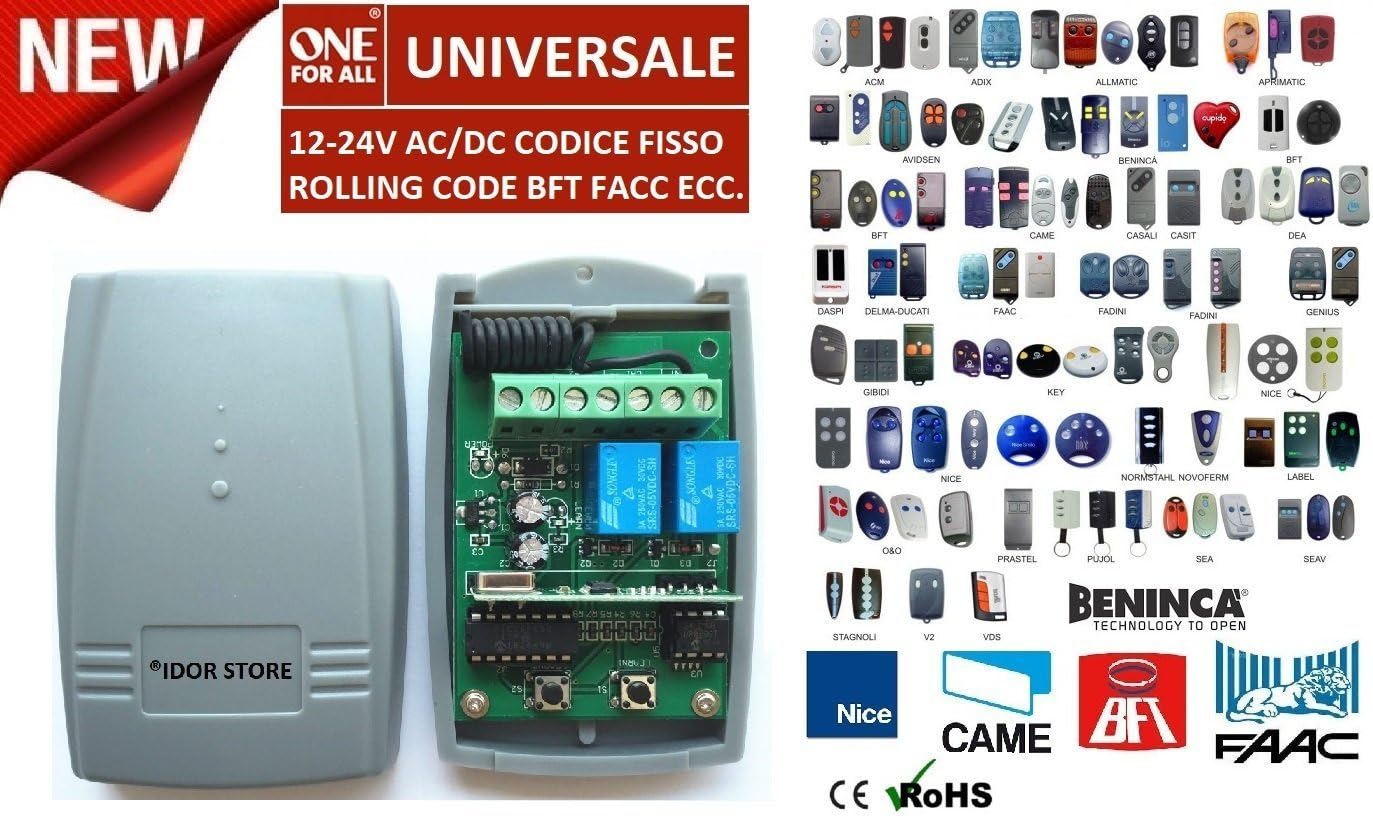
Gambar: A comprehensive collage showcasing numerous remote control models from various brands (e.g., Allmatic, Beninca, BFT, Fadini, Genius, Key) that are compatible with this universal 433.92 MHz receiver. This visual aid helps users identify if their existing remotes can be paired.
A more complete list of compatible models is often available in the full product documentation. If your remote control is not pictured or you are unsure about compatibility, please consult the manufacturer or seller.
7. Garansi jeung Rojongan
For warranty information and technical support, please refer to the specific terms provided by your retailer or the manufacturer, Juhui. Keep your purchase receipt as proof of purchase.
For further assistance, please contact the seller or manufacturer directly.