
Bubuka
Thank you for choosing the Cygnett FreePlay Bluetooth Earbuds. These truly wireless earbuds are designed to provide a seamless audio experience with comfort and convenience. This manual will guide you through the setup, operation, and maintenance of your new earbuds.
The FreePlay earbuds feature a secure fit with ultra-comfortable silicone ear tips, a lightweight design, and a 10-meter wireless range. They come with an integrated microphone and a portable charging case for extended use.
Eusi pakét
Punten pastikeun sadaya barang aya dina pakét anjeun:
- Cygnett FreePlay Bluetooth Earbuds (Left and Right)
- Ngecas Case
- Micro USB Ngecas Cable
- Ujung Ceuli Silikon (Leutik, Sedeng, Ageung)
Produk Leuwihview
Familiarize yourself with the components of your Cygnett FreePlay Bluetooth Earbuds and how they fit.

Gambar: A man wearing a Cygnett FreePlay earbud, demonstrating its discreet and secure fit.

Gambar: A woman wearing a Cygnett FreePlay earbud, illustrating its comfortable placement for active use.

Gambar: Close-up of a single Cygnett FreePlay earbud, showing the speaker mesh and silicone ear tip.
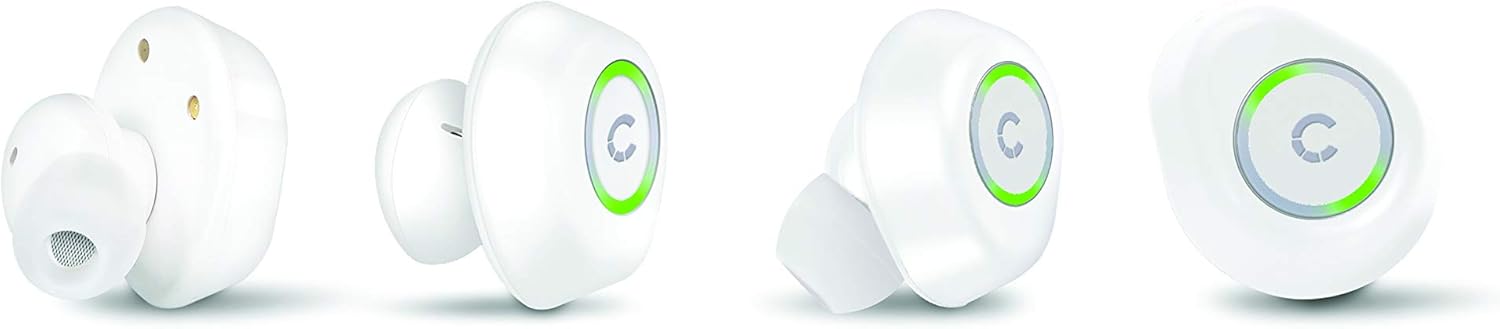
Gambar: Various angles of the Cygnett FreePlay earbuds, highlighting their compact design and the illuminated 'C' logo.

Gambar: The Cygnett FreePlay earbuds placed inside their open charging case, showing the charging contacts and the Cygnett branding.
Disetél
1. Ngecas Earbuds jeung Case
Saméméh dipaké munggaran, eusian pinuh ku earbuds jeung wadah ngecas.
- Lebetkeun earbud kana wadah ngecas. Pastikeun éta dipasang kalayan leres dina slotna masing-masing (L pikeun kénca, R pikeun katuhu).
- Connect the Micro USB cable to the charging port on the case and the other end to a USB power source (e.g., computer, wall adapter).
- The indicator lights on the earbuds and/or case will show charging status.
- Once fully charged, disconnect the charging cable. The case provides approximately 6 hours of additional playback time for the earbuds.
2. Papasangan Bluetooth
To connect your Cygnett FreePlay earbuds to your device:
- Ensure the earbuds are charged and removed from the charging case. They should automatically enter pairing mode, indicated by a flashing LED light (color/pattern may vary).
- Dina smartphone anjeun, tablet, atawa alat Bluetooth-diaktipkeun sejen, buka setélan Bluetooth.
- Hurungkeun Bluetooth.
- Milarian pikeun available devices. You should see "Cygnett FreePlay" or a similar name appear in the list.
- Select "Cygnett FreePlay" to connect. Once connected, the earbud LED light will typically stop flashing or change to a solid color.
- Headphone bakal otomatis nyambung deui ka alat anu terakhir dipasangkeun nalika dicabut tina casing sareng aya dina jangkauan.
Catetan: If pairing fails, turn off the earbuds, disable Bluetooth on your device, and repeat the steps.
Ngoperasikeun Earbuds
The Cygnett FreePlay earbuds feature a simple single-button control for managing calls and music playback.
Kontrol Musik
- Puter / Reureuh: Pencét tombol sakali dina salah sahiji earbud.
- Lagu salajengna: Pencét dua kali tombol dina earbud katuhu.
- Lagu Sateuacanna: Pencét dua kali tombol dina earbud kénca.
- Volume Up: Triple-press the button on the right earbud.
- Volume Turun: Triple-press the button on the left earbud.
Kontrol Telepon
- Ngajawab / mungkas Telepon: Pencét tombol sakali dina salah sahiji earbud.
- Nolak Telepon: Press and hold the button for approximately 2 seconds on either earbud.
- Asistén Sora: Press and hold the button for approximately 2 seconds (when not on a call) to activate your device's voice assistant (e.g., Siri, Google Assistant).
Daya Hurung/Pareuman
- Daya Hurung: Remove earbuds from the charging case. They will power on automatically. Alternatively, press and hold the button on each earbud for 3 seconds.
- Pareum listrik: Place earbuds back into the charging case. They will power off automatically. Alternatively, press and hold the button on each earbud for 5 seconds.
Pangropéa
Proper care will extend the life of your Cygnett FreePlay earbuds.
- beberesih: Regularly clean the silicone ear tips with a soft, dry cloth. If necessary, use a slightly damp usap lawon ku sabun anu hampang, teras garingkeun dugi ka garing. Entong nganggo bahan kimia anu keras atanapi bahan anu abrasif.
- Panyimpenan: Salawasna simpen earbud dina wadah ngecasna nalika henteu dianggo pikeun ngajagi tina lebu, kokotor, sareng karusakan.
- Hindarkeun Uap: Keep the earbuds and charging case away from water and excessive moisture. While designed for active lifestyles, they are not waterproof.
- Suhu: Avoid exposing the device to extreme temperatures (hot or cold) as this can shorten battery life and affect performance.
Pamérésan masalah
Upami anjeun ngalaman masalah sareng earbud anjeun, cobian solusi ieu:
| Masalah | Solusi |
|---|---|
| Earbuds henteu dipasangkeun sareng alat. |
|
| Taya sora tina earbuds. |
|
| Hiji earbud teu jalan. |
|
| Kasus ngecas teu ngecas. |
|
spésifikasi
| Ngaran modél | Cy2496Frepl |
| Nomer modél | CY2496FREPL |
| merek | Cygnett |
| Téhnologi konektipitas | Nirkabel |
| Téknologi Komunikasi Nirkabel | Bluetooth |
| Range nirkabel | 10 méter |
| Faktor Bentuk | Dina-Ceuli |
| Bahan | Silikon |
| Warna | Bodas |
| Jenis Batré | 1 logam litium (kaasup) |
| Waktu Ngobrol | 3 jam |
| Waktu sayaga | 100 jam |
| Additional Playback from Case | 6 jam |
| Tipe Kontrol | Tombol Control |
| Alat nu cocog | Smartphone, Tablet |
| Komponén Kaasup | Kabel Micro USB |
| Port ngecas | USB |
Garansi sareng Rojongan
For warranty information and customer support, please refer to the documentation provided with your purchase or visit the official Cygnett websitus.
If you require further assistance or have questions not covered in this manual, please contact Cygnett customer service.