
1. Bubuka
This manual provides detailed instructions for the installation, operation, and maintenance of your Akozon Digital Programmable Timer. Please read this manual carefully before use to ensure proper function and safety.

Figure 1: Akozon Digital Programmable Timer 12V
2. Produk Langkungview jeung Fitur
The Akozon Digital Programmable Timer is a weekly programmable electronic timer designed for precise control of various electrical equipment. Its robust design and advanced features ensure reliable operation.
- Kontrol otomatis: Automatically turns electrical equipment on and off according to preset schedules.
- Precision luhur: Equipped with a high-precision chip for accurate timing.
- Pemrograman mingguan: Supports advanced programming for up to one week in advance.
- Sababaraha Program: Features 16 ON/OFF settings (programs) for daily or weekly scheduling.
- Daya Nyadangkeun: Integrated high-performance rechargeable battery maintains time display and stores data for over 12 months during power outages.
- Konstruksi awét: Housing made of hard, durable plastic for extended lifespan.
- Layar LCD: Clear LCD for easy viewing of time and program status.
- Pamasangan DIN Rail: Designed for convenient installation on a DIN rail.
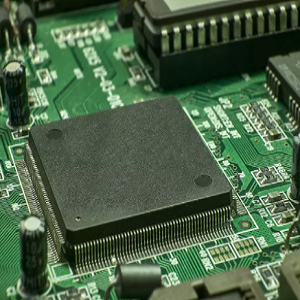
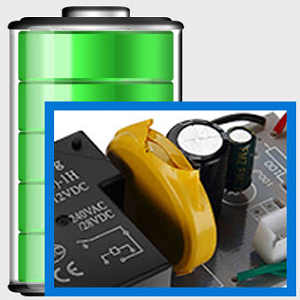
Figure 2: Internal components showing the high-precision chip and rechargeable backup battery.
3. Spésifikasi
| Nomer modél | Akozonqegcgmk04u-01 |
| Masukan Voltage | 12V DC / AC |
| Kamampuh kaluaran | 25(16)A, 240VAC |
| Konsumsi Daya | <1W |
| Rentang Timing | 1 menit nepi ka 168 jam |
| Program | 16 ON/OFF settings (daily/weekly) |
| Kasalahan Timing | <±2 seconds/day |
| Mémori Gagal Daya | >12 months (with internal rechargeable battery) |
| Suhu Operasi | -20°C nepi ka 55°C |
| Métode Pamasangan | DIN Rel |
| Ukuran (approx.) | 36mm (W) x 86mm (H) x 65mm (D) |
| Beurat (approx.) | 120g |
| tampilan | LCD |

Gambar 3: Diménsi produk anu lengkep sareng spésifikasi konci.
4. Émbaran Kasalametan
- Salawasna pegatkeun sambungan kakuatan saméméh instalasi atawa perawatan.
- Pamasangan kedah dilakukeun ku tukang listrik anu mumpuni pikeun nyegah sengatan listrik atanapi karusakan kana alat.
- Pastikeun input voltage matches the timer's specifications (12V DC/AC). Connecting to incorrect voltage bisa ngaruksak unit.
- Do not expose the device to excessive moisture or extreme temperatures outside the specified operating range.
- Do not disassemble the timer; refer servicing to qualified personnel.
5. Setup jeung Instalasi
5.1 DIN Rail Installation
The timer is designed for easy installation on a standard 35mm DIN rail. Simply clip the timer onto the rail in your distribution box.

Gambar 4: Kelample of the timer installed on a DIN rail within a distribution box.
5.2 Parentah Wiring
Refer to the wiring diagram below for correct connection. Ensure all connections are secure and comply with local electrical codes.
- Terminal 1 & 2: Power input (12V DC/AC).
- Terminals 3, 4, 5: Output contacts.
- 3: Biasana Ditutup (NC)
- 4: Biasa (COM)
- 5: Biasana Buka (NO)

Figure 5: Detailed wiring diagram showing connections for power input and output contacts.

Gambar 6: Kelamples of wiring methods, including direct load connection and connection via a contactor.
6. Parentah Operasi
6.1 Initial Setup and Unlocking
- Upon first use, connect the timer to power (12V DC/AC).
- Pencét éta RESET button to clear all previous settings and initialize the timer.
- The timer display may be locked. To unlock, press the C/Urang Sunda button four times. The lock icon will disappear from the display. If no operation occurs for 15 seconds, the timer will automatically lock again.
6.2 Nyetél Waktos sareng Dinten Ayeuna
After unlocking, set the current time and day:
- Pencét éta P button (Program button) once.
- Pencét éta D+ button to set the current day of the week (MO, TU, WE, TH, FR, SA, SU).
- Pencét éta H+ tombol pikeun ngeset jam ayeuna.
- Pencét éta M+ tombol pikeun nyetél menit ayeuna.
- Pencét éta P pencét tombol deui pikeun kaluar ti modeu setelan waktos.

angka 7: Tutup-up view of the timer's control buttons.

Figure 8: Explanation of button functions and display elements, including day, hour, minute, and reset.
6.3 Kontrol Manual
Pencét éta MANUAL C/R button to cycle through manual control modes:
- ON: Output is continuously ON.
- Otomatis: Timer operates according to programmed schedules.
- Pareuman: Output is continuously OFF.
Pilih OTOMATIS for the timer to follow your programmed settings.
7. Programming ON/OFF Schedules
The timer supports up to 16 ON/OFF programs. Follow these steps to set your desired schedules:
- Pencét éta P button to enter programming mode. The display will show "1 ON".
- Pencét D+ to select the day(s) for this program. You can choose a single day, weekdays, weekends, or all days.
- Pencét H+ to set the ON hour.
- Pencét M+ to set the ON minute.
- Pencét P deui. Layarna bakal némbongkeun "1 OFF".
- Pencét D+ to select the day(s) for this OFF program (usually the same as ON, but can be different).
- Pencét H+ to set the OFF hour.
- Pencét M+ to set the OFF minute.
- Repeat steps 1-8 for additional ON/OFF programs (up to 16). Press P to advance to the next program number.
- Pikeun kaluar tina mode programming, pencét tombol MANUAL C/R button. Ensure the timer is set to OTOMATIS mode for programs to execute.
Note: If you need to cancel a program, press the C/Urang Sunda kancing bari viewing the specific ON or OFF program. This will clear the settings for that program.
8. Aplikasi
The Akozon Digital Programmable Timer is versatile and can be used in various applications, including:
- Controlling lamps and lighting systems (e.g., streetlights, garden lights, neon signs).
- Managing water heaters and preheaters.
- Automating agricultural facilities (e.g., irrigation systems).
- Controlling broadcasting equipment.
- Scheduling household appliances.
- Operating sprayers and bottling equipment.

Gambar 9: Kelamples of environments where the timer can be used, such as controlling outdoor lighting and industrial equipment.
9. Pangropéa
- Keep the timer clean and free from dust. Use a soft, dry cloth for cleaning.
- Ulah make cleaners abrasive atawa pangleyur.
- Pastikeun ventilasi ditangtoskeun sabudeureun alat pikeun nyegah overheating.
- The internal battery is designed for long-term backup. If the timer consistently loses time or program settings after a power outage, the internal battery may need professional inspection.
10. Cara ngungkulan
| Masalah | Mungkin Cukang lantaranana | Solusi |
|---|---|---|
| Paparanana kosong. | No power supply or internal battery depleted. | Check power connections. Allow time for the internal battery to charge (connect to power for several hours). |
| Timer does not respond to button presses. | Timer is locked. | Pencét éta C/Urang Sunda button four times to unlock. |
| Programs are not executing. | Timer is not in AUTO mode. Incorrect program settings. | Pencét MANUAL C/R until "AUTO" is displayed. Review and correct program settings. |
| Time or settings are lost after power outage. | Internal backup battery is not charging or is depleted. | Ensure the timer is connected to power for sufficient time to charge the internal battery. If the issue persists, contact customer support. |
| Output is always ON or OFF, ignoring programs. | Timer is in manual ON or OFF mode. | Pencét MANUAL C/R until "AUTO" is displayed. |
11. Garansi jeung Rojongan
Akozon products are manufactured to high-quality standards. For warranty information or technical support, please refer to the contact details provided with your purchase or visit the official Akozon websitus.
Punten tahan bukti pameseran anjeun pikeun klaim garansi.