
Integra CDC-3.4
Integra CDC-3.4
6-Disc CD Carousel Changer User Manual
Bubuka
This manual provides detailed instructions for the proper setup, operation, and maintenance of your Integra CDC-3.4 6-Disc CD Carousel Changer. Please read this manual thoroughly before using the unit to ensure optimal performance and longevity. The Integra CDC-3.4 is designed for high-fidelity audio playback from compact discs, featuring a robust carousel mechanism for convenient disc management.
Émbaran Kasalametan penting
Pikeun ngirangan résiko kasetrum listrik, kahuruan, atanapi karusakan kana unit, punten perhatikeun pancegahan kaamanan ieu:
- Baca pituduh: Baca sadaya parentah kaamanan sareng operasi sateuacan ngoperasikeun alat.
- Ngajaga parentah: Tetep kaamanan sarta parentah operasi pikeun rujukan hareup.
- Perhatoskeun Perhatosan: Taat kana sadaya peringatan ngeunaan alat sareng pitunjuk operasi.
- Turutan parentah: Turutan sagala parentah operasi sarta pamakéan.
- Cai sareng Uap: Entong nganggo alat ieu caket cai.
- beberesih: Ngabersihan ngan ku kaén garing.
- Ventilasi: Ulah meungpeuk sagala bukaan ventilasi. Pasang saluyu sareng parentah produsén.
- Panas: Entong dipasang di deukeut sumber panas sapertos radiator, register panas, kompor, atanapi aparat sanésna (kalebet ampLiifiers) anu ngahasilkeun panas.
- Perlindungan Kabel-kabel: Nangtayungan kabel listrik tina leumpang atawa diciwit, utamana dina colokan, wadah merenah, jeung titik dimana aranjeunna kaluar tina aparat.
- Cabut colokan Nalika Badai: Cabut colokan alat ieu nalika badai kilat atanapi nalika henteu dianggo kanggo waktos anu lami.
- Palayanan: Rujuk sadayana jasa ka tanaga jasa anu mumpuni. Diperlukeun ngalayanan nalika aparatur ruksak ku cara naon waé, sapertos kabel catu daya atanapi colokan rusak, cairan tumpah atanapi barang murag kana aparatur, aparatur parantos kakeunaan hujan atanapi lembab, henteu beroperasi normal. , atawa geus turun.
Naon dina Box
Carefully unpack your Integra CDC-3.4 and ensure all the following items are present:
- Integra CDC-3.4 CD Player
- Kabel listrik
- Basic manual (this document)
- RCA Cable (for analog audio connection)
- RI Cable (for system remote integration)
- Remote Control (RC-778C)
- 2 Batré AAA (pikeun kadali jauh)
Disetél
1. Panempatan
Place the Integra CDC-3.4 on a stable, level surface with adequate ventilation. Ensure there is sufficient space around the unit for proper airflow to prevent overheating. Avoid placing it near heat sources or in direct sunlight.
2. Nyambungkeun Kabel Audio
The CDC-3.4 offers multiple audio output options. Choose the connection type that best suits your audio receiver or amppanguat:
- Analog Audio Output (RCA): Connect the supplied RCA cable from the ANALOG OUTPUT (L/R) jacks on the CDC-3.4 to the corresponding analog audio input jacks on your receiver/amppangagung.
- Digital Coaxial Output: For a digital audio connection, use a coaxial digital cable (not supplied) to connect the COAXIAL jack on the CDC-3.4 to a digital coaxial input on your receiver/amppangagung.
- Kaluaran optik digital: For an optical digital audio connection, use an optical digital cable (not supplied) to connect the OPTICAL jack on the CDC-3.4 to a digital optical input on your receiver/amppangagung.
3. Connecting RI Cable (Remote Interactive)
Lamun panarima anjeun/amplifier supports Integra's RI (Remote Interactive) system, connect the supplied RI cable from the REMOTE CONTROL (RI) jack on the CDC-3.4 to the RI jack on your receiver/amplifier. This allows for integrated control functions between the components.
4. Nyambungkeun Power
After all audio and control cables are connected, plug the supplied power cord into the AC INLET on the rear of the CDC-3.4, and then plug the other end into a wall outlet.
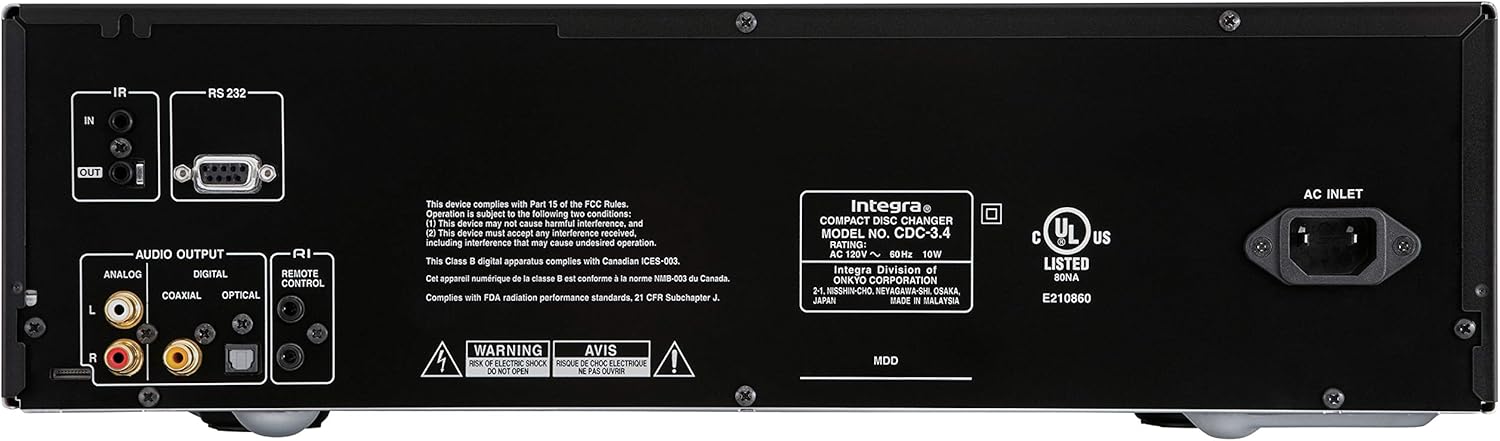
Figure 1: Rear panel connections of the Integra CDC-3.4.
Parentah Operasi
1. Daya Hurung / Pareum
Pencét éta Sayaga / Hurung tombol dina panel hareup atawa On tombol dina remot kontrol pikeun ngahurungkeun atanapi mareuman unit.
2. Loading Discs
The CDC-3.4 is a 6-disc carousel changer. To load discs:
- Pencét éta Buka/Tutup tombol dina panel hareup atawa remot pikeun muka baki disk.
- Place a CD onto an empty disc well, ensuring it is seated correctly. The disc wells are numbered 1 through 6.
- You can swap up to 5 discs while the 6th disc continues to play.
- Pencét Buka/Tutup deui nutup baki.
3. Disc Selection
To select a specific disc for playback:
- On the front panel, use the Pilih Disc buttons (1-6) to directly choose a disc.
- On the remote control, use the numbered buttons (1-6) to select a disc.
4. Kadali Playback
Use the following buttons on the front panel or remote control for playback:
- Play/Pause (►/▐▐): Ngamimitian atanapi ngareureuhkeun playback.
- Eureun (■): Ngeureunkeun playback.
- Skip (◀◀/►►): Luncat ka lagu saméméhna atawa salajengna.
- Search (◀◀◀/►►►): Fast forwards or reverses within a track (hold down).
5. Modeu Playback
- Acak: Pencét éta Acak tombol pikeun muterkeun lagu dina urutan acak.
- Ulang deui: Pencét éta malikan deui tombol pikeun ngulang lagu ayeuna, disk ayeuna, atanapi sadaya disk.

Figure 2: Front panel controls of the Integra CDC-3.4.

Figure 3: Integra RC-778C Remote Control.
Pangropéa
Ngabersihkeun Unit
To clean the exterior of the unit, use a soft, dry cloth. For stubborn stains, slightly dampen the cloth with water or a mild, non-abrasive cleaner. Do not use harsh chemicals, solvents, or abrasive cleaning pads, as these can damage the finish.
Kamanusaan sarta Studi Disc
Handle CDs by their edges to avoid fingerprints and scratches. Store discs in their cases when not in use. If a disc is dirty, wipe it gently from the center outwards with a soft, lint-free cloth. Do not use abrasive materials or solvents.
Pangropéa internal
The Integra CDC-3.4 contains no user-serviceable parts. Do not attempt to open the casing or perform any internal maintenance. Refer all servicing to qualified service personnel.
Pamérésan masalah
If you experience issues with your Integra CDC-3.4, please consult the table below before contacting support.
| Masalah | Mungkin Cukang lantaranana | Solusi |
|---|---|---|
| Taya kakuatan | Kabel listrik teu aman disambungkeun. | Pastikeun yén kabel listrik dicolok pageuh kana unit sareng stop kontak témbok. |
| Stop kontak dina témbok teu aktip. | Nguji stop kontak jeung alat sejen. | |
| Taya sora | Audio cables not connected correctly. | Check all audio cable connections between the CDC-3.4 and your receiver/amppangagung. |
| Incorrect input selected on receiver/amppangagung. | Select the correct input source on your receiver/amppangagung. | |
| Disc not playing or reading | Cakram kotor atanapi corétan. | Bersihkeun cakram nganggo lawon anu lemes sareng henteu ngaganggu. Coba cakram anu sanés. |
| Cakram diselapkeun teu leres. | Ensure the disc is placed correctly in the disc well with the label side up. | |
| Kadali jauh teu jalan | Batré béak atanapi teu leres diselapkeun. | Ganti batré ku batré AAA anyar, mastikeun polaritasna bener. |
| Halangan antara jarak jauh sareng unit. | Pastikeun aya garis pandang anu jelas antara remot sareng sénsor IR unit. |
spésifikasi
| Fitur | Rincian |
|---|---|
| Nomer modél | CDC-3.4 |
| Kapasitas Cakram | 6 Discs (CD Carousel Changer) |
| Digital to Analog Converters (DACs) | Dual High Quality Wolfson 192 kHz / 24-bit |
| oversampling | 128 times oversampling |
| Signal Path Technology | Vector Linear Shaping Circuitry (VLSC) for Noise-free Signal Path, Proprietary Direct Digital Path |
| Kaluaran Audio | Analog (RCA L/R), Digital Coaxial, Digital Optical |
| Kontrol Interface | RS232, IR (Infrared), RI (Remote Interactive) |
| Diménsi Produk (W x H x D) | Kira-kira 17.1 x 9.8 x 21 inci (43.4 x 24.9 x 53.3 cm) |
| Item Beurat | 15.2 pon (6.9 kg) |
| Sarat kakuatan | AC 120V ~ 60Hz |
| Kaasup Asesoris | Remote Control, RCA Cable, RI Cable, Power Cord, AAA Batteries |
Garansi sareng Rojongan
Garansi Produsén
The Integra CDC-3.4 typically comes with a manufacturer's warranty, which may vary by region. Please refer to the warranty card included with your product or visit the official Integra (Onkyo) website for specific warranty terms and conditions. It is recommended to retain your proof of purchase for warranty claims.
Rojongan Palanggan
For technical assistance, troubleshooting beyond this manual, or warranty inquiries, please contact Integra customer support. You can find contact information, including phone numbers and online support resources, on the official Onkyo/Integra websitus.
Ask a question about this manual
Ask about setup, troubleshooting, compatibility, parts, safety, or missing instructions. Manuals+ will review the question and use this page’s manual context to help answer it.