
1. Bubuka
The Taramps TR2 P Remote Control is an advanced device designed exclusively for Taramps Group alarm systems. It incorporates anti-cloning (hopping code) technology to provide enhanced security for your vehicle. This remote control also features a presence function and a home function, allowing for the activation of automated gates. Built for durability, it is resistant to moisture infiltration and includes a long-lasting lithium battery with a low battery indicator.
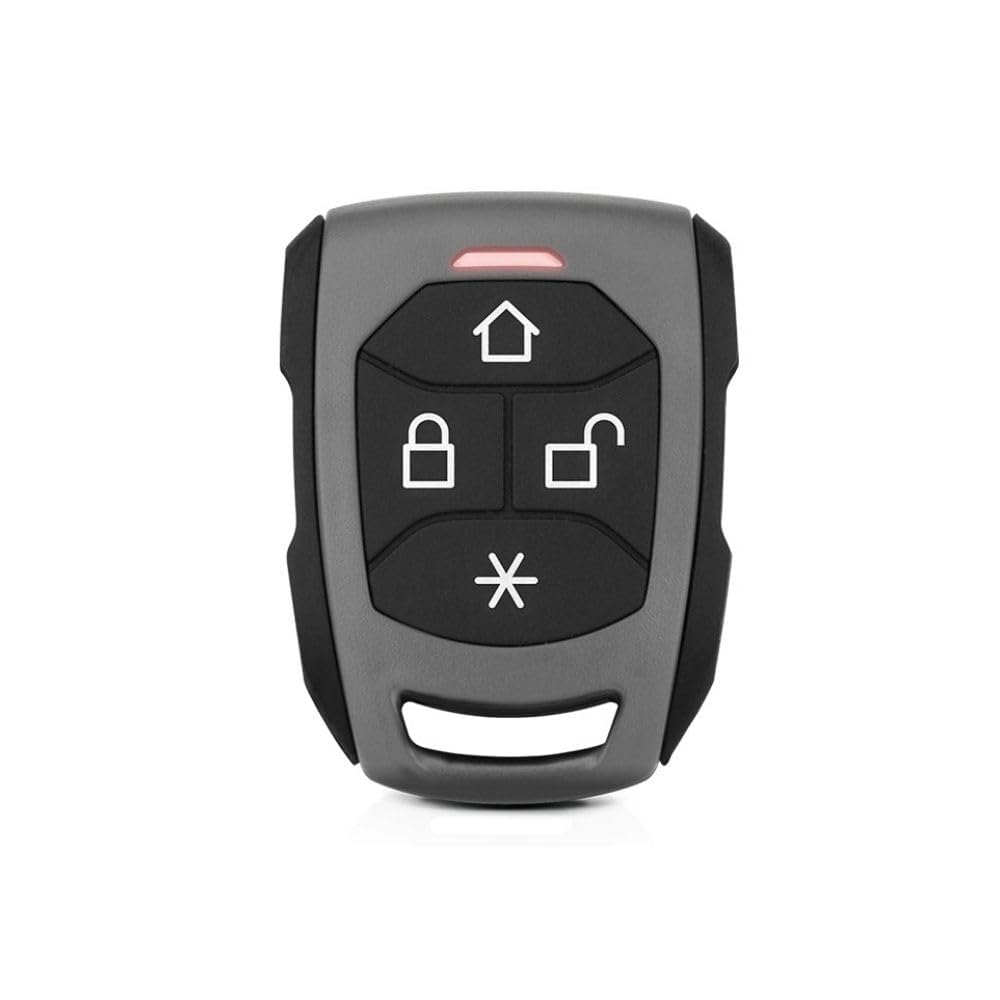
Figure 1: Taramps TR2 P Remote Control. This image shows the front view of the remote control, highlighting its four primary function buttons and the LED indicator.
2. Fitur konci
- Anti-Cloning Technology: Utilizes HOPPING CODE for enhanced security against unauthorized duplication.
- Kasaluyuan: Fully compatible with all Taramps TW20 series alarm systems.
- Frékuénsi operasi: Operates at 433.92 MHz.
- Indikator LED: Features a blue LED for status indication.
- Konstruksi awét: Manufactured from high-density ABS material.
- Tahan cai: Designed to be resistant to moisture infiltration.
- Batré: Powered by a CR2032 Lithium 3V battery, known for its long durability.
- Presence Function: Identified by its gray color, this function is integral to the alarm system's presence feature.
- Fungsi Imah: Allows for the activation of automated gates.
3. Setélan
3.1 Pamasangan batré
The TR2 P remote control comes with a CR2032 lithium battery pre-installed. If replacement is needed, follow these steps:
- Buka remot kontrol kalayan ati-atiasing using a small, flat tool.
- Leupaskeun batré CR2032 heubeul.
- Insert a new CR2032 3V lithium battery, ensuring the positive (+) side faces upwards.
- Close the remote control casing pageuh nepi ka ngaklik kana tempatna.
3.2 Pairing with Taramps TW20 Alarm System
To ensure proper functionality, the TR2 P remote control must be paired with your Taramps TW20 alarm system. Refer to your specific Taramps TW20 alarm system manual for detailed pairing instructions, as the procedure may vary slightly between alarm models. Generally, the process involves:
- Entering the alarm system's programming mode (often by turning the ignition on/off a specific number of times or pressing a master button).
- Pressing a button on the TR2 P remote control when prompted by the alarm system.
- Confirming successful pairing (usually indicated by a siren chirp or LED flash from the alarm system).
4. Parentah Operasi
The TR2 P remote control features four primary buttons for various functions:
- House Icon Button (⌂): Aktipkeun Fungsi Bumi, typically used for controlling automated gates or other integrated home automation features.
- Locked Padlock Icon Button (🔒): Locks the vehicle and arms the alarm system. Press this button to secure your vehicle.
- Unlocked Padlock Icon Button (🔓): Unlocks the vehicle and disarms the alarm system. Press this button to access your vehicle.
- Asterisk Icon Button (*): This button is typically associated with the Fungsi Ayana or other auxiliary functions depending on your alarm system's configuration. Consult your alarm system manual for specific details.
The blue LED indicator on the remote control will illuminate briefly when a button is pressed, confirming signal transmission.
5. Pangropéa
5.1 Ngagantian batré
The TR2 P remote control is powered by a CR2032 3V lithium battery. The remote control will indicate a low battery condition, prompting replacement. Refer to section 3.1 for battery installation instructions.
5.2 Beberesih sareng Perawatan
- Bersihkeun kadali jauh ku lawon anu lembut sareng garing.
- Ulah nganggo pembersih atanapi pelarut anu abrasif, sabab ieu tiasa ngaruksak casing and buttons.
- While resistant to moisture, avoid prolonged exposure to water or submerging the device.
6. Cara ngungkulan
- Remote Control Teu Ngabales:
- Check if the blue LED illuminates when a button is pressed. If not, the battery may be depleted. Replace the CR2032 battery (see section 3.1).
- Ensure you are within range of the alarm system.
- Verify that the remote control is properly paired with your Taramps TW20 alarm system (see section 3.2).
- Operasi intermittent:
- Weak battery can cause intermittent operation. Replace the battery.
- Environmental interference might affect signal transmission. Try operating the remote from a different location.
- Alarm System Not Responding to Home Function:
- Ensure the automated gate receiver is powered on and within range.
- Verify that the Home Function is correctly programmed and linked to your automated gate system. Consult the gate system's manual or a professional installer.
7. Spésifikasi
| merek | Taramps |
| Produsén | Taramps Éléktronik |
| Nomer modél | 900739 (Part Number: TR2 P) |
| Frékuénsi Operasi | 433.92 MHz |
| Jenis Batré | CR2032 Lithium, 3V |
| Bahan | High-density ABS |
| Tahan cai | Resistant to moisture infiltration |
| Komponén Kaasup | Sertipikat Garansi |
8. Émbaran jaminan
The Taramps TR2 P Remote Control comes with a garansi 2 taun. This warranty is provided directly by the manufacturer, Taramps Electronics, and is valid for 24 months from the date of product purchase. Please retain your proof of purchase for warranty claims. For detailed terms and conditions, refer to the included Warranty Certificate.
9. Rojongan
For technical assistance, troubleshooting beyond this manual, or warranty claims, please contact Taramps customer support. Refer to the contact information provided on the product packaging or the official Taramps websitus.
Taramps Official Websitus: www.taramps.com.br