
Bubuka
This manual provides detailed instructions for the assembly, operation, and maintenance of your Monarch Specialties L-Shaped Corner Desk with Hutch, Model I 7160. Please read all instructions carefully before beginning assembly and retain this manual for future reference.
The Monarch Specialties Workstation is a multi-functional computer desk designed for home and office use. It features a modern industrial aesthetic with a grey wood-grain laminate finish and a strong black metal frame. The desk offers numerous storage options, including a spacious drawer on metal glides, two fixed bottom shelves, and three spacious cubbies in the hutch.
- Multi-functional computer workstation that can be assembled on the left or right hand side.
- Numerous storage options including 2 fixed shelves, a spacious middle drawer on metal glides, and 4 large open cubbies.
- Spacious desk tops for a computer and other work essentials.
- Strong and sturdy black metal base.
- Modern industrial inspired design finished on all sides in a rustic grey wood-grain look.
Setup sareng Majelis
Assembly of this workstation is required. All necessary assembly tools are included. It is recommended that at least one person is available for assembly. Please ensure you have adequate space to lay out all components before starting.
Carefully follow the step-by-step instructions provided in the packaging. Pay close attention to the orientation of each piece, especially during the installation of the drawer glides. The drawer glides feature a release lever that allows for separation of the two pieces, which is crucial for proper installation. Ensure all screws and fasteners are securely tightened for stability.

Figure 1: Overall dimensions and component measurements of the desk.
The L-shaped configuration of the desk is reversible, allowing you to set up the longer side on either the left or right, depending on your space requirements. Refer to the assembly diagrams for specific instructions on reversing the setup.
Operating Your Workstation
Your Monarch Specialties L-Shaped Corner Desk is designed to provide a functional and organized workspace. Utilize the various storage options to keep your area tidy.
- Beungeut meja: The spacious desktop can accommodate a computer, monitor, and other work essentials.
- laci: The single drawer, equipped with ball-bearing glides, provides enclosed storage for documents or office supplies.
- Bottom Shelves: Two fixed shelves are located on the side, suitable for books, binders, or decorative items.
- Hutch Cubbies: The hutch features three open cubbies, ideal for organizing smaller items, displaying decor, or storing frequently accessed materials.
The maximum weight recommendation for the desk surface is 100 pounds. Distribute weight evenly across the desk and shelves to maintain stability.
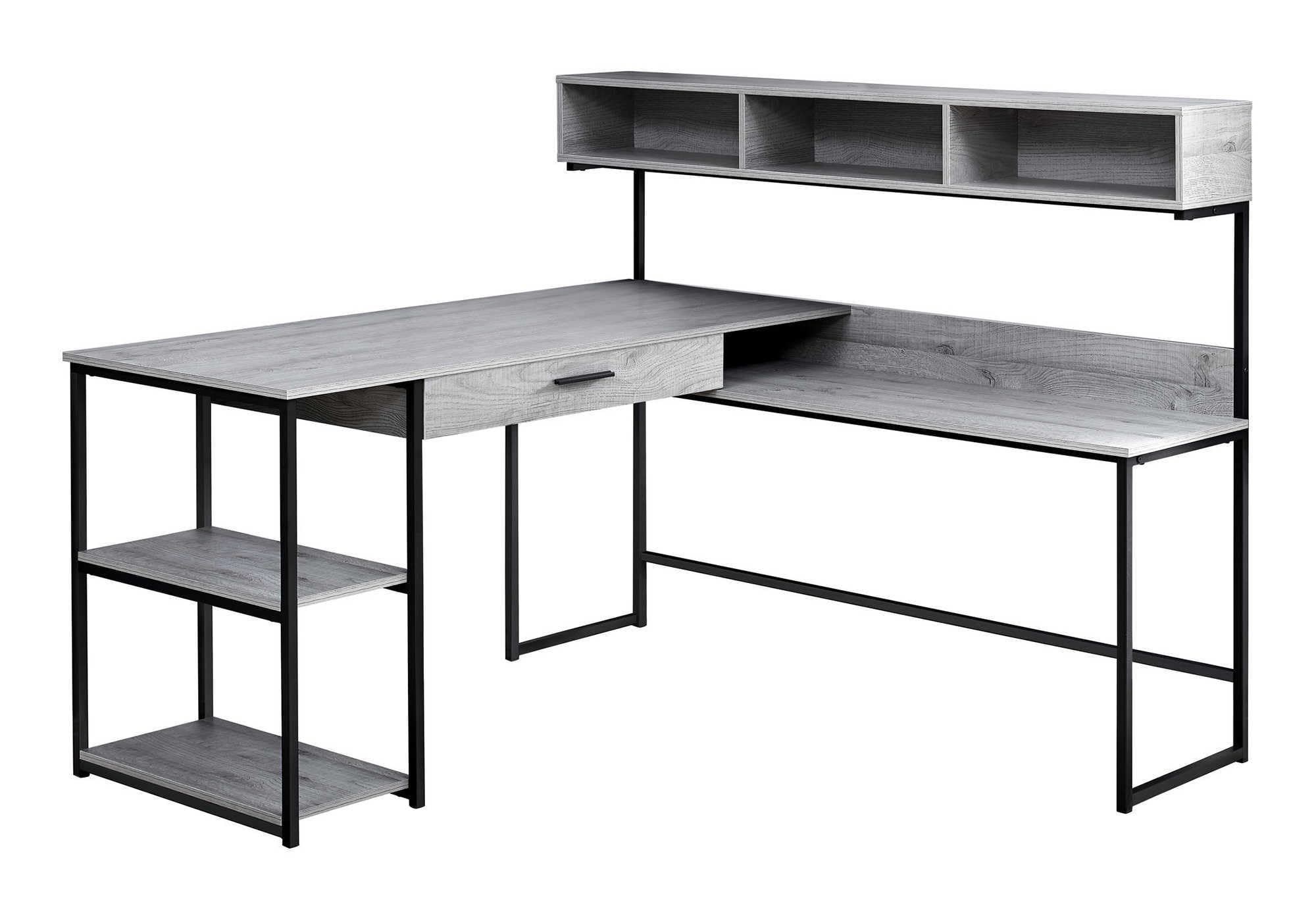
Figure 2: The L-shaped desk with hutch, showcasing its functional design and storage.
Pangropéa
To ensure the longevity and appearance of your workstation, follow these simple maintenance guidelines:
- beberesih: Usap permukaan nganggo iklanamp cloth. Avoid using harsh chemicals or abrasive cleaners, which can damage the laminate finish.
- Tumpahan: Clean up spills immediately to prevent staining or damage to the wood-grain laminate.
- Pengikat: Periodically check all screws and fasteners to ensure they remain tight. Re-tighten as necessary to maintain desk stability.
- panempatan: Avoid placing the desk in direct sunlight or near heat sources, which can cause fading or warping.
Pamérésan masalah
If you encounter any issues with your workstation, consider the following common solutions:
- Meja goyah: Ensure all assembly screws and bolts are fully tightened. A loose connection can cause instability. Verify that the desk is placed on a level surface.
- Laci Henteu Ngageser Mulus: Check that the ball-bearing drawer glides are correctly installed and aligned. Ensure the release levers on the glides were properly used during assembly to separate the inner and outer tracks. Lubrication with a silicone-based spray can sometimes improve movement.
- Damaged Parts Upon Arrival: If any parts were damaged during shipping, do not proceed with assembly. Contact Monarch Specialties customer support immediately for replacement parts.
- Hardware leungit: Double-check all packaging materials. If hardware is genuinely missing, contact customer support for assistance.
spésifikasi
| Nomer modél | Abdi 7160 |
| merek | Spésialisasi Monarch |
| Wangun | L-Wujud |
| Ukuran produk (D x W x H) | 59 "D x 59" W x 47.25" H |
| Warna | Grey / Black Frame |
| Gaya | Kontemporer |
| Jenis Bahan | Kayu direkayasa, Logam |
| Tipe rengse | Laminated |
| Item Beurat | 102 pon |
| Jumlah laci | 1 |
| Jumlah Rak | 2 (fixed bottom shelves) |
| Number of Open Cubbies (Hutch) | 3 |
| Rekomendasi beurat maksimum | 100 pon |
| Majelis Diperlukeun | Sumuhun |
| Reversible Setup | Sumuhun |
Émbaran jaminan
This Monarch Specialties workstation comes with a 1-taun jaminan kawates on parts. This warranty covers manufacturing defects and issues with components under normal use. Please retain your proof of purchase for any warranty claims.
Ngarojong
For further assistance, replacement parts, or to report any issues not covered in this manual, please contact Monarch Specialties customer service. Refer to the contact information provided with your product packaging or visit the official Monarch Specialties websitus pikeun detil rojongan.