
1. Bubuka
This manual provides essential information for the safe and effective use of your Sigma 60-600mm F4.5-6.3 DG OS HSM Camera Lens. Please read this manual thoroughly before using the lens and keep it for future reference. This lens is designed to offer a versatile focal range from 60mm to 600mm, suitable for various photographic applications, including wildlife, sports, and landscapes.
2. Produk Langkungview
The Sigma 60-600mm F4.5-6.3 DG OS HSM is a high-performance super-telephoto zoom lens. It features a robust construction, optical stabilization, and advanced optical elements to deliver high image quality across its extensive zoom range.

Figure 2.1: Sigma 60-600mm F4.5-6.3 DG OS HSM Camera Lens with lens hood.
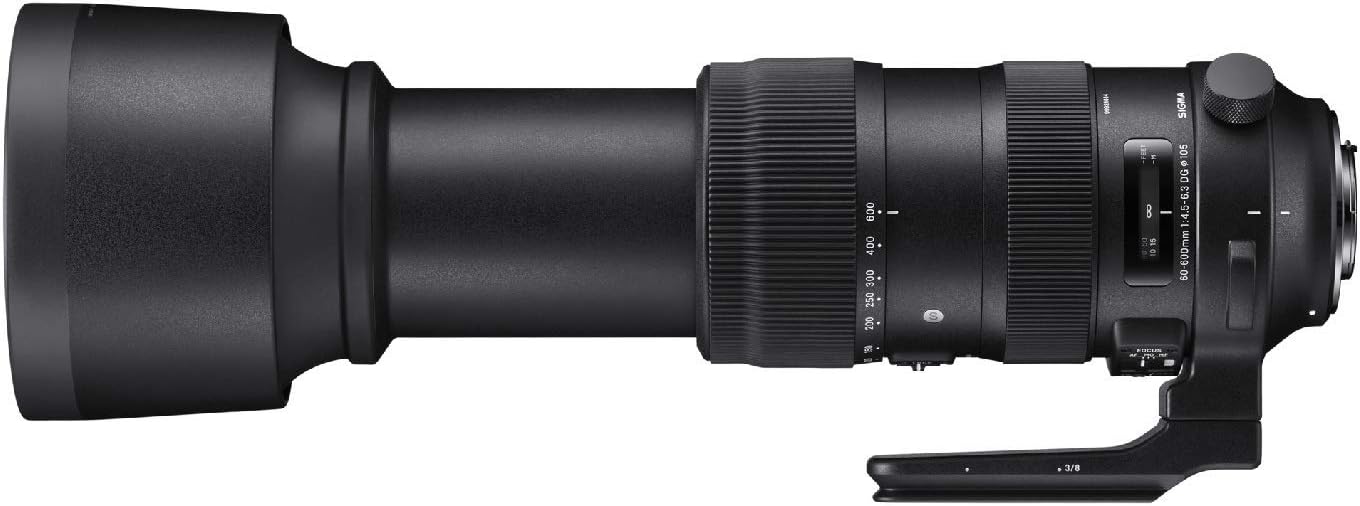
Gambar 2.2: Sisi view of the lens highlighting control switches.

Figure 2.3: Detached lens hood.
3. Setup jeung Instalasi
3.1 Ngapasangkeun Lénsa kana Kaméra
- Align the lens mount index mark with the corresponding mark on your camera body.
- Rotate the lens clockwise (for Canon EF mount) until it clicks into place. Ensure it is securely locked.
- Pikeun nyopotkeun, pencét tombol pelepas lénsa dina awak kaméra teras puterkeun lénsa ka arah anu ngalawan arah jarum jam.
3.2 Ngalampirkeun Tudung Lensa
- Sejajarkeun titik beureum dina sungkup lénsa sareng titik beureum di payun lénsa.
- Twist the lens hood clockwise until it locks into position.
- To remove, twist counter-clockwise.
3.3 Ngagunakeun Kalung Tripod
The lens includes a tripod collar for stable mounting on a tripod or monopod, especially recommended due to the lens's weight. The collar allows for rotation of the camera without detaching the lens, facilitating quick changes between horizontal and vertical orientations.
4. Ngoperasikeun Lensa
4.1 Ngazum
Rotate the zoom ring to adjust the focal length between 60mm and 600mm. The lens also supports push-pull zooming for rapid focal length changes.
4.2 Pokus
- Pokus otomatis (AF): Set the FOCUS mode switch to 'AF'. The lens will automatically focus when the camera's shutter button is half-pressed.
- Fokus Manual (MF): Set the FOCUS mode switch to 'MF'. Rotate the focus ring to manually adjust focus.
- Manual Override (MO): This mode allows for manual focus adjustment even when the lens is set to autofocus, providing fine-tuning capability.
4.3 Pangwates Fokus
The focus limiter switch allows you to restrict the autofocus range, which can improve autofocus speed when shooting subjects within a specific distance. Options typically include FULL (full range), 6m - ∞ (6 meters to infinity), and 6m - 2.6m (6 meters to 2.6 meters).
4.4 Optical Stabilization (OS)
The Intelligent OS system minimizes camera shake, providing up to 4 stops of stabilization. Set the OS switch to 'ON' for handheld shooting. Different OS modes may be available for various shooting scenarios (e.g., Mode 1 for general use, Mode 2 for panning shots).
4.5 Zoom Lock Switch
Use the zoom lock switch to secure the lens at a desired focal length, preventing zoom creep during transport or when shooting at a fixed focal length.
5. Pangropéa sarta perawatan
- Keep the lens caps on when not in use to protect the front and rear elements.
- Clean lens surfaces with a soft, lint-free cloth and a specialized lens cleaning solution. Avoid harsh chemicals.
- Simpen lensa di tempat anu tiis, garing, jauh tina sinar panonpoé langsung sareng suhu anu ekstrim.
- The lens features a dust and splash-proof construction, but it is not fully waterproof. Avoid exposing it to heavy rain or submersion.
6. Cara ngungkulan
- Lénsa teu fokus: Ensure the camera is set to the correct focus mode (AF/MF) and the lens's focus mode switch matches. Check the focus limiter setting.
- Gambar kabur: Verify that the optical stabilization (OS) is enabled for handheld shots. Check shutter speed and aperture settings. Ensure the lens and camera are clean.
- Zoom ring stiff: Ensure the zoom lock switch is disengaged. If the issue persists, contact customer support.
7. Spésifikasi
| Fitur | Spésifikasi |
|---|---|
| merek | Sigma |
| Ngaran modél | 730954 |
| Tipe Lénsa | Superzoom |
| Mountings cocog | Canon ef |
| Panjang Fokus Minimum | 60 milimeter |
| Panjang Fokus Maksimum | 600 milimeter |
| Aperture maksimum | f/22 |
| Aperture Minimum | f/32 |
| Tipe Fokus | Pokus Otomatis |
| Stabilisasi Gambar | Optik |
| Photo Filter Size | 105 milimeter |
| Item Beurat | 4 pon |
| Tingkat Résistansi Cai | Tahan cai |
| Produsén | Sigma Corporation of America |
8. Garansi jeung Rojongan
This product is covered by a manufacturer's warranty. For detailed warranty information, please refer to the documentation included with your purchase or visit the official Sigma website. For technical support, service, or inquiries, please contact Sigma Corporation of America customer service.