
Bubuka
This manual provides essential information for the installation, operation, and maintenance of your SilverStone SST-ST65F-GS 650W 80 Plus Gold Fully Modular ATX Power Supply. The SST-ST65F-GS is designed to meet the demands of modern desktop computers, offering a compact, fully modular design with 80 PLUS Gold level efficiency. It features a 650W maximum DC output, strict voltage regulation, low ripple and noise, and a silent 120mm fan for continuous 24/7 operation at 40°C.
Émbaran Kasalametan
- Always disconnect the AC power cord from the wall outlet before installing, removing, or cleaning the power supply unit (PSU).
- The PSU contains high voltage components. Do not open the PSU casing. Henteu aya bagian anu tiasa dilayanan ku pangguna di jero.
- Ensure the PSU is installed in a well-ventilated area. Do not block the fan or ventilation openings.
- Use only the modular cables provided with this power supply. Using third-party cables may cause damage to the PSU or connected components.
- Connect the correct cables to the appropriate ports on the PSU and your system components. Incorrect connections can cause severe damage.
- This product is designed for use in personal computer systems. Do not use it for any other purpose.
- Keep the PSU away from water, moisture, and extreme temperatures.
Eusi pakét
Pastikeun sadaya barang aya dina bungkusan sateuacan dipasang.
- SilverStone SST-ST65F-GS 650W Power Supply Unit
- Modular Cable Set (including ATX 24-pin, EPS/ATX 8-pin, PCIe 6+2-pin, SATA, Peripheral 4-pin cables)
- Kabel Daya AC
- Pamasangan screws
- Cable Ties / Velcro Straps
- Buku Panduan Pangguna / Inpormasi Garansi

Image: The SilverStone SST-ST65F-GS power supply unit shown with its full set of modular cables, mounting screws, and documentation.
Produk Leuwihview
The SilverStone SST-ST65F-GS is a high-performance, fully modular power supply designed for reliability and efficiency. Key features include:
- 650 Watt Maximum DC Output: Nyadiakeun ample power for most gaming and workstation systems.
- Desain kompak: With a depth of 140mm, it allows for easy integration into various PC cases.
- 100% Modular Cables: Enables users to connect only the necessary cables, reducing clutter and improving airflow.
- Sertifikasi Emas 80 PLUS: Mastikeun efisiensi daya anu luhur, ngirangan pembangkitan panas sareng biaya operasi.
- Class-Leading Single +12V Rail: Delivers stable and reliable power to demanding components.
- Strict Voltage Peraturan: Ngajaga volume kaluarantages within 3% of the nominal value.
- Low Ripple & Noise: Ensures clean power delivery to sensitive components.
- 24/7 Continuous Power Output: Capable of sustained operation at 40°C ambient temperature.
- Silent Running 120mm Fan: Operates with a minimum noise level of 18dBA for quiet performance.
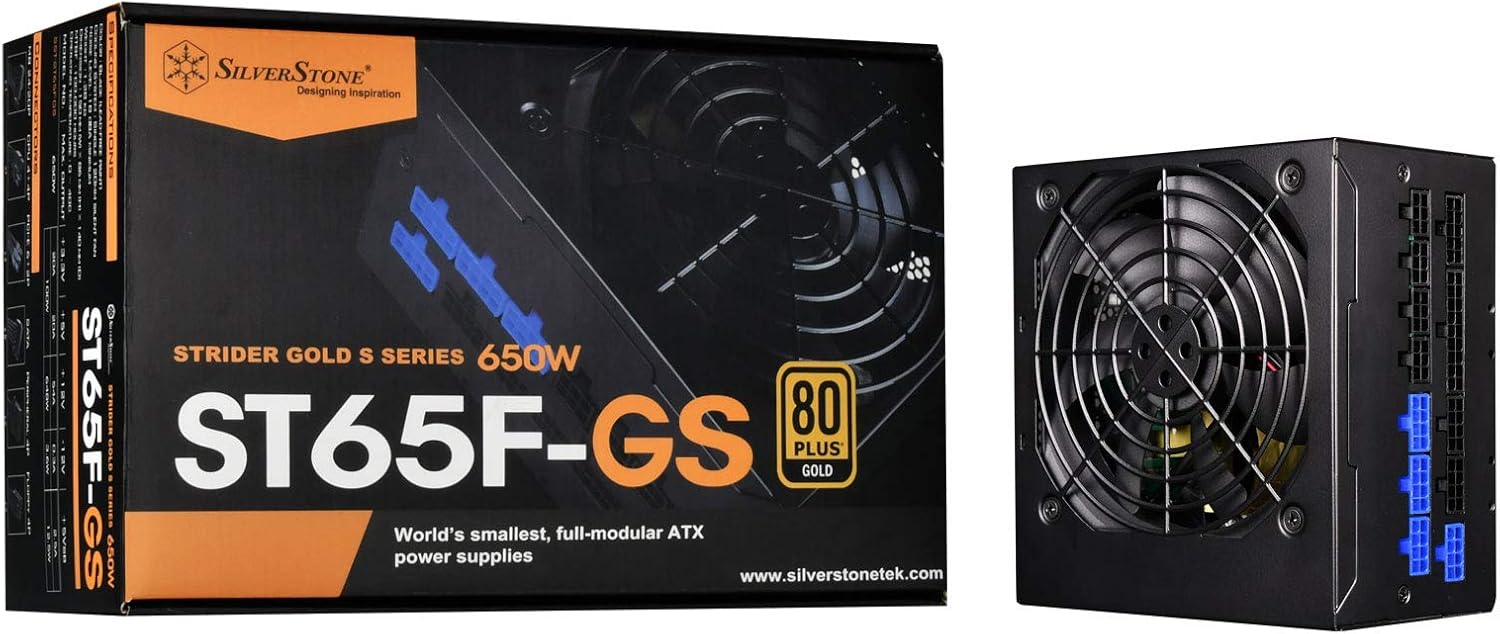
Image: The SilverStone SST-ST65F-GS power supply unit alongside its retail packaging, highlighting its compact size and 80 PLUS Gold certification.

Gambar: Hiji sudut view of the SilverStone SST-ST65F-GS power supply, showing the fan grill and modular cable connectors.

Gambar: Deukeut view of the fully modular cable connection panel on the SilverStone SST-ST65F-GS, with blue connectors for main power and black for peripherals.

Gambar: luhur-handap view of the 120mm cooling fan and grill on the SilverStone SST-ST65F-GS power supply.

Gambar: Tukangeun view of the SilverStone SST-ST65F-GS power supply, showing the AC power inlet, ventilation grille, and the main power switch.
Setup sareng Instalasi
- Nyiapkeun Sistim anjeun: Ensure your computer is completely powered off and unplugged from the wall outlet. Open your computer case to access the PSU mounting area.
- Cabut PSU Lama (upami aya): Disconnect all cables from your old power supply and remove its mounting screws. Carefully slide the old PSU out of the case.
- Pasang PSU Anyar: Slide the SilverStone SST-ST65F-GS into the designated PSU bay in your computer case. Align the screw holes and secure the PSU with the provided mounting screws. Ensure the fan is facing the correct direction for optimal airflow (typically facing down if there's a bottom vent, or up if there isn't).
- Sambungkeun kabel modular:
- Main ATX Power (20+4 pin): Connect the 24-pin cable to the corresponding port on the PSU and the motherboard.
- CPU Power (4+4 pin EPS/ATX): Connect the 8-pin (or 4+4 pin) CPU power cable to the PSU and the motherboard's CPU power connector.
- PCIe Power (6+2 pin): Connect the necessary PCIe cables to the PSU and your graphics card(s). Each 6+2 pin connector can be used for either 6-pin or 8-pin PCIe power.
- Daya SATA: Sambungkeun kabel daya SATA ka SSD, HDD, sareng drive optik anjeun.
- Peripheral (Molex) Power: Connect peripheral cables for case fans, older drives, or other accessories as needed.
penting: Ensure all cable connections are firm and correctly oriented. Do not force connectors.
- Manajemén Kabel: Route cables neatly to improve airflow and aesthetics within your case. Use the provided cable ties or Velcro straps.
- Tutup Case sareng Sambungkeun Daya AC: Once all internal connections are made, close your computer case. Connect the AC power cord to the PSU's inlet and then to a wall outlet or surge protector.
- Daya Hurung: Flip the power switch on the back of the PSU to the "I" (On) position. Then, power on your computer.
Parentah Operasi
The SilverStone SST-ST65F-GS power supply operates automatically once installed and powered on. It is designed for continuous operation under normal computing loads.
- Hurungkeun/Pareuman: Use the main power switch on the back of the PSU to completely cut power to the unit. For daily use, power your computer on and off via the operating system or case power button.
- Operasi Kipas: The integrated 120mm fan will automatically adjust its speed based on the PSU's internal temperature and load to maintain optimal cooling and quiet operation.
- Efisiensi: The 80 PLUS Gold certification indicates high efficiency, meaning less power is wasted as heat, contributing to lower energy consumption and a cooler system.
Pangropéa
Pangropéa anu leres mastikeun umur panjang sareng kinerja optimal catu daya anjeun.
- beberesih lebu: Periodically (e.g., every 6-12 months), disconnect the PSU from AC power and use compressed air to gently clean dust from the fan grille and ventilation openings. Do not open the PSU casing.
- Pastikeun aliran hawa: Make sure that the PSU's intake and exhaust vents are not obstructed by cables, dust, or other components within the PC case. Good airflow is crucial for cooling.
- Pamariksaan kabel: Occasionally check that all modular cables are securely connected to both the PSU and your components.
Pamérésan masalah
Upami anjeun mendakan masalah sareng catu daya anjeun, tingali léngkah-léngkah ngungkulan umum ieu:
- Henteu aya kakuatan:
- Pastikeun kabel listrik AC disambungkeun sacara aman ka PSU sareng stop kontak témbok.
- Check that the power switch on the back of the PSU is in the "I" (On) position.
- Verify all modular cables are correctly and firmly seated in the PSU and connected components (motherboard, CPU, GPU).
- Nguji stop kontak témbok kalawan alat sejen pikeun mastikeun eta boga kakuatan.
- Instabilitas Sistem / Kacilakaan:
- Pastikeun syarat kakuatan sistem anjeun henteu ngaleuwihan kapasitas 650W PSU.
- Pariksa sambungan kabel leupas.
- Monitor system temperatures to ensure components are not overheating, which can be exacerbated by poor PSU performance or airflow.
- Bising kipas:
- Bersihkeun sagala lebu anu numpuk tina kipas sareng ventilasi PSU.
- Pastikeun aliran hawa anu cekap dina jero wadah PC.
- If the noise is excessive and persistent even under low load, contact SilverStone support.
If these steps do not resolve your issue, please contact SilverStone customer support for further assistance.
spésifikasi
| Fitur | Spésifikasi |
|---|---|
| merek | SilverStone |
| Nomer modél | SST-ST65F-GS |
| Runtuyan | Strider Gold S |
| Maximum DC Output | 650W |
| 80 PLUS sertifikasi | emas |
| Faktor Bentuk | ATX |
| Tipe Modular | Pinuh Modular |
| Métode Cooling | 120mm Fan (Silent running, 18dBA minimum) |
| Voltage Perda | Strict 3% |
| Ripple & Noise | Rendah 3% |
| Continuous Output Temperature | 40°C (24/7 operation) |
| Ukuran (L x W x H) | 5.91 x 5.51 x 3.39 inci (150 x 140 x 86 mm) |
| Item Beurat | 2.83 pon (1.28 kg) |
| Alat nu cocog | Komputer Pribadi |
| Tipe Panyambung | ATX |
Garansi sareng Rojongan
SilverStone Technology provides a limited warranty for its power supply units. Please refer to the warranty information included in your product package for specific terms and conditions, including warranty duration and coverage details. You can also visit the official SilverStone Technology website for the most up-to-date warranty policy and to access customer support resources.
For technical support, troubleshooting assistance beyond this manual, or warranty claims, please contact SilverStone Technology customer service through their official websitus: