
Parentah Kasalametan penting
Baca sagala parentah taliti saméméh ngagunakeun alat. Simpen manual ieu pikeun rujukan ka hareup.
- Ulah nyobian ngajalankeun oven ieu kalawan panto muka sabab ieu bisa ngakibatkeun paparan ngabahayakeun kana énergi gelombang mikro.
- Ulah nempatkeun sagala objék antara beungeut hareup oven jeung panto atawa ngidinan taneuh atawa résidu cleaner akumulasi dina surfaces sealing.
- Ulah ngajalankeun oven lamun geus ruksak. Ieu hususna penting yén panto oven nutup leres tur teu aya karuksakan kana: (1) panto (ngagulung), (2) hinges na latches (pegat atawa loosened), (3) segel panto na surfaces sealing.
- Oven teu kedah disaluyukeun atanapi repaired ku saha iwal tanaga jasa mumpuni leres.
- Pastikeun alatna dibumikeun leres.
- Entong nganggo bahan kimia korosif atanapi uap dina alat ieu.
- Salawasna nganggo sarung tangan oven nalika nyekel barang panas tina oven.
Naon dina Box
Saatos ngabongkar bungkusan, pariksa yén sadaya komponén aya sareng henteu ruksak:
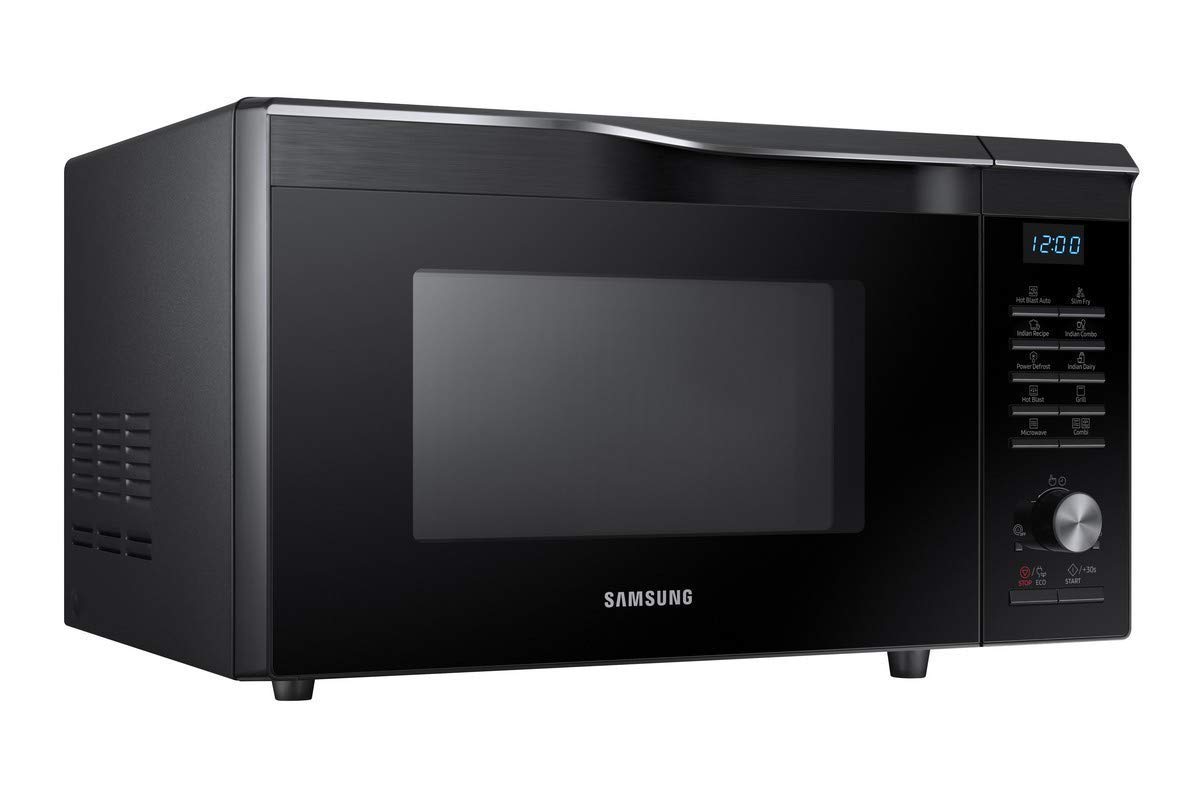
- Samsung Convection Microwave Oven (MC28M6035CK/TL)
- Méja péngkolan
- Crusty Plate
- Rak Kawat
- Manual pamaké
Note: Starter kit is not included with this product.
Setup sareng Instalasi
1. Panempatan
Place the microwave oven on a flat, stable surface strong enough to hold its weight plus the heaviest food item likely to be cooked in it. Ensure adequate ventilation around the oven. Maintain a minimum of 10 cm (4 inches) clearance at the rear, 20 cm (8 inches) at the top, and 5 cm (2 inches) on each side.
2. Sambungan Listrik
Plug the oven into a properly grounded 230V, 50Hz AC outlet. Do not use extension cords or adapters.
3. Majelis Turntable
- Teundeun cingcin roller di tengah rohangan oven.
- Teundeun turntable kaca dina luhureun ring roller, mastikeun eta sits aman dina rojongan puseur.
Gambar: Interior view of the Samsung Convection Microwave Oven with the turntable and roller ring in place. The ceramic enamel interior is visible.
Parentah Operasi
This section details the various cooking functions and how to use them.
Kontrol Panel Langkungview

Gambar: A lengkep view of the control panel on the right side of the microwave oven, showing the digital display, function buttons, and rotary dial.
- tampilan: Nembongkeun waktu, setelan masak, jeung indikator.
- Tombol Fungsi: Select cooking modes like Microwave, Grill, Convection, Combi, Defrost, Hot Blast, Slim Fry, Indian Recipe, Indian Dairy.
- Dial Rotary: Adjusts cooking time, weight, or temperature.
- START/+30s Button: Mimitian masak atanapi nambihan 30 detik kana waktos masak.
- STOP/ECO Button: Ngeureunkeun masak atawa ngabolaykeun setelan.
1. Dasar Microwave Masak
- Teundeun dahareun dina wadah microwave-aman dina turntable nu.
- Tutupkeun pantona.
- Pencét tombol "Mikrowave".
- Turn the rotary dial to set the desired cooking time.
- Press "START/+30s".
2. Convection masak
Modeu konveksi ngagunakeun kipas pikeun ngiderkeun hawa panas, idéal pikeun manggang sareng ngasang.
- Place food on the wire rack or a suitable baking dish.
- Pencét tombol "Konvéksi".
- Turn the rotary dial to select the desired temperature.
- Press "START/+30s" to preheat (optional).
- Once preheated (or if not preheating), turn the dial to set cooking time.
- Press "START/+30s".

Gambar: Deukeut view of the interior top of the microwave oven, highlighting the convection heating element.
3. Grill masak
Anggo fungsi panggangan pikeun ngagoréng sareng ngagaringkeun kadaharan.
- Tempatkeun tuangeun kana rak kawat.
- Pencét tombol "Grill".
- Turn the rotary dial to set the desired cooking time.
- Press "START/+30s".
4. Combi Cooking (Microwave + Convection/Grill)
Combination modes allow for faster cooking with browning results.
- Susun kadaharan dina wadah anu cocog.
- Press the "Combi" button repeatedly to select the desired combination mode (e.g., Microwave + Grill, Microwave + Convection).
- Turn the rotary dial to set cooking time.
- Press "START/+30s".
5. Power Defrost
This feature allows for quick and even defrosting of various food types.
- Place frozen food in a microwave-safe dish.
- Press the "Power Defrost" button.
- Turn the rotary dial to select the food type and weight.
- Press "START/+30s".
6. Special Features (Hot Blast, Slim Fry, Indian Recipe, Indian Dairy)
These pre-programmed functions offer optimized settings for specific dishes.
- Hot Blast: For faster and more even cooking, similar to a hot air fryer.
- Slim Fry: Allows cooking with minimal oil, achieving a crispy texture.
- Indian Recipe: Pre-set programs for popular Indian dishes.
- Indian Dairy: Specific settings for dairy-based preparations.
To use these features:
- Place food in the appropriate cookware.
- Press the corresponding function button (e.g., "Hot Blast", "Slim Fry", "Indian Recipe", "Indian Dairy").
- Turn the rotary dial to select the specific dish or weight if prompted.
- Press "START/+30s".
Perawatan sareng Pangropéa
1. Ngabersihkeun Bagian Jero Oven
- Salawasna cabut oven saméméh beberesih.
- Wipe the interior cavity, door seals, and door with a damp lawon sanggeus unggal pamakéan.
- For stubborn stains, use a mild detergent and then wipe with a clean, damp lawon.
- Ulah nganggo pembersih anu abrasif, sabut baja, atanapi bahan kimia anu kasar.
- The ceramic enamel interior is designed for easy cleaning.
2. Ngabersihan Exterior
- Ngusap permukaan luar kalayan lemes, damp lawon.
- Hindarkeun cai kana liang ventilasi.
3. Cleaning the Turntable and Roller Ring
- The glass turntable and roller ring can be washed in warm soapy water or in a dishwasher.
- Pastikeun aranjeunna tos rengse garing saméméh nempatkeun deui dina oven.
Pamérésan masalah
| Masalah | Mungkin Cukang lantaranana | Solusi |
|---|---|---|
| Oven henteu ngamimitian | Kabel listrik henteu dipasang; Panto teu ditutup leres; Fuse ditiup atawa circuit breaker tripped. | Pastikeun kabel listrik geus dipasang pageuh; Tutupkeun panto pageuh-pageuh; Pariksa sekering/pemutus sirkuit rumah tangga. |
| Dahareun henteu rata | Dahareun teu diaduk atawa ngancik; Tingkat kakuatan anu salah atanapi waktos masak. | Aduk atanapi balikkeun kadaharan nalika satengah jalan asak; Saluyukeun tingkat daya sareng waktos masak sakumaha diperyogikeun. |
| Bohlam teu jalan | Bohlam lampu kudu diganti. | Kontak tanaga layanan mumpuni pikeun ngagantian bohlam. |
| Uap kaleuleuwihan tina panto | Normal nalika masak, utamana pikeun kadaharan anu ngandung kadar cai anu luhur. | Ieu normal sareng sanés lepat. Pastikeun ventilasi anu leres. |
Lamun masalah persists sanggeus nyobian solusi ieu, mangga ngahubungan rojongan customer.
Spésifikasi produk
| merek | Samsung |
| Nomer modél | MC28M6035CK/TL |
| Kapasitas | 28 Liter |
| Modeu Masak Oven | Padumukan |
| Tipe Pamasangan | Countertop |
| Fitur husus | Defrost, Hot Blast, Slim Fry, Indian Recipe, Indian Dairy |
| Warna | Hideung |
| Voltage | 230 volt |
| Bahan | Ceramic Enamel (Interior) |
| Item Ukuran (L x W x H) | 46.3 x 51.7 x 31 cm |
| Item Beurat | 31 kg |
Garansi sareng Rojongan
Produk ieu hadir kalawan a 6-month Seller Warranty ti tanggal beuli. Garansi ieu nyertakeun cacad manufaktur sareng gangguan dina panggunaan normal.
For warranty claims, technical assistance, or service requests, please contact your seller or authorized Samsung service center. Keep your purchase receipt as proof of purchase.
For further information, you may visit the official Samsung support websitus atanapi tingal wincik kontak disadiakeun kalawan dokuméntasi pameseran Anjeun.