
Émbaran Kasalametan penting
Please read these instructions carefully before assembly and use. Failure to follow these instructions may result in property damage, serious injury, or death. If you do not understand these instructions or have doubts about the safety of the installation, please contact customer service.
- Kapasitas beurat: Do not exceed the maximum weight capacity of 100 lbs (45.3 kg) for the TV and 20 lbs (9 kg) for the AV shelf.
- Ukuran TV: This stand is designed for TVs between 32 and 85 inches.
- Kasaluyuan VESA: Ensure your TV's VESA mounting pattern is between 100x100mm and 600x400mm.
- Stabilitas: Always ensure all bolts are securely tightened before moving the stand. Lock the casters when the stand is in a stationary position.
- Barudak: Keep children away from the TV stand during assembly. Do not allow children to climb on or play with the stand or TV.
- lokasi: Place the TV stand on a flat, stable surface. Avoid placing it in areas with high winds or uneven terrain.
Eusi pakét
Verify that all components are present and undamaged before beginning assembly. If any parts are missing or damaged, contact PERLESMITH customer service.

Image: All components of the PERLESMITH PSTVMC05 Rolling TV Stand, including the base, vertical poles, TV mounting bracket, AV shelf, camera shelf, casters, and various hardware.
- TV Cart Base
- Vertical Support Poles (2)
- Bracket Pamasangan TV
- AV Shelf
- Rak kaméra
- Roda Kastor anu tiasa dikonci (4)
- Pakakas Pemasangan (rupa-rupa sekrup, ring, spacer)
- Instruksi Manual
Setup sareng Majelis
Assembly of the PERLESMITH PSTVMC05 TV stand is designed to be straightforward and does not require drilling into walls. It is recommended to have a second person assist with lifting the TV.
Video Guide: How to Install PSTVMC05 Mobile TV Stand
Video: A detailed step-by-step guide on how to assemble the PERLESMITH PSTVMC05 mobile TV stand. This video covers attaching the TV bracket, assembling the base and vertical poles, and mounting the TV.
- Gantelkeun Casters ka Base: Securely screw the four lockable caster wheels into the designated holes on the TV cart base. Ensure they are tightened to prevent wobbling.
- Susun kutub nangtung: Connect the two vertical support poles to the base. Follow the instructions in the manual for proper alignment and secure fastening.
- Install TV Mounting Bracket: Attach the TV mounting bracket to the vertical poles at your desired initial height. This bracket will hold your television.
- Nyiapkeun TV pikeun dipasang: Attach the TV adapter plates (if necessary) and the TV mounting arms to the back of your television using the appropriate screws and spacers from the hardware kit. Ensure the VESA pattern matches the stand's compatibility.
- Pasang TV: With assistance, carefully lift your TV and hook the mounting arms onto the TV mounting bracket on the stand. Secure the TV to the bracket using the safety screws or locking mechanisms provided.
- Install AV Shelf: Attach the AV shelf to the vertical poles at a comfortable height for your devices.
- Install Camera Shelf: Attach the camera shelf to the top of the vertical poles, if desired, for webcams or other small accessories.
- Manajemén Kabel: Utilize the hollow design of the vertical tubes to route and organize cables, maintaining a neat appearance.

Image: The PERLESMITH PSTVMC05 TV stand with a television mounted, illustrating its wide TV compatibility (32-85 inches) and VESA patterns up to 600x400mm.
Parentah Operasi
The PERLESMITH PSTVMC05 TV stand offers flexibility for optimal viewing and placement.
adjustment jangkungna
The TV plate height can be adjusted to 11 different levels, ranging from 39.37 inches (100 cm) to 59.06 inches (150 cm) from the floor. To adjust the height, loosen the securing bolts on the vertical poles, slide the TV mounting bracket to the desired height, and re-tighten the bolts securely.

Image: A visual representation of the 11 height adjustment levels available on the PERLESMITH PSTVMC05 TV stand, indicating minimum and maximum heights.
Adjustment Dengdekkeun
The TV mount allows for a tilt range of -10° to +5°. This feature helps reduce glare and optimize viewing angles. To adjust the tilt, loosen the tilt adjustment knobs on the side of the TV mounting bracket, set the desired angle, and re-tighten the knobs.
Mobilitas jeung Ngonci Casters
The stand is equipped with four lockable caster wheels for easy movement. To move the stand, unlock all four casters. To secure the stand in place, press down on the locking levers on each caster until they click into position. Ensure all casters are locked when the stand is stationary to prevent accidental movement.

Image: The PERLESMITH PSTVMC05 TV stand demonstrating its 360-degree rotating casters for easy mobility, with examples of moving the TV between rooms.
AV and Camera Shelves
The adjustable AV shelf provides space for devices such as laptops, DVD players, or gaming consoles. The top camera shelf is suitable for webcams or other small peripherals. Both shelves can be adjusted vertically along the main poles.
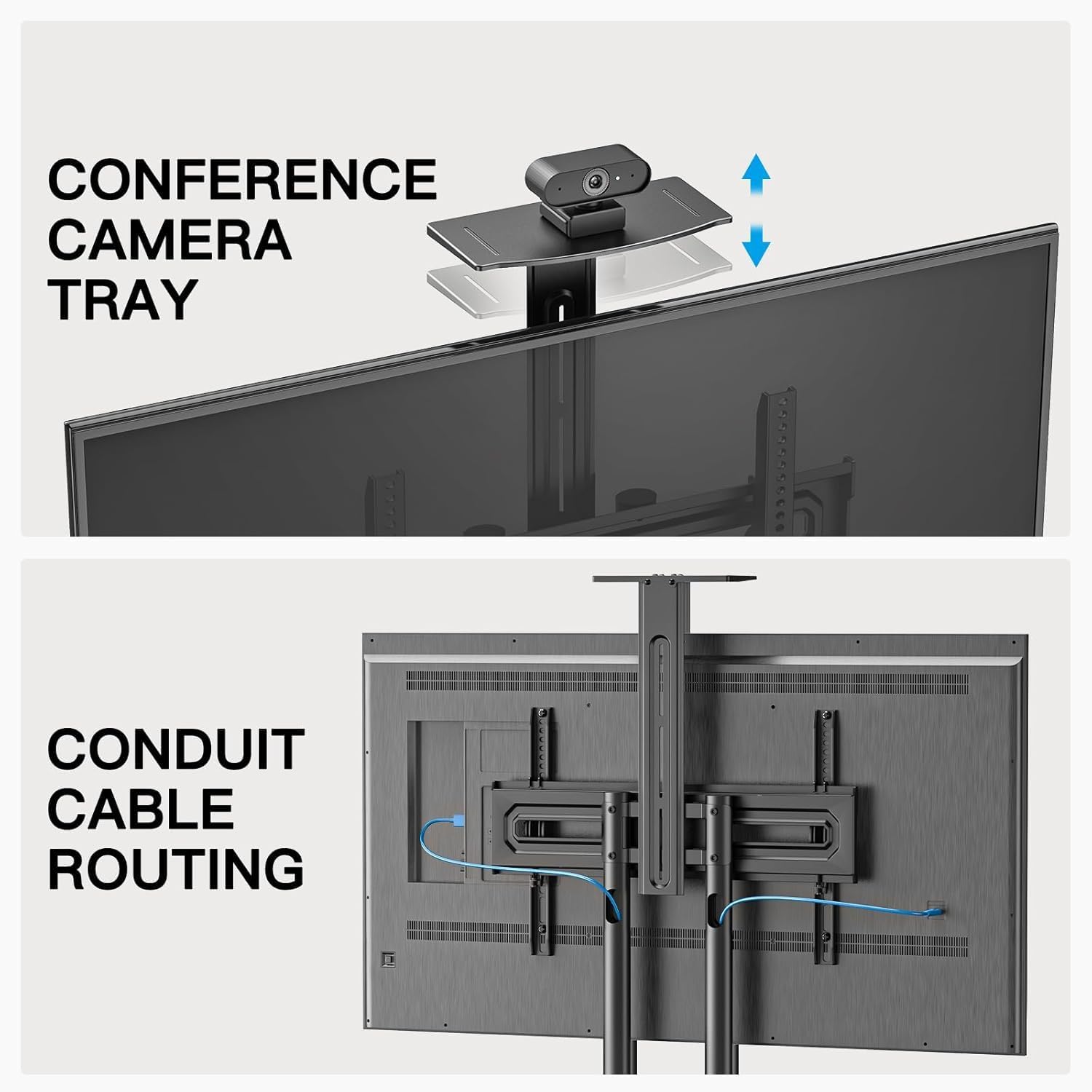
Gambar: A close-up view highlighting the adjustable camera tray and the integrated conduit cable routing system within the vertical poles of the PERLESMITH PSTVMC05 TV stand.
Pangropéa
Pangropéa rutin mastikeun umur panjang sareng operasi anu aman tina rak TV anjeun.
- beberesih: Wipe the stand with a soft, dry cloth. Avoid abrasive cleaners or solvents that could damage the finish.
- Pengikat: Pariksa sadaya sekrup sareng baut sacara berkala pikeun mastikeun éta tetep pageuh. Kencengkeun deui upami diperyogikeun.
- Casters: Jaga roda kastor bébas tina kokotor supados gerakanana lancar.
- Distribusi beurat: Ensure the weight of the TV and any devices on the shelves is evenly distributed and within the specified limits.
Pamérésan masalah
If you encounter issues with your PERLESMITH PSTVMC05 TV stand, refer to the following common problems and solutions:
| Masalah | Mungkin Cukang lantaranana | Solusi |
|---|---|---|
| Stand feels unstable or wobbles. | Loose fasteners; uneven floor; TV weight exceeds capacity. | Check and tighten all screws and bolts. Ensure the stand is on a level surface. Verify TV weight is within 100 lbs (45.3 kg). |
| Roda teu ngagulung kalawan mulus atawa teu bisa dikonci kalawan bener. | Debris in casters; casters not fully engaged/disengaged. | Clean any debris from the caster wheels. Ensure the locking levers are fully pushed down to lock or fully pulled up to unlock. |
| TV appears to lean or is not level. | Mounting arms not level; vertical poles not securely fastened. | Use a level to ensure the TV mounting arms are horizontal before attaching the TV. Re-check the tightness of the vertical pole connections to the base and the TV mounting bracket. |
| Difficulty adjusting TV height or tilt. | Adjustment knobs/bolts are too tight. | Loosen the relevant knobs or bolts sufficiently before attempting to adjust. Re-tighten firmly after adjustment. |
spésifikasi
| Fitur | Rincian |
|---|---|
| Nomer modél | PSTVMC05 |
| Ukuran TV cocog | 32 - 85 inci |
| Kapasitas Beurat TV Maksimum | 100 lbs (45.3 kg) |
| Kasaluyuan VESA | 100x100mm ka 600x400mm |
| Jangkungna adjustment Range | 39.37" - 59.06" (100 cm - 150 cm) |
| Sudut Dengdekkeun | -10 ° ka +5 ° |
| AV Shelf Weight Capacity | 20 lbs (9 kg) |
| Bahan | Alloy Steel |
| Jinis Gerakan | Mobile (with lockable casters) |
| Item Beurat | 16.9 kg |

Image: A comparison highlighting the superior weight capacity of the PERLESMITH PSTVMC05 TV stand (100 lbs for TV, 20 lbs for shelf) compared to other models.
Garansi sareng Rojongan
The PERLESMITH PSTVMC05 Rolling TV Stand comes with a 10-TAHUN HARANSI.
For technical assistance, missing parts, or warranty claims, please contact PERLESMITH customer service. You can typically find contact information on the manufacturer's websitus atawa ngaliwatan platform pameseran Anjeun.
Additional resources, including a PDF user manual, may be available online. For example, a PDF manual is available at: Manual Pamaké (PDF).