
1. Bubuka
This manual provides essential information for the installation, operation, and maintenance of the Walfront SX460 Automatic Voltage Regulator (AVR) board. The SX460 is designed to maintain a stable output voltage for brushless generators up to 80KW, ensuring consistent power delivery.
2. Émbaran Kasalametan
WARNING: ELECTRIC SHOCK RISK!
Alat ieu beroperasi kalayan voltase anu luhurtages. Improper installation or handling can result in severe injury or death. Always ensure the generator is completely shut down and disconnected from all power sources before attempting any installation, inspection, or maintenance procedures. Only qualified personnel should perform work on this equipment.
Observe all local electrical codes and safety regulations. Do not touch live terminals or heatsinks when the unit is powered.
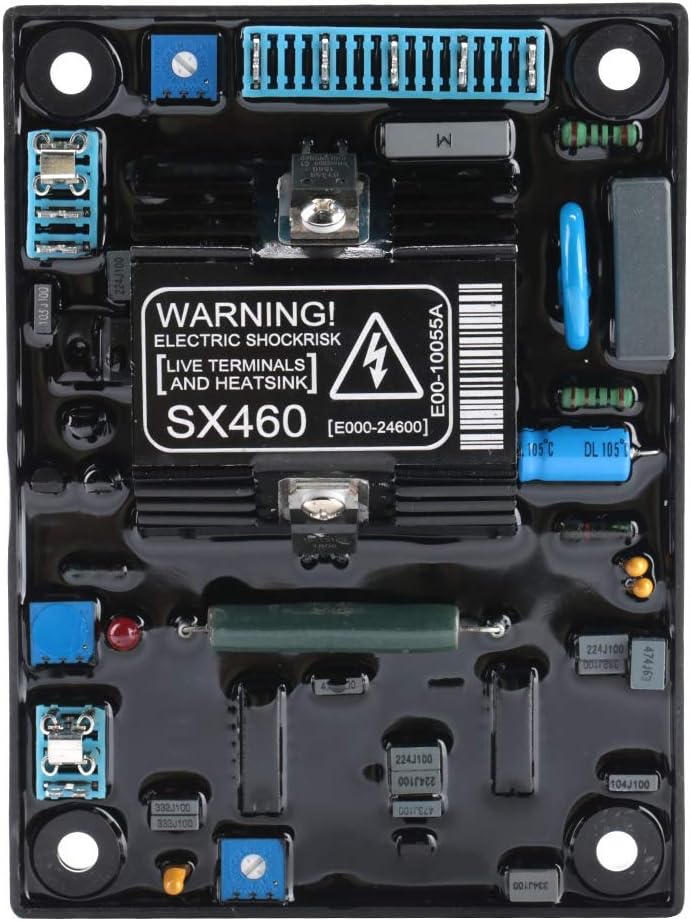
Gambar 2.1: Hareupeun view of the Walfront SX460 AVR board, clearly showing the electric shock warning label.
3. Produk Langkungview
The Walfront SX460 is a robust Automatic Voltage Regulator designed for reliable performance in generator systems. It features high-quality components for stable operation and precise voltage pangaturan.
Fitur konci:
- Detection and power input: 120 (95-132) / 240 (190-264) VAC.
- Single-phase two-wire selection via jumper.
- Magnetic field output: maximum 90VDC at 207VAC input.
- Current: 4A continuous, 10A for 10 seconds (non-discontinuous).
- Pressure regulation accuracy: <±1%.
- Suitable for brushless generators within 80KW.
- Constructed with high-quality capacitance for parameter consistency and reliability.

Gambar 3.1: Angled view of the SX460 AVR board, highlighting its compact design and component layout.
4. Setup jeung Instalasi
Before installation, ensure the generator is completely powered off and locked out. Refer to your generator's manual for specific wiring diagrams and safety procedures.
4.1. Input Voltage Pilihan
The SX460 supports both 120VAC and 240VAC input. Select the appropriate voltage using the jumper copper on the board. Consult the markings on the board for correct jumper placement for your specific generator's input voltage (95-132VAC for 120V nominal, 190-264VAC for 240V nominal).
4.2. Sambungan Wiring
Connect the SX460 AVR to your generator's excitation system according to the generator manufacturer's wiring diagram. Ensure all connections are secure and properly insulated. Pay close attention to the polarity of the excitation windings.
4.3. Pamasangan
Mount the AVR board in a location that is free from excessive vibration, moisture, and extreme temperatures. Ensure adequate ventilation around the unit to prevent overheating.

Gambar 4.1: Balik view of the SX460 AVR board, illustrating mounting points and model identification.
5. Parentah Operasi
Once installed, the SX460 AVR automatically regulates the generator's output voltage. Minimal adjustment may be required for optimal performance.
5.1. Initial Start-up and Adjustment
- After ensuring all connections are correct and secure, start the generator.
- Monitor the generator's output voltage using a suitable voltmeter.
- Lamun voltage is not at the desired level, locate the voltage adjustment potentiometer on the AVR board.
- Carefully turn the potentiometer with a non-conductive tool to achieve the required output voltage. Make small adjustments and allow the system to stabilize between turns.
- The SX460 is designed for a pressure regulation accuracy of less than ±1%.
6. Pangropéa
The Walfront SX460 AVR is designed for long-term reliability with minimal maintenance. However, periodic checks can help ensure optimal performance and longevity.
- Inspeksi Visual: Periodically inspect the AVR board for any signs of physical damage, loose connections, or discoloration due to overheating.
- Kabersihan: Keep the board clean and free from dust, dirt, and moisture. Use a soft, dry brush or compressed air for cleaning. Do not use liquid cleaners.
- Integritas sambungan: Ensure all wiring connections remain tight and free from corrosion.
7. Cara ngungkulan
If you experience issues with your generator's voltage regulation, consider the following common troubleshooting steps:
| Masalah | Mungkin Cukang lantaranana | Solusi |
|---|---|---|
| Henteu voltage output or very low voltage |
|
|
| Unstable or fluctuating voltage |
|
|
| Overvoltage atanapi Undervoltage |
|
|
8. Spésifikasi
- model: SX460
- merek: Walfront
- Detection & Power Input: 120 (95-132) / 240 (190-264) VAC, Single-phase two-wire (jumper selectable)
- Magnetic Field Output: Max 90VDC at 207VAC input
- Ayeuna: 4A continuous, 10A for 10 seconds (non-discontinuous)
- Pressure Regulation Accuracy: <±1%
- Sarat Sistim: Brushless generator within 80KW
- Beurat barang: Kurang leuwih 0.3 Kilogram
- Bahan: palastik
- warna: Hideung
9. Garansi jeung Rojongan
For information regarding warranty coverage, technical support, or replacement parts, please contact your original point of purchase or the Walfront customer service department. Keep your purchase receipt or order details handy when contacting support.