
1. Bubuka
Welcome to the user manual for your Google Pixel 4 XL smartphone. This guide provides essential information to help you get started, understand its features, and maintain your device. The Google Pixel 4 XL is designed to offer a seamless Android experience with advanced camera capabilities, intuitive gesture controls, and the integrated Google Assistant.

Figure 1.1: Google Pixel 4 XL (Oh So Orange)
2. Setélan
2.1 Naon dina Box
- Telepon pinter Google Pixel 4 XL
- Adaptor AC
- Kabel USB (USB-C ka USB-C)
- OTG Dongle (USB-A to USB-C adapter)
- Pakakas Pangeluar Baki SIM
- Gancang Mimitian Guide
2.2 Nyelapkeun Kartu SIM
- Locate the SIM card tray on the side of your Pixel 4 XL.
- Selapkeun alat ejector baki SIM kana liang leutik gigireun baki terus pencét pageuh nepi baki pops kaluar.
- Place your Nano SIM card into the tray with the gold contacts facing down. Ensure it fits securely.
- Carefully push the SIM tray back into the phone until it clicks into place.

Figure 2.1: SIM Card Tray Location
2.3 Daya Awal Hurung sareng Setup
- Pencét jeung tahan tombol Daya (aya di sisi katuhu) nepi ka logo Google nembongan.
- Follow the on-screen instructions to select your language, connect to Wi-Fi, and transfer data from an old device if desired.
- Lebet nganggo Akun Google anjeun atanapi jieun anu énggal.
- Set up security features such as Face Unlock.
2.4 Ngecas Alat
Connect the USB cable to the AC adapter and plug it into a power outlet. Connect the other end of the USB cable to the USB-C port at the bottom of your Pixel 4 XL. The device supports fast charging. For optimal battery health, avoid fully discharging the battery frequently.
3. Parentah Operasi
3.1 Napigasi Dasar
The Pixel 4 XL uses a touchscreen interface for navigation. Swipe up from the bottom to go to the home screen, swipe from the left or right edge to go back, and swipe up and hold to view aktip panganyarna.

Figure 3.1: Pixel 4 XL Front Display
3.2 Asistén Google
The new Google Assistant is integrated into the Pixel 4 XL. You can activate it by squeezing the sides of your phone or by saying "Hey Google." Use your voice to send texts, share photos, get directions, and more.
3.3 Fitur kaméra
The Pixel 4 XL camera offers advanced photography capabilities:
- Point and Shoot: Capture brilliant color and control exposure balance.
- Tetempoan peuting: Take clear photos in low-light conditions, including astrophotography for capturing the Milky Way.
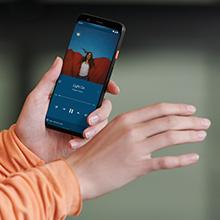
Figure 3.2: Using the Pixel 4 XL Camera
3.4 Motion Sense (Quick Gestures)
Utilize Quick Gestures to control your phone without touching it. Wave your hand above the screen to skip songs, silence calls, and more. Motion Sense functionality is available in specific regions including the US, Canada, Singapore, Australia, Taiwan, and most European countries.
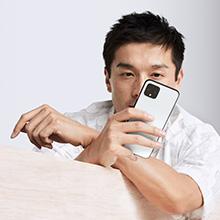
Figure 3.3: Motion Sense in Action
3.5 Call Screen
The Google Assistant's Call Screen feature helps filter out spam calls. It can proactively screen unknown callers and provide a transcript of the conversation, allowing you to decide whether to answer.
3.6 Video Produk Resmi
Video 3.1: An official video from Google Inc showcasing the features of the Google Pixel 4, including Google Assistant and Motion Sense. This video provides a visual overview of key functionalities.
4. Pangropéa
4.1 Ngabersihan Alat Anjeun
To clean your Pixel 4 XL, use a soft, lint-free cloth. Avoid abrasive materials, solvents, or aerosol sprays. For stubborn marks, slightly dampen the cloth with water. Do not submerge the device in water.
4.2 Apdet parangkat lunak
Google regularly releases software updates to improve performance, add features, and enhance security. Ensure your device is connected to Wi-Fi and has sufficient battery life before installing updates. You can check for updates in Settings > System > System update.
4.3 Perawatan Batré
Pikeun manjangkeun umur batre:
- Hindarkeun suhu anu ekstrim.
- Use the provided charger or a compatible Qi-certified wireless charger.
- Enable Adaptive Battery in settings to optimize app usage.
- Disable features like Motion Sense and Always-on Display if not actively needed to conserve power.
4.4 Nyadangkeun Data
Regularly back up your data to your Google Account. This includes photos, videos, contacts, and app data. Go to Settings > System > Backup to manage your backup settings.
5. Cara ngungkulan
5.1 Isu umum jeung Solusi
- Alat teu ngabales: Pencét jeung tahan tombol Daya salila kira 30 detik pikeun maksa balikan deui.
- Aplikasi nabrak: Clear the cache and data for the problematic app in Settings > Apps & notifications > See all apps > [App Name] > Storage & cache.
- Masalah konéktipitas (Wi-Fi/Bluetooth): Try toggling Wi-Fi or Bluetooth off and on. If the issue persists, reset network settings in Settings > System > Reset options > Reset Wi-Fi, mobile & Bluetooth.
- Kahirupan batré goréng: Review battery usage in Settings > Battery to identify apps consuming excessive power. Adjust screen brightness and disable unnecessary features.
5.2 Reset pabrik
Reset pabrik bakal ngahapus sadaya data tina telepon anjeun sareng mulangkeun kana setélan pabrik aslina. Ieu tiasa ngabéréskeun masalah parangkat lunak anu terus-terusan. Warning: Back up all important data before proceeding.
- Buka Setélan> Sistem> Reset pilihan.
- Ketok "Pupus sadaya data (reset pabrik)".
- Pastikeun kaputusan anjeun sareng turutan pitunjuk dina layar.
6. Spésifikasi
Key technical specifications for the Google Pixel 4 XL:
| Fitur | Spésifikasi |
|---|---|
| merek | |
| Ngaran modél | Piksel 4 XL |
| Sistem operasi | Android |
| Kapasitas Panyimpenan Mémori | 64 GB |
| RAM Mémori Dipasang Ukuran | 6 GB |
| Ukuran layar | 6.3 inci |
| Resolusi | 1440 x 2960 |
| Refresh Laju | 120 Hz |
| Modél CPU | Snapdragon S3 |
| Laju CPU | 2.84 GHz |
| Warna | Oh So Orange |
| Jumlah slot Kartu SIM | SIM tunggal |
| Tipe Panyambung | USB Tipe C |
| Fitur Kaamanan Biometrik | Pangenal raray |
| Tingkat Résistansi Cai | Tahan cai |
| Headphone Jack | Taya jack headphone |
| Front Photo Sensor Resolution | 8 MP |
| Resolusi Capture Video | 4k (30fps) |
| Tipe tampilan | OLED |
| Panyadia Nirkabel | Henteu dikonci |
| Batré Rata Kahirupan | 12 Jam |
7. Émbaran jaminan
Your Google Pixel 4 XL comes with a 2-taun jaminan produsén urang. This warranty covers defects in materials and workmanship under normal use. It does not cover damage caused by accidents, misuse, unauthorized repairs, or normal wear and tear.
For detailed terms and conditions, please refer to the warranty card included with your product or visit the official Google support websitus.
8. Rojongan
If you require further assistance or encounter issues not covered in this manual, please utilize the following resources:
- Pitulung Online: Visit the official Google Pixel Help Center for comprehensive articles, FAQs, and troubleshooting guides.
- Forum Komunitas: Engage with other Pixel users and experts in Google's official product forums.
- Kontak Rojongan: Access direct support options (chat, phone, email) through the Google Pixel Help Center.
Always ensure you are referring to official Google support channels for accurate and up-to-date information.