
1. Bubuka
Thank you for choosing the Philips Shaver S3134/51. This electric rotary shaver is designed for both wet and dry use, offering a comfortable and efficient shaving experience. Please read this user manual carefully before using the appliance and save it for future reference. This manual provides essential information on safe operation, setup, usage, maintenance, and troubleshooting.
2. Émbaran Kasalametan penting
To ensure safe operation and prevent injury, always follow these basic safety precautions:
- Unplug before use: This appliance is designed for cordless operation only. Always disconnect the shaver from the power outlet before use.
- Entong anggo alatna upami rusak.
- Keep the charging adapter dry. Do not immerse it in water or use it in wet conditions.
- Alat ieu tiasa dianggo ku murangkalih umur 8 taun ka luhur sareng jalma anu kakurangan kamampuan fisik, indrawi atanapi mental atanapi kurang pangalaman sareng pangaweruh upami aranjeunna dipasihan pangawasan atanapi petunjuk ngeunaan panggunaan alat dina cara anu aman sareng ngartos bahaya anu aya. .
- Barudak teu kedah maén sareng alat. Beberesih sareng pangropéa pangguna henteu kedah dilakukeun ku murangkalih tanpa pangawasan.
- Only use the original Philips charger provided with the appliance.
- Ulah muka alat pikeun ngaganti batré rechargeable.
3. Eusi Paket
The Philips Shaver S3134/51 package typically includes:
- Philips Shaver S3134/51
- Adaptor ngecas
- Cap Pelindung
- Sikat beberesih
- Manual pamaké
4. Ngamimitian (Setup)
4.1 Ngecas Cukur
Before first use, or when the battery indicator shows low charge, fully charge your shaver. A full charge provides up to 60 minutes of cordless shaving time.
- Pastikeun alat cukur dipareuman.
- Insert the small plug of the charging adapter into the shaver's charging socket.
- Colokkeun adaptor kana stop kontak témbok.
- The battery indicator light will illuminate to show charging status. When fully charged, the light may turn solid or switch off, depending on the model.
- Ngecas pinuh biasana peryogi waktos sakitar 1 jam.
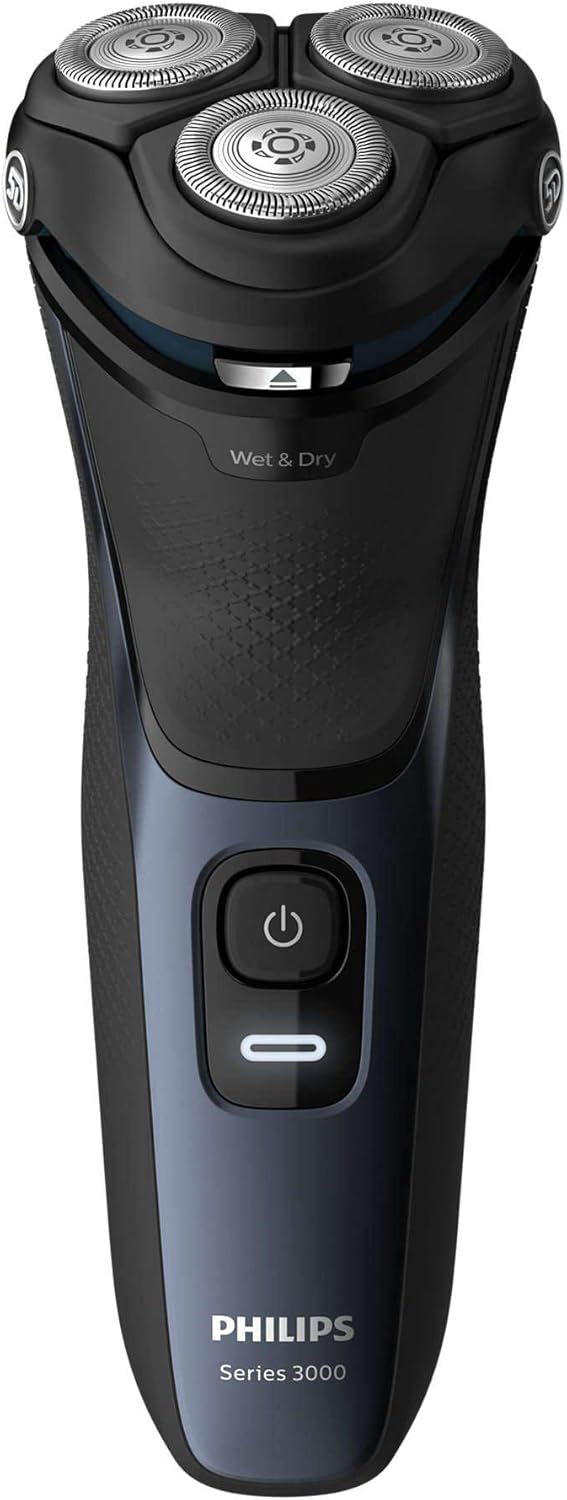
Gambar 1: Hareupeun view of the Philips Shaver S3134/51, showing the power button and 'Wet & Dry' indicator.
5. Ngoperasikeun Shaver
5.1 Powering on / Pareum
- Pikeun ngaktipkeun cukur, pencét tombol daya sakali.
- Pikeun mareuman cukur, pencét deui tombol daya.
5.2 Cukur baseuh
For a refreshing and comfortable shave, you can use the shaver with foam or gel.
- Baseuh beungeut anjeun sarta nerapkeun busa cukur atawa gél.
- Hurungkeun cukur.
- Move the shaver in slow, circular motions over your skin.
- Rinse the shaving heads under running water during and after shaving to prevent clogging.
5.3 Cukur garing
For a quick and convenient shave, use the shaver on dry skin.
- Pastikeun kulit anjeun beresih jeung garing.
- Hurungkeun cukur.
- Move the shaver in slow, circular motions over your skin.
5.4 Ngagunakeun Pemangkas Pop-Up
Pemangkas pop-up anu terintegrasi ieu idéal pikeun ngajaga kumis sareng cambang anjeun.
- Ensure the shaver is turned on.
- Geser tombol pelepas trimmer ka luhur pikeun ngaktipkeun trimmer.
- Hold the trimmer perpendicular to your skin and move it gently to trim desired areas.
- Nalika rengse, dorong trimmer deui ka handap nepi ka clicks kana tempatna.

Gambar 2: Sisi view of the Philips Shaver S3134/51 with the precision pop-up trimmer extended.
6. beberesih sarta Pangropéa
Pembersih rutin ngajamin kinerja optimal sareng manjangkeun umur cukur anjeun.
6.1 beberesih poean
- Sanggeus unggal pamakéan, pareuman cukur jeung cabut colokan tina carjer.
- Open the shaving unit by pressing the release button (if applicable) or gently pulling the shaving head assembly upwards.
- Bilas unit cukur tuntas dina cai haneut.
- Ngocok kaluar kaleuwihan cai sarta ninggalkeun unit cukur kabuka nepi ka hawa garing.
- Tutup unit cukur.
6.2 Deep Cleaning (Weekly/Monthly)
Pikeun beberesih anu langkung lengkep:
- Laksanakeun léngkah-léngkah beberesih sapopoé.
- Cabut hulu cukur tina unit cukur.
- Clean the individual cutters and guards with the provided cleaning brush. Do not clean more than one cutter and guard at a time, as they are matching sets.
- Bilas sadaya bagian dina cai haneut.
- Ngidinan sadaya bagian ka hawa garing lengkep sateuacan reassembling.
6.3 Ngaganti sirah cukur
For optimal shaving performance, it is recommended to replace the shaving heads every two years. Replacement heads can be purchased from authorized Philips retailers or the Philips website. Refer to your shaver's packaging or the Philips website for the correct replacement head type for model S3134/51.
7. Cara ngungkulan
| Masalah | Mungkin Cukang lantaranana | Solusi |
|---|---|---|
| Shaver teu hurung. | Batréna kosong. | Ngeusi batre cukur pikeun sahenteuna 1 jam. |
| Shaver teu ngecas. | Adapter not properly connected or faulty. | Ensure the adapter is securely plugged into both the shaver and the wall outlet. Try a different outlet. If the issue persists, contact Philips support. |
| Kinerja cukur goréng. | Sirah cukur kotor atanapi lungse. | Clean the shaving heads thoroughly. If performance does not improve, consider replacing the shaving heads. |
| Iritasi kulit saatos cukur. | Téhnik cukur anu salah atanapi kulit sénsitip. | Ensure you are using gentle, circular motions. Try wet shaving with foam or gel. Allow your skin to adapt to the new shaver. |
If you encounter problems not listed here, or if the suggested solutions do not resolve the issue, please contact Philips Customer Support.
8. Spésifikasi
- Jumlah modél: S3134/51
- merek: PHILIPS
- Sumber Daya: Batré Powered (Rechargeable Litium-ion)
- Kahirupan batré: Nepi ka 60 menit cukur tanpa kabel
- Waktu Ngecas: Kurang leuwih 1 jam pikeun ngecas pinuh
- Sistem cukur: Rotary, 5D Pivot & Flex Heads
- Bahan sabeulah: Beusi sténless
- Pamakéan: baseuh & garing
- Komponén Kaasup: Shaver, Charger
- Ukuran (L x W x H): 2.79 x 24.64 x 16.51 cm
- beurat: 281 gram
- warna: Badai Biru
9. Garansi jeung Rojongan
This Philips appliance comes with a standard manufacturer's warranty. Please refer to the warranty card included in your package or visit the official Philips websitus pikeun istilah jaminan lengkep jeung kaayaan husus pikeun wewengkon Anjeun.
For product support, frequently asked questions, or to register your product, please visit the Philips support website or contact your local Philips customer service center. Contact information can typically be found on the Philips websitus atawa dina dokuméntasi disadiakeun kalawan produk Anjeun.
Dukungan Online: www.philips.com/support