
Parentah Kasalametan penting
Please read these instructions carefully before using your Sencor SCE 5070 BK coffee maker. Keep this manual for future reference.
- Pastikeun voltage dituduhkeun dina alat anu saluyu sareng vol lokal anjeuntage saméméh nyambungkeun.
- Entong neuleumkeun alat, kabel listrik, atanapi nyolok kana cai atanapi cairan sanésna.
- Pengawasan anu ketat diperyogikeun nalika alatna dianggo ku atanapi caket barudak.
- Cabut colokan tina stop kontak nalika henteu dianggo sareng sateuacan beberesih. Ngidinan pikeun niiskeun sateuacan dipasang atanapi nyabut bagian, sareng sateuacan ngabersihkeun alat.
- Entong ngoperasikeun alat naon waé nganggo kabel atanapi colokan anu ruksak, atanapi saatos alatna teu tiasa dianggo atanapi parantos ruksak dina cara naon waé.
- Pamakéan kantétan aksésori anu henteu disarankeun ku produsén alat tiasa nyababkeun kahuruan, kejutan listrik, atanapi cilaka jalma.
- Ulah make di luar.
- Entong ngantepkeun kabel ngagantung dina ujung méja atanapi konter, atanapi nyabak permukaan anu panas.
- Ulah nempatkeun dina atawa deukeut gas panas atawa burner listrik, atawa dina oven dipanaskeun.
- Ulah make alat pikeun lian ti pamakéan dimaksudkeun.
- Teko kaca dirancang pikeun dianggo sareng alat ieu. Éta henteu kedah dianggo dina luhureun rentang.
- Entong nempatkeun wadah panas dina permukaan anu baseuh atanapi tiis.
- Entong nganggo teko retak atanapi teko anu gaduh gagang anu leupas atanapi lemah.
- Ulah ngabersihan wadah ku cleansers, hampang wol baja, atawa bahan abrasive séjén.
- Alat ieu henteu dimaksudkeun pikeun dianggo ku jalma (kalebet murangkalih) anu ngirangan kamampuan fisik, indrawi atanapi mental, atanapi kirang pangalaman sareng pangaweruh, kecuali aranjeunna dipasihan pangawasan atanapi petunjuk ngeunaan panggunaan alat ku jalma anu tanggung jawab kana kasalametanana.
Produk Leuwihview
The Sencor SCE 5070 BK is an American-style drip coffee maker designed for ease of use and efficient coffee brewing. It features a 1.8-liter glass carafe, suitable for preparing up to 15 cups of coffee at once.
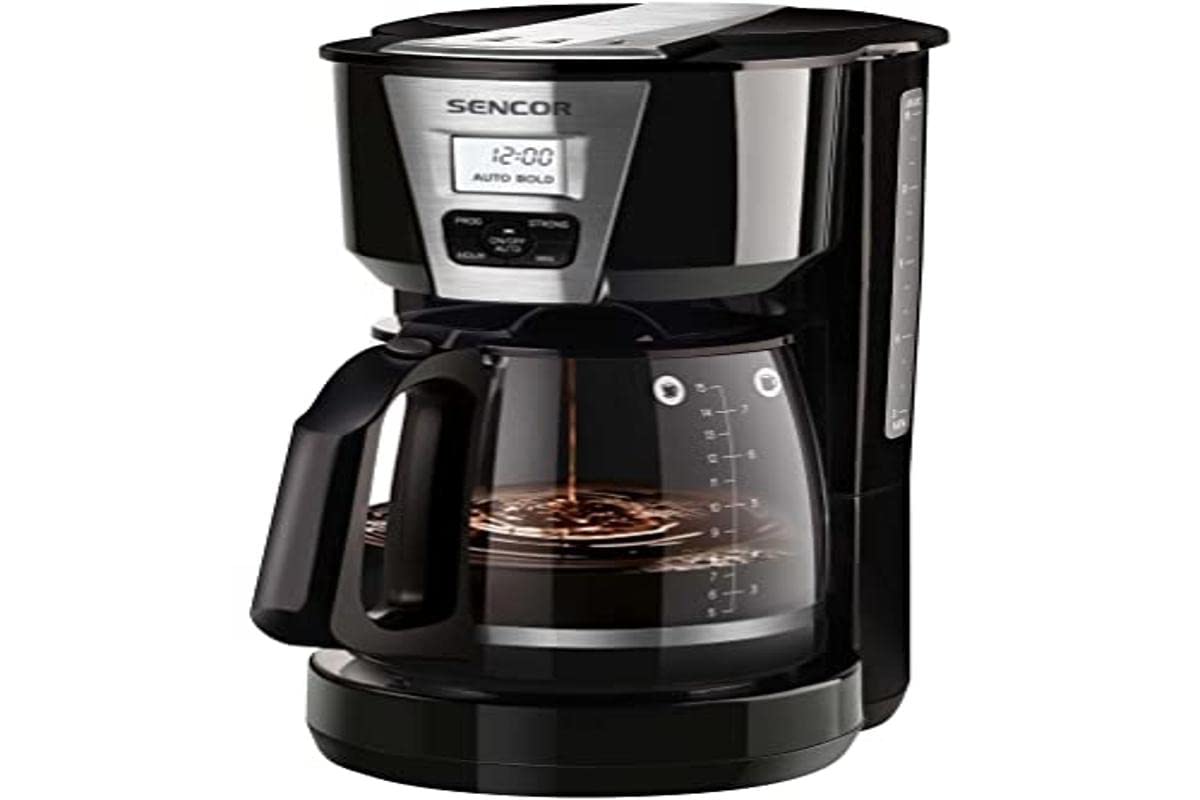
Image: Sencor SCE 5070 BK American Coffee Maker. This image shows the complete coffee maker unit with its glass carafe and filter basket.
Disetél
Ngabongkar bungkusan
- Cabut sadaya bahan bungkus tina mesin kopi kalayan ati-ati.
- Check that all components are present: main unit, glass carafe with lid, and permanent filter.
- Buang bahan bungkusan anu tanggung jawab.
Paké munggaran tur beberesih
- Before first use, wash the glass carafe, its lid, and the permanent filter in warm, soapy water. Rinse thoroughly and dry.
- Fill the water reservoir with fresh, cold water up to the "MAX" level (1.8 liters).
- Place the permanent filter into the filter basket. Do not add coffee grounds for this initial cleaning cycle.
- Tempatkeun karafe kaca sareng tutupna dina piring pemanasan.
- Plug the coffee maker into a suitable electrical outlet.
- Press the ON/OFF button to start a brewing cycle. Allow the full cycle to complete.
- Buang cai tina teko. Mesin kopi anjeun ayeuna tos siap dianggo.
Parentah Operasi
Nyiduh Kopi
- Ensure the coffee maker is unplugged and cooled if previously used.
- Fill the water reservoir with fresh, cold water to your desired level, observing the water level markings. The maximum capacity is 1.8 liters (approximately 15 cups).
- Place the permanent washable filter into the filter basket. If using paper filters, place a standard cone-shaped paper filter into the filter basket.
- Add your desired amount of ground coffee into the filter. A general guideline is one tablespoon of ground coffee per cup (150ml), but adjust to your taste.
- Close the filter basket cover securely.
- Place the glass carafe with its lid onto the warming plate. Ensure the lid is properly seated to activate the drip-stop mechanism.
- Plug the coffee maker into a suitable electrical outlet.
- Press the ON/OFF button. The indicator light will illuminate, and the brewing process will begin.
- Once the brewing cycle is complete, the coffee maker will automatically switch to a "keep warm" function. The warming plate will keep the coffee hot for a period before automatically shutting off.
- To serve, carefully remove the carafe from the warming plate. The drip-stop feature will prevent coffee from dripping.
- Unplug the appliance when not in use or when the warming function is no longer needed.
Catetan: For best results, use fresh, cold water and high-quality ground coffee. Do not open the filter basket cover during the brewing cycle as hot water may escape.
Pangropéa
beberesih poean
- Salawasna cabut colokan mesin kopi teras antepkeun tiis sagemblengna sateuacan dibersihkeun.
- Remove the permanent filter and discard used coffee grounds. Wash the permanent filter, glass carafe, and carafe lid in warm, soapy water. Rinse thoroughly and dry. The permanent filter is reusable.
- Ngusap permukaan luar tina maker kopi ku lemes, damp lawon. Ulah make cleaners abrasive atawa hampang scouring.
- Entong neuleumkeun unit utama, kabel listrik, atanapi nyolok kana cai atanapi cairan sanésna.
- The item is henteu dishwasher aman.
Nuju
Mineral deposits (limescale) can build up in your coffee maker over time, affecting its performance and the taste of your coffee. Descale your coffee maker regularly, depending on the hardness of your water and frequency of use (e.g., every 2-4 weeks).
- Prepare a descaling solution by mixing white vinegar and water in equal parts, or use a commercial descaling agent according to its instructions.
- Pour the descaling solution into the water reservoir up to the "MAX" level.
- Teundeun wadah kaca kosong dina piring pemanasan.
- Start a brewing cycle without coffee grounds. Allow half of the solution to brew through, then turn off the coffee maker and let it sit for 15-20 minutes to allow the solution to work.
- Turn the coffee maker back on and allow the remaining solution to brew through.
- Discard the descaling solution from the carafe.
- Rinse the coffee maker by running at least two full cycles with fresh, cold water to remove any residual descaling solution taste.
Pamérésan masalah
If you encounter issues with your coffee maker, please consult the table below before contacting customer support.
| Masalah | Mungkin Cukang lantaranana | Solusi |
|---|---|---|
| Kopi teu diseduh. |
|
|
| Kopi diseduh laun teuing. |
|
|
| Kopi ngalembur tina karanjang saringan. |
|
|
| Kopi rasana lemah atanapi caian. |
|
|
Spésifikasi teknis
| Fitur | Rincian |
|---|---|
| merek | SENCOR |
| Nomer modél | SCE 5070BK |
| Kapasitas | 1.8 Liter (kira-kira 15 gelas) |
| Warna | Hideung |
| Fitur husus | Permanent filter, Thermal (warming plate) |
| Jenis Kopi Maker | Tetes Kopi Maker |
| Bahan | Glass (carafe) |
| Wattage | 1000 watt |
| Voltage | 240 volt |
| Input User Interface | Kancing |
| Kopi Input Tipe | Kopi taneuh |
| Sumber Daya | adaptor AC |
| Jenis Filter | Bisa dipaké deui |
| Item Beurat | 1742 gram |
| Dishwasher Aman | No |
Garansi sareng Rojongan
For warranty information, please refer to the warranty card included with your product or visit the official Sencor website. If you require technical support or have questions not covered in this manual, please contact Sencor customer service.
Please have your model number (SCE 5070BK) and purchase details ready when contacting support.


